Sharp Job Accounting II
Sharp Job Accounting II is paid output-management software for controlling fleets of Sharp multifunction printers and printers.
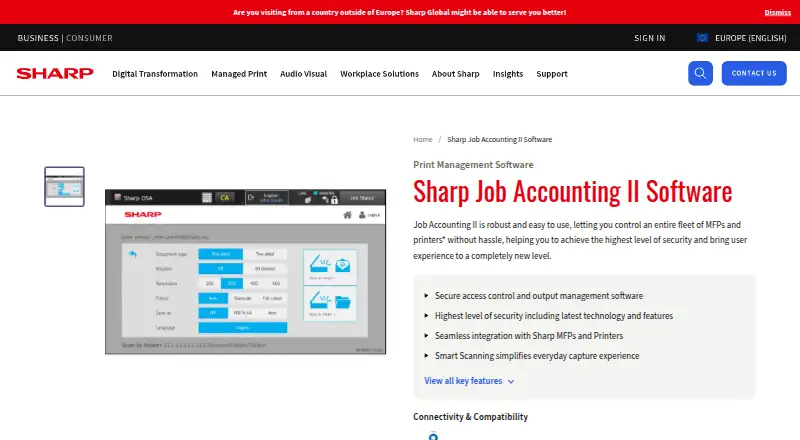
What Sharp Job Accounting II is
Sharp Job Accounting II is paid output-management software for controlling fleets of Sharp multifunction printers and printers. Its four modules cover core job accounting, pull printing, client billing and smart scanning. The system records print, copy, scan and fax activity, then provides reporting, user limits and print-policy controls. The main module secures access to office devices and applies printing rules. Pull Printing keeps jobs in a server queue until users release them from an approved Sharp device. Client Billing assigns work to clients, cost centres or project codes and supports reports and invoices. Smart Scanning offers quick email scanning, password-protected secure scans and conversion to editable text. Sharp cites PayPal as an example integration, and mobile and BYOD printing are supported. Pull Printing can enforce a Print Security Policy with GDPR compliance. The product requires a Sharp OSA-enabled device and is deployed on premises. Listed systems include Windows Server and Windows, with specific legacy server and desktop versions documented. Pricing is by quote.
Good
- Tracks print, copy, scan and fax activity
- Offers secure release and print quotas
- Supports client, cost-centre and project billing
- Includes smart scanning functions
- Supports mobile and BYOD printing
Watch out
- Requires a Sharp OSA-enabled device
- On-premises deployment
- Pricing is available only by request
- Documented operating systems include older Windows versions
Who it suits
It suits organizations managing Sharp printer fleets that need secure release, quotas, policy rules, billing or detailed activity reporting. Teams must have compatible Sharp OSA-enabled devices and an on-premises Windows environment.
Verdict
Job Accounting II provides modular controls for printer access, accounting, scanning and reporting. Its device requirement, on-premises deployment and quote-based pricing are key considerations.
Plans and prices
From Sharp Job Accounting II's own pricing page, checked 8 Oct 2026.
| Plan | Price | What it gives you |
|---|---|---|
| Job Accounting II | Priced on request | Price by quote; modular options available |
The facts
Each one read from Sharp Job Accounting II's own pages, with the date it was checked.
What it does
- Access and rules
- The main module can secure access to office devices and apply rules to printing.checked 8 Oct 2026
- Activity tracking
- It tracks print, copy, scan, and fax activity and provides reporting, user limits, and print policies.checked 8 Oct 2026
- Download
- Sharp lists Job Accounting v2.10.0, including installers and documentation, as a 383.97 MB download dated 12.05.2025.checked 8 Oct 2026
- Integration
- Sharp cites PayPal as an example of a third-party application integration.checked 8 Oct 2026
- Mobile printing
- The overview says the system allows printing from mobile devices and BYOD.checked 8 Oct 2026
- Modules
- The product has four modules: Job Accounting II (MX-SW310), Pull Printing (MX-SW311), Client Billing (MX-SW312), and Smart Scanning (MX-SW313).checked 8 Oct 2026
- Pull printing
- The optional Pull Printing module holds jobs in a server queue until users release them from a permitted Sharp device on the network.checked 8 Oct 2026
- Purpose
- Job Accounting II is output management software for controlling fleets of multifunction printers and printers.checked 8 Oct 2026
- Scanning
- Smart Scanning offers Quick Scan to email, Secure Scan with password protection, and conversion of scans to editable text.checked 8 Oct 2026
- Security and compliance
- Sharp says Pull Printing can enforce a Print Security Policy with GDPR compliance.checked 8 Oct 2026
- Server compatibility
- A Sharp brochure lists 32- or 64-bit Windows Server 2008, 2008 R2, 2012, 2012 R2, and 2016, plus Windows 7 Professional, 8.1 Professional, and 10 Professional as supported operating systems.checked 8 Oct 2026
- System requirements
- The brochure specifies a minimum 1.5 GHz processor, 25 GB hard drive, 1 GB RAM, and Sharp OSA 3.0-or-higher MFP; concurrent MFP capacity depends on server hardware.checked 8 Oct 2026
Money
- Billing
- The optional Client Billing module assigns jobs to clients, cost centres, or project codes and supports reports and invoices.checked 8 Oct 2026
Where it runs
- Device requirement
- The product requires a Sharp OSA-enabled device.checked 8 Oct 2026
The company
- Founded
- 1912checked 28 Sep 2026
- Headquarters
- Osaka, Japanchecked 28 Sep 2026
Alternatives to Sharp Job Accounting II
- 1
Print Manager Plus
Free planAndroidiOSWebAPI8.0Free plan - 2

ezeep
Free planAndroidiOSWebAPI7.4From €3.45 a month - 3
QZ Tray
Free planAndroidiOSWebAPI7.3From $749 a year - 4
PrintNode
Free planWebAPILinuxmacOS7.0From $90 a year - 5

Printix
AndroidiOSWebLinux6.9From $2.09 a month - 6
Microsoft Universal Print
AndroidiOSWebAPI6.8From $90 a month