
Senso.cloud
Senso.cloud combines classroom, network, safeguarding, and asset management tools for schools and districts, and also offers employee device monitoring for b…
What Senso.cloud is
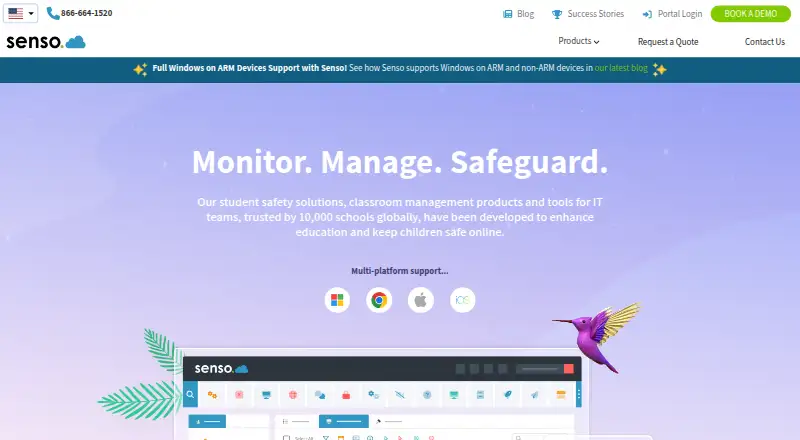
Senso.cloud combines classroom, network, safeguarding, and asset management tools for schools and districts, and also offers employee device monitoring for businesses. Depending on the module, teams can filter web content, monitor activity, view live screens, manage devices, or use network and classroom controls. Safeguarding features include logging and blocking, raising concerns, and monitoring Microsoft Teams chat for inappropriate messages and images. Class Instructor integrates with Microsoft Teams, Google Classroom, and ClassLink; sync options include Azure AD, Microsoft Teams, and Google Classroom. The platform runs on Microsoft Azure, with a separate tenancy for each organisation. Senso says the service can scale from one room with 30 machines to tens of thousands of devices worldwide. Its modules are independently designed and interchangeable, and granular permissions support different staff roles. Platforms include Windows, Chrome OS, macOS, and iOS. The macOS client is being released in stages: its first release includes remote screen, shared-control remote control, and other tools, but has no background service at the logon screen.
Good
- Combines classroom, safeguarding, network, and asset tools.
- Granular permissions can be assigned by role.
- Separate Azure tenancy for each organisation.
- Integrates with Microsoft Teams, Google Classroom, and ClassLink.
- Listed plans start at £1.00 per user or device per year.
Watch out
- No free plan is listed.
- Trial terms are set at Senso's discretion.
- The macOS client is being released in stages.
- macOS has no background service at the logon screen.
Who it suits
Senso.cloud suits schools, districts, teachers, students, and IT teams looking for classroom, safeguarding, network, or asset tools. Businesses seeking employee device monitoring are also within its stated audience.
Verdict
Senso.cloud brings several school technology and safeguarding functions into a modular platform, with business device monitoring also available. Buyers should check which module fits their needs and note the staged macOS client and discretionary trial terms.
Plans and prices
From Senso.cloud's own pricing page, checked 1 Oct 2026.
| Plan | Price | What it gives you |
|---|---|---|
| Senso for Microsoft Teams | £1 a year | Monitor Microsoft Teams chat for inappropriate messages and images; view violations · £1.00 user / year* |
| Asset Cloud | £2 a year | Monitor and manage devices; device performance insight · £2.00 device / year* |
| Content Filtering | £2 a year | Category based web content filter for Chromebooks and Windows · £2.00 device / year* |
| Network Cloud | £3 a year | Azure AD · Remote Control · Remote Logon · Reset Password · Command Prompt · Registry Edit · Remote Script · Security Check · Service Management · Software Search · Speed Test · System Info · Task Manager · £3.00 / device ann.* |
| Class Cloud | £3 a year | Azure AD · Client Updater · Remote Control · Live Thumbnail View · Send Message · Microsoft Teams Sync · Google Classroom Sync · Substitute Teacher · Lock Screen · Clever Sync · Block Sound · Block Web · Close Tab · Run Website / App · Client Live Chat · Quick Question · Send File · £3.00 / device ann.* |
| Safeguard Cloud | £4.50 a year | Azure AD · Microsoft Teams Sync · Google Classroom Sync · Send File · AUP · Logging and Blocking · Raise Concern · £4.50 / device ann.* |
| Enterprise Cloud | £6.50 a year | Classroom, network, safeguarding and management modules including Remote Control, Content Filtering, Logging and Blocking, Remote Logon and Reset Password · £6.50 / device ann.* |
| Service Desk | Priced on request | Centralised web platform for submitting issues and technical queries · Price upon request |
The facts
Each one read from Senso.cloud's own pages, with the date it was checked.
What it does
- Access controls
- Granular access controls assign tools and data permissions to teachers, managers, technicians and safeguarding or wellbeing officers.checked 1 Oct 2026
- Cloud scale
- Senso says its Azure platform can scale from one room with 30 machines to tens of thousands of machines worldwide.checked 1 Oct 2026
- Content filtering
- Its content-filtering service claims over 99.9% coverage of active web traffic and over 99% categorisation accuracy using AI and human verification.checked 1 Oct 2026
- Integrations
- Class Instructor integrates with Microsoft Teams, Google Classroom and ClassLink, and supports Azure AD, Microsoft Teams Sync and Google Classroom Sync.checked 1 Oct 2026
- Modular design
- Its modules are independently designed and interchangeable to support flexible large-scale deployments and seamless updates.checked 1 Oct 2026
- Primary users
- The platform is designed for schools, districts, students, teachers and IT teams, and it also offers employee device monitoring for businesses.checked 1 Oct 2026
- Product scope
- Senso.cloud is an all-in-one platform for classroom, network, safeguarding and asset management.checked 1 Oct 2026
- Security architecture
- Senso is designed within Microsoft Azure and gives each organisation its own Senso Azure tenancy that only that organisation can access.checked 1 Oct 2026
- Support channels
- Service Desk tickets can be raised through the Senso Portal, email forwarding, the Senso toolbar or an external form.checked 1 Oct 2026
The company
- Company history
- Senso says it was founded in 2015 by a team focused on student safety.checked 1 Oct 2026
- Headquarters
- Nottingham, England, United Kingdomchecked 23 Sep 2026
- Teams safeguarding
- Senso monitors Microsoft Teams chat for inappropriate messages and images using AI visual threat detection and keyword algorithms.checked 1 Oct 2026
Where it runs
- Device support
- The platform supports Windows ARM and non-ARM devices and provides multi-platform support for Windows, Chrome, Mac and iOS devices.checked 1 Oct 2026
- macOS limitation
- The macOS client is being released in stages; its first release includes remote screen, shared-control remote control, keyword logging, live chat, messaging, notifications, receive-only broadcast and lock screen, with no background service at the logon screen.checked 1 Oct 2026
Money
- Trial terms
- Renato may offer trials at its discretion, with the trial period, offerings and licensed capacity specified in an admin-centre trial confirmation.checked 1 Oct 2026
The full review of Senso.cloud
Overview
Senso.cloud is a modular platform for school classroom management, network administration, safeguarding and device assets, with employee device monitoring also offered to businesses. It best suits schools that need several of those jobs under one system and want to choose modules by role or deployment size. Its breadth is a strength, but buyers should match modules carefully: the individual plans cover distinct needs rather than delivering the full platform at the entry price.
Key features
Classroom and network tools
Class Cloud combines classroom controls such as remote control, live thumbnail viewing, messaging, live chat and lock screen with options to block sound or web access, close tabs, and run a website or app. Azure AD, Microsoft Teams and Google Classroom sync are included. This is a broad classroom toolkit for schools that want device control alongside teaching-platform connections; it is less compelling if the need is limited to one function such as filtering.
Network Cloud is aimed at technicians, with remote logon, password reset, command prompt, registry editing, scripts, security checks, service management, software search, speed tests and system information. Its tools go beyond classroom supervision, but are a separate module rather than a reason to assume every Class Cloud buyer gets network administration.
Safeguarding and filtering
Safeguard Cloud includes logging and blocking, AUP support and the ability to raise concerns. Senso also monitors Microsoft Teams chat for inappropriate messages and images using AI visual threat detection and keyword algorithms. Its content filter reports more than 99.9% coverage of active web traffic and over 99% categorisation accuracy, using AI with human verification. These capabilities make the platform relevant to schools that need both web filtering and safeguarding workflows, though the broad platform may be excessive for an organisation seeking only one of them.
Deployment and access
Senso's modules are independently designed and interchangeable, allowing schools to combine functions and update modules separately. Its Azure service is designed to scale from a room of 30 machines to tens of thousands worldwide, and gives each organisation a separate tenancy. Granular permissions let schools assign tools and data access to teachers, managers, technicians and safeguarding or wellbeing officers. Class Instructor integrates with Microsoft Teams, Google Classroom and ClassLink, alongside Azure AD and sync options for Teams and Google Classroom.
Service Desk tickets can be raised through the Senso Portal, email forwarding, the Senso toolbar or an external form. That gives technical teams several routes for submitting issues, while Service Desk itself is a separately priced option.
Pricing
Senso.cloud is paid, with no free plan. The published annual prices are:
- Senso for Microsoft Teams: £1.00 user / year, for monitoring Teams chats for inappropriate messages and images and viewing violations. Best suited to schools focused on Teams safeguarding.
- Asset Cloud: £2.00 device / year, for monitoring and managing devices and viewing performance insights. It is the narrowest fit for asset oversight.
- Content Filtering: £2.00 device / year, for category-based web filtering on Chromebooks and Windows devices. It does not include the broader classroom or network toolsets.
- Class Cloud: £3.00 / device ann., with classroom controls, sync options and device actions such as remote control and lock screen. It suits classroom management needs.
- Network Cloud: £3.00 / device ann., covering remote administration and diagnostic tools for IT teams.
- Safeguard Cloud: £4.50 / device ann., including logging and blocking, AUP, raise-concern tools and sync options. It fits schools prioritising safeguarding workflows.
- Enterprise Cloud: £6.50 / device ann., combining classroom, network, safeguarding and management modules, including remote control, content filtering, logging and blocking, remote logon and password reset. It is the broadest published bundle and costs more than selecting a single-function module.
- Service Desk: custom pricing for a centralised web platform to submit issues and technical queries.
The device-based plans make costs scale with managed devices, while the Teams plan is user-based. Senso offers a free trial, but Renato may offer trials at its discretion; the trial period, included offerings and licensed capacity are specified in an admin-centre trial confirmation. Buyers should confirm those terms before relying on a trial to cover a full deployment.
Platforms
Senso.cloud supports Windows, Chrome OS, macOS and iOS, including Windows ARM and non-ARM devices. The macOS client is being released in stages. Its first release includes remote screen, shared-control remote control, keyword logging, live chat, messaging, notifications, receive-only broadcast and lock screen, but has no background service at the logon screen. Schools needing a complete macOS experience at logon should weigh that limitation before choosing it.
Who it's for
Senso.cloud is best for schools and districts that want classroom controls, safeguarding, filtering and IT administration to sit within a modular platform, with permissions tailored to different staff roles. Its separate pricing also gives smaller or more focused deployments a way to buy a specific capability rather than the full Enterprise bundle. Businesses may consider its employee device monitoring, but the plans and integrations described here are primarily oriented toward school environments.
Pros and cons
- Pros: Independently designed modules let schools build a deployment around classroom, network, safeguarding or asset needs rather than buying one fixed package.
- Pros: Granular permissions and a separate Azure tenancy support role-based access and organisation-level separation.
- Pros: Teams chat monitoring, web filtering and raise-concern workflows address different parts of school safeguarding.
- Cons: Several capabilities are separate paid plans, so the low-priced entry modules should not be mistaken for the full platform.
- Cons: The macOS client is still staged, and its first release lacks a background service at the logon screen.
- Cons: Trial availability and capacity are discretionary rather than guaranteed on fixed terms.
Alternatives
classroom.cloud is another paid classroom option, with a free trial and support for Android, iOS, macOS, web and Windows.
Classwize is a paid alternative available on extension, iOS, macOS, web and Windows.
NetSupport School is worth comparing if device-based licensing, buy-once ownership options and free support are priorities; it also offers a free trial.
GoGuardian Teacher may suit schools looking for pricing based on enrollment, product bundles, contract length and professional services.
Lightspeed Classroom is another paid option, with personalized quotes and inclusion in Lightspeed's integrated ecosystem.
Securly Classroom is a paid classroom alternative for web, Windows and macOS.
LanSchool Air offers a free trial and school or district licensing, with quotes rather than a numeric published price.
AB Tutor offers a cloud plan with fixed annual subscription terms, a 100-device minimum and one-, three- or five-year options.
For more options, browse Classroom Management Software or Internet Filtering Software.
Verdict
Senso.cloud is a strong choice for schools that want to assemble classroom management, safeguarding, filtering and IT administration from modules within one Azure-based platform. Its main advantage is that range and modularity; its main reason to look elsewhere is that separate plans, discretionary trial terms and the staged macOS client require careful fit-checking before a school commits.
Alternatives to Senso.cloud
- 1

AdGuard DNS
Free planOpen sourceAndroidiOSWebAPI8.6From $29.88 a year - 2

NextDNS
Free planOpen sourceAndroidiOSWebAPI8.6From £1.79 a month - 3

Cloudflare Gateway
Free planAndroidiOSWebAPI8.3$7 usage-based - 4

Control D
Open sourceAndroidiOSWebAPI8.1From $2 a month - 5
OpenBLD
Free planAndroidiOSWebAPI7.9From $15 a month - 6
DNSFilter
AndroidiOSWebAPI7.8From $1 a month