
Lightspeed Classroom
Lightspeed Classroom is a classroom management solution that gives teachers controls for student screens and web activity.
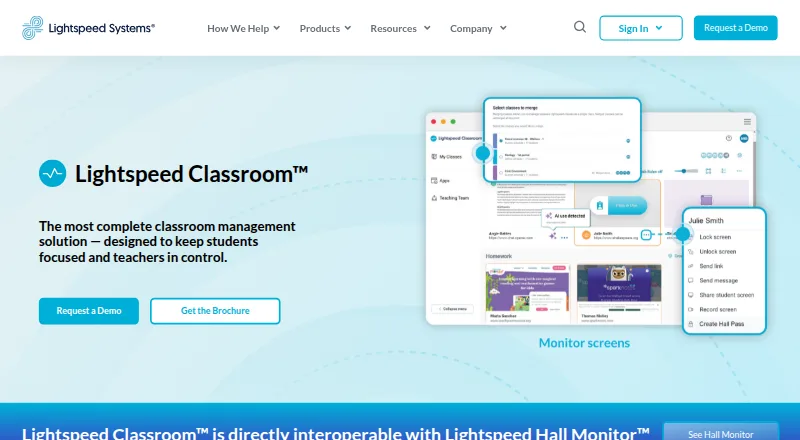
What Lightspeed Classroom is
Lightspeed Classroom is a classroom management solution that gives teachers controls for student screens and web activity. Teachers can view, lock, and record screens, receive notifications about unusual browsing, restrict web access, set tab limits, and close off-task tabs. They can create groups with custom browsing rules and curriculum links, add co-teachers, and merge classes. The product also provides visibility and notifications about classroom AI activity. It interoperates with Lightspeed Hall Monitor to show hall-pass reports, and integrates with Zoom and Microsoft Teams. Lightspeed Classroom works on Chromebooks, Windows devices, and Mac devices; its FAQ says third-party screen monitoring does not work on iOS. Administrators can choose whether screen monitoring is enabled off campus. Lightspeed offers weekly live online teacher training, an on-demand video course, documentation, and help materials. The company says customer data is encrypted at rest using AES and in transit using TLS, and it undergoes an annual independent SOC 2 Type II audit. Pricing is available by request.
Good
- Teachers can view, lock, and record screens.
- Includes web access and tab controls.
- Offers visibility into classroom AI activity.
- Weekly live online teacher training is available.
- Administrators can choose off-campus monitoring settings.
Watch out
- Third-party screen monitoring does not work on iOS.
- Pricing is available by request.
- SOC 2 Type II report requires an NDA to request.
Who it suits
It is designed for teachers and school administrators who need classroom screen and browsing controls. It may suit schools that want visibility into classroom AI activity and the option to manage off-campus monitoring.
Verdict
Lightspeed Classroom combines screen visibility and web controls with class organization and teacher training. Schools using iOS should note the stated limitation on third-party screen monitoring.
Plans and prices
From Lightspeed Classroom's own pricing page, checked 29 Sep 2026.
| Plan | Price | What it gives you |
|---|---|---|
| Lightspeed Classroom | Priced on request | Personalized quote; included in Lightspeed’s integrated ecosystem |
The facts
Each one read from Lightspeed Classroom's own pages, with the date it was checked.
What it does
- AI visibility
- The product provides notifications and visibility into classroom AI activity.checked 29 Sep 2026
- Browsing controls
- Teachers can restrict web access, set tab limits, and close off-task tabs.checked 29 Sep 2026
- Encryption
- Lightspeed Systems says customer data is encrypted at rest using AES and in transit using TLS.checked 29 Sep 2026
- Hall passes
- Lightspeed Classroom is directly interoperable with Lightspeed Hall Monitor and can show reports of hall pass use.checked 29 Sep 2026
- Instruction tools
- Teachers can create groups with custom browsing rules and curriculum links, add co-teachers, and merge classes.checked 29 Sep 2026
- Integrations
- The product integrates with Zoom and Microsoft Teams.checked 29 Sep 2026
- Off-campus monitoring
- Administrators can choose whether Lightspeed Classroom can monitor screens off campus.checked 29 Sep 2026
- Purpose
- Lightspeed Classroom is a classroom management solution designed to keep students focused and teachers in control.checked 29 Sep 2026
- Scale
- Lightspeed says Classroom is scalable for districts with 100 to 100,000 students or more.checked 29 Sep 2026
- Screen monitoring
- Teachers can view, lock, and record student screens and receive notifications about unusual browsing.checked 29 Sep 2026
- Security audit
- Lightspeed Systems undergoes an annual independent SOC 2 Type II audit, and customers can request the report after signing an NDA.checked 29 Sep 2026
- Training
- Lightspeed offers weekly live online teacher training, an on-demand video course, documentation, and help materials.checked 29 Sep 2026
The company
- Company history
- Lightspeed Systems says it was founded in 1999.checked 29 Sep 2026
- Founded
- 1999checked 28 Sep 2026
- Headquarters
- Lightspeed Systems lists its headquarters at 12013 Fitzhugh Rd., Austin, Texas 78736.checked 29 Sep 2026
Where it runs
- Supported devices
- Lightspeed Classroom works on Chromebooks, Windows devices, and Mac devices; its FAQ says it does not work on iOS for third-party screen monitoring.checked 29 Sep 2026
The full review of Lightspeed Classroom
Overview
Lightspeed Classroom is a classroom management service for teachers and administrators who need to supervise student screens and guide web use. It is best suited to schools managing classes across supported desktop and Chromebook devices; its iOS limitation matters if third-party screen monitoring is essential.
The case for it is breadth: screen oversight, browsing controls, class organization, and visibility into classroom AI activity sit alongside integrations for school operations. It is less compelling for an iOS-centered deployment that expects the same screen-monitoring coverage across devices.
Key features
Teachers can view, lock, and record student screens, and receive notifications about unusual browsing. In practice, this gives teachers several ways to respond to off-task activity, though schools should weigh the control against how much screen supervision suits their classrooms.
Web controls include restricting access, setting tab limits, and closing off-task tabs. Teachers can also make groups with custom browsing rules and curriculum links, add co-teachers, and merge classes. Those tools make the product more useful for directing instruction than a screen-viewing tool alone.
Lightspeed Classroom provides visibility and notifications about classroom AI activity. It interoperates with Lightspeed Hall Monitor to show hall-pass reports, and integrates with Zoom and Microsoft Teams. Administrators can choose whether monitoring is allowed off campus, a relevant control for schools defining where classroom oversight applies.
Lightspeed offers weekly live online teacher training, an on-demand video course, documentation, and help materials. Lightspeed Systems undergoes an annual independent SOC 2 Type II audit; customers can request the report after signing an NDA. The company says customer data is encrypted at rest using AES and in transit using TLS.
Pricing
Lightspeed Classroom: custom pricing. It is included in Lightspeed’s integrated ecosystem, with a personalized quote rather than a published rate. Schools should request a quote for their intended deployment before comparing costs.
The product is paid, so there is no free plan to assess. Lightspeed describes it as scalable for districts with 100 to 100,000 students or more, which gives large districts a stated scale range, but does not replace a deployment-specific quote.
Platforms
Lightspeed Classroom supports Chromebooks/Chrome, Windows, macOS, iOS, BYOD, and IoT, with activity monitoring, live screen view, web filtering, device controls, behavior tracking, custom blocklists, safe-search controls, filtering schedules, advanced activity reports, automated enrollment, app deployment, and remote commands. The FAQ says it does not work on iOS for third-party screen monitoring, so iOS support should not be mistaken for feature parity with Chromebook, Windows, or Mac devices.
Who it's for
It suits schools and districts that want teacher-facing screen and web controls combined with class organization, AI activity visibility, and training support. Districts considering a wider rollout may value the stated scale and enrollment and device-management tools. Schools centered on iOS should look elsewhere if third-party screen monitoring is a requirement.
Pros and cons
- Pro: Several classroom controls in one service. Screen actions, tab limits, web restrictions, group rules, and class merging cover both supervision and instructional organization.
- Pro: Useful operational connections. Zoom and Microsoft Teams integration, plus hall-pass reports through Lightspeed Hall Monitor, extend its role beyond screen oversight.
- Pro: Training and security provisions. Weekly live training and on-demand materials support teachers, while the annual SOC 2 Type II audit and stated encryption practices address school security concerns.
- Con: iOS screen-monitoring limitation. Third-party screen monitoring does not work on iOS, which may rule it out for schools expecting equivalent supervision across Apple mobile devices.
- Con: Custom pricing. Without a published rate, buyers need a personalized quote to judge the cost for their schools.
Alternatives
Consider LiveSchool if a school-year pilot is useful: its free Pilot includes all features for one grade level at one school, with SSO and rostering, for up to one school year; its paid Starter plan is $1960.00 per year.
Anchor is a free alternative for schools willing to self-host; its free plan has no licence fee or per-seat charge and is limited to one school per deployment, with Azure hosting costs possible.
Consider Classwize as another paid classroom-management option for its listed extension, iOS, macOS, web, and Windows platforms.
classroom.cloud is another paid option, with a free trial and Android, iOS, macOS, web, and Windows support.
Consider GoGuardian Teacher if a quote based on enrollment, product bundles, contract length, and professional services fits your purchasing process.
KyberClassroom is a paid alternative with a free trial and a displayed KyberGate Basic price of $5 a year for 1,000–4,999 devices, billed annually.
Senso.cloud is a paid alternative with a free trial and a Microsoft Teams plan priced at ££1 a year for monitoring inappropriate chat messages and images and viewing violations.
NetSupport School is another paid option, with a free trial and device-based licensing, including buy-once options.
Browse Classroom Management Software for more classroom tools, Mac Management Software for Mac-focused choices, or Internet Filtering Software for web-control alternatives.
Verdict
Lightspeed Classroom is a strong fit for schools that want screen supervision, web restrictions, and class organization in one managed classroom service, especially across Chromebooks, Windows, and Mac devices. Its broad control set and teacher training are the main reasons to choose it. Look elsewhere if third-party screen monitoring on iOS is central, and obtain a custom quote before committing.
Alternatives to Lightspeed Classroom
- 1

ClassDojo
Free planAndroidiOSWebmacOS8.2From $69.99 a year - 2

Anchor
Free planOpen sourceWebAPIExtensionSelf-hosted7.9From €24 a month - 3
Piazza
Free planAndroidiOSWebAPI7.9Free plan - 4

KyberClassroom
AndroidiOSWebAPI7.6From $5 a year - 5

LiveSchool
Free planAndroidiOSWebmacOS7.4From $1,960 a year - 6
Veyon
Free planOpen sourceAPILinuxSelf-hostedWindows7.1Free plan