Piazza
Piazza is a Q&A platform connecting students, teaching assistants, and professors around coursework.
What Piazza is
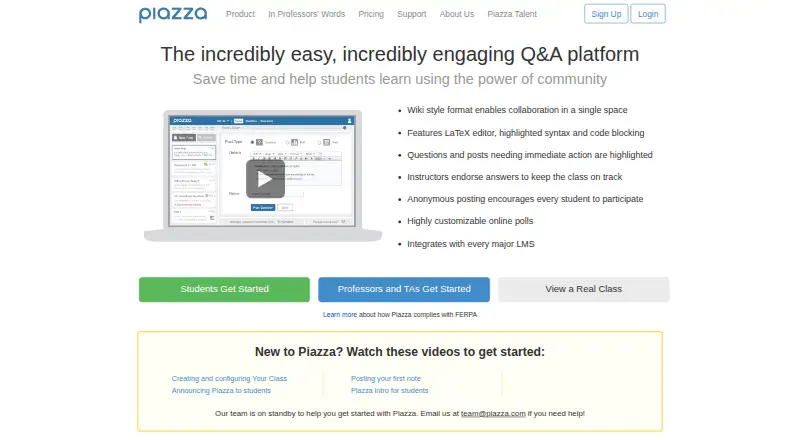
Piazza is a Q&A platform connecting students, teaching assistants, and professors around coursework. Its wiki-style format lets participants edit shared discussions while keeping one student answer and one instructor answer for each question. Students may post anonymously to classmates, and can post anonymously to the instructor when the instructor permits it. Instructors can endorse questions and answers, and view reports showing who asks, answers, edits, or reads, as well as when questions arise during the term. Course pages can hold announcements, course information, syllabi, assignments, lecture notes, and links. Piazza lists integrations with Blackboard, Moodle, Sakai, Desire2Learn, Canvas, Jenzabar, and Angel; connected rosters can enroll users with appropriate roles and allow LMS sign-in. Web, iOS, and Android access is available, with class alerts in the mobile apps. Piazza says student email addresses and enrollment information are accessible only to class instructors. Its free contribution-supported model has optional contribution prompts; polls, statistics, and class locking require a paid license.
Good
- Supports anonymous posts to classmates.
- Course pages can hold syllabi and learning resources.
- LMS rosters can enroll users with appropriate roles.
- Available on web, iOS, and Android.
- K-12 and classes up to 25 need no license.
Watch out
- Polls require a paid license.
- Statistics require a paid license.
- Class locking requires a paid license.
Who it suits
Piazza suits course communities that need a shared place for coursework questions, instructor responses, and course materials. It may also suit instructors who want participation reports or LMS-based enrollment and sign-in.
Verdict
Piazza combines course Q&A, course materials, and participation reporting, with LMS integrations and mobile access. Its contribution-supported option is free, but polls, statistics, and class locking require a paid license.
Plans and prices
From Piazza's own pricing page, checked 15 Oct 2026.
| Plan | Price | What it gives you |
|---|---|---|
| Contribution-supported | Free | Polls, statistics and class locking excluded · no ads · Free use; optional contribution prompts |
| Contribution-supported model | Free | Optional contribution prompts · polls, statistics, and class locking require a paid license |
| Instructor license — 400-student maximum | $379 a month | 400 student max class size · per term; payment is due 3 weeks after class start date |
| Instructor license (up to 400 students) | $379, paid once | 400 student maximum · covers all students in instructor classes · $379(USD)/term |
| Instructor license (up to 700 students) | $429, paid once | 700 student maximum · covers all students in instructor classes · $429/term |
| Instructor license — 700-student maximum | $429 a month | 700 student max class size · per term; payment is due 3 weeks after class start date |
| Instructor license (unlimited) | $479, paid once | Unlimited class size · covers all students in instructor classes · $479/term |
| Instructor license — unlimited class size | $479 a month | Unlimited class size · per term; payment is due 3 weeks after class start date |
| Department license (up to 2,000 students) | $9,000 a year | Up to 2,000 students · unlimited classes per student · $9,000/year |
| Department license | $12,000 a year | Up to 3,000 students · unlimited classes per student in the department · per year |
| Department license (up to 3,000 students) | $12,000 a year | Up to 3,000 students · unlimited classes per student · $12,000/year |
| Enterprise site license | Priced on request | Institution or school-level license · contact Piazza for details |
The facts
Each one read from Piazza's own pages, with the date it was checked.
What it does
- Anonymity and endorsements
- Students can post anonymously to classmates, or anonymously to the instructor if the instructor allows it, and instructors can endorse questions and answers.checked 7 Oct 2026
- Anonymous participation
- Users can post anonymously to classmates and, where enabled, anonymously to instructors.checked 15 Oct 2026
- API availability
- GetApp states that Piazza has no available API, while third-party projects describe unofficial clients for its internal API.checked 15 Oct 2026
- Class locking
- A premium lock feature lets instructors schedule lock dates and times for posting.checked 15 Oct 2026
- Class statistics
- The support center documents instructor class-statistics viewing and statistics export tools.checked 15 Oct 2026
- Collaborative answers
- Piazza uses community-edited wiki-style Q&A with a single student answer and a single instructor answer for each question.checked 7 Oct 2026
- Course tools
- Course pages can host announcements, course information, syllabi, and resources such as assignments, lecture notes, and links.checked 7 Oct 2026
- Data practices
- The privacy policy says Piazza collects device, usage and location information and uses service vendors for storage, analytics, billing and security.checked 15 Oct 2026
- Help documentation
- The help center lists instructor, student, mobile, accessibility, integrations, licensing and Teams sections with dozens of articles.checked 15 Oct 2026
- Instructor endorsements
- Instructors can endorse answers to steer the class toward reliable responses.checked 15 Oct 2026
- LaTeX and code
- The product advertises a LaTeX editor, syntax highlighting and code blocks.checked 15 Oct 2026
- License exceptions
- The paid-model page says K-12 classes and classes with up to 25 students do not require licenses.checked 7 Oct 2026
- Limit: missing assessment tools
- Software Advice reviews cite absent timed quizzes, grading, course calendars, assignment submission and plagiarism detection.checked 15 Oct 2026
- Limit: pricing
- A Software Advice reviewer said a price increase made Piazza too expensive and led them to leave.checked 15 Oct 2026
- Limit: user interface
- G2 reviewers describe the interface as dull, while Software Advice reviewers call navigation and search dated or jumbled.checked 15 Oct 2026
- LMS integrations
- Documented integrations cover Blackboard, Coursera, Moodle, Canvas and other major learning-management systems.checked 15 Oct 2026
- LMS sign-in and enrollment
- With LMS integration, course rosters can automatically enroll users with appropriate roles, and users can be signed in through the LMS.checked 7 Oct 2026
The company
- Company facts
- LinkedIn lists Piazza as privately held, founded in 2009, headquartered at 101 University Ave in Palo Alto, California, with 11–50 employees.checked 15 Oct 2026
- Company legal name
- The privacy policy identifies the maker as Piazza Technologies, Inc.checked 15 Oct 2026
- Company products
- Crunchbase describes Piazza Q&A and Piazza Network, and lists Pooja Sankar as founder and Ethan O’Rafferty as CEO.checked 15 Oct 2026
- Founded
- 2009checked 28 Sep 2026
- Headquarters
- Palo Alto, California, United Stateschecked 28 Sep 2026
Where it runs
- Limit: Android feature gaps
- Google Play reviews report teammate search failures, update-related lockouts, difficult link sharing and no convenient pinning.checked 15 Oct 2026
- Limit: mobile app
- App-store reviewers report sluggish or buggy mobile behavior, missing desktop features, failed uploads and login or loading problems.checked 15 Oct 2026
The full review of Piazza
Piazza is a course Q&A and materials platform for students, teaching assistants, and instructors. It is best suited to courses that want students to develop shared answers and instructors to track participation, particularly when an LMS integration can simplify enrollment and sign-in. The free option supports core use, while paid licenses add controls and set class-size limits.
Overview
Piazza brings coursework questions, class resources, and instructor involvement into a shared course space. Its defining choice is to center each question on one evolving student answer and one instructor answer, rather than a stream of separate replies. That structure gives students a common answer to improve, but may not suit classes that prefer conventional threaded discussion.
Students can post anonymously to classmates, or anonymously to the instructor when the instructor permits it. Instructors can endorse questions and answers, offering a way to recognize useful contributions while remaining part of the exchange.
Key features
- Collaborative Q&A: Wiki-style student answers let classmates refine one shared response, with a distinct instructor answer alongside it. This is a good fit for courses where corrections should accumulate in one place; it is less natural for open-ended conversations with many independent replies.
- Course materials: Pages can hold announcements, course information, syllabi, assignments, lecture notes, and links. Keeping these alongside questions makes Piazza a useful course companion, though the listed tools do not make it a replacement for an LMS.
- Participation reports: Instructors can see who asks, answers, edits, or reads, as well as when questions arise during the term. These reports can help instructors follow engagement, but polls, statistics, and class locking require a paid license.
- LMS integration: Piazza supports Blackboard, Moodle, Sakai, Desire2Learn, Canvas, Jenzabar, and Angel. Integrated rosters can enroll users with appropriate roles, and users can sign in through the LMS, reducing separate account and enrollment work for a course.
- Mobile access and privacy: iOS and Android apps provide class alerts and ongoing access. Piazza says student email addresses and enrollment information are accessible only to class instructors, and that its safeguards protect information from loss, misuse, and unauthorized access or alteration. It also states that universities have verified its Q&A platform facilitates FERPA compliance.
Pricing
Piazza has a contribution-supported free model and paid licenses billed by month or year as specified below. K-12 classes and classes with up to 25 students do not require licenses, an important exception for smaller courses.
- Contribution-supported model: free. Optional contribution prompts support the free model; polls, statistics, and class locking require a paid license. This is the sensible starting point for courses that need core Q&A and materials without those controls.
- Instructor license — 400-student maximum: $379 a month (billed per term), with payment due 3 weeks after class start date and a 400-student maximum. It fits courses that need paid features and stay within that cap.
- Instructor license — 700-student maximum: $429 a month (billed per term), with payment due 3 weeks after class start date and a 700-student maximum. Choose it over the 400-student option when enrollment exceeds that lower cap.
- Instructor license — unlimited class size: $479 a month (billed per term), with payment due 3 weeks after class start date and no class-size limit. It is the option for larger courses that need an individual instructor license.
- Department license: $12,000 a year (billed per year), covering up to 3,000 students and unlimited classes per student in the department. This suits department-wide use rather than a single course.
- Enterprise site license: Custom pricing for an institution- or school-level license; contact Piazza for details.
Platforms
Piazza is available on the web, iOS, and Android. Mobile apps keep users connected to class and provide class alerts, while LMS sign-in can make the web-based course experience easier to access for institutions using a supported platform.
Who it's for
Piazza is a strong choice for courses where students benefit from collectively improving answers and instructors want visibility into participation. It is especially practical for classes already using one of its supported LMS integrations. Courses that need polls, statistics, or class locking should budget for a paid license; instructors who want a many-reply discussion format should consider a different approach.
Pros and cons
- Pro: A shared student answer and a separate instructor answer keep course explanations together and open to refinement.
- Pro: LMS roster enrollment and sign-in can reduce administrative friction for supported systems.
- Pro: Participation reports show who engages and when questions surface during the term.
- Con: Polls, statistics, and class locking are not included in the contribution-supported option.
- Con: Paid instructor licenses have enrollment ceilings unless the unlimited class-size tier is chosen.
- Con: Its single shared student answer is a less suitable format for courses that rely on threaded back-and-forth discussion.
Alternatives
For a wider set of classroom software, browse Classroom Management Software.
- LiveSchool is a paid classroom-management option with a free school-year pilot that includes SSO and rostering, all features, one grade level, and up to one school year.
- ClassDojo is a freemium alternative with a free core experience for teacher messaging, class points, and class story updates.
- Anchor is a free, self-hosted option with no license fee or per-seat charge, suited to schools prepared to manage its deployment and Azure hosting costs.
- Apple Classroom is a free choice for iPad and Mac environments.
- Lightspeed Classroom is an option for schools seeking a personalized quote within Lightspeed’s integrated ecosystem.
- Veyon offers a free, open-source core for Linux, self-hosted, and Windows environments, with commercial add-ons available by quote.
- Classwize is another paid classroom software option.
- Epoptes is a free, open-source computer lab management and monitoring tool installed as server and client packages.
Verdict
Choose Piazza if your course needs a shared, editable Q&A space, course materials, and participation visibility, especially alongside a supported LMS. Its strongest advantage is bringing student contributions and instructor oversight into the same course workflow. Look elsewhere if your class depends on threaded discussion or needs paid course controls without taking on a license.
Getting started
- Visit https://piazza.com/.
- Use the contribution-supported model, or select an instructor or department license.
- For LMS-based enrollment and sign-in, connect through one of the supported LMS platforms.
- Access the course on the web, iOS, or Android.
Limits worth knowing
The free contribution-supported plan does not include polls, statistics, or class locking. Instructor licenses cap classes at 400 or 700 students, depending on the license; the unlimited instructor license has no class-size cap.
Questions
Is Piazza free?
Yes. Its contribution-supported model is free, with optional contribution prompts. Polls, statistics, and class locking require a paid license.
What do the instructor licenses cost?
The 400-student maximum license is $379 a month, billed per term; the 700-student maximum is $429 a month, billed per term. The unlimited class-size license is $479 a month, billed per term.
What platforms does Piazza support?
Piazza supports the web, iOS, and Android.
Which learning management systems integrate with Piazza?
Supported systems include Blackboard, Moodle, Sakai, Desire2Learn, Canvas, Jenzabar, and Angel.
Is there a department plan?
Yes. The department license is $12,000 a year, billed per year, for up to 3,000 students and unlimited classes per student in the department.
Does Piazza offer an enterprise site license?
Yes. It is an institution- or school-level license; contact Piazza for details.
Alternatives to Piazza
- 1

ClassDojo
Free planAndroidiOSWebmacOS8.2From $69.99 a year - 2

Anchor
Free planOpen sourceWebAPIExtensionSelf-hosted7.9From €24 a month - 3

KyberClassroom
AndroidiOSWebAPI7.6From $5 a year - 4

LiveSchool
Free planAndroidiOSWebmacOS7.4From $1,960 a year - 5
Veyon
Free planOpen sourceAPILinuxSelf-hostedWindows7.1Free plan - 6

Senso.cloud
iOSWebmacOSWindows7.0From £1 a year