
Apple Classroom
Apple Classroom is a free app for teachers using iPad or Mac to guide lessons, keep students focused, and share learning resources.
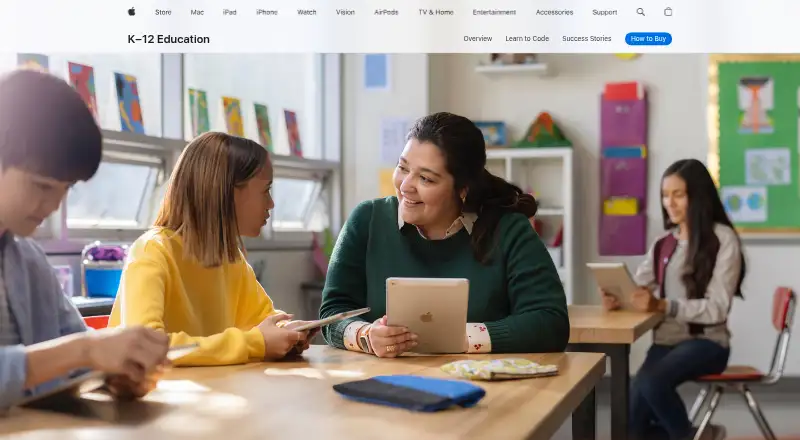
What Apple Classroom is
Apple Classroom is a free app for teachers using iPad or Mac to guide lessons, keep students focused, and share learning resources. During a session, a teacher can view student screens together and direct an individual student or the class to a web page, book, or app. Teachers can launch apps, websites, or books, lock students into one app, lock screens, and mute device audio. They can prepare agendas with timed tasks and start a session from an agenda. Classes may be created by teachers or managed by IT, and students can be organized into groups. Classroom supports sharing documents and links through AirDrop and presenting student work using AirPlay on Apple TV. Apple says students can connect remotely; schools using Shared iPad can have students reassigned to the device they most recently used. The App Store listing says actions take place over the local network only. Student iPads require iPadOS 14.4 or later, Bluetooth and Wi-Fi must be enabled, and students must be within Bluetooth range of the teacher running Classroom. The Mac version requires macOS 11.3 or later on the teacher’s Mac.
Good
- Free iPad and Mac app
- View all student screens at once
- Create agendas with timed tasks
- Share links and documents using AirDrop
- Supports teacher-created and IT-managed classes
Watch out
- Student iPads require iPadOS 14.4 or later
- Students must be within Bluetooth range
- Requires Bluetooth and Wi-Fi on teacher and student devices
Who it suits
Classroom suits teachers who lead lessons with iPads or Macs and want to direct class devices, view student screens, and share student work. It is also relevant to schools that organize classes through IT or teacher-created groups.
Verdict
Classroom brings lesson guidance, device controls, and sharing into one teacher-facing app. Its device and Bluetooth requirements are important to check before using it in a classroom.
Plans and prices
From Apple Classroom's own pricing page, checked 15 Oct 2026.
| Plan | Price | What it gives you |
|---|---|---|
| Classroom | Free | iPadOS 14.4+ · macOS 11.3+ · Bluetooth and Wi‑Fi · nearby students within Bluetooth range · MDM for MDM-created classes |
The facts
Each one read from Apple Classroom's own pages, with the date it was checked.
What it does
- Agendas and timers
- Agendas contain timed tasks and actions, can start a class session, and can be saved, duplicated, searched and sorted.checked 15 Oct 2026
- AirDrop sharing
- Teachers can distribute documents and links to a class through AirDrop, and students can share items back.checked 15 Oct 2026
- AirPlay
- A teacher can present one student’s screen on an Apple TV using AirPlay.checked 15 Oct 2026
- API and SDKs
- Apple’s developer education documentation exposes ClassKit for reporting learning activities and progress, while no public Classroom API or Classroom SDK is listed.checked 15 Oct 2026
- Class setup
- Classroom supports IT-managed classes and teacher-created classes, and can organize students into groups.checked 7 Oct 2026
- Content navigation
- Teachers can send an individual student or an entire class to a webpage, book or app.checked 15 Oct 2026
- Focus controls
- Teachers can lock students into one app, lock screens and mute student-device audio.checked 15 Oct 2026
- Groups
- Classroom creates app-based smart groups and lets teachers create their own project groups.checked 15 Oct 2026
- Independent review: deployment
- Speirs reported that the free app does little until an MDM server supplies an education configuration profile and student iPads are supervised.checked 15 Oct 2026
- Independent review: product category
- Independent Apple educator Fraser Speirs characterized Classroom as an iOS classroom-management tool closer to Apple Remote Desktop than to an assignment-management system.checked 15 Oct 2026
- Independent review: usability limit
- Speirs noted that the app list lacked filtering, could show apps unavailable to students and made frequent app selection cumbersome.checked 15 Oct 2026
- Integrations
- Apple documents connections with Apple School Manager, mobile-device-management services, Managed Apple Accounts, Shared iPad, Apple TV, AirPlay and AirDrop.checked 15 Oct 2026
- Limit: network scope
- An App Store reviewer liked remote lock and navigation but complained that Classroom could not reach an iPad on another network.checked 15 Oct 2026
- Limit: roster synchronization
- An App Store teacher reported that roster changes took weeks to appear and students remained offline despite checking settings.checked 15 Oct 2026
- Limit: website locking
- An App Store reviewer said students could exit a locked website through page controls and requested tighter URL enforcement.checked 15 Oct 2026
- Live screen view
- Teachers can see all student screens together or focus on one student, with students notified when viewing is active.checked 15 Oct 2026
- Local network
- The App Store listing says all Classroom actions take place over the local network only.checked 7 Oct 2026
Where it runs
- App launching
- Classroom can launch an app for every student or launch different apps for separate groups.checked 15 Oct 2026
- Device controls
- Teachers can launch apps, websites, or books, lock students into one app, lock screens, and mute device audio.checked 7 Oct 2026
- Device requirements
- The documented MDM configuration requires iPadOS 14.5 or later, macOS 11.3 or later, Bluetooth, supervision and MDM enrollment on student devices.checked 15 Oct 2026
- Mac requirements
- For the Mac version, the App Store listing requires macOS 11.3 or later on the teacher’s Mac and iPadOS 14.4 or later on student iPads.checked 7 Oct 2026
The company
- Company founded
- Apple’s LinkedIn profile gives 1976 as the founding year.checked 15 Oct 2026
- Company headquarters
- Apple’s LinkedIn profile lists Cupertino, California, as headquarters.checked 15 Oct 2026
- Company size
- Apple’s LinkedIn profile places the company in the 10,001-plus employee category.checked 15 Oct 2026
The full review of Apple Classroom
Apple Classroom is a free teacher-facing app for directing lessons and supervising student activity on iPad and Mac. It is strongest for Apple-centered schools that need device guidance, screen visibility, and resource sharing without a software charge. Schools should verify the Bluetooth, Wi-Fi, operating-system, and local-network conditions before committing to it.
Overview
Classroom puts lesson flow and device supervision in one workflow. A teacher can see student screens together, send an individual student or the whole class to a web page, book, or app, and organize timed work through agendas. That combination is valuable when a class must stay on a common sequence, but it is a focused Apple-device tool rather than a general solution for mixed hardware.
Key features
Lesson direction and monitoring
Live views of every student screen give a teacher immediate visibility into activity. Navigation commands can move students to assigned content, while agendas provide timed tasks and can launch a Classroom session directly. These controls support structured instruction and make it easier to redirect attention during a lesson; they are less useful when students work outside the supported Apple setup.
Device controls
Teachers can open apps, websites, or books remotely, lock a student into one app, lock screens, and mute device audio. In practice, that lets a teacher turn tablets into task-specific tools and pause activity when instruction requires it. The controls are practical for managed classrooms, but they rely on compatible devices being connected correctly.
Sharing and class organization
AirDrop distributes documents and links to the class, and AirPlay to Apple TV allows student work to be presented. Teachers can use IT-managed classes or create their own, then arrange students into groups. Schools using Shared iPad benefit from automatic reassignment to each student’s most recently used device. Apple School Manager can connect identity providers such as Google Workspace or Microsoft Entra ID and synchronize current rosters from a student information system.
Connectivity and privacy
Apple says students can connect remotely, while the App Store listing states that Classroom actions occur over the local network only. Student iPads require iPadOS 14.4 or later, with Bluetooth and Wi-Fi enabled on teacher and student devices; students must remain within Bluetooth range of the teacher running Classroom. The Mac version requires macOS 11.3 or later on the teacher’s Mac, alongside iPadOS 14.4 or later on student iPads. Apple says it does not sell student information or use it for third-party marketing or advertising, and limits Classroom data handling to providing relevant educational services.
Pricing
Classroom: free (free iPad and Mac app).
There is no software charge, seat fee, quota, or trial deadline stated for this plan. It fits schools that already provide compatible Apple devices and want teacher controls without adding a classroom-management subscription. The trade-off is operational rather than monetary: schools must supply the required hardware, connectivity, and roster or identity setup.
Platforms
Classroom is available on iOS and macOS, with supported use centered on iPad and Mac. Student iPads need iPadOS 14.4 or later; teachers using a Mac need macOS 11.3 or later. Bluetooth and Wi-Fi are required on both sides of the classroom connection.
Who it's for
Choose Classroom for Apple-based primary or secondary schools where teachers need live screen oversight, app and content launching, timed lesson agendas, and lock or mute controls. It is also a sensible fit for schools using Shared iPad and Apple School Manager roster integrations. Look elsewhere if students use Android, Windows, or Linux as standard devices, or if classrooms cannot maintain Bluetooth range and a shared local network.
Pros and cons
Pros
- No software cost: the free iPad and Mac app avoids per-seat licensing.
- Strong in-lesson control: screen viewing, app locks, screen locks, and audio muting let teachers keep devices on task.
- Structured sessions: timed agendas and direct navigation support a consistent lesson sequence.
- Apple workflow integration: AirDrop, AirPlay, Shared iPad reassignment, and Apple School Manager connections fit existing Apple deployments.
- Clear privacy position: Apple says student information is not sold or shared for third-party advertising.
Cons
- Narrow platform scope: the supported classroom experience is built around iPad and Mac, not mixed-device fleets.
- Connection dependency: Bluetooth range, Wi-Fi, local-network operation, and specified operating-system versions are prerequisites.
- Deployment responsibility: schools need IT-managed classes or teacher-created classes and may need identity-provider and student-information-system integration work.
Alternatives
Browse Classroom Management Software for a broader category comparison. Pick LiveSchool instead when you need Android, web, or Windows support, with a school-year pilot and paid annual options. Piazza suits classes centered on discussion and polls; its free model makes some features dependent on a paid license. Choose ClassDojo for teacher messaging, class points, and story updates, with Plus offered separately. Anchor is a no-license-fee, self-hosted option for schools prepared to manage Azure hosting. Lightspeed Classroom is for schools seeking an integrated ecosystem with personalized pricing. Veyon offers open-source computer-lab management, with paid commercial add-ons. Classwize provides a paid classroom-management alternative across browser and desktop platforms. Epoptes is a free, open-source choice for Linux and self-hosted computer labs.
Verdict
Apple Classroom is the right choice for Apple-equipped schools that want capable lesson direction and device controls at no software cost. Its main reason to choose it is the tight combination of live monitoring, timed agendas, content launching, and Apple sharing tools. Its main reason to look elsewhere is the strict iPad/Mac, Bluetooth, Wi-Fi, and local-network dependency, which makes it a poor fit for mixed-device or irregularly connected classrooms. Apple provides a Classroom User Guide, education support guides, and AppleCare for education support.
Alternatives to Apple Classroom
- 1

ClassDojo
Free planAndroidiOSWebmacOS8.2From $69.99 a year - 2

Anchor
Free planOpen sourceWebAPIExtensionSelf-hosted7.9From €24 a month - 3
Piazza
Free planAndroidiOSWebAPI7.9Free plan - 4

KyberClassroom
AndroidiOSWebAPI7.6From $5 a year - 5

LiveSchool
Free planAndroidiOSWebmacOS7.4From $1,960 a year - 6
Veyon
Free planOpen sourceAPILinuxSelf-hostedWindows7.1Free plan