
Sendiee Teambox
Sendiee Teambox is a shared team inbox that brings WhatsApp, Instagram, Messenger, and LINE conversations into a common queue.
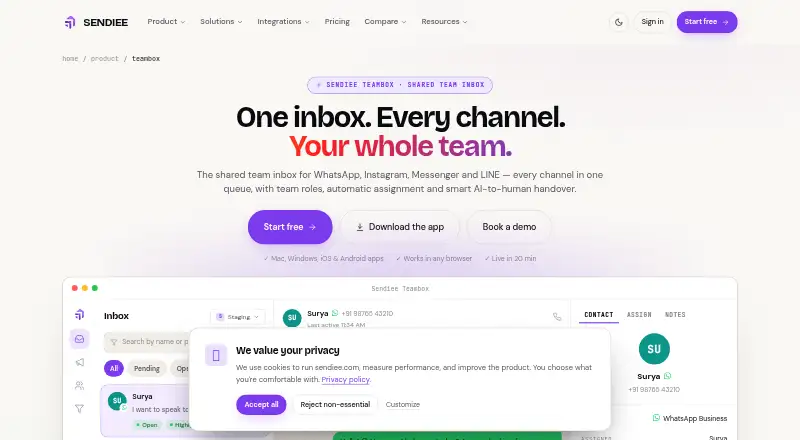
What Sendiee Teambox is
Sendiee Teambox is a shared team inbox that brings WhatsApp, Instagram, Messenger, and LINE conversations into a common queue. Messages from one customer across supported channels can be grouped in a single thread. Teams can use condition-based routing, assign chats manually, or use AI handover to direct a human request to a team and round-robin an agent with a summary. Admin, Manager, Team Lead, and Agent roles support role-based visibility and team management. Inbox tools include advanced filters, custom statuses, assignment history, and insights into volume, response time, and resolution. AI features include translation, summaries, quick replies, per-chat controls, and live manager instructions. The apps are available on web, macOS, Windows, iPhone, iPad, and Android, with push notifications and mobile biometric locks. The free plan includes one channel, one AI assistant, 1,000 contacts, 1,000 conversations per month, and one team member.
Good
- Combines supported channels in a shared inbox
- Supports condition-based routing and manual assignment
- Includes role-based conversation visibility
- Mobile apps include push notifications
- Free plan includes 1,000 conversations per month
Watch out
- Free plan limited to one channel
- Free plan limited to one team member
- Creator plans do not include WhatsApp
Who it suits
Teambox suits support and sales teams managing customer conversations across supported messaging channels. Its plans range from a free single-channel option to paid shared inbox plans with larger team limits.
Verdict
Sendiee Teambox brings several messaging channels, team assignment, and inbox controls into one shared workspace. Compare channel, contact, conversation, and team limits across plans before choosing.
Plans and prices
From Sendiee Teambox's own pricing page, checked 30 Sep 2026.
| Plan | Price | What it gives you |
|---|---|---|
| Free | Free | 1 channel · 1 AI assistant · 1,000 contacts · 1,000 conversations/month · 1 team member |
| Creator Lite | $22 a year | Instagram and Messenger · no WhatsApp · 30,000 contacts · 2 users · shared team inbox · billed annually |
| Creator Plus | $29 a year | Instagram and Messenger · no WhatsApp · 80,000 contacts · 5 users · 10 agents · 3 teams · shared inbox · billed annually |
| Growth | $30 a year | 1 channel · 5,000 contacts · 10,000 conversations/month · 5 team members · billed annually |
| Pro | $52 a year | 2 channels · 30,000 contacts · 1 Lakh conversations/month · 10 users · 5 agents · shared inbox · billed annually |
| Business | $67 a year | 3 channels · 80,000 contacts · 10 Lakh conversations/month · 20 users · 10 agents · 3 teams · shared inbox · billed annually |
| Enterprise | Priced on request | Custom channels, tools, contact limits, campaigns, conversations, integrations and SLA |
The facts
Each one read from Sendiee Teambox's own pages, with the date it was checked.
What it does
- AI tools
- Features include per-chat AI controls, live manager instructions, translation, conversation summaries and quick replies.checked 30 Sep 2026
- Cross-channel threads
- Messages from one customer across supported channels appear in a single conversation thread.checked 30 Sep 2026
- Inbox controls
- The inbox supports advanced filters, custom statuses, assignment history, and team and agent insights for volume, response time and resolution.checked 30 Sep 2026
- Integrations
- The pricing feature matrix lists Shopify, Zoho and Meta Pixel (CAPI) on Pro and Business, and custom integrations on Enterprise.checked 30 Sep 2026
- Notable limits
- Pro includes 10 team members, 5 agents and 1 team, while Business includes 20 members, 10 agents and 3 teams.checked 30 Sep 2026
- Product
- Sendiee Teambox is a shared team inbox that brings WhatsApp, Instagram, Messenger and LINE conversations into one queue.checked 30 Sep 2026
- Routing and handover
- Teambox supports condition-based routing, manual assignment, and AI handover that routes a human request to a team and round-robins an agent with a summary.checked 30 Sep 2026
- Security
- Sendiee states that it encrypts data at rest with AES-256 and in transit with TLS 1.2+, and offers a SOC 2 Type II report under NDA while its policy says Type I was attested in 2025.checked 30 Sep 2026
- Support
- The pricing page lists priority support with Pro, Business, Creator Plus and Enterprise, and an account manager with Business and Enterprise.checked 30 Sep 2026
Where it runs
- Apps
- Teambox is available on the web, macOS, Windows, iPhone and iPad, and Android; its apps include push notifications and mobile biometric locks.checked 30 Sep 2026
The company
- Company
- Sendiee describes Teambox as an omnichannel shared inbox for support and sales teams and says Sendiee is a Codestormx product registered in Tiruppur, Tamil Nadu.checked 30 Sep 2026
- Teams and roles
- The product lists Admin, Manager, Team Lead and Agent roles, with role-based conversation visibility and team management.checked 30 Sep 2026
Money
- Plan availability
- The shared inbox is included with Pro, Business, Creator Lite, Creator Plus and Enterprise plans; the apps are free downloads.checked 30 Sep 2026
The full review of Sendiee Teambox
Overview
Sendiee Teambox is a shared inbox for customer conversations across WhatsApp, Instagram, Messenger and LINE. It suits support and sales teams that need to route messages among several agents; its appeal is breadth of channel and team controls, while channel and contact caps make plan choice important.
Messages from the same customer across supported channels can sit in one thread, giving agents a more joined-up view than separate channel queues. Condition-based routing, manual assignment and AI-assisted handover cover different levels of triage, though teams should compare the available channel and agent limits against their workload before committing.
For more options, see Social Customer Service Software.
Key features
Routing, roles and AI assistance
Teambox can route conversations by conditions or let staff assign them manually. Its AI handover sends a request for a person to a team, then round-robins an agent and supplies a summary. That combination is useful when teams want automation to handle initial sorting without removing human ownership. Admin, Manager, Team Lead and Agent roles, with role-based conversation visibility and team management, provide a structure for dividing access and responsibility.
AI tools include per-chat controls, live manager instructions, translation, conversation summaries and quick replies. These are practical aids for teams handling varied conversations, but they do not replace the need to set clear routing and review practices.
Inbox management and integrations
Advanced filters, custom statuses and assignment history help teams organize queues and trace ownership. Team and agent insights cover volume, response time and resolution, giving managers useful operational measures. Shopify, Zoho and Meta Pixel (CAPI) are included on Pro and Business; custom integrations are reserved for Enterprise.
The shared inbox appears in Pro, Business, Creator Lite, Creator Plus and Enterprise. Creator plans focus on Instagram and Messenger and exclude WhatsApp, so they are a poor fit for teams whose core channel is WhatsApp. Priority support comes with Pro, Business, Creator Plus and Enterprise; an account manager is included only with Business and Enterprise.
Pricing
Teambox uses a freemium model. The free plan costs nothing and allows one channel, one AI assistant, 1,000 contacts, 1,000 conversations per month and one team member. It is a useful small-scale entry point, but one seat and one channel sharply limit shared team use.
Creator Lite costs $22 a year (billed annually) and adds Instagram and Messenger, 30,000 contacts, two users and a shared inbox, but no WhatsApp. Creator Plus costs $29 a year (billed annually), with the same two channels, 80,000 contacts, five users, 10 agents, three teams and a shared inbox. The latter is the more flexible Creator option for a small multi-team operation, but neither Creator plan covers WhatsApp.
Growth costs $30 a year (billed annually) and includes one channel, 5,000 contacts, 10,000 conversations per month and five team members. It is a modest step up from free, though the single-channel cap and lower contact allowance may constrain a growing queue.
Pro costs $52 a year (billed annually) and provides two channels, 30,000 contacts, 1 Lakh conversations per month, 10 users, five agents and a shared inbox. It suits teams needing more capacity and channel choice, but its one-team limit makes it less suitable for organizations dividing work across several teams. Business costs $67 a year (billed annually), with three channels, 80,000 contacts, 10 Lakh conversations per month, 20 users, 10 agents, three teams and a shared inbox. It is the clearest fit for larger teams needing higher quotas and multiple teams. Enterprise has custom pricing, with custom channels, tools, contact limits, campaigns, conversations, integrations and SLA.
A 14-day trial is offered. The apps are free downloads, but that does not remove the plan limits.
Platforms
Teambox is available on web, macOS, Windows, iPhone and iPad, and Android. Its apps support push notifications and mobile biometric locks, which are useful for teams working across desktop and mobile devices.
Who it's for
Teambox is best suited to support or sales teams that handle several social messaging channels and need assignment, role-based access and shared queue oversight. Business is better aligned with multiple teams and larger conversation volumes; smaller groups may find Creator Plus or Pro sufficient, depending on whether WhatsApp and additional channels matter. A solo user or team needing only a single basic channel may not benefit from the breadth of its team controls.
Pros and cons
- Pros: Cross-channel threads can keep one customer's conversations together, reducing fragmentation across supported channels.
- Pros: Routing, assignment history, custom statuses and operational insights give managers concrete ways to organize and monitor team work.
- Pros: Pro and Business include named integrations, while Enterprise allows custom integrations.
- Cons: Free is limited to one channel and one team member, so it is not a full shared-team setup.
- Cons: Creator Lite and Creator Plus omit WhatsApp, while Growth is limited to one channel.
- Cons: Pro is limited to one team; teams needing three teams must move to Business or Creator Plus, with different channel and quota trade-offs.
Alternatives
Choose Soclo if connecting accounts and publishing manually on a no-cost plan is the priority; its free tier includes 0 credits each month.
Mixdesk is another freemium alternative, with a free plan capped at 10 conversations, 10 connected channel accounts, 100 translation characters and no AI messages.
Upcellia offers a free plan with one channel, one user, one mailbox, 100 conversations per month and 100 contacts.
Desku AI Chatbot Builder has a free plan with two agents and one inbox, and a Growth plan at $39 a month with six agents.
AmmarAI Smart Inbox is a web-based freemium alternative with Starter at $9.99 a month and Professional at $29.99 a month.
ConvoHub is a web-based freemium alternative with plans measured by agent seats, campaigns and contacts.
Deskero is a freemium alternative whose Start plan includes one agent and unlimited customers.
Verdict
Sendiee Teambox is a strong choice for support and sales teams that need cross-channel conversations, structured handoffs and visibility across agents. Its main advantage is the combination of shared threads and team controls; its main drawback is that channel and team limits vary sharply by plan, and the Creator plans exclude WhatsApp. Choose it when those routing and collaboration tools justify matching your workflow to a plan's caps; look elsewhere if you need a simple, low-limit inbox without those constraints.
Getting started
- Visit https://www.sendiee.com/product/teambox.
- Download the app for web, macOS, Windows, iPhone, iPad, or Android.
- Start with the free plan, which includes one channel and one team member.
- Choose a paid plan if you need a shared inbox included with Pro, Business, Creator Lite, Creator Plus, or Enterprise.
- Use the listed 14-day trial if you want to try a plan.
Limits worth knowing
The free plan allows one channel, one AI assistant, 1,000 contacts, 1,000 conversations per month, and one team member. Pro includes 10 team members, five agents, and one team; Business includes 20 members, ten agents, and three teams.
Questions
Is there a free plan?
Yes. It includes one channel, one AI assistant, 1,000 contacts, 1,000 conversations per month, and one team member.
Is there a free trial?
Yes, a 14-day trial is listed.
Which platforms can I use?
Teambox is available on web, macOS, Windows, iPhone, iPad, and Android.
Which channels does the inbox support?
The inbox brings together WhatsApp, Instagram, Messenger, and LINE conversations.
Which plans include the shared inbox?
The shared inbox is included with Pro, Business, Creator Lite, Creator Plus, and Enterprise.
Alternatives to Sendiee Teambox
- 1

Deskero
Free planAndroidiOSWebAPI8.1From $12 a month - 2

Mixdesk
Free planAndroidiOSWebAPI8.1From $49 a month - 3
Soclo
Free planAndroidiOSWebAPI8.1From £7.99 a month - 4

ViralDashboard
Free planAndroidiOSWebAPI8.0From $19 a month - 5
Emplifi
AndroidiOSWebAPI7.5From $1,249 a month - 6

eksis
Free planWebAPI7.3From $4 a month