Send It Secure
Send It Secure is an encrypted messaging platform that lets people send protected messages to any email address through their existing email provider.
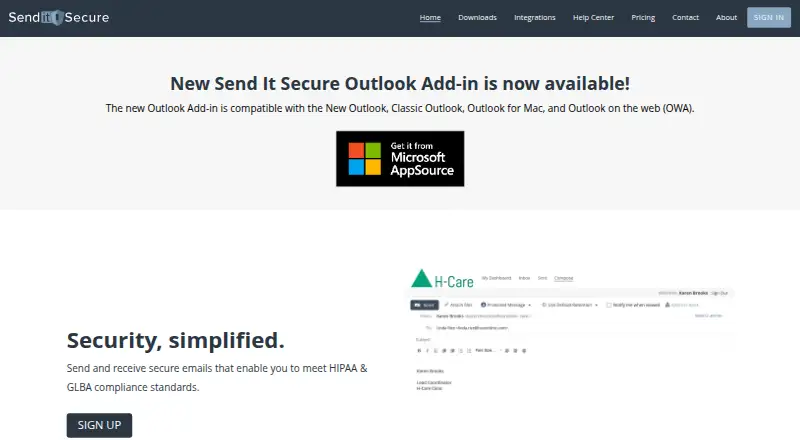
What Send It Secure is
Send It Secure is an encrypted messaging platform that lets people send protected messages to any email address through their existing email provider. It is aimed at dental, medical, financial, legal, and other organizations handling confidential communications. Senders can revoke messages, receive read receipts, set expiration and retention periods, define message policies, and choose recipient authentication methods. Recipients can open secure messages without registering, using a shared secret or phone verification. The maker says messages are protected with TLS while moving between systems and AES 256-bit encryption when stored, and that SOC 2 Type 2 attestations are available to clients. The service supports identity-based recipient verification, message expiry, administrative access controls, Outlook integration, and portal delivery. It integrates with practice-management software, EHR applications, and Windows applications that send email; listed dental systems include Eaglesoft, Dentrix, Open Dental, and Carestream Dental. Outlook add-ins cover New Outlook, Classic Outlook, Outlook for Mac, and Outlook on the web. Plans include a free Guest account, Essentials at $15 a month, Professional at $29 a month for two users, and an SMTP Service with contact-based pricing.
Good
- Recipients need no registration
- Messages can be revoked and set to expire
- Supports read receipts and retention controls
- Offers Outlook add-ins across listed Outlook versions
- Integrates with practice-management and EHR software
- Uses TLS in transit and AES 256-bit at rest
Watch out
- Gmail integration is not supported
- Guest accounts allow only 10 lifetime sends to non-paid users
- Guest file size is limited to 25 MB
- Professional pricing includes two users before additional-user charges
Who it suits
Send It Secure suits organizations that need confidential email delivery, including dental, medical, financial, and legal practices. It also fits teams using Outlook, practice-management systems, EHR applications, or Windows email software.
Verdict
Choose Send It Secure when confidential email must reach recipients without requiring them to create accounts. Its Outlook and business-software integrations, recipient verification, and message controls suit regulated workflows. Look elsewhere if Gmail integration is essential or if the Guest account's lifetime sending limit is too restrictive.
Plans and prices
From Send It Secure's own pricing page, checked 7 Oct 2026.
| Plan | Price | What it gives you |
|---|---|---|
| Guest | Free | 30 Day Retention · 25 MB Files · 10 message sends to non-paid users for the lifetime of the account · $0 /user/month |
| Essentials | $15 a month | 1 Year Retention · 50 MB Files · Unlimited Messages · $15 per user per month · $15 /user/month |
| Professional | $29 a month | 7 Year Retention · 1 GB Files · Unlimited Messages · Includes 2 users · $29 /month for 2 users · $10 /additional user/month |
| SMTP Service | Priced on request | Priced per bucket of messages · Includes mailboxes for administrators · Minimum charge required · Contact Us for Pricing |
The facts
Each one read from Send It Secure's own pages, with the date it was checked.
What it does
- Admin access controls
- Yeschecked 20 Sep 2026
- Attachment limit
- 50checked 20 Sep 2026
- Compliance
- The maker says it enters into a HIPAA Business Associate Agreement with every client and supports HIPAA and GLBA compliance needs.checked 7 Oct 2026
- Gmail integration
- Nochecked 20 Sep 2026
- Integrations
- The service integrates with practice management software, EHR applications, and Windows apps that send email; its help center lists dental systems including Eaglesoft, Dentrix, Open Dental, and Carestream Dental.checked 7 Oct 2026
- Large files
- The security page says messages can include files up to 2 GB, with limits up to 5 GB available on some plans.checked 7 Oct 2026
- Message controls
- Senders can revoke messages, receive read receipts, set expiration and retention, define message policies, and choose recipient authentication methods.checked 7 Oct 2026
- Message expiry
- Yeschecked 20 Sep 2026
- Outlook
- The Outlook add-in supports New Outlook, Classic Outlook, Outlook for Mac, and Outlook on the web.checked 7 Oct 2026
- Outlook integration
- Yeschecked 20 Sep 2026
- Product
- Send It Secure is an encrypted messaging platform that lets users send secure messages to any email address using their existing email provider.checked 7 Oct 2026
- Recipient access
- Recipients can open secure messages without registering, with verification options including a shared secret or phone verification.checked 7 Oct 2026
- Recipient verification
- identitychecked 20 Sep 2026
- Secure delivery
- portalchecked 20 Sep 2026
- Security
- The maker says messages are encrypted in transit with TLS and at rest with AES 256-bit encryption, and that it maintains SOC 2 Type 2 attestations available to clients.checked 7 Oct 2026
- SMTP and API
- The SMTP service can send secure messages from applications that support SMTP; the developer guide says fewer than 300 sends per month are included with a business account and 301 or more require contacting the company.checked 7 Oct 2026
- Support
- The help center provides setup and troubleshooting articles, and the pricing page directs customers to submit a ticket to discuss custom plans and volume pricing.checked 7 Oct 2026
- Use cases
- The maker describes the product for dental, medical, financial, legal, and other organizations that need to send confidential communications.checked 7 Oct 2026
The company
- Company history
- The about page says Send It Secure is the new brand for the company's email encryption product formerly known as Protected Trust Email Encryption.checked 7 Oct 2026
Money
- Free account limit
- Guest users are limited to 10 message sends to non-paid users over the lifetime of the account.checked 7 Oct 2026
- Free plan
- Yeschecked 20 Sep 2026
The full review of Send It Secure
Send It Secure adds encrypted delivery and recipient checks to ordinary email workflows, so organizations can protect confidential correspondence without asking recipients to open accounts. It is aimed at healthcare, dental, financial, legal, and other regulated teams that need control after a message is sent. The service is strongest when Outlook or SMTP integration and verification matter; its Gmail gap and plan-specific quotas limit its appeal for some users.
Overview
Messages are delivered through a secure portal while recipients authenticate with a shared secret or phone verification. They can open a message without registering, which removes a common obstacle when communicating with patients, clients, or outside counsel. Senders can revoke access, request read receipts, set expiration and retention periods, apply message policies, and choose the authentication method. Those controls make the product more suitable for sensitive records and time-limited disclosures than conventional email.
The maker says traffic is protected with TLS and stored with AES 256-bit encryption. SOC 2 Type 2 attestations are available to clients, and the company says it signs a HIPAA Business Associate Agreement with every client while supporting HIPAA and GLBA requirements. These assurances are relevant for regulated operations, but organizations should still verify that the service's controls and contract terms satisfy their own obligations.
Key features
- Recipient verification: Shared-secret and phone verification provide a practical identity check without forcing an account creation. This suits external recipients, although every extra verification step can add support work for less technical users.
- Post-send controls: Revocation, expiration, retention rules, read receipts, and sender-defined policies help limit exposure and provide evidence of access. They are meaningful advantages for confidential workflows where an email should not remain open indefinitely.
- Business integrations: Outlook support covers New Outlook, Classic Outlook, Outlook for Mac, and Outlook on the web. Connections to practice-management and EHR systems, including Eaglesoft, Dentrix, Open Dental, and Carestream Dental, make it a natural fit for dental offices. Gmail is not supported, so Google-centered teams lose the same workflow.
- SMTP and API delivery: Applications that support SMTP can send protected messages, and an API is available for software integrations. A business account includes fewer than 300 SMTP sends per month; 301 or more requires contacting the company, an important consideration for automated notifications.
- File handling: The service supports attachments up to 50 MB in plan listings, while some plans offer up to 1 GB and the security page describes files up to 2 GB, with limits up to 5 GB on some plans. The actual allowance therefore depends on the plan and workflow rather than being uniform.
- Administration: Admin access controls and policy settings support centralized management, which matters when multiple staff handle regulated communications.
Pricing
Send It Secure uses a freemium model with a free trial. The plans differ sharply in retention, file size, seats, and sending limits.
| Plan | Price and terms | What it includes |
|---|---|---|
| Guest | free, billed $0 per user per month | 30-day retention, 25 MB files, and 10 message sends to non-paid users over the account's lifetime. It is suitable for occasional evaluation or very light use, not an ongoing outbound program. |
| Essentials | $15 a month, billed $15 per user per month | One-year retention, 50 MB files, and unlimited messages. This is the straightforward choice for an individual or small team that does not need large attachments or long archival periods. |
| Professional | $29 a month, billed $29 per month for two users; $10 per additional user per month | Seven-year retention, 1 GB files, unlimited messages, and two included users. The longer retention and larger files justify it for organizations with persistent records or heavier document exchange. |
| SMTP Service | Custom pricing, priced per message bucket; minimum charge required | Administrator mailboxes and application-oriented sending. Teams should confirm volume economics before building high-volume automation. |
The Guest lifetime cap is the main free-plan constraint: ten sends to non-paid recipients cannot support regular client communication. Essentials removes that quota but keeps retention and attachment allowances modest. Custom plans and volume pricing are discussed through support.
Platforms
Send It Secure is offered on the web, Windows, iOS, as an extension, and through an API. Outlook coverage is unusually broad across desktop, Mac, New Outlook, and browser versions. SMTP support extends delivery to compatible business software, while the absence of Gmail integration is a decisive limitation for Google Workspace workflows.
Who it's for
Choose it for dental and medical practices, financial firms, law offices, and other organizations sending confidential information to people outside their domain. It is especially well matched to teams that need recipient verification, revocation, retention rules, or administrative controls while preserving familiar Outlook and line-of-business workflows. It is a weaker fit for Gmail-first organizations, high-volume SMTP senders that need predictable published thresholds, or anyone expecting the free account to support continuing outreach.
Pros and cons
Pros
- Recipients can read protected messages without registering, reducing friction for external contacts.
- Revocation, expiration, retention, read receipts, policies, and authentication choices provide meaningful lifecycle control.
- Outlook support spans current, classic, Mac, and web clients, with integrations for common dental and clinical systems.
- HIPAA BAA availability, stated TLS and AES-256 protection, and client-accessible SOC 2 Type 2 attestations address regulated-use concerns.
Cons
- Gmail integration is absent, excluding a major email workflow.
- The Guest account permits only ten sends to non-paid users for its entire lifetime.
- Attachment allowances vary from 25 MB to 1 GB by plan, so larger-file needs raise the subscription cost.
- SMTP pricing is custom and sends above 300 per month require contacting the company, complicating volume planning.
Alternatives
For a broader directory of comparable products, see Email Encryption Software and File encryption tools.
- Lockbin is a freemium web, Windows, macOS, and Linux option with a free tier capped at one user, 25 MB attachments, and six months of inbox storage; pick it when cross-platform desktop coverage matters more than Send It Secure's Outlook and healthcare integrations.
- SecureMyEmail offers free and paid tiers across Android, iOS, macOS, and Windows; choose it when mobile and desktop apps are more important than portal-based recipient access.
- gpg4o is a Windows Outlook-focused OpenPGP product with a 99.95 EUR monthly paid plan and a free tier; it suits users seeking traditional OpenPGP functions inside supported classic Outlook versions.
- Secure Message is a Linux, self-hosted, and web deployment; consider it when hosting your own service is preferable.
- c.Email is a free browser extension with unlimited email addresses; choose it for a no-cost extension-based approach.
- FlowCrypt is an extension with a free tier for fewer than 100 users and a 5 MB attachment threshold; it fits smaller teams accepting much smaller files.
- Mimecast Secure Messaging is a paid multi-platform service for secure messages and large files.
- DataMotion Secure Email Exchange is a freemium enterprise offering with custom pricing and Android, iOS, web, and API support.
Verdict
Send It Secure is a strong choice for regulated organizations that need encrypted portal delivery, recipient verification, and enforceable message controls without making every recipient register. Its Outlook, SMTP, and practice-software connections reinforce that business case. Look elsewhere if Gmail is central, if free sending must continue beyond ten lifetime guest messages, or if your attachment and automated-volume requirements do not fit the published plan boundaries.
Getting started
- Open the Send It Secure website
- Create a Guest, Essentials, or Professional account, or contact the company about SMTP Service pricing
- Use the web portal or supported API
- Install an Outlook add-in for New Outlook, Classic Outlook, Outlook for Mac, or Outlook on the web
- Connect compatible practice-management, EHR, or Windows email software
- Choose recipient verification, retention, expiry, and message-policy settings
- Send a secure message and manage receipts or revocation
Limits worth knowing
Guest costs $0 /user/month and includes 30 Day Retention, 25 MB Files, and 10 message sends to non-paid users over the account's lifetime. Essentials includes 50 MB files and one-year retention; Professional includes 1 GB files and seven-year retention, with $10 per additional user per month beyond its two included users.
Questions
Is there a free plan?
Yes. The Guest plan is billed at $0 /user/month.
What does Guest include?
Guest includes 30 Day Retention, 25 MB Files, and 10 message sends to non-paid users for the account's lifetime.
How much do paid plans cost?
Essentials costs $15 a month at $15 /user/month. Professional costs $29 a month for two users, with $10 /additional user/month.
Does it work with Gmail?
No. Gmail integration is listed as unsupported, while Outlook integration is available.
Can recipients open messages without an account?
Yes. Recipients can access secure messages without registering, using a shared secret or phone verification.
What platforms are supported?
Listed platforms are API, extension, iOS, web, and Windows.
Alternatives to Send It Secure
- 1
SecureMyEmail
Free planAndroidiOSWebmacOS8.9From $29.99 a year - 2

Virtru Email Encryption
AndroidiOSWebAPI8.4From $119 a month - 3
Virtru Data Security Platform
AndroidiOSWebAPI8.0From $119 a month - 4
Lockbin
Free planWebLinuxmacOSWindows7.9From $10 a month - 5

Mailvelope
WebExtension7.5From €3 a month - 6

FlowCrypt
Free planExtension7.3Free plan