SecureMyEmail
SecureMyEmail encrypts email while letting you keep your current email provider and address.
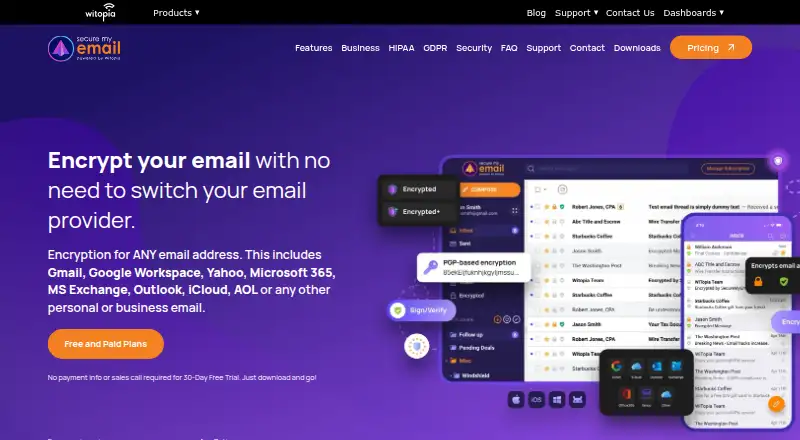
What SecureMyEmail is
SecureMyEmail encrypts email while letting you keep your current email provider and address. It supports IMAP accounts, with built-in setup for Gmail, Google Workspace, Yahoo, Microsoft, Exchange, Outlook.com, Hotmail, MSN, and AOL Mail. You can use it on Android, iOS, macOS, and Windows. The service uses OpenPGP, supports key import and export, and lets you digitally sign messages so recipients can verify them. SecureMyEmail says messages and attachments are encrypted on your device before sending, and that it cannot decrypt them. Encryption keys are generated locally; optional server backups are protected with a zero-knowledge passphrase that the maker says it cannot recover. Recipients can read and reply to encrypted messages through a secure link without registering, installing an app, or entering a password. An individual can encrypt up to eight personal or work addresses. The free plan covers one Gmail, Yahoo, or Microsoft consumer address; other addresses are offered a 30-day trial. A 12-month subscription is $2.49 a year, billed as 29.99 USD at purchase and every 12 months afterward. A one-month subscription is $3.99 a month. The maker also offers business trials without a sales call.
Good
- Works with existing email providers and addresses.
- Supports IMAP accounts and major built-in email setups.
- Encrypts messages and attachments on the device before sending.
- Recipients can reply through a secure link without registering.
- Supports OpenPGP, key import and export, and digital signatures.
Watch out
- The free plan covers only one consumer Gmail, Yahoo, or Microsoft address.
- The free plan does not cover other email addresses.
- An individual account is limited to eight email addresses.
Who it suits
SecureMyEmail suits people who want to encrypt email while keeping an existing provider, especially those using IMAP or one of its built-in services. It also fits individuals who need up to eight addresses or organizations seeking consolidated billing and support after a trial.
Verdict
Choose SecureMyEmail if you want end-to-end email encryption without changing providers, or need encryption across several addresses. Look elsewhere if you need to use the free plan with an address outside its eligible consumer Gmail, Yahoo, or Microsoft accounts.
Plans and prices
From SecureMyEmail's own pricing page, checked 9 Oct 2026.
| Plan | Price | What it gives you |
|---|---|---|
| Free Forever | Free | One Gmail.com, Yahoo.com, or Microsoft consumer email address · Free forever |
| Free | Free | one Gmail.com, Yahoo.com, or Microsoft consumer email address · free forever |
| Premium monthly | $3.99 a month | up to 8 personal or business email addresses per user · unlimited use on supported devices · monthly |
| 1-month subscription | $3.99 a month | Any personal or business email address · Cancel anytime · Billed $3.99 at purchase, then monthly. |
| 12-month subscription | $29.99 a year | Any personal or business email address · Billed $29.99 at purchase, then every 12 months. |
| Premium annual | $29.99 a year | up to 8 personal or business email addresses per user · unlimited use on supported devices · annually |
| Lifetime Plan | $99.99, paid once | SecureMyEmail access; App Store listing does not state address limits · in-app purchase |
The facts
Each one read from SecureMyEmail's own pages, with the date it was checked.
What it does
- Advanced key controls
- Advanced settings include 4096-bit OpenPGP keys, subkeys, regeneration, passphrase controls and full key import/export.checked 14 Oct 2026
- Business use
- Businesses can start a trial without a sales call, then contact sales to consolidate users under one account for billing and support.checked 9 Oct 2026
- Compliance
- The business page says the service is intended to help with GDPR, HIPAA, and other industry compliance initiatives.checked 9 Oct 2026
- Digital signatures
- Users can digitally sign messages with OpenPGP keys so recipients can verify origin and detect tampering.checked 14 Oct 2026
- Encrypted mode
- The standard encrypted mode sends messages through an encrypted tunnel, uses temporary keys and lets the sender choose an availability period from one hour to forever.checked 14 Oct 2026
- Encryption
- The maker says messages and attachments are encrypted on the device before sending and that it cannot decrypt them.checked 9 Oct 2026
- End-to-end encryption
- The company says messages and attachments are encrypted before leaving the device and cannot be decrypted by the provider, ISP or SecureMyEmail.checked 14 Oct 2026
- Ephemeral messages
- Messages sent to non-users can be configured to self-delete after periods from one hour to 30 days.checked 14 Oct 2026
- Hosting
- The maker says its infrastructure is hosted in Switzerland.checked 9 Oct 2026
- Hosting location
- SecureMyEmail states that its infrastructure and servers are located in Geneva or Swiss data centers.checked 14 Oct 2026
- Key handling
- Encryption keys are generated locally; optional server backups are encrypted with a zero-knowledge passphrase the maker says it cannot recover.checked 9 Oct 2026
- Licence
- The EULA says SecureMyEmail clients and plugins are proprietary licensed software, prohibits reverse engineering and grants a limited nonexclusive licence.checked 14 Oct 2026
- Limit: mobile bugs
- App Store reviewers reported syncing errors, sending problems and slow loading, while another reported difficulty sending when prompted for a secret phrase.checked 14 Oct 2026
- Limit: payment methods
- TechRadar noted that SecureMyEmail does not accept cryptocurrency or cash payments.checked 14 Oct 2026
- Limit: support channels
- TechRadar found email support and a knowledge base but no live chat or phone support for ordinary users.checked 14 Oct 2026
- Limit: unified inbox
- An App Store reviewer complained that multiple accounts lacked an aggregate inbox and that Google and Microsoft sign-ins sometimes failed.checked 14 Oct 2026
- Mail protocol support
- imap_smtpchecked 20 Sep 2026
The company
- Company founded
- WiTopia says it began as Full Mesh Networks in June 2003 and adopted the WiTopia name in 2005.checked 14 Oct 2026
- Company headquarters
- LinkedIn lists WiTopia headquarters in Reston, Virginia.checked 14 Oct 2026
- Company legal name
- The maker is WiTopia, Inc.checked 14 Oct 2026
- Company size
- LinkedIn lists WiTopia in the 11–50 employee range.checked 14 Oct 2026
- Founded
- 2003checked 28 Sep 2026
Money
- Free plan
- Yeschecked 20 Sep 2026
- Free-plan eligibility
- The free plan is limited to a single Gmail, Yahoo, or Microsoft consumer email address; other addresses are offered a 30-day trial.checked 9 Oct 2026
The full review of SecureMyEmail
Overview
SecureMyEmail adds end-to-end encryption to existing email accounts, making it a strong fit for people who want to protect messages without moving to a new provider. It stands out for supporting multiple addresses and letting recipients reply through a secure link; the catch is that the free plan is limited to a narrow set of consumer accounts.
Key features
Keep your existing email
The service supports IMAP accounts, with built-in setup for Gmail, Google Workspace, Yahoo, Microsoft, Exchange, Outlook.com, Hotmail, MSN, and AOL Mail. That breadth suits people who want encryption on established personal or work inboxes rather than a new email address. One individual can encrypt up to eight addresses, a meaningful advantage for anyone juggling several accounts.
Encryption and recipient access
The maker says messages and attachments are encrypted on the device before sending and that it cannot decrypt them. Keys are generated locally; optional server backups are encrypted with a zero-knowledge passphrase that the maker says it cannot recover. OpenPGP support, key import and export, and digital signatures give experienced users control over keys and a way to verify messages, though that flexibility may be unnecessary for casual users.
Recipients can read and reply through a secure link without registering, installing an app, or entering a password. This makes encrypted exchanges less demanding for people outside the sender’s usual setup. Encrypted+ offers another option, using ChaCha20-Poly1305 and a shared password to protect a message end to end. The maker says its infrastructure is hosted in Switzerland.
Pricing
SecureMyEmail has a free plan and a 30-day trial. The free plan works with one Gmail, Yahoo, or Microsoft consumer address; other addresses receive a 30-day trial instead. That restriction makes free access useful for trying the service with an eligible personal inbox, but not for keeping a non-eligible or additional account encrypted at no cost.
- Free Forever: free, for one Gmail.com, Yahoo.com, or Microsoft consumer address. Best for someone protecting a single eligible consumer inbox.
- 12-month subscription: $2.49 a year, billed $29.99 at purchase and then every 12 months. It covers any personal or business email address, making it the lower-cost paid option for users willing to commit annually.
- 1-month subscription: $3.99 a month, billed at purchase and then monthly, with cancellation anytime. It supports any personal or business address and suits someone who wants a shorter commitment, at a higher stated rate than the annual option.
- Premium monthly and Premium annual: custom pricing, each for up to eight email addresses per user. These tiers suit users needing multiple addresses; the subscription plans show the same eight-address allowance, while the consumer subscriptions have stated prices.
Businesses can begin a trial without a sales call, then contact sales to consolidate users under one account for billing and support. The business page says the service is intended to help with GDPR, HIPAA, and other industry compliance initiatives; that is not a substitute for assessing an organization’s own compliance requirements.
Platforms
SecureMyEmail is available on Android, iOS, macOS, and Windows. That combination covers mobile and desktop use, though no browser platform is included among its supported platforms.
Who it's for
Choose SecureMyEmail if you want end-to-end encryption on an existing IMAP account, need to protect several addresses, or regularly send encrypted messages to people who should not have to create an account or install an app. It is less suitable if you need a permanent free plan for an address outside the eligible Gmail, Yahoo, or Microsoft consumer accounts. Its OpenPGP and key-management features are most useful to people comfortable taking an active role in encryption.
Pros and cons
- Pro: Works with existing IMAP accounts and a broad range of named providers, so users can keep their current addresses.
- Pro: One individual can encrypt up to eight addresses, useful for people separating work and personal email.
- Pro: Recipients can read and reply through a secure link without an account, app, or password, lowering the barrier to protected conversations.
- Con: The free plan covers only one eligible consumer address, ruling out free ongoing use for other account types.
- Con: Key import, export, and digital signatures add control but may feel like unnecessary complexity for users who want encryption with minimal involvement.
Alternatives
FlowCrypt is worth considering if you prefer a browser extension and need a free tier aimed at fewer than 100 users, with a 5 MB attachment threshold; its enterprise plan supports attachments up to 25 MB and is priced by custom quote.
c.Email may suit someone seeking a free extension with unlimited email addresses and support for an existing address.
Send It Secure is an option if you want API, extension, web, Windows, or iOS access; its free Guest plan includes 30-day retention, 25 MB files, and 10 message sends to non-paid users over the account’s lifetime.
Mailvelope may be a better fit if you want extension or web access and are considering its business plan at €3 a month per user for 1–49 users.
DataMotion Secure Email Exchange is another option, with its enterprise offering priced by contacting sales.
Virtru Email Encryption may suit users looking for a paid option with web, Windows, macOS, iOS, and Android support; its Starter plan is $119 a month, billed annually, for 5 users.
Lockbin is worth a look if you need Linux or web access; its free plan is for one user and includes a 25 MB attachment limit and six months of inbox storage.
Trustifi Outbound Shield is another paid email encryption option.
For more choices, browse Email Encryption Software, Email providers, Secure Email Providers, or File encryption tools.
Verdict
SecureMyEmail is a compelling choice for people who want to keep their current email accounts while adding end-to-end encryption, especially if they need several addresses or want recipients to access protected messages without installing anything. Look elsewhere if the free plan must cover a non-eligible account, or if you want a permanently free option for more than one address.
Getting started
- Open the SecureMyEmail website.
- Choose the free plan for one eligible consumer email address, or select a subscription for other address types.
- Use the built-in setup for a supported provider or connect an IMAP account.
- Install the app on Android, iOS, macOS, or Windows.
- For business use, start a trial and then contact sales to consolidate users under one account.
Limits worth knowing
The free plan is limited to one Gmail, Yahoo, or Microsoft consumer address. Other personal or business addresses are offered a 30-day trial; the 12-month subscription is $2.49 a year, billed as 29.99 USD at purchase and every 12 months afterward, and the one-month subscription is $3.99 a month.
Questions
Is there a free plan?
Yes. Free Forever costs nothing and covers one Gmail.com, Yahoo.com, or Microsoft consumer email address.
What do subscriptions cost?
The 12-month subscription is $2.49 a year, billed as 29.99 USD at purchase and every 12 months afterward. The one-month subscription is $3.99 a month, and can be cancelled anytime.
Which email accounts does it support?
It supports IMAP accounts and has built-in setup for Gmail, Google Workspace, Yahoo, Microsoft, Exchange, Outlook.com, Hotmail, MSN, and AOL Mail.
Which devices can I use it on?
SecureMyEmail is available on Android, iOS, macOS, and Windows.
Can recipients read encrypted messages without an account?
Yes. They can read and reply through a secure link without registering, downloading an app, or using a password.
Can businesses use it?
Businesses can start a trial without a sales call, then contact sales to consolidate users under one account for billing and support.
Alternatives to SecureMyEmail
- 1

Virtru Email Encryption
AndroidiOSWebAPI7.7From $119 a month - 2
Lockbin
Free planWebLinuxmacOSWindows7.5From $10 a month - 3
Send It Secure
Free planiOSWebAPIExtension7.5From $15 a month - 4
Virtru Data Security Platform
AndroidiOSWebAPI7.5From $119 a month - 5
gpg4o
Free planWindows7.0From €5,195 a year - 6
MailHippo
WebAPIWindows6.9From $4.95 a month