
c.Email
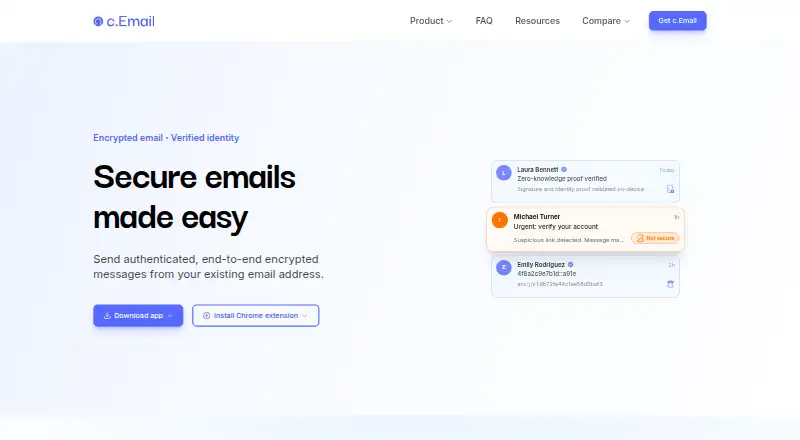
c.Email adds encryption and verified sending to existing Gmail or Outlook addresses, so users can keep their current email address.
What c.Email is
c.Email adds encryption and verified sending to existing Gmail or Outlook addresses, so users can keep their current email address. Its free tier includes unlimited email addresses, end-to-end encryption, post-quantum security, and For Your Eyes Only messages. Users can choose Not secure, Secure, or For Your Eyes Only settings; the last option requires ongoing liveness verification from the intended recipient. Setup includes a one-time identity check using an existing ID and liveness check, while identity data remains on the user's device. Messages are encrypted and decrypted on sender and recipient devices, rather than stored or processed on c.Email servers, subject to a business exception. Its encryption combines classical and post-quantum cryptography and uses the ML-KEM standard published by NIST. c.Email is offered as an app and browser extension, including a Chrome extension. Premium and business features are planned, with no prices listed. The service is provided by Certonymity, based in London, and built on the cDot protocol for encrypted identity, email, messaging, and payments.
Good
- Free tier includes unlimited email addresses.
- Works with existing Gmail and Outlook addresses.
- Identity data stays on the user's device.
- Uses end-to-end encryption and the ML-KEM standard.
Watch out
- Setup requires an ID and liveness check.
- For Your Eyes Only requires continuous recipient liveness verification.
- Premium features are planned, with no listed price.
Who it suits
c.Email suits people who want encryption and sender verification while keeping an existing Gmail or Outlook address. Its For Your Eyes Only setting is for users who want recipient liveness verification for a message.
Verdict
c.Email offers encryption and verified sending without requiring a new email address. Its free tier includes the main security features, while setup requires identity verification.
Plans and prices
From c.Email's own pricing page, checked 27 Sep 2026.
| Plan | Price | What it gives you |
|---|---|---|
| Free | Free | Everything needed to protect emails, including unlimited email addresses. · Existing email address support · End-to-end encryption · Verified sending · c.Email is free for all users. |
| Business Plus | Priced on request | Coming soon; customised business protection and enterprise-level secrecy. |
| Business Self-Serve | Priced on request | Coming soon; protection for teams and organisations with server-hosted encryption. |
| Premium | Priced on request | Coming soon; advanced features for individuals. |
The facts
Each one read from c.Email's own pages, with the date it was checked.
What it does
- Business compliance
- Business Self-Serve includes efficient compliance with data protection regulations.checked 27 Sep 2026
- Business hosting
- Business Self-Serve can use the customer's server or a server included in the plan.checked 27 Sep 2026
- cDot framework
- c.Email is built on cDot, a protocol for encrypted identity, email, messaging, and payments.checked 27 Sep 2026
- C-layer network
- Public encryption and verification keys are stored on a distributed blockchain of independent nodes.checked 27 Sep 2026
- C-layer status
- The C-layer is under development, and anyone can run a node.checked 27 Sep 2026
- Email addresses
- The free plan allows unlimited email addresses.checked 27 Sep 2026
- Email integrations
- c.Email connects with Gmail and Outlook addresses.checked 27 Sep 2026
- Encryption method
- c.Email uses end-to-end hybrid public-key encryption combining classical and post-quantum cryptography.checked 27 Sep 2026
- Existing email
- Users keep their current email address and do not need to create a new account.checked 27 Sep 2026
- Eyes Only protection
- For Your Eyes Only emails require continuous liveness verification from the intended recipient.checked 27 Sep 2026
- Identity check
- Setup includes a one-time identity check with an existing ID and liveness check.checked 27 Sep 2026
- Post-quantum standard
- c.Email uses ML-KEM, the post-quantum standard published by NIST.checked 27 Sep 2026
- Premium status
- Premium features are planned as part of an expanded product suite.checked 27 Sep 2026
- Security levels
- Users can choose Not secure, Secure, or For Your Eyes Only email security.checked 27 Sep 2026
- Server access
- Emails are encrypted and decrypted on devices and are not stored, encrypted, or decrypted on c.Email servers, with a business exception.checked 27 Sep 2026
- Support access
- The site provides a Support link and invites users to get in touch.checked 27 Sep 2026
The company
- Business teams
- Business plans provide protection for teams and organisations.checked 27 Sep 2026
- Company owner
- c.Email is provided by Certonymity.checked 27 Sep 2026
- Headquarters
- London, United Kingdomchecked 23 Sep 2026
Money
- Free features
- The free plan includes encryption, verified sending, post-quantum security, and For Your Eyes Only emails.checked 27 Sep 2026
- Free plan
- Yeschecked 20 Sep 2026
- Free pricing
- c.Email is free for all users and will always have a free tier.checked 27 Sep 2026
Where it runs
- On-device data
- Identity data is stored only on the user's device and does not leave it.checked 27 Sep 2026
- Platforms and apps
- c.Email is available as an app and browser extension, including a Chrome extension.checked 27 Sep 2026
The full review of c.Email
c.Email adds encryption and verified sending to an existing Gmail or Outlook address. It is best suited to people who want stronger protection without changing their email address, and the free tier covers its main security features. Setup takes an identity check, and the most restrictive message mode adds ongoing verification.
Overview
Rather than asking users to create a new mailbox, c.Email connects to Gmail or Outlook and lets them continue using their current address. Senders can choose among Not secure, Secure, and For Your Eyes Only levels, matching the protection to the message. Verified sending uses identity verification and cryptographic proofs to authenticate the sender.
Getting started requires a one-time check using an existing ID and a liveness check. Identity data stays on the user's device. That is a meaningful privacy safeguard, but the identity step is extra setup friction for anyone seeking a quick email add-on.
Key features
Device-based encryption
Messages are encrypted on the sender's device and decrypted on the recipient's device, rather than being stored, encrypted, or decrypted on c.Email servers. The system combines classical cryptography with ML-KEM, the post-quantum standard published by NIST. Business use has a server-side exception, so this handling should not be assumed for every business configuration.
For Your Eyes Only
This strongest mode requires continuous liveness verification from the intended recipient. That offers an additional check around access to sensitive messages, but it also makes this mode less convenient than ordinary protected email.
Existing addresses and multiple accounts
Gmail and Outlook support means users can keep familiar addresses, and the free plan permits unlimited email addresses. That breadth is useful for people managing multiple accounts without wanting a new c.Email address. c.Email is also built on cDot, a protocol for encrypted identity, email, messaging, and payments; its C-layer stores public encryption and verification keys on a distributed blockchain of independent nodes. The C-layer is under development, and anyone can run a node.
Pricing
Free — free. The free plan includes end-to-end encryption, verified sending, post-quantum security, For Your Eyes Only emails, and unlimited email addresses, with support for existing email addresses. It is the natural starting point for individuals who want the core protections without a subscription. Premium capabilities are planned as the product suite expands.
Premium — custom pricing. Advanced features for individuals are coming soon. This may suit individual users who later need more than the free tier, but it is not a current option.
Business Self-Serve — custom pricing. This upcoming plan is aimed at teams and organisations, with server-hosted encryption using either the customer's server or a server included in the plan. It also includes efficient compliance with data protection regulations.
Business Plus — custom pricing. Coming soon, this plan is for customised business protection and enterprise-level secrecy. There is no current paid tier to compare with the free offer; the listed business options are future plans, not a present upgrade path.
Platforms
c.Email is available as an app and browser extension, including a Chrome extension. The platform information also identifies mobile apps, while Gmail and Outlook are the supported email integrations.
Who it's for
c.Email makes the most sense for people who want encrypted messages and sender verification while retaining a Gmail or Outlook address, particularly those who value device-side handling and post-quantum cryptography. It is less suitable for someone unwilling to complete an identity check, or for a recipient who would find continuous liveness checks burdensome. Organisations can consider the planned business plans, but those options are not yet available.
Pros and cons
- Pros: The free plan includes encryption, verified sending, post-quantum security, For Your Eyes Only, and unlimited addresses, so its core protections do not require a paid plan.
- Pros: Existing Gmail and Outlook addresses can be connected, avoiding a forced address change.
- Pros: Identity data remains on-device, and ordinary message encryption and decryption happen on the sender's and recipient's devices.
- Cons: Setup requires an ID and liveness check, adding a hurdle before use.
- Cons: For Your Eyes Only requires continuous liveness verification, which trades convenience for added access control.
- Cons: Premium and business plans are coming soon, leaving no current paid option for users or teams that need features beyond the free tier.
Alternatives
FlowCrypt is worth considering for users who want an extension-based freemium option with a stated free-plan cap of fewer than 100 users and a 5 MB attachment threshold.
SecureMyEmail may suit people who prefer a freemium service with Windows, macOS, iOS, and Android platform support; its free plan allows one email address.
Mailvelope is another freemium extension and web option, with a free trial and a stated Mailvelope Business price of €3 a month for 1–49 users.
DataMotion Secure Email Exchange is a freemium alternative with Android, iOS, API, and web platforms and an enterprise offering priced through sales.
Virtru Email Encryption may fit teams seeking a paid product with web, desktop, and mobile platforms; its Starter plan is $119 a month billed annually for 5 users.
Lockbin is a freemium option with web, desktop, and Linux platforms; its free plan is for one user and includes a 25 MB attachment limit and six months of inbox storage.
RMail is a paid alternative with web and desktop platforms.
Send It Secure is a freemium alternative with a guest plan that includes 30-day retention, 25 MB files, and 10 lifetime sends to non-paid users.
Browse more options in Email Encryption Software or File encryption tools.
Verdict
Choose c.Email if you want end-to-end encryption, verified sending, and post-quantum security without abandoning Gmail or Outlook, and can accept identity verification during setup. Its free plan is unusually complete for those core needs. Look elsewhere if that onboarding or continuous liveness verification is too much friction, or if you need a paid individual or business plan now.
Getting started
- Visit the c.Email website.
- Choose the app or browser extension, including the Chrome extension.
- Connect an existing Gmail or Outlook address.
- Complete the one-time identity check using an existing ID and liveness check.
- Choose Not secure, Secure, or For Your Eyes Only for an email.
Limits worth knowing
The free plan includes encryption and unlimited email addresses. Premium and business features are planned, and For Your Eyes Only emails require continuous liveness verification from the intended recipient.
Questions
How much does c.Email cost?
The free plan costs nothing. Premium and business plans are planned, with no price stated here.
Can I use my existing email address?
Yes. c.Email connects with existing Gmail or Outlook addresses, so users keep their current email address.
Which platforms does c.Email support?
It is available as an app and browser extension, including a Chrome extension. Mobile apps are also listed.
What security does the free plan include?
It includes end-to-end encryption, verified sending, post-quantum security, and For Your Eyes Only emails. Users can choose Not secure, Secure, or For Your Eyes Only settings.
Does c.Email store identity data on its servers?
Identity data from setup stays on the user's device. Emails are encrypted and decrypted on sender and recipient devices and are not stored, encrypted, or decrypted on c.Email servers, with a business exception.
Who provides c.Email?
c.Email is provided by Certonymity, based in London, United Kingdom.
Alternatives to c.Email
- 1
SecureMyEmail
Free planAndroidiOSWebmacOS8.9From $29.99 a year - 2

Virtru Email Encryption
AndroidiOSWebAPI8.4From $119 a month - 3
Send It Secure
Free planiOSWebAPIExtension8.1From $15 a month - 4
Virtru Data Security Platform
AndroidiOSWebAPI8.0From $119 a month - 5
Lockbin
Free planWebLinuxmacOSWindows7.9From $10 a month - 6

Mailvelope
WebExtension7.5From €3 a month