SelfLock
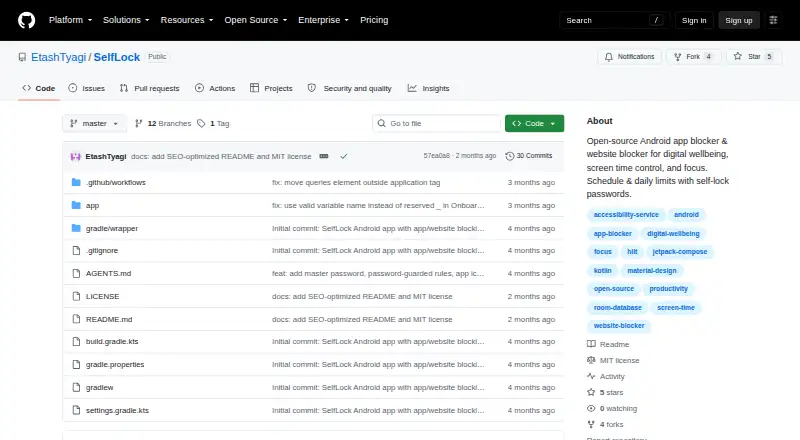
SelfLock is a free, open-source Android app and website blocker for digital wellbeing, screen-time control and focus.
What SelfLock is
SelfLock is a free, open-source Android app and website blocker for digital wellbeing, screen-time control and focus. It blocks installed apps or website domains by schedule or daily usage limit, showing a full-screen overlay when rules apply. Active rules can be locked against editing or deletion, with optional master and per-rule passwords. The app records local app and matched-website usage, date-range summaries, block history, budget warnings and notifications. Website blocking detects URL bars in Chrome, Firefox, Samsung Internet and Edge. Rules, logs and passwords remain on-device; the project states there is no login, telemetry, cloud sync or third-party advertising or analytics SDKs. Passwords use PBKDF2-HMAC-SHA256 hashing and EncryptedSharedPreferences. Setup needs several Android permissions and unrestricted battery use. SelfLock requires Android 14 or newer and is installed by building its APK from source.
Good
- Open-source and free under the MIT License
- Scheduled and daily-limit blocking for apps and domains
- Locked rules with optional passwords
- Local statistics and block history
- No login, telemetry or cloud sync
Watch out
- Requires Android 14 or newer
- Not listed on Google Play
- Needs multiple permissions and unrestricted battery use
- Browser URL detection can change and is not DNS blocking
Who it suits
SelfLock suits Android users seeking scheduled or budget-based blocking for apps and websites, especially those wanting local-only data. It is aimed at users comfortable building and installing an APK.
Verdict
SelfLock provides detailed, on-device blocking and usage controls without accounts or cloud services. Its source-based installation, Android requirement, permission demands and browser-dependent website detection should be considered before choosing it.
The facts
Each one read from SelfLock's own pages, with the date it was checked.
Where it runs
- Android requirement
- SelfLock requires Android 14 or newer (minSdk 34).checked 11 Oct 2026
- App blocking
- It can block installed apps by schedule or daily usage limit and show a full-screen block overlay.checked 10 Oct 2026
- Supported browsers
- Website blocking uses URL-bar detection in Chrome, Firefox, Samsung Internet, and Edge.checked 11 Oct 2026
What it does
- Blocking rules
- It can block installed apps or website domains by schedule or daily usage limit.checked 11 Oct 2026
- Enforcement limitation
- The project says it cannot fully prevent removal through Safe Mode, ADB, or factory reset.checked 10 Oct 2026
- Installation
- The README directs users to build from source for now; it says releases may appear as GitHub Actions artifacts and that the app is not on Google Play.checked 11 Oct 2026
- License
- The repository states that SelfLock is licensed under the MIT License.checked 11 Oct 2026
- Network behavior
- SelfLock says it does not send browsing or app-usage data to a server and uses internet access only to load website favicons.checked 11 Oct 2026
- Password security
- The README says passwords use PBKDF2-HMAC-SHA256 hashing with 600,000 iterations and EncryptedSharedPreferences.checked 10 Oct 2026
- Permissions
- Setup requires accessibility, usage access, overlay, notifications, exact alarms, and unrestricted battery settings for reliable enforcement.checked 11 Oct 2026
- Privacy
- Rules, logs, usage, and passwords stay on-device; the project says it has no login, cloud sync, telemetry, or third-party ad or analytics SDKs.checked 11 Oct 2026
- Purpose
- SelfLock is an open-source Android app and website blocker for digital wellbeing, screen-time control, and focus.checked 11 Oct 2026
- Security
- The README says passwords are hashed with PBKDF2-HMAC-SHA256 at 600,000 iterations and stored using EncryptedSharedPreferences.checked 11 Oct 2026
- Self-lock
- Active rules are locked against editing or deletion, with optional master and per-rule passwords.checked 11 Oct 2026
- Usage statistics
- It tracks daily app and matched website usage and provides statistics, budget warnings, and block notifications.checked 10 Oct 2026
- Usage stats
- The app provides local usage statistics, date-range summaries, block history, and budget warnings.checked 11 Oct 2026
- Website blocking
- It blocks domains by schedule or daily budget by detecting browser URL bars in Chrome, Firefox, Samsung Internet, and Edge.checked 10 Oct 2026
- Website-blocking limit
- Website blocking depends on browser accessibility URL-bar identifiers, which may change, and is not a network-level DNS blocker.checked 11 Oct 2026
- Website blocking limitation
- Website blocking depends on browser accessibility URL-bar identifiers, which browsers can change.checked 10 Oct 2026
Alternatives to SelfLock
- 1

Freedom
Free planAndroidiOSWebExtension8.2From $40 a year - 2

Opal
Free planAndroidiOSExtensionmacOS8.0From $8.29 a month - 3

ScreenZen
Free planAndroidiOSmacOSWindows7.3$49 one-time - 4
Focus Bear
Free planAndroidiOSmacOSWindows7.2From $9.99 a month - 5
one sec
AndroidiOSExtensionLinux7.2From $19.99 a year - 6
FocusMe
AndroidiOSExtensionLinux7.1$249 one-time