
Selekt
Selekt is a desktop photo library manager for photographers, combining import, organization, culling, rating, RAW processing and tagging.
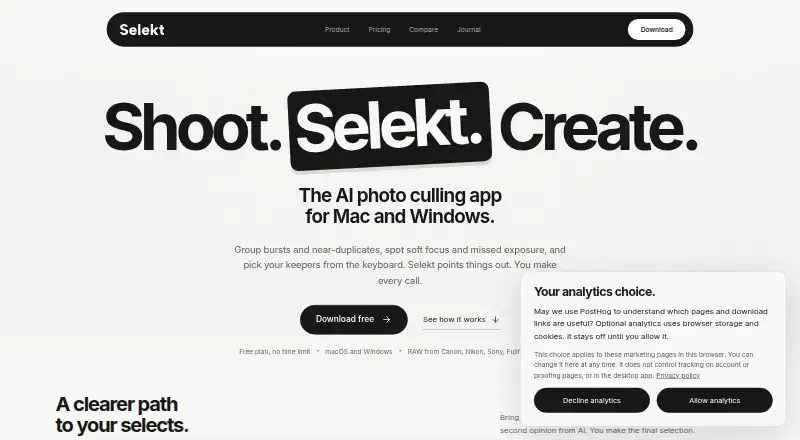
What Selekt is
Selekt is a desktop photo library manager for photographers, combining import, organization, culling, rating, RAW processing and tagging. It groups bursts, similar frames and duplicates for comparison, and on-device scoring checks focus, exposure and blur using profiles for weddings, portraits, sports and events. Optional cloud analysis can flag closed eyes, create face close-ups and tag subjects and scenes for search. Import, manual culling and export work offline; cloud AI, sync and client proofing need an internet connection. Selekt runs on Apple silicon and Intel Macs, plus 64-bit Windows 10 and 11, and supports camera RAW formats including CR2/CR3, NEF, ARW, RAF, RW2, ORF, PEF, SRW and DNG, along with JPEG, TIFF, PNG, HEIC and HEIF. XMP sidecars can be exported for Lightroom Classic, Capture One and Adobe Bridge. Importing, culling and exporting do not require sign-in; a free account enables AI scoring and grouping. The free plan includes cloud AI for 100 photos/month and 1 GB sync and client proofing. Pro is A$16 a month.
Good
- Groups bursts, similar frames and duplicates for comparison.
- On-device scoring checks focus, exposure and blur.
- Import, culling and export work offline.
- Exports XMP sidecars for three listed editors.
- Supports macOS and Windows 10 and 11.
Watch out
- Cloud AI, sync and client proofing require internet.
- Free cloud AI is limited to 100 photos/month.
- Catalogue database has no database-level encryption.
- Pro costs A$16 a month.
Who it suits
Selekt suits photographers who want desktop tools for sorting and assessing photo libraries, including people who work offline. Its Pro plan is described for working photographers and includes room for client galleries.
Verdict
Selekt brings photo organization, culling and quality scoring together, with core workflows available offline. Check its online-service requirements and catalogue encryption limitation against your needs.
Plans and prices
From Selekt's own pricing page, checked 15 Oct 2026.
| Plan | Price | What it gives you |
|---|---|---|
| Free | Free | Unlimited imports, culling and export · on-device focus/exposure/blur scoring · burst/similar/duplicate grouping · 100 cloud-AI photos/month · 1 GB sync/proofing · XMP export · A$0/ forever |
| Pro | A$16 a month | Everything in Free · unlimited cloud AI for everyday shooting · 10 GB sync/proofing · priority support · unlimited social-export crops · A$16/ month (about US$11 a month) |
The facts
Each one read from Selekt's own pages, with the date it was checked.
What it does
- Account requirement
- A free Selekt account enables AI scoring and grouping, while importing, culling, and exporting work without signing in.checked 1 Oct 2026
- AI limitation
- Terms state that AI tags and descriptions may be inaccurate and cloud services can experience maintenance, downtime or discontinuation.checked 15 Oct 2026
- API and SDK
- Public materials document file and XMP export workflows but provide no public API or SDK documentation.checked 15 Oct 2026
- Backup responsibility
- The terms place responsibility for maintaining photo and data backups on the user.checked 15 Oct 2026
- Client proofing
- Synced galleries let clients use browser links, optional PINs, hearts and notes without creating an account.checked 15 Oct 2026
- Cloud AI
- Optional cloud analysis detects closed eyes, creates face close-ups, groups people and adds searchable subject and scene tags.checked 15 Oct 2026
- Cloud data handling
- Cloud features can send developed JPEGs, thumbnails, face crops and metadata; RAW sync uses a developed or embedded JPEG rather than the RAW file.checked 15 Oct 2026
- Cloud providers
- Listed subprocessors include Cloudflare R2, Vercel, Supabase, Clerk, AWS Rekognition, OpenAI, PostHog, Lemon Squeezy and Loops.checked 15 Oct 2026
- Download release
- Version 1.3.1 was released September 9, 2026; the macOS download is 23.1 MB and the Windows installer is 11.1 MB.checked 15 Oct 2026
- Editor integrations
- XMP sidecars carry selections and ratings to Lightroom Classic, Capture One and Adobe Bridge.checked 15 Oct 2026
- File formats
- Supported formats include Canon CR2/CR3, Nikon NEF, Sony ARW, Fujifilm RAF, Panasonic RW2, OM System ORF, Pentax PEF, Samsung SRW, Adobe DNG, JPEG, TIFF, PNG, HEIC, and HEIF.checked 1 Oct 2026
- Founder
- Marc Obieglo’s personal site lists him as founder of selekt.photos from 2025 to the present.checked 15 Oct 2026
- Integrations
- Selekt exports XMP sidecars for Lightroom Classic, Capture One, and Adobe Bridge.checked 1 Oct 2026
- Intended users
- The Pro plan is described as being for working photographers and includes room for client galleries.checked 1 Oct 2026
- Keyboard workflow
- Default controls include P/M/X/U for pick, maybe, reject and clear, with Quickview, loupe, EXIF and exposure-overlay shortcuts.checked 15 Oct 2026
- Licence
- The application, code, features and documentation are proprietary Common Tools Co property; copying, modification, distribution and reverse engineering are prohibited.checked 15 Oct 2026
- Local-first
- Culling, grouping, and quality scoring run on the user’s computer without uploading photographs.checked 1 Oct 2026
- Local storage
- The local catalogue is stored in SQLite and includes filenames, locations, previews, EXIF, tags, ratings and culling state.checked 15 Oct 2026
- Manual decisions
- Selekt can suggest a target count, but the photographer makes every final pick or reject decision.checked 15 Oct 2026
- Mobile status
- A mobile companion for viewing synced shoots is described as early development and is not publicly available.checked 15 Oct 2026
- Offline use
- Import, manual culling and export work offline; cloud analysis, sync, proofing and account checks require connectivity.checked 15 Oct 2026
The company
- Company size
- LinkedIn lists Common Tools as privately held with 2–10 employees.checked 15 Oct 2026
- Maker description
- Common Tools Co. describes Selekt as a desktop photography-library product for professionals and says the company was established in 2025.checked 15 Oct 2026
- Maker headquarters
- The company site gives Marrickville, Sydney as its location.checked 15 Oct 2026
The full review of Selekt
Selekt is a desktop photo library manager for photographers handling large shoots, with tools for organizing, reviewing, and preparing images for editing. It suits Mac and Windows users who want local culling and scoring alongside optional cloud services. Its main appeal is that core selection work stays on the computer; cloud features and catalogue privacy deserve a careful look before committing.
Overview
Import, organization, rating, RAW processing, tagging, and export bring several steps of a photo workflow into one application. Selekt groups bursts, similar frames, and duplicates, then scores focus, exposure, and blur on-device. Wedding, portrait, sports, and event profiles tailor that scoring to different kinds of shoots, though photographers still make the final call on which images to keep.
Importing, manual culling, and exporting work offline, and culling, grouping, and quality scoring do not require photographs to be uploaded. Cloud AI, synchronization, and client proofing do require an internet connection. A free account enables AI scoring and grouping, but importing, culling, and export do not require sign-in.
Key features
Selection and cloud analysis
Side-by-side comparison makes it easier to judge similar frames, while on-device scoring provides a private way to identify likely focus, exposure, and blur issues. Cloud analysis adds closed-eye flags, face close-ups, and searchable tags for subjects and scenes. That is a useful division for photographers who want local selection but can connect for additional analysis; it is less suitable for workflows that cannot rely on online services.
Formats and handoff
Selekt supports major camera RAW formats including CR2/CR3, NEF, ARW, RAF, RW2, ORF, PEF, SRW, and DNG, as well as JPEG, TIFF, PNG, HEIC, and HEIF. XMP sidecar export connects its workflow with Lightroom Classic, Capture One, and Adobe Bridge. That gives photographers a route to carry selection metadata into established editing tools without requiring Selekt to replace them.
Privacy and security
Implemented network paths use HTTPS/TLS, and Cloudflare R2 objects and metadata, along with Amazon Rekognition face vectors, are encrypted at rest. The local catalogue is a SQLite database without database-level encryption from Selekt. That limitation matters to photographers whose computer or catalogue could expose sensitive client work, even though local culling itself avoids uploading photographs.
Pricing
| Plan | Price | Includes |
|---|---|---|
| Free | free (billed A$0/ forever) | Unlimited imports, culling, and export; on-device focus, exposure, and blur scoring; cloud AI for 100 photos/month; 1 GB sync and client proofing; XMP export. |
| Pro | A$16 a month (billed A$16/month (about US$11 a month)) | Unlimited cloud AI; 10 GB sync and client proofing; priority support; high fair-use limit. |
The free plan is unusually capable for photographers who mainly need local selection: imports, culling, export, and on-device scoring are unlimited. Its constraints are 100 cloud-AI photos per month and 1 GB for sync and client proofing, so it is a better fit for occasional online use than ongoing client delivery. Pro is aimed at working photographers who need more room for client galleries and unlimited cloud AI; the stated sync and proofing allowance is 10 GB. General support is available by email, while priority support is included with Pro.
Platforms
Selekt runs on macOS and Windows. The Mac app supports both Apple silicon and Intel processors; Windows support is through a 64-bit installer for Windows 10 and 11. It is a desktop option rather than a mobile photo-management app.
Who it's for
Selekt is a strong fit for photographers who want to narrow a shoot locally, compare similar frames, and pass XMP metadata into Lightroom Classic, Capture One, or Adobe Bridge. Its free tier can cover a substantial offline culling workflow. Photographers who depend on client proofing or cloud analysis should account for the connection requirement and plan quotas, while those needing database-level encryption should look elsewhere.
Pros and cons
- Pro: Unlimited free imports, culling, and export make the core desktop workflow usable without a subscription.
- Pro: On-device quality scoring and grouping keep core selection work local, and offline import, culling, and export support disconnected workflows.
- Pro: XMP export and broad RAW support fit photographers who use dedicated editing applications after culling.
- Con: Cloud AI, sync, and client proofing need internet access, limiting those tools on location without reliable connectivity.
- Con: The free plan caps cloud AI at 100 photos per month and sync/proofing at 1 GB, which can constrain regular client work.
- Con: The local SQLite catalogue lacks database-level encryption, a consideration for sensitive libraries.
Alternatives
Photo Curator is a free, open-source alternative available on Linux, macOS, the web, and Windows for readers who prioritize those platforms and an open-source option. Vantage is worth considering for an iPhone-centered workflow, with a free tier for recent duplicate cleanup, monthly best-photo selection, and space-saving tools; it also supports macOS and Windows. Cullora offers a free tier with limited monthly filing and unlimited viewing, rating, and flagging, making it a possible fit for readers who can work within its filing allowance. SnapCuller is another freemium option for macOS and Windows. Keeper is a Mac-only alternative with a free trial and paid plans. OptiCull is a freemium Mac option with a free trial. Culvia is a free choice across Linux, macOS, web, and Windows. Memory Ease is a paid alternative for photographers seeking a cross-platform option, including mobile and web. Compare more options in Photo Culling Software and AI Photo Culling Software.
Verdict
Choose Selekt if you want a capable local-first culling workflow, offline basics, and XMP handoff to established editors, with cloud tools available when useful. Its free plan makes that case without a subscription. Look elsewhere if online-dependent proofing and AI do not suit your workflow or if an unencrypted local catalogue is unacceptable.
Alternatives to Selekt
- 1
Zno
Free planAndroidiOSWebmacOS7.6Free plan - 2

AccioPix Photo Culling
Free planWebAPImacOSWindows7.5₹0.20 one-time - 3

Facet
Free planOpen sourceWebAPILinuxmacOS7.5Free plan - 4
Memory Ease
AndroidiOSWebmacOS7.0From $7.50 a month - 5

Cull AI Studio
macOSWindows6.9From $159 a year - 6
Optyx
Free planAPImacOSWindows6.7From $6.99 a month