Photo Curator
Photo Curator is a free, open-source tool for reviewing large photo libraries and identifying likely keepers.
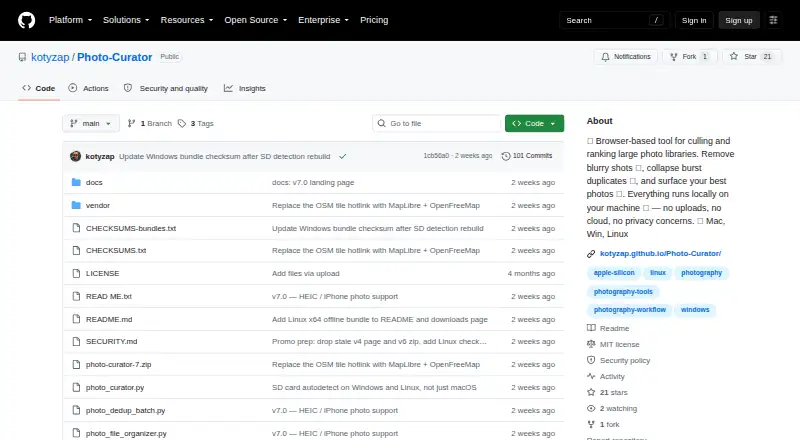
What Photo Curator is
Photo Curator is a free, open-source tool for reviewing large photo libraries and identifying likely keepers. Cull groups photos as Sharp, Soft (recoverable), or Blurry using a contrast-normalized sharpness measure. Dedup clusters near-duplicates using perceptual hashes, capture-time metadata, and ORB feature matching, then identifies the sharpest frame in each group. Rank scores photos on composition, lighting, focus, color, and contrast, and displays the top selections with per-photo radar charts. The software reads JPEG, PNG, HEIC, HEIF, HIF, TIFF, BMP, WebP, and RAW formats supported by LibRaw. Processing is local: the app binds its server to 127.0.0.1 and says images are not uploaded. Files stay in place until the user chooses an action. The GPS view can make optional requests for OpenFreeMap tiles. The offline Linux bundle is limited to x86_64 and requires glibc 2.28 or later; it does not cover ARM or musl distributions.
Good
- Groups blurry, soft, and sharp photos.
- Finds near-duplicates and highlights the sharpest frame.
- Scores composition, lighting, focus, color, and contrast.
- Photos are processed locally and not uploaded.
Watch out
- Offline Linux bundle supports x86_64 only.
- Linux bundle requires glibc 2.28 or later.
- ARM and musl distributions are not covered by that bundle.
Who it suits
Photo Curator is aimed at photographers returning with large batches of images who want to sort and rank potential keepers. It can suit people who prefer local processing and reversible file actions.
Verdict
Photo Curator combines culling, duplicate grouping, and image ranking while keeping processing local. Check its Linux bundle requirements if using ARM or a musl distribution.
Plans and prices
From Photo Curator's own pricing page, checked 2 Oct 2026.
| Plan | Price | What it gives you |
|---|---|---|
| Free and open source | Free | Free · open source · MIT license |
The facts
Each one read from Photo Curator's own pages, with the date it was checked.
What it does
- Cull
- Cull sorts photos into Sharp, Soft (recoverable), and Blurry groups using a contrast-normalized sharpness measure.checked 2 Oct 2026
- Dedup
- Dedup uses perceptual hashing, capture-time metadata, and ORB feature matching to cluster near-duplicates and keep the sharpest frame in each group.checked 2 Oct 2026
- Download limits
- The offline Linux bundle is x86_64 only and requires glibc 2.28 or later; ARM and musl distributions are not covered by that bundle.checked 2 Oct 2026
- Formats
- It reads JPEG, PNG, HEIC/HEIF/HIF, TIFF, BMP, WebP, and RAW formats supported by LibRaw.checked 2 Oct 2026
- Integrations
- The GPS view uses MapLibre with OpenFreeMap vector tiles, and the map library is bundled rather than loaded from a CDN.checked 2 Oct 2026
- Local processing
- The app runs locally on the user's machine, binds its server to 127.0.0.1, and says photos are not uploaded.checked 2 Oct 2026
- Outbound requests
- The maker says the only optional outbound requests are OpenFreeMap tiles for the GPS view, loaded by the browser.checked 2 Oct 2026
- Rank
- Rank scores photos on composition, lighting, focus, color, and contrast, then shows the TOP N with per-photo radar charts.checked 2 Oct 2026
- Reversible actions
- Files are not deleted or moved until the user chooses an action; rejected photos are moved only when the user presses the relevant button.checked 2 Oct 2026
- Security
- The security policy says requests require a loopback Host header, cross-site Origin requests are rejected, and image endpoints restrict access to image files within selected or recently used folders.checked 2 Oct 2026
- Support
- The project is free and open source, and the maker invites users to support development through Ko-fi.checked 2 Oct 2026
- What it does
- Photo Curator culls blurry photos, groups burst duplicates, and ranks keepers from large photo libraries.checked 2 Oct 2026
- Who it is for
- The maker describes it as built for photographers who return from a trip with thousands of frames and want to find keepers quickly.checked 2 Oct 2026
The company
- Maker
- The GitHub account identifies the maker as Pavel Kotyza and lists Prague, Czech Republic.checked 2 Oct 2026
The full review of Photo Curator
Overview
Photo Curator is a free, open-source tool for sorting large photo libraries by sharpness, similarity, and image quality. It best suits photographers who want to narrow thousands of trip or event frames on their own computer. Its combination of culling, duplicate grouping, and ranking is useful, though the offline Linux bundle is limited to x86_64 systems with glibc 2.28 or later.
Key features
Three ways to narrow a library
Cull separates images into Sharp, Soft (recoverable), and Blurry groups using a contrast-normalized sharpness measure. That middle category is a practical distinction for photographers who may want to review a slightly soft frame rather than discard it outright.
Dedup combines perceptual hashing, capture-time metadata, and ORB feature matching to cluster near-duplicates, then identifies the sharpest frame in each group. This targets the repetitive review burden of bursts and similar shots without making the final deletion decision for you.
Rank scores composition, lighting, focus, color, and contrast, then presents the TOP N with a radar chart for each photo. That gives users a shortlist and a view of each image's scoring dimensions, but it is a ranking aid rather than a substitute for choosing images based on personal or client priorities.
Formats and control
Photo Curator reads JPEG, PNG, HEIC/HEIF/HIF, TIFF, BMP, WebP, and RAW formats supported by LibRaw. RAW preview, batch culling actions, and offline culling make it a capable fit for a local review workflow.
Processing stays on the user's machine; the app binds its server to 127.0.0.1 and says photos are not uploaded. The only optional outbound requests are OpenFreeMap tiles for the GPS view, loaded by the browser. MapLibre is bundled rather than fetched from a CDN. Files are not moved or deleted until the user chooses an action, and rejected photos move only when the relevant button is pressed. The security policy also requires a loopback Host header, rejects cross-site Origin requests, and limits image endpoints to image files in selected or recently used folders. These safeguards and reversible actions suit photographers who want to retain control of their library.
Pricing
Free and open source: free. The free plan is the product: it carries an MIT license, with no paid tier or free trial. The maker invites users to support development through Ko-fi. The zero-price plan makes sense for photographers comfortable with an open-source tool; the main trade-off is that its Linux offline bundle does not cover ARM or musl distributions.
Platforms
Photo Curator is listed for Linux, macOS, web, and Windows. The offline Linux bundle is specifically x86_64 and requires glibc 2.28 or later, so it is not a fit for ARM or musl Linux users seeking that bundle.
Who it's for
Photographers returning from trips with thousands of frames are the clearest match: sharpness sorting, near-duplicate clustering, and ranked keepers address three different stages of reducing a large shoot. It is also a sensible choice for users who want local, offline processing and explicit control before moving or deleting rejected images. Those looking for AI-assisted culling should look elsewhere; Photo Curator does not offer it.
Pros and cons
- Pros: Cull, Dedup, and Rank cover blur review, near-duplicate grouping, and shortlist ranking in one workflow.
- Pros: Local processing, offline culling, and delayed file actions keep photo handling on the user's machine and leave the final action to them.
- Pros: Broad image-format support includes RAW formats supported by LibRaw, plus RAW preview.
- Cons: No AI-assisted culling, so photographers seeking an AI-led selection workflow need another app.
- Cons: The offline Linux bundle excludes ARM and musl distributions and requires x86_64 with glibc 2.28 or later.
Alternatives
For a wider category comparison, browse Photo Culling Software.
Choose Vantage if an iPhone option matters: it supports iOS, macOS, and Windows, offers a free plan for cleaning up and finding duplicates from the last 30 days, monthly best photos, and space-saving tools, and has a free trial.
FilterPixel may suit photographers who want shoot-based pricing: its Extra DeepCull shoot costs $7.99, paid once, never expires, and covers one shoot up to 5,500 photos. It supports macOS and Windows and has a free plan and free trial.
Selekt is another macOS and Windows option with a free plan. Its free tier includes unlimited imports, culling, and export, on-device focus, exposure, and blur scoring, cloud AI for 100 photos per month, and 1 GB sync and client features.
SnapCuller is a freemium alternative for Windows and macOS.
OptiCull is a freemium alternative for macOS.
Culvia is a free alternative available for web, Windows, macOS, and Linux.
Aftershoot is a paid option for macOS and Windows, with a free trial but no free plan; its Select plan offers unlimited AI culling for $10 a month billed annually.
Cullora is a freemium alternative for Windows.
Verdict
Photo Curator is a strong fit for photographers who want free, local tools to reduce a large shoot without handing over control of file actions. Its sharpness groups, duplicate clustering, and ranked shortlist provide a focused culling workflow; look elsewhere if you need AI-assisted selection or an offline Linux bundle for ARM or musl.
Getting started
- Visit https://github.com/kotyzap/Photo-Curator to access the project.
- Choose a supported platform: Linux, macOS, web, or Windows.
- For the offline Linux bundle, use an x86_64 system with glibc 2.28 or later.
- Select a photo folder, then use Cull, Dedup, or Rank to review images.
- Choose an action when you want to move or otherwise handle selected files.
Limits worth knowing
The offline Linux bundle is limited to x86_64 and requires glibc 2.28 or later; it does not cover ARM or musl distributions.
Questions
Does Photo Curator cost anything?
No. It is free and open source under the MIT license.
Does it upload photos?
The app runs locally and says photos are not uploaded. Its only optional outbound requests are OpenFreeMap tiles for the GPS view, loaded by the browser.
Which photo formats can it read?
It reads JPEG, PNG, HEIC, HEIF, HIF, TIFF, BMP, WebP, and RAW formats supported by LibRaw.
What operating systems does it support?
Its listed platforms are Linux, macOS, web, and Windows. The offline Linux bundle is limited to x86_64 with glibc 2.28 or later.
Does it delete or move files automatically?
No. Files are not deleted or moved until the user chooses an action; rejected photos move only when the relevant button is pressed.
Who makes Photo Curator?
The GitHub account identifies the maker as Pavel Kotyza and lists Prague, Czech Republic.
Alternatives to Photo Curator
- 1

Endor Labs
Free planWebAPIExtensionLinux7.4Free plan - 2

ActiveState Platform
Free planWebAPILinuxmacOS7.2Free plan - 3
OHRisk
Free planLinuxmacOSWindows6.1Free plan - 44.8
- 5
OpenSSF Scorecard
LinuxmacOSWindows4.7 - 64.6