
Vantage
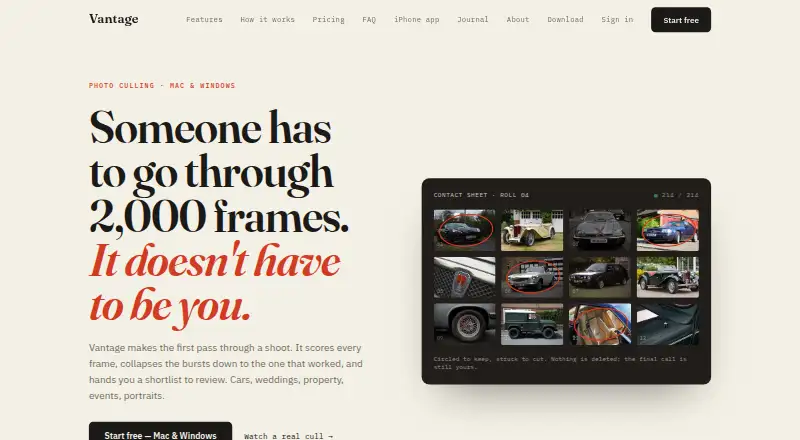
Vantage is a desktop photo-culling app that sorts shoot images into keep, review, and cut selections.
What Vantage is
Vantage is a desktop photo-culling app that sorts shoot images into keep, review, and cut selections. It accepts camera RAW, JPEG, and TIFF files without requiring conversion first. Photographers can apply exposure, colour, and straightening adjustments to keepers in batches or individually, and use natural-language search to find images by subject, angle, or lighting. Client galleries can be password-protected, set to expire, and offer full-size or web-size downloads. The desktop app exports Lightroom XMP sidecars and catalog data; Capture One is also listed among supported workflow names. Desktop culling runs locally by default. Vantage says originals uploaded for cloud processing are deleted once results are ready and photos are not used to train AI models. The desktop product is in early access, which Vantage says has rough edges and performs better on cars and property than weddings. Desktop pricing is £15.99/mo, with unlimited shoots and 2.5 GB cloud storage included. iPhone options include a free tier and Pro subscription.
Good
- Accepts RAW, JPEG, and TIFF files.
- Groups images into keep, review, and cut.
- Searches by subject, angle, and lighting.
- Offers password-protected client galleries.
- Desktop culling runs locally by default.
Watch out
- Desktop product is in early access.
- Vantage says it has rough edges.
- It performs better on cars and property than weddings.
- Desktop plan costs £15.99/mo.
Who it suits
Vantage is aimed at photographers handling car, property, wedding, event, portrait, or other shoots. It may suit those who want culling, keeper adjustments, and client galleries in one desktop workflow.
Verdict
Vantage brings selection, basic keeper adjustments, search, and client delivery together for photo shoots. Its early-access status and stated uneven performance across shoot types are important caveats.
Plans and prices
From Vantage's own pricing page, checked 15 Oct 2026.
| Plan | Price | What it gives you |
|---|---|---|
| Vantage iPhone Free | Free | Last 30 days · cleanup and duplicates · monthly best photos |
| Vantage Pro iPhone monthly | £2.99 a month | Three months, one year and whole-library access · photographer modes · auto-renewable |
| Vantage Pro for iPhone | £2.99 a month | Three months, a year, or whole-library access · one week free to try · Monthly |
| Cloud storage 250 GB | £3.99 a month | Adds 250 GB storage · monthly |
| Cloud storage 1 TB | £9.99 a month | Adds 1 TB storage · monthly |
| Vantage Pro for iPhone | £14.99 a year | Three months, a year, or whole-library access · one week free to try · Yearly |
| Vantage Pro iPhone yearly | £14.99 a year | Three months, one year and whole-library access · photographer modes · auto-renewable |
| Vantage desktop | £15.99 a month | Unlimited shoots · RAW and JPEG · local and cloud processing · 2.5 GB cloud storage · monthly |
| Cloud storage 2 TB | £17.99 a month | Adds 2 TB storage · monthly |
The facts
Each one read from Vantage's own pages, with the date it was checked.
What it does
- AI scoring
- Its score considers composition, lighting, angle and subject sharpness, and users can adjust how aggressively it cuts.checked 15 Oct 2026
- Burst grouping
- The software groups near-identical frames, surfaces a sharpest frame and lets users set how many images to retain per angle.checked 15 Oct 2026
- Client galleries
- The product creates private galleries with password protection, expiry dates and full-size or web-size downloads.checked 15 Oct 2026
- Cloud deletion policy
- Cloud processing uploads originals only during processing and says they are actively deleted when results are ready and are not used for training.checked 15 Oct 2026
- Delivery
- Client galleries support password protection, expiry dates, and full-size or web-size downloads.checked 3 Oct 2026
- Documentation
- The help centre covers installation, scoring, keyboard shortcuts, grouping controls, search, Lightroom export, processing modes, billing and troubleshooting.checked 15 Oct 2026
- Editing
- Vantage applies exposure, colour and straightening adjustments across a set, with per-photo controls.checked 15 Oct 2026
- Engine download
- The first launch downloads an approximately 1.4 GB local culling engine, after which the app can work offline.checked 15 Oct 2026
- Installer limitation
- The Windows installer is not code-signed yet, so SmartScreen displays a warning; the Mac build is signed and notarised.checked 15 Oct 2026
- Integrations
- The maker names Lightroom and Capture One workflows and lists Canon, Nikon, Sony and Fujifilm camera files plus DNG support.checked 15 Oct 2026
- iPhone privacy
- Everyday iPhone scanning runs on-device, while optional photographer Pro modes send reduced-size copies to a scoring server and delete them after scoring.checked 3 Oct 2026
- Licence and API
- The opened maker pages describe a proprietary commercial product and provide no open-source licence, public API, SDK or self-hosting package.checked 15 Oct 2026
- Limit: beta status
- The maker labels Vantage early access and warns that rough edges remain.checked 15 Oct 2026
- Limit: genre performance
- The maker says the software is stronger on automotive and property work and that weddings and portraits are at an earlier stage.checked 15 Oct 2026
- Limit: subscription economics
- The flat monthly fee can be inefficient for photographers who shoot only twice a year because the subscription continues between shoots.checked 15 Oct 2026
- Natural-language search
- Users can search a complete shoot with descriptions of subject, camera angle and lighting without creating keywords first.checked 15 Oct 2026
Where it runs
- App Store compatibility
- The iPhone listing requires iOS 17 or later and also lists Mac compatibility requiring macOS 14 or later with Apple silicon.checked 15 Oct 2026
- App Store privacy
- The iPhone listing says image analysis runs on-device, with no upload, no account requirement and no advertising use.checked 15 Oct 2026
- App Store safety behavior
- The iPhone app sends deleted photos to Recently Deleted for 30 days and does not delete anything without user action.checked 15 Oct 2026
Money
- App Store trial
- The iPhone Pro subscription includes a seven-day free trial and renews automatically unless cancelled at least 24 hours before renewal.checked 15 Oct 2026
The company
- Company address
- Companies House lists the company's correspondence address as South Lodge, North Moss Lane, Liverpool, United Kingdom, L37 0AQ.checked 15 Oct 2026
- Company legal identity
- The product identifies its operator as Vantage Enterprises Ltd, company number 17334160, parent of Harry Moores Media.checked 15 Oct 2026
- Company officer
- UK Companies House lists Harry George Moores as the active director of Vantage Enterprises Ltd, appointed 12 July 2026.checked 15 Oct 2026
- Maker background
- Harry Moores says he built Vantage from his own motorsport, classic-car, dealership, property and aerial photography workflow.checked 15 Oct 2026
The full review of Vantage
Vantage is a photo-selection and delivery app for photographers who want to sort a shoot and share a client gallery in one workflow. It is a stronger fit for car and property work than weddings, and its desktop app remains in early access.
Overview
Vantage sorts shoot photos into keep, review, and cut groups, with batch actions for moving through a set. It accepts camera RAW, JPEG, and TIFF files without conversion, and supports offline culling. That combination helps photographers narrow a shoot without first changing their file format or depending on a connection.
The desktop app is still early access, with rough edges. Vantage also says it performs better on cars and property than weddings. Photographers working in other genres may still find its tools relevant, but wedding photographers should be especially cautious about relying on it as their primary culling tool.
Key features
Selection and adjustments
After grouping images, Vantage can apply exposure, colour, and straightening adjustments across keepers, with individual photo adjustments for frames that need separate treatment. This makes it useful for a consistent basic pass after selection, but it is not a substitute for a broader editing workflow.
Search and delivery
Natural-language search finds photos by subject, angle, and lighting across a shoot, which can help locate specific frames in a large set. Client galleries include password protection, expiry dates, and full-size or web-size downloads, giving photographers control over access and what clients receive.
Workflow and privacy
The desktop app exports Lightroom XMP sidecars and catalog data, and Capture One appears among its supported workflow names. Desktop culling runs locally by default; when originals are uploaded for cloud processing, Vantage says they are deleted once results are ready and are not used to train AI models. Everyday iPhone scanning also runs on-device, while optional photographer Pro modes send reduced-size copies to a scoring server and delete them after scoring.
Pricing
Vantage has a free iPhone plan and paid iPhone and desktop plans. The Vantage iPhone Free plan costs nothing and covers cleanup and duplicate finding from the last 30 days, monthly best photos, and space-saving tools. Its recent-history limit makes it a fit for routine phone cleanup, not a full-library culling workflow.
Vantage Pro for iPhone costs £2.99 a month, billed monthly, and includes three months, a year, or whole-library access, with one week free to try. It suits iPhone users who need access beyond the free plan's 30-day window. Vantage desktop costs £15.99 per month, billed monthly, and includes unlimited shoots and 2.5 GB of cloud storage. That is the relevant plan for photographers culling client work, though the included storage is a defined allowance rather than unlimited cloud space.
Platforms
Vantage is available on iOS, macOS, and Windows. Offline culling and local-by-default desktop processing make it practical when connectivity is limited, while cloud processing and gallery delivery cover workflows that need online services.
Who it's for
Vantage is aimed at photographers working across car, property, wedding, event, portrait, and other shoots. Its selection, basic keeper adjustments, search, and galleries make the desktop plan most compelling for photographers who want those steps together, particularly in car and property work. Its stated rough edges and weaker wedding performance make it a less assured choice for wedding specialists.
Pros and cons
- Pros: RAW, JPEG, and TIFF support without conversion, plus offline culling, suits shoots where file preparation or reliable internet is a concern.
- Pros: Batch selection, keeper adjustments, search, and password-protected client galleries bring several stages of a shoot into one workflow.
- Pros: Local-by-default desktop culling and stated deletion of cloud-processing originals address privacy concerns.
- Cons: Early-access rough edges mean the desktop app is not yet the most dependable choice for a polished, predictable workflow.
- Cons: Vantage says results are stronger on cars and property than weddings, a meaningful caveat for wedding photographers.
- Cons: The desktop plan includes 2.5 GB of cloud storage, which may constrain photographers who rely on cloud space for large shoots.
Alternatives
For a broader comparison, see Photo Culling Software.
Photo Curator is a free option for photographers who prefer open-source software and need Linux support. Selekt is worth considering for Mac or Windows users who want a free tier with unlimited imports, culling, and export, on-device scoring, and 100 cloud-AI photos per month.
SnapCuller is another freemium Mac and Windows alternative. OptiCull offers a freemium option with a free trial on macOS. Keeper is a paid, Mac-only alternative for users who do not need a free plan.
FilterPixel may suit photographers who prefer either a one-time purchase for a single shoot of up to 5,500 photos or an annual Standard plan. PhotoPicker is an Android and iOS alternative with paid Pro access to unlimited catalogs. Aftershoot is a paid Mac and Windows option with a free trial and an unlimited-AI-culling Select plan.
Verdict
Choose Vantage if you shoot cars or property and want selection, basic adjustments, search, and client delivery alongside offline-capable culling. The main reason to look elsewhere is its early-access state and stated weaker wedding performance; photographers who need a more assured wedding workflow should compare alternatives before committing.
Getting started
- Choose iOS, macOS, or Windows as your platform.
- For iPhone, start with Vantage iPhone Free or try Vantage Pro for iPhone with its one-week free trial.
- For desktop, choose Vantage desktop at £15.99/mo.
- Import camera RAW, JPEG, or TIFF files into the desktop app; conversion is not required.
Limits worth knowing
Vantage iPhone Free covers cleanup and duplicate finding from the last 30 days, monthly best photos, and space-saving tools. Vantage Pro for iPhone is £2.99 per month and offers three months, a year, or whole-library access; the desktop plan is £15.99/mo with 2.5 GB cloud storage included.
Questions
How much does Vantage cost?
Vantage desktop is £15.99/mo and includes unlimited shoots and 2.5 GB cloud storage. Vantage Pro for iPhone is £2.99 per month, billed monthly.
Is there a free plan or trial?
Vantage iPhone Free is listed as free. Vantage Pro for iPhone includes one week free to try, and Vantage also lists a free trial.
Which platforms does Vantage support?
The listed platforms are iOS, macOS, and Windows.
Does Vantage work with RAW files and Lightroom?
The desktop app accepts camera RAW files as well as JPEG and TIFF without prior conversion. It exports Lightroom XMP sidecars and catalog data.
How does Vantage handle photo privacy?
Desktop culling runs locally by default. The privacy policy says originals uploaded for cloud processing are deleted when results are ready, and photos are not used to train AI models.
What should I know about the desktop product?
Vantage describes it as early access with rough edges. It says the product performs better on car and property shoots than weddings.
Alternatives to Vantage
- 1

Selekt
Free planWebmacOSWindows7.7From A$16 a month - 2

Cullora
Free planmacOSWindows7.2€29 one-time - 3
Keeper
Free planmacOS7.2$15 one-time - 4
Memory Ease
AndroidiOSWebmacOS7.0From $7.50 a month - 5

Cull AI Studio
macOSWindows6.9From $159 a year - 6
FastPictureViewer Professional
APIWindows6.7$9.99 one-time