
FilterPixel
FilterPixel is photo culling and editing software for photographers who need to select and organize image collections.
What FilterPixel is
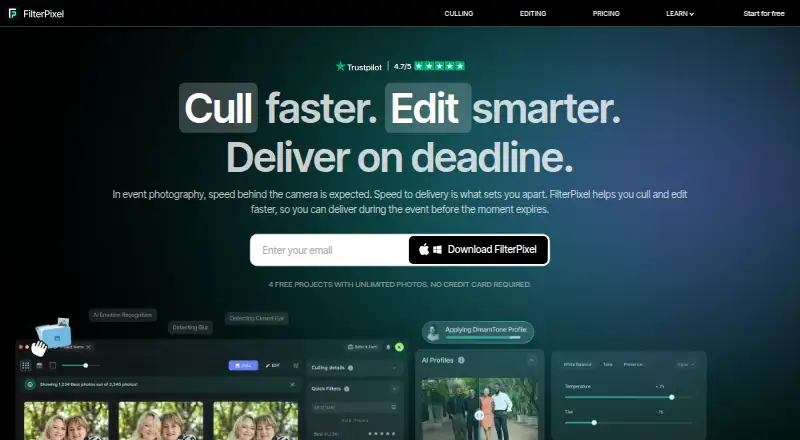
FilterPixel is photo culling and editing software for photographers who need to select and organize image collections. Its DeepCull feature assesses photos using criteria for events, sports, concerts, and weddings, giving each evaluated image a score and reason. Review Mode groups burst photos, while Survey Mode compares similar frames with detail inspection up to 16× zoom. Users can apply built-in AI profiles or train custom profiles from an edited Lightroom catalog. Exports to Lightroom, Lightroom Classic, Photoshop, and Capture One carry ratings and color labels through XMP metadata. FilterPixel supports JPEG and RAW files and says it organizes photos rather than deleting them; flagged rejects can be recovered with one click. Each DeepCull shoot processes up to 5,500 photos, with larger projects split into multiple shoots. Standard costs $14.99/mo when billed annually at $180/yr and includes 20 DeepCull shoots per year. It runs on macOS and Windows, and culling happens in the cloud.
Good
- Scores and explains evaluated images
- Compares similar frames at up to 16× zoom
- Exports ratings and color labels through XMP metadata
- Flagged rejects can be recovered with one click
Watch out
- DeepCull runs in the cloud, not offline
- Each shoot is capped at 5,500 photos
- Standard is billed annually at $180/yr
Who it suits
FilterPixel suits professional event, sports, wedding, concert, school, dance, and portrait photographers who want AI-assisted culling and editing workflows. Its export options may suit photographers working with Lightroom, Photoshop, or Capture One.
Verdict
FilterPixel combines AI-assisted selection with review tools and exports to several photo-editing products. Its cloud-based culling and per-shoot photo cap are worth weighing against your workflow.
Plans and prices
From FilterPixel's own pricing page, checked 29 Sep 2026.
| Plan | Price | What it gives you |
|---|---|---|
| Extra DeepCull shoot | $7.99, paid once | 1 shoot · up to 5,500 photos · one-time purchase; never expires |
| Standard | $14.99 a month | 20 DeepCull shoots/year · up to 5,500 photos per shoot · unlimited basic AI cull · annually at $180/yr |
| Pro | $34.99 a month | 70 DeepCull shoots/year · up to 5,500 photos per shoot · 1 seat · 2 custom trainable AI profiles · annually at $420/yr |
| Studio | $64.99 a month | 140 DeepCull shoots/year · up to 5,500 photos per shoot · up to 5 team seats · 5 custom trainable AI profiles · annually at $780/yr |
The facts
Each one read from FilterPixel's own pages, with the date it was checked.
What it does
- Audience
- FilterPixel describes its workflow for professional photographers, including event, sports, wedding, concert, school, dance, and portrait photographers.checked 29 Sep 2026
- Editing
- Users can apply built-in AI profiles or train custom profiles from an edited Lightroom catalog to apply their editing style.checked 29 Sep 2026
- Genre-specific culling
- DeepCull evaluates photos using genre-specific criteria for events, sports, concerts, and weddings, and gives each evaluated photo a score and reason.checked 29 Sep 2026
- Integrations
- FilterPixel exports to Lightroom, Lightroom Classic, Photoshop, and Capture One, carrying ratings and color labels through XMP metadata.checked 29 Sep 2026
- Photo handling
- FilterPixel says it organizes rather than deletes photos, and flagged rejects can be recovered with one click.checked 29 Sep 2026
- Product
- FilterPixel is photo culling and editing software that uses AI to select and organize images for photographers.checked 29 Sep 2026
- Review tools
- Review Mode groups burst photos, while Survey Mode lets users compare similar frames and inspect details at up to 16× zoom.checked 29 Sep 2026
- Shoot limit
- Each DeepCull shoot processes up to 5,500 photos; larger projects are automatically split into multiple shoots.checked 29 Sep 2026
- Support
- Plans include in-app support; the Studio plan adds VIP support and an onboarding call.checked 29 Sep 2026
- Supported files
- The product supports JPEG and RAW formats, and its pricing page lists JPEG and RAW support.checked 29 Sep 2026
- Unused allocation
- Unused DeepCull shoots reset on the first of each billing month, while separately purchased add-on shoots do not expire.checked 29 Sep 2026
The company
- Headquarters
- Noida, Uttar Pradesh, Indiachecked 23 Sep 2026
Money
- Trial
- The pricing FAQ says users can try free DeepCull shoots without a credit card; it does not state a trial duration there.checked 29 Sep 2026
The full review of FilterPixel
Overview
FilterPixel is cloud-based photo culling and editing software for photographers using macOS or Windows. It is best suited to professionals sorting large shoots, especially in events, sports, concerts, or weddings. Its standout is genre-aware scoring paired with close-review tools; the trade-off is that culling depends on a connection and is capped per shoot.
For a broader comparison, browse Photo Culling Software or AI Photo Culling Software.
Key features
Genre-aware culling and review
DeepCull evaluates photos against criteria for events, sports, concerts, and weddings, assigning each a score and reason. That context can help photographers work through a shoot more deliberately than a bare keep-or-reject flag. Review Mode groups burst photos; Survey Mode compares similar frames and supports inspection at up to 16× zoom. Batch culling actions are also supported.
Editing and exports
Users can apply built-in AI profiles or train custom profiles from an edited Lightroom catalog. Export works with Lightroom, Lightroom Classic, Photoshop, and Capture One, carrying ratings and color labels through XMP metadata. That makes FilterPixel a more natural fit for photographers whose editing workflow already uses one of those products.
File handling and limits
FilterPixel supports JPEG and RAW. It organizes photos rather than deleting them, and flagged rejects can be recovered with one click. Each DeepCull shoot handles up to 5,500 photos; larger projects are split into multiple shoots, so the per-shoot ceiling does not prevent processing them but does shape the workflow. Culling happens in the cloud, with no offline culling, which makes it a poor fit when shoots must be sorted without internet access.
Pricing
FilterPixel is freemium, with a free plan and paid plans from $14.99 per month billed annually. The pricing FAQ offers free DeepCull shoots without a credit card, but does not give a trial duration.
- Standard: $14.99 per month, billed annually at $180 per year. Includes 20 DeepCull shoots per year, up to 5,500 photos per shoot, unlimited basic AI culling, and in-app support. It suits photographers with a moderate number of shoots who do not need custom profiles or multiple seats.
- Pro: $34.99 per month, billed annually at $420 per year. Includes 70 DeepCull shoots per year, one seat, two custom trainable AI profiles, and in-app support. The higher allocation and custom profiles better suit individual professionals with recurring work and a distinct editing style.
- Studio: $64.99 per month, billed annually at $780 per year. Includes 140 DeepCull shoots per year, up to five team seats, five custom trainable AI profiles, VIP support, and an onboarding call. Its added capacity and team provisions are aimed at studios rather than solo users.
- Extra DeepCull shoot: $7.99 as a one-time purchase for one shoot of up to 5,500 photos. Unlike plan allocations, add-on shoots do not expire.
Unused DeepCull shoots in a plan reset on the first of each billing month, while separately purchased add-on shoots remain available. The lower-cost Standard plan gives up trainable profiles and multi-seat access; Pro is limited to one seat. Consider annual billing and the monthly reset when estimating how much shoot capacity you will use.
Platforms
FilterPixel runs on macOS and Windows. Because culling is cloud-based and offline culling is not supported, a desktop platform alone does not make it suitable for disconnected workflows.
Who it's for
FilterPixel is designed for professional photographers, including those covering events, sports, weddings, concerts, schools, dance, and portraits. It is especially compelling when genre-specific evaluation, burst grouping, close comparison, and exports to established editing tools can save time across repeated shoots. Photographers who need offline culling, or whose work regularly exceeds the annual shoot allocation, should weigh those constraints before choosing a plan.
Pros and cons
- Pros: DeepCull supplies a score and reason using criteria tailored to four genres, giving photographers more context while selecting images.
- Pros: Burst grouping, similar-frame comparison, and up to 16× inspection support careful review, while one-click recovery reduces the risk of losing flagged rejects.
- Pros: Exports preserve ratings and color labels for four major editing products through XMP metadata.
- Cons: Cloud-only culling rules it out for photographers who need to select images offline.
- Cons: Every shoot is limited to 5,500 photos, and plan shoots reset monthly, so capacity needs careful matching to a photographer's workload.
Alternatives
SnapCuller is another freemium option with a free plan for macOS and Windows users. Selekt may suit photographers seeking unlimited imports, culling, and export, with on-device focus, exposure, and blur scoring; its free plan also includes cloud AI for 100 photos per month and 1 GB sync.
OptiCull is a freemium alternative for macOS. Vantage may be worth considering for someone who also wants iPhone photo-cleanup tools, alongside its macOS and Windows availability.
Aftershoot offers paid plans, a free trial, and unlimited AI culling on its Select plan, which may suit photographers prioritizing an unlimited culling allowance. Narrative Select offers a Lite plan with unlimited images and projects and exports to Lightroom, Photoshop, and Capture One.
Photo Curator is a free, open-source alternative available on Linux, macOS, the web, and Windows. Photo Mechanic is a paid alternative with a single-user plan covering up to two computers.
Verdict
Choose FilterPixel if you are a professional photographer who wants genre-aware AI selection, detailed frame review, and exports that preserve metadata in your editing tools. Its strongest case is the combination of scored culling and practical review controls; its main reasons to look elsewhere are cloud dependence and the need to plan around shoot caps and annual allocations.
Alternatives to FilterPixel
- 1

Selekt
Free planWebmacOSWindows7.7From A$16 a month - 2
Zno
Free planAndroidiOSWebmacOS7.6Free plan - 3

AccioPix Photo Culling
Free planWebAPImacOSWindows7.5₹0.20 one-time - 4

Facet
Free planOpen sourceWebAPILinuxmacOS7.5Free plan - 5
Memory Ease
AndroidiOSWebmacOS7.0From $7.50 a month - 6

Cull AI Studio
macOSWindows6.9From $159 a year