
Facet
Facet is a free tool for scoring, culling, organizing, and browsing photo libraries stored locally on your machine.
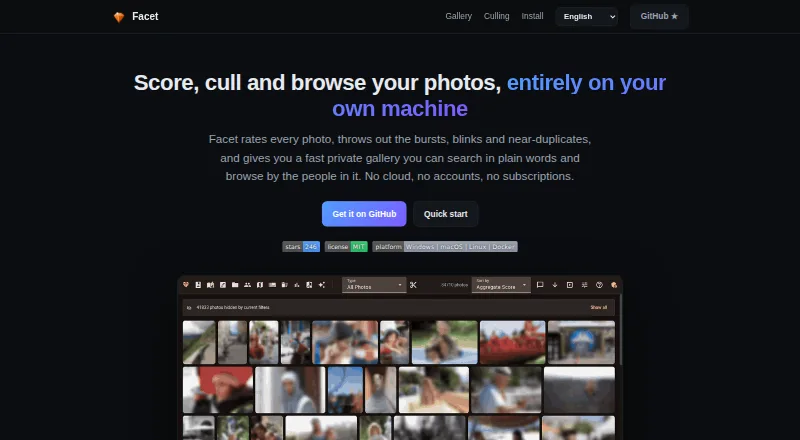
What Facet is
Facet is a free tool for scoring, culling, organizing, and browsing photo libraries stored locally on your machine. It rates images across nine dimensions, including composition, sharpness, color, exposure, face quality, subject saliency, and dynamic range. It can flag bursts, similar images, blinks, and duplicates, and offers a preview before automatic culling. Its web gallery provides semantic search, filters, timeline and map views, albums, and themed slideshows. Face tools group people and let you search, rename, merge, and organize those groups. XMP sidecars support metadata exchange with Lightroom, Capture One, digiKam, and darktable. Users can also send photos to a WebDAV inbox, or share revocable album links without requiring recipients to log in; proofing offers hearts and comments, with an optional PIN. Core functions run on CPU, while an NVIDIA GPU enables additional models and features. Facet has no cloud service, account requirement, or API keys. It can be installed with Docker or natively on Linux and macOS, and requires Python.
Good
- Scores photos across nine dimensions.
- Detects bursts, blinks, similar photos, and duplicates.
- Gallery includes semantic search, maps, and albums.
- Works on CPU for core features.
- Free and distributed under the MIT license.
Watch out
- Does not provide RAW editing or development.
- No mobile app or cloud backup.
- Native installation is listed for Linux and macOS; Python required.
Who it suits
Facet suits people with large local photo libraries who want to find strong images and sort bursts or near-duplicates. It is also relevant to users who want local processing and web-based browsing without cloud accounts.
Verdict
Facet brings photo scoring, culling, face grouping, and gallery browsing together for local libraries. Its lack of RAW development and cloud backup matters if those are part of your workflow.
Plans and prices
From Facet's own pricing page, checked 28 Sep 2026.
| Plan | Price | What it gives you |
|---|---|---|
| Facet | Free | Free and local · no cloud, accounts, or subscriptions |
| Free | Free | local processing · self-hosted gallery · no cloud account or subscription |
The facts
Each one read from Facet's own pages, with the date it was checked.
What it does
- API extensibility
- The documentation describes configurable plugins and a Prometheus metrics endpoint that can be enabled through configuration.checked 15 Oct 2026
- Audience
- The maker describes Facet as a fit for people with large local libraries who want to find top shots and cull bursts and near-duplicates.checked 28 Sep 2026
- Burst culling
- Facet groups rapid-fire shots and recommends keepers using quality, sharpness, and blink signals.checked 15 Oct 2026
- Community technical description
- A Reddit project post describes Facet as a free open-source Python tool using multiple vision models, a web gallery, face clustering, semantic tagging, and GPU-profile detection.checked 15 Oct 2026
- Culling
- It detects bursts, similar photos, blinks, and duplicates, and provides auto-culling with a dry-run preview.checked 28 Sep 2026
- Documentation depth
- The project publishes separate guides for installation, commands, configuration, scoring, faces, viewer use, interoperability, Immich, and deployment.checked 15 Oct 2026
- Face recognition
- The gallery detects faces, clusters people, supports naming and merging, and provides blink and expression indicators.checked 15 Oct 2026
- Gallery
- The gallery includes natural-language semantic search, filters, timeline, map, albums, and themed slideshows.checked 28 Sep 2026
- Gallery views
- The web interface includes mosaic and grid galleries, timeline, map, folders, albums, memories, slideshows, and themed capsules.checked 15 Oct 2026
- Hardware
- Core scoring, face detection, culling, gallery, search, albums, and metadata export work on CPU without a GPU; an NVIDIA GPU unlocks additional models and features.checked 28 Sep 2026
- Hardware profiles
- Profiles cover CPU-only legacy mode, NVIDIA GPUs with 8GB, 16GB, or 24GB VRAM, and automatic Apple Silicon sizing.checked 15 Oct 2026
- Independent directory description
- Localhosted lists Facet as a self-hosted AI photo manager that runs on CPU or GPU without cloud services or accounts.checked 15 Oct 2026
- Independent directory metadata
- Localhosted reports Facet as MIT licensed, with Windows, macOS, Linux, Docker, and web availability, and recorded 288 repository stars when fetched on 15 October 2026.checked 15 Oct 2026
- Installation
- Docker is supported on Windows, macOS, and Linux, while native installation is documented for Linux and macOS.checked 15 Oct 2026
- Integrations
- XMP sidecars connect Facet with Lightroom, darktable, digiKam, Capture One, and Immich workflows.checked 15 Oct 2026
- Licence
- The repository distributes Facet under the MIT License, permitting reuse, modification, distribution, sublicensing, and sale subject to the notice.checked 15 Oct 2026
- License
- Facet is distributed under the MIT license.checked 28 Sep 2026
- Lightroom plugin
- The bundled Lightroom Classic plugin exchanges ratings, flags, metadata, burst decisions, and collection information through a manifest.checked 15 Oct 2026
- Limit: Lightroom picks
- The Lightroom integration rejects discarded frames but does not yet mark the recommended burst frame as a Pick automatically.checked 15 Oct 2026
- Limit: Lightroom stacks
- The maintainer explains that the Lightroom SDK cannot create stacks, so Facet cannot automatically build them and users must use Lightroom’s own auto-stack command.checked 15 Oct 2026
- Limits
- Facet does not provide RAW editing or development, and its README says it has no mobile app or cloud backup.checked 28 Sep 2026
- Limit: setup reliability
- A Reddit user said an initial trial could not make Facet see their photos, despite trying the project.checked 15 Oct 2026
Where it runs
- Limit: no editing app
- The project documentation positions Facet as a scoring, organization, and culling tool rather than a RAW development editor or mobile replacement.checked 15 Oct 2026
The company
- Maker identity
- The repository owner identifies as Nicolas Coevoet.checked 15 Oct 2026
The full review of Facet
Overview
Facet is a free, local photo-library manager for photographers who need to sift through large collections. Its standout strength is combining detailed scoring and culling with a searchable gallery, while keeping the library on the user's machine.
It is a strong fit for sorting and sharing selected images, but not a replacement for a photo editor or cloud backup service.
Key features
Scoring and culling
Facet scores photos across nine dimensions, including composition, face quality, sharpness, color, exposure, subject saliency, and dynamic range. That range helps photographers assess images from several angles rather than relying on a single quality score. It also detects bursts, similar images, blinks, and duplicates. Auto-culling includes a dry-run preview, so users can review proposed choices before applying them.
Facet supports RAW photos and offers blur detection, closed-eye detection, and subject detection. Those capabilities help with selection, but RAW support does not include editing or development; photographers who need adjustments will need a separate editor.
Gallery and people
The web gallery includes natural-language semantic search, filters, a timeline, a map, albums, and themed slideshows. Face grouping adds a useful people-based route through a library, with tools to search, rename, merge, and organize person clusters. Together, these features make Facet useful after the initial cull, not just for choosing keepers.
Metadata, uploads, and sharing
Facet documents XMP sidecar interoperability with Lightroom, Capture One, digiKam, and darktable, which helps it fit alongside those tools. Photos can be sent to its WebDAV inbox using PhotoSync or another WebDAV app. Album links let recipients view without logging in and can be revoked; client proofing supports hearts and comments, with an optional PIN. This is practical for review and handoff, but it does not amount to cloud backup.
Facet runs locally without cloud services, accounts, or API keys. Core scoring, face detection, culling, gallery browsing, search, albums, and metadata export work on a CPU. An NVIDIA GPU unlocks additional models and features, so GPU ownership is not a prerequisite for the core workflow.
Pricing
Facet costs nothing, with no subscription. The free plan is the product: it is local and has no cloud or account requirement. There is no free trial because there is no paid plan to trial. For photographers who want local scoring and library tools without recurring software costs, that is a clear advantage.
The trade-off is that free does not include RAW development or cloud backup, and Facet has no mobile app. Its MIT license also makes it an option for people who value software distributed under an open-source license.
Platforms
Facet is available for Linux, macOS, Windows, and self-hosted use, with a web gallery for browsing. Installation is supported through Docker or natively on Linux and macOS; setup requires Python. Its WebDAV inbox can receive phone uploads through PhotoSync or another WebDAV app, but Facet itself has no mobile app.
Who it's for
Facet is best for photographers with large local libraries who want to identify strong frames, reduce bursts and near-duplicates, and then browse or share the results. It also suits people who want face grouping and metadata exchange with established photo tools while keeping their images local. Look elsewhere if you need RAW editing, a dedicated mobile app, or cloud backup built into the same product.
Pros and cons
- Pros: Nine scoring dimensions and several culling checks help users make more informed selections from large collections.
- Pros: A dry-run preview makes automatic culling less risky, while gallery search, face groups, and albums support ongoing library organization.
- Pros: Local operation, CPU support for core features, and a free plan avoid cloud dependence, GPU requirements, and subscription costs.
- Pros: XMP interoperability, WebDAV uploads, and revocable proofing links extend the workflow beyond culling.
- Cons: Facet cannot develop or edit RAW files, so image adjustments require another application.
- Cons: No mobile app or cloud backup means users need other tools for mobile access and backup.
- Cons: Native installation is limited to Linux and macOS; Windows users have Docker or self-hosted options.
Alternatives
AI Photo Culling Software is the category directory for comparing culling tools.
Zno is worth considering for users who want a freemium service spanning Android, iOS, macOS, web, and Windows, with a free starting option and a free trial. Optyx offers a free monthly plan with previews, image rating, metadata, and Lightroom compatibility, making it a more focused option for those needs; its Pro plan is $6.99 a month billed annually. RawPicker is another freemium alternative, with Android, iOS, Linux, macOS, web, and Windows support.
Kepla has a free private preview and is macOS-only. Futura Photo offers unlimited analyses on its free Community plan, with up to 100 images per analysis and one concurrent installation; its Enthusiast plan is $29 a year. Selekt is a macOS and Windows option whose free plan includes unlimited imports, culling, and export, on-device focus, exposure, and blur scoring, plus cloud AI for 100 photos per month.
AccioPix Photo Culling is a free web tool with no sign-up and no photo limit beyond the user's computer capacity. OptiCull is a macOS freemium alternative with a free trial.
Verdict
Choose Facet if you want a free, local-first way to score and cull a large photo library, then search, organize, and share selected images. Its breadth and lack of subscription make it compelling for library management; choose another tool if RAW development, mobile access, or built-in cloud backup is essential.
Getting started
- Visit the Facet website.
- Install with Docker or install natively on Linux or macOS.
- For native installation, make sure Python is available.
- Use the local gallery to score, cull, organize, and browse photos.
Limits worth knowing
Facet does not provide RAW editing or development, a mobile app, or cloud backup.
Questions
How much does Facet cost?
Facet is free: its listed plan is free.
Does Facet have a free plan or trial?
It has a free plan. There is no free trial.
Which platforms does Facet support?
The listed platforms are Linux, macOS, self-hosted, web, and Windows. Native installation is documented for Linux and macOS.
Is Facet open source?
Facet is distributed under the MIT license.
Can Facet work without a GPU?
Its core scoring, face detection, culling, gallery, search, albums, and metadata export work on CPU. An NVIDIA GPU unlocks additional models and features.
Which photo tools can exchange metadata with Facet?
Facet documents XMP sidecar interoperability with Lightroom, Capture One, digiKam, and darktable.
Alternatives to Facet
- 1

Selekt
Free planWebmacOSWindows7.7From A$16 a month - 2
Zno
Free planAndroidiOSWebmacOS7.6Free plan - 3

AccioPix Photo Culling
Free planWebAPImacOSWindows7.5₹0.20 one-time - 4
Memory Ease
AndroidiOSWebmacOS7.0From $7.50 a month - 5

Cull AI Studio
macOSWindows6.9From $159 a year - 6
Optyx
Free planAPImacOSWindows6.7From $6.99 a month