Scalene
Scalene is a free, open-source profiler for Python programs that reports CPU, GPU, and memory use and offers AI-powered optimization proposals.
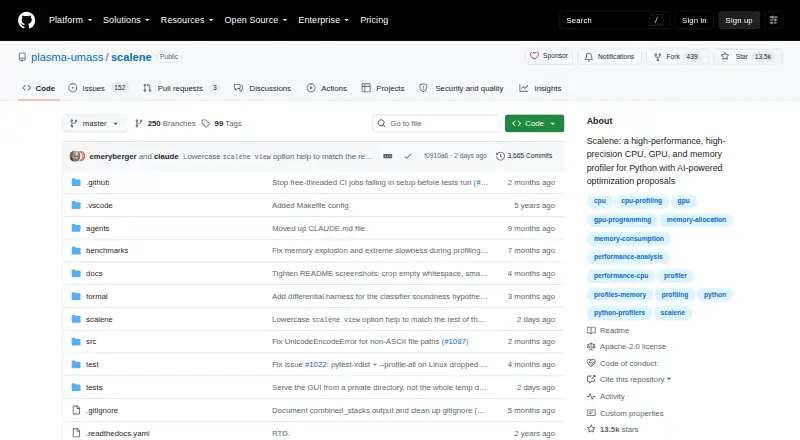
What Scalene is
Scalene is a free, open-source profiler for Python programs that reports CPU, GPU, and memory use and offers AI-powered optimization proposals. Its line- and function-level reports distinguish Python time from native-code and system time. Memory analysis shows per-line use, separates Python and native allocations, and identifies lines with likely memory leaks. GPU profiling reports time on NVIDIA-based systems. Async profiling attributes waiting time to the suspended coroutine line and reports average and peak concurrent waiters. Its graphical interface can display Python and native call stacks, memory flame charts, and a timeline. Scalene can be used from the command line, a web interface, a Visual Studio Code extension, or Jupyter notebooks. The web interface processes profiles locally and works offline. The project lists macOS, Linux, Windows, and Windows Subsystem for Linux 2 for installation; Windows troubleshooting may require the Visual C++ Redistributable. Its license is Apache-2.0.
Good
- Free and licensed under Apache-2.0.
- Reports CPU and memory use at line level.
- Web interface processes profiles locally and works offline.
- Available through command line, GUI, VS Code, and notebooks.
Watch out
- GPU profiling reports time on NVIDIA-based systems.
- Windows troubleshooting may require the Visual C++ Redistributable.
- Profiling overhead is typically no more than 10–20%, and often less.
Who it suits
Scalene suits Python developers who want CPU, memory, or GPU profiling and line-level performance details. It also fits users who prefer a GUI, editor extension, or notebook interface.
Verdict
Scalene offers several ways to profile Python programs, with detailed CPU and memory reporting and local offline web processing. Its GPU profiling is specified for NVIDIA-based systems, and Windows troubleshooting may require an additional redistributable.
Plans and prices
From Scalene's own pricing page, checked 4 Oct 2026.
| Plan | Price | What it gives you |
|---|---|---|
| Scalene | Free | Open-source Python profiler · install via pip or conda |
The facts
Each one read from Scalene's own pages, with the date it was checked.
What it does
- AI providers
- For optimization suggestions, Scalene lists Amazon Bedrock, Microsoft Azure, OpenAI, and local models via Ollama as supported providers.checked 4 Oct 2026
- Async profiling
- Async profiling attributes wall-clock await time to the line where a coroutine is suspended and reports mean and peak concurrent waiters.checked 4 Oct 2026
- Detailed profiling
- It reports performance at line and function level and separates Python time from native-code and system time.checked 4 Oct 2026
- GPU support
- GPU profiling reports time on NVIDIA-based systems.checked 4 Oct 2026
- Interfaces
- Scalene can be used from the command line, a web-based GUI, a Visual Studio Code extension, or Jupyter notebooks.checked 4 Oct 2026
- License
- The repository identifies its license as Apache-2.0.checked 4 Oct 2026
- Local processing
- The web interface processes profiles locally and works offline; the project says API keys passed from environment variables are sent only to the local browser session and are never written into the HTML file.checked 4 Oct 2026
- Memory analysis
- It reports per-line memory use, distinguishes Python from native allocations, and identifies lines with likely memory leaks.checked 4 Oct 2026
- Performance overhead
- The README says profiling overhead is typically no more than 10–20%, and often less.checked 4 Oct 2026
- Purpose
- Scalene profiles Python programs for CPU, GPU, and memory use and provides AI-powered optimization proposals.checked 4 Oct 2026
- Stack views
- Its GUI can display stitched Python and native call stacks, memory flame charts, and a timeline.checked 4 Oct 2026
- Support
- The project links to a Scalene community Slack for community discussion.checked 4 Oct 2026
Where it runs
- Install platforms
- The project lists macOS, Linux, Windows, and Windows Subsystem for Linux 2 as supported installation platforms.checked 4 Oct 2026
- Windows note
- Starting with Scalene 2.0, Windows supports full memory profiling; troubleshooting may require the Visual C++ Redistributable.checked 4 Oct 2026
The full review of Scalene
Overview
Scalene is a Python profiler for developers who need to locate CPU, memory, GPU, or asynchronous waiting costs. Its strongest case is for Python applications where work crosses into native code, or where line-level memory and timing detail can narrow an investigation.
You can use it in a terminal, browser GUI, Visual Studio Code, or Jupyter. The browser interface processes profiles locally and works offline, while profiling itself typically adds no more than 10–20% overhead and often less.
Key features
- CPU and timing detail: Line- and function-level reports distinguish Python execution from native-code and system time. That distinction helps identify whether a slow line is doing Python work or waiting on code outside Python; it is more actionable than a single runtime figure.
- Memory analysis: Per-line reporting separates Python from native allocations and points to lines with likely leaks. These are useful clues for narrowing a memory investigation, not proof that a particular line is leaking.
- GPU profiling: Scalene reports GPU time on NVIDIA-based systems. Python work using other GPU hardware should not rely on this feature.
- Async profiling: It attributes wall-clock await time to the line where a coroutine suspends and reports mean and peak concurrent waiters. This is useful for finding where asynchronous work spends time waiting, rather than mistaking that wait for CPU execution.
- Visual analysis: The GUI can show stitched Python and native call stacks, memory flame charts, and a timeline. Those views give developers several ways to follow costs across a program, alongside the detailed reports.
- AI optimization proposals: Suggestions can use Amazon Bedrock, Microsoft Azure, OpenAI, or local models through Ollama. This is an optional route to optimization ideas, not a substitute for interpreting profiling results.
- Local web workflow: The web interface processes profiles locally and works offline. API keys supplied through environment variables are sent only to the local browser session and are not written into the HTML file, a useful boundary for developers handling profile data locally.
Pricing
Scalene: free. This open-source Python profiler is free to install via pip or conda, with no separate paid plan or free-trial decision to weigh. Its Apache-2.0 license makes it a straightforward choice for individuals and teams looking for a no-cost profiler; the project also links to a community Slack for discussion.
Platforms
Scalene supports installation on macOS, Linux, Windows, and Windows Subsystem for Linux 2. It is categorized for extension, desktop, and web use, with command-line, web GUI, Visual Studio Code extension, and Jupyter notebook interfaces. Windows supports full memory profiling starting with Scalene 2.0, though troubleshooting may require the Visual C++ Redistributable.
Its profiling mode is sampling, and its supported language is Python. CPU, memory, and thread profiling are supported. GPU reporting is specifically for NVIDIA-based systems, so it is not the right GPU profiler for users who need coverage beyond that hardware.
Who it's for
Scalene suits Python developers diagnosing bottlenecks that span Python and native code, tracking per-line memory use, or investigating asynchronous wait time. Its multiple interfaces make it practical for developers who prefer an editor, notebook, terminal, or visual report. It is a weaker fit for teams seeking a general-purpose, multi-language profiler, or GPU profiling for non-NVIDIA systems.
Pros and cons
- Pro: Separating Python, native, and system time at line and function level helps target the layer responsible for a slowdown.
- Pro: Per-line allocation reporting, likely-leak clues, and visual memory and stack views provide complementary ways to investigate memory and call costs.
- Pro: The free Apache-2.0 release includes CPU, memory, and thread profiling, with several ways to work across common developer environments.
- Pro: Offline, local browser processing and local-session handling of environment-provided API keys suit workflows where profile data should stay on the machine.
- Con: GPU profiling is limited to NVIDIA-based systems.
- Con: Profiling adds overhead, typically up to 10–20%, so measured runs are not cost-free in execution time.
- Con: Windows troubleshooting may require installing the Visual C++ Redistributable.
- Con: Its stated language support is Python, so developers profiling other languages should choose a different tool.
Alternatives
Profiling Software is the broader category to browse when Scalene's Python focus or NVIDIA-specific GPU reporting does not match the job.
- Grafana Cloud Application Observability is worth considering for a cloud observability option with a free plan covering 2,232 host hours and a Pro plan charging $0.03 a month, billed at $0.025 per host hour plus a $19 monthly platform fee.
- Javadoc is the alternative for Java documentation work rather than Python profiling; its Javadoc plan is included with JDK 25, whose binaries are free under Oracle No-Fee Terms and Conditions through September 2028.
- Pyroscope may suit readers seeking another profiling product with an always-free tier offering 50 GB ingested monthly and 14-day retention, plus a Pro plan at $19 a month.
- VisualVM is a free standalone Java troubleshooting tool for Windows, Linux, and macOS, covering Java 8–26.
- async-profiler is a free Apache-2.0 community tool with Linux and macOS binaries.
- Intel VTune Profiler offers a free download as a standalone tool or through the Intel oneAPI Toolkit, for commercial or non-commercial use, with community support.
- AMD Auto-Detect and Install Tool is a free Windows utility for supported Windows 10 and 11 systems with AMD Radeon graphics or Ryzen chipsets.
- Google Cloud Profiler has no usage cost, with profile data retained for 30 days and quotas and limits applying.
Verdict
Choose Scalene if you need a free, detailed Python profiler that can separate Python work from native and system costs while tracing memory and asynchronous waits. Its local offline web interface and varied developer workflows add useful flexibility. Look elsewhere if your work needs profiling beyond Python or GPU timing beyond NVIDIA-based systems.
Getting started
- Install Scalene with pip or conda
- Use it on macOS, Linux, Windows, or Windows Subsystem for Linux 2
- Choose the command line, web GUI, Visual Studio Code extension, or Jupyter interface
- Select an AI suggestion provider such as Amazon Bedrock, Microsoft Azure, OpenAI, or Ollama if needed
- On Windows, install the Visual C++ Redistributable if troubleshooting requires it
Limits worth knowing
Scalene is free and open source. GPU timing is described for NVIDIA-based systems, and Windows full memory profiling starts with Scalene 2.0.
Questions
How much does Scalene cost?
Scalene is free, open-source software under the Apache-2.0 license.
Which platforms can run it?
Installation is listed for macOS, Linux, Windows, and Windows Subsystem for Linux 2.
Which interfaces are available?
Scalene can be used from the command line, a web-based GUI, a Visual Studio Code extension, or Jupyter notebooks.
Does it work offline?
Its web interface processes profiles locally and works offline.
Which AI providers are supported?
Optimization suggestions can use Amazon Bedrock, Microsoft Azure, OpenAI, or local models through Ollama.
Alternatives to Scalene
- 1
Grafana Cloud Application Observability
Free planAndroidiOSWebAPI8.4From $0.03 a month - 2
Grafana Alerting
Free planWebLinuxmacOSWindows6.8$0.03 usage-based - 3
YourKit .NET Profiler
Free planAPILinuxmacOSWindows6.8From $99 a year - 4

Amazon CodeGuru Profiler
Free planWebAPILinuxSelf-hosted6.7From $0.01 a month - 5
Pyroscope
Free planWebLinuxmacOSWindows6.7From $19 a month - 6

Parca
Free planWebAPILinuxSelf-hosted6.6Free plan