AMD Auto-Detect and Install Tool
AMD Auto-Detect and Install Tool checks a Windows PC for compatible AMD Radeon graphics, AMD Ryzen chipsets, and the installed Windows version, then retrieve…
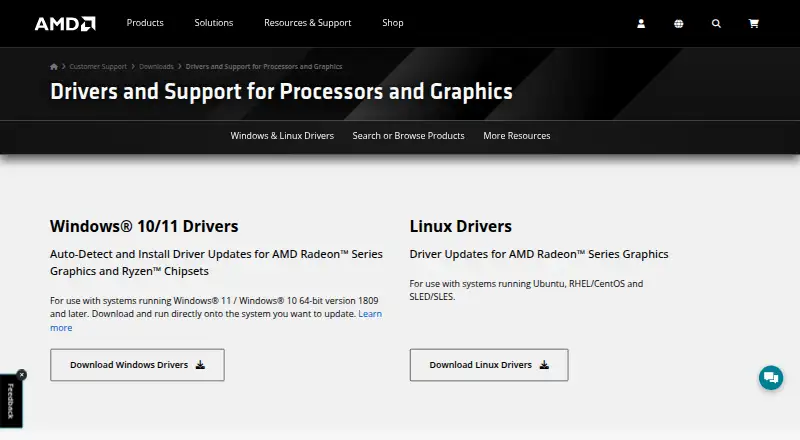
What AMD Auto-Detect and Install Tool is
AMD Auto-Detect and Install Tool checks a Windows PC for compatible AMD Radeon graphics, AMD Ryzen chipsets, and the installed Windows version, then retrieves drivers for detected devices. It requires an internet connection and supports Windows 11 version 21H2 and later, or Windows 10 64-bit version 1809 and later. When newer drivers are available, users can choose components, customize setup, skip the current driver, or cancel. Driver choices include Recommended versions certified by Microsoft and Optional versions with the latest features and bug fixes. Install modes are Default, Minimal, and Driver Only, and an option enables automatic updates. Factory Reset removes earlier AMD Software Package versions and temporarily pauses Windows Updates; previous drivers cannot be restored afterward. Keep user settings preserves AMD Software settings and profiles for reapplication after that reset. Systems outside the tool’s supported scope, including other operating systems or AMD products, are directed to AMD Product Selector for manual driver selection. The tool is free. AMD says it may collect system configuration, hardware, software-version, and installation-log information.
Good
- Automatically detects AMD graphics and Ryzen chipsets.
- Offers Recommended and Optional driver choices.
- Provides Default, Minimal, and Driver Only modes.
- Can preserve settings during Factory Reset.
Watch out
- Requires an internet connection.
- Supports only specified Windows versions.
- Previous drivers cannot be rolled back after Factory Reset.
Who it suits
It suits Windows users with compatible AMD Radeon graphics or Ryzen chipsets who want the tool to identify their hardware and fetch drivers. Users of unsupported systems or other AMD products need to use AMD Product Selector for manual drivers.
Verdict
This free tool identifies supported AMD hardware and offers several driver and installation choices. Confirm Windows compatibility first, and take note of the Factory Reset rollback limitation.
Plans and prices
From AMD Auto-Detect and Install Tool's own pricing page, checked 1 Oct 2026.
| Plan | Price | What it gives you |
|---|---|---|
| AMD Auto-Detect and Install Tool | Free | Windows 11 version 21H2+ · Windows 10 64-bit version 1809+ · AMD Radeon graphics or Ryzen chipsets |
The facts
Each one read from AMD Auto-Detect and Install Tool's own pages, with the date it was checked.
What it does
- Automatic detection
- It detects the AMD Radeon graphics model, AMD Ryzen chipset and Microsoft Windows version installed on the PC.checked 1 Oct 2026
- Automatic installation
- Nochecked 20 Sep 2026
- Automatic scanning
- Yeschecked 20 Sep 2026
- Automatic updates
- The installer provides an option to enable automatic updates so AMD software stays current.checked 1 Oct 2026
- Driver channels
- The installer offers Recommended drivers certified by Microsoft and Optional drivers with the latest features and bug fixes.checked 1 Oct 2026
- Driver downloads
- The tool obtains the latest driver versions from AMD for detected devices.checked 1 Oct 2026
- Driver rollback
- Nochecked 20 Sep 2026
- Factory reset
- Factory Reset removes prior AMD Software Package versions and temporarily pauses Windows Updates, and the previous drivers cannot be rolled back afterward.checked 1 Oct 2026
- Hardware scope
- graphics-and-otherchecked 20 Sep 2026
- Install modes
- Install types are Default, Minimal and Driver Only.checked 1 Oct 2026
- Internet requirement
- An internet connection is required to run the auto-detect tool.checked 1 Oct 2026
- Privacy and security
- AMD's privacy notice says it may collect system configuration, hardware, software-version and installation-log information and uses security technologies including encryption for sensitive information transmitted online.checked 1 Oct 2026
- Purpose
- The tool checks a PC for compatible AMD Radeon Series Graphics, AMD Ryzen Chipsets and the Windows version, then downloads supporting AMD drivers.checked 1 Oct 2026
- Security program
- AMD says security is considered during hardware and software development and that it follows coordinated vulnerability disclosure as a CVE Numbering Authority member.checked 1 Oct 2026
- Settings preservation
- Keep user settings saves AMD Software settings and profiles and reapplies them after installation when Factory Reset is used.checked 1 Oct 2026
- Unsupported systems
- AMD directs systems unsupported by the tool or needing other operating systems or AMD products to the AMD Product Selector for manual drivers.checked 1 Oct 2026
- Update choices
- When newer drivers are available, users can download needed components, customize setup, skip the current driver or cancel installation.checked 1 Oct 2026
The company
- Founded
- 1969checked 23 Sep 2026
- Headquarters
- Santa Clara, California, United Stateschecked 23 Sep 2026
Money
- Free plan
- Yeschecked 20 Sep 2026
Where it runs
- Supported platforms
- Windowschecked 20 Sep 2026
- Supported Windows
- AMD lists support for Windows 11 version 21H2 and later and Windows 10 64-bit version 1809 and later.checked 1 Oct 2026
The full review of AMD Auto-Detect and Install Tool
AMD Auto-Detect and Install Tool is a free Windows utility for identifying supported Radeon graphics and Ryzen chipsets and obtaining their AMD drivers. It suits owners of compatible AMD hardware who want a guided way to select packages and installation scope. The sensible use case is controlled driver maintenance rather than unattended updating.
Overview
The desktop tool checks the installed AMD Radeon graphics model, AMD Ryzen chipset and Microsoft Windows version, then retrieves current supporting drivers from AMD. It is narrowly focused on AMD hardware, which keeps its recommendations relevant but makes it unsuitable for systems that need drivers for other operating systems, unsupported AMD products or hardware outside its detection scope. Those systems should use AMD's Product Selector for manual downloads.
Key features
Detection and driver selection
Automatic scanning removes much of the guesswork from identifying an AMD graphics card or chipset and matching it to a driver. An internet connection is required, so it is not a solution for an offline installation. The tool does not install automatically: when newer drivers are found, you can download selected components, customize setup, skip the current driver or cancel. That pause is valuable for users who need to control timing, but it is less convenient than a fully hands-off updater.
Two driver channels serve different priorities. Recommended releases are certified by Microsoft and are the safer default for users who value certification. Optional releases carry the latest features and bug fixes, making them the more relevant choice when new functionality or a recent fix outweighs a preference for the certified channel.
Installation and reset controls
Default, Minimal and Driver Only modes let you choose how much of the AMD package is installed. This is useful when you want the complete software package, a leaner setup or only the driver itself. An automatic-update option can keep AMD software current, although users who prefer to approve every change can leave that option off.
Factory Reset is a powerful cleanup option, not a routine safety net. It removes earlier AMD Software Package versions and temporarily pauses Windows Updates. Previous drivers cannot be rolled back afterward, so it fits a clean-reinstallation or troubleshooting scenario rather than an experiment where reversal is important. When Factory Reset is used, Keep user settings preserves AMD Software settings and profiles and reapplies them after installation.
Security and data handling
AMD says security is considered throughout hardware and software development and that it follows coordinated vulnerability disclosure as a CVE Numbering Authority member. Its privacy notice says the tool may collect system configuration, hardware and software-version data and installation logs. Sensitive information transmitted online is protected with security technologies including encryption.
Pricing
The AMD Auto-Detect and Install Tool plan costs free. It covers Windows 11 version 21H2 or later and Windows 10 64-bit version 1809 or later on PCs with AMD Radeon graphics or Ryzen chipsets. There are no paid tiers or seat quotas to weigh, making it a straightforward choice for a supported personal Windows PC. The trade-off is scope: it is a free AMD-specific utility, not a general multi-vendor driver-management service.
Platforms
Support is for Windows. AMD lists Windows 11 version 21H2 and later and Windows 10 64-bit version 1809 and later. The deployment model is desktop, and an internet connection is required while the auto-detect tool runs.
Who it's for
This is a strong fit for Windows users with Radeon graphics or Ryzen chipsets who want AMD's own detection, current driver downloads and meaningful control over release channel and install mode. It also suits anyone performing a deliberate clean reinstall, provided they accept the permanent loss of rollback after Factory Reset.
Look elsewhere if you need offline deployment, support for multiple hardware makers, automatic installation without prompts or a recovery path to the immediately previous driver. It is also the wrong tool for operating systems outside the supported Windows versions.
Pros and cons
Pros
- Free for supported systems: there is no paid tier, subscription or seat limit to manage.
- AMD-specific detection: it identifies Radeon graphics, Ryzen chipsets and Windows versions before fetching matching drivers.
- Useful release choices: Microsoft-certified Recommended drivers and feature-focused Optional drivers cover different risk preferences.
- Flexible installation: Default, Minimal and Driver Only modes, plus component selection and cancellation, avoid a forced all-or-nothing update.
- Profile preservation: Keep user settings can restore AMD Software settings and profiles after a Factory Reset.
Cons
- No automatic installation: users must approve and start the update, so it is not a hands-off updater.
- Internet dependent: the auto-detect workflow cannot serve an offline PC.
- Factory Reset is irreversible for rollback: previous drivers cannot be restored after the cleanup.
- Windows and AMD limits: unsupported Windows versions, other operating systems and non-supported AMD products require manual selection instead.
Alternatives
For a broader driver-updating category, browse Game Driver Updaters. If your priority is performance analysis rather than obtaining AMD packages, see Profiling Software. For rendering-focused tools, 3D Rendering Software is the more relevant category.
IObit Uninstaller is a Windows freemium utility centered on removing applications and cleaning leftovers, not on AMD driver detection. DriverFinder is a Windows freemium driver updater with paid one- and three-PC plans, suited to readers who want broader driver coverage and are willing to pay. DriverHub offers free driver searching, restore-point creation and automatic download, installation and updating for users seeking more automation.
DriverMax is a Windows freemium option with paid monthly and annual plans for unlimited installs on one computer. DriverPack Solution is free Windows software that provides online and offline driver packages, useful when offline installation matters. AVG Secure Browser is a cross-platform freemium browser with ad blocking, anti-tracking, private browsing and web protection rather than a driver tool.
Driver Genius is a Windows freemium updater whose free edition includes driver backup and restore and offline updating. Driver Talent X is another Windows freemium choice with detection, updates, uninstall, backup and restore features.
Verdict
Choose AMD Auto-Detect and Install Tool if you run a supported Windows version with Radeon graphics or a Ryzen chipset and want AMD's own hardware matching plus control over driver channel and installation mode at no cost. Its main reason to look elsewhere is equally clear: it requires internet access, does not install unattended and gives up rollback after Factory Reset.
Alternatives to AMD Auto-Detect and Install Tool
- 1
Driver Genius
Free planWindows8.1Free plan - 2

AVG Secure Browser
Free planAndroidWebExtensionmacOS8.1From $39.99 a year - 3

CCleaner
Free planAndroidiOSmacOSWindows8.1From $44.95 a year - 4

DriverFinder
Free planWindows7.8From $29.95 a year - 5
DriverMax
Free planWindows7.7From $10.39 a year - 6

DriverPack Solution
Free planWindows7.6Free plan