DriverHub
DriverHub is Windows software for finding, downloading, installing and updating drivers for PCs and laptops.
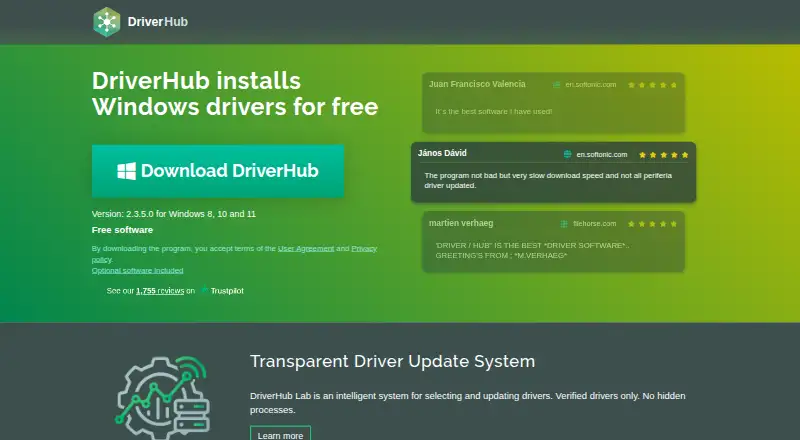
What DriverHub is
DriverHub is Windows software for finding, downloading, installing and updating drivers for PCs and laptops. It supports Windows 8, 10 and 11, with automatic scanning and driver installation. The free tier covers downloading and installing drivers, and its free plan lists searching for outdated drivers, updating them and creating restore points automatically. DriverHub says its drivers are signed by Microsoft WHQL and the DrvHub laboratory, and that antivirus software companies test the software. It describes its driver database as up to date and says it includes drivers for outdated hardware. The free plan is listed at no charge. DriverHub Pro is a 30-day subscription for three PCs, listed at ₹500 for a 30-day subscription, with automatic rebilling every 30 days. Pro adds a scan and update scheduler, automatic driver backup and download history. The installer includes optional software offers. The site provides help, license recovery and cancellation links, and lists a refund policy page. Consider the three-PC device limit and recurring billing before selecting Pro.
Good
- Free driver downloading and installation.
- Automatically scans and installs drivers.
- Creates restore points automatically.
- Supports Windows 8, 10 and 11.
- Pro includes scheduling and driver backup.
Watch out
- Pro is limited to three PCs.
- Pro rebills automatically every 30 days.
- Installer includes optional software offers.
Who it suits
DriverHub suits Windows 8, 10 and 11 users looking for automated driver scanning and installation. Pro may suit people who want scheduled updates and automatic driver backups for up to three PCs.
Verdict
DriverHub offers a free route to driver installation, with scheduling and backup features in its paid plan. Review the optional installer offers and Pro's recurring billing and device limit before choosing.
Plans and prices
From DriverHub's own pricing page, checked 20 Sep 2026.
| Plan | Price | What it gives you |
|---|---|---|
| Free | Free | Search and update outdated drivers · Automatic restore point creation · Automatic driver downloads, installation, and updates |
| DriverHub Pro | — | 30 days, 3 PCs subscription · 3 PCs · Rebilling is carried out automatically once every 30 days |
| DriverHub Free | Free | Freeware for downloading, installing and updating drivers · Free software |
The facts
Each one read from DriverHub's own pages, with the date it was checked.
What it does
- Automatic installation
- Yeschecked 20 Sep 2026
- Automatic scanning
- Yeschecked 20 Sep 2026
- Automatic updates
- Automatically downloads, installs and updates drivers.checked 28 Sep 2026
- Driver database
- Has a large and up-to-date driver database.checked 28 Sep 2026
- Driver rollback
- Yeschecked 20 Sep 2026
- Hardware scope
- Covers Bluetooth, network, video, printers, chipsets, sound, storage and more.checked 28 Sep 2026
- Old hardware
- Includes drivers for outdated hardware.checked 28 Sep 2026
- Optional offers
- The installer includes optional software offers.checked 28 Sep 2026
- Pro backup
- Pro includes automatic driver backup and download history.checked 28 Sep 2026
- Pro scheduler
- Pro includes scan and driver update scheduler.checked 28 Sep 2026
- Refund policy
- The site lists a refund policy page.checked 28 Sep 2026
- Restore points
- Creates restore points automatically.checked 28 Sep 2026
- Security testing
- Tested by antivirus software companies and signed by code signing certificate.checked 28 Sep 2026
- Signed drivers
- Drivers are signed by Microsoft WHQL and DrvHub laboratory.checked 28 Sep 2026
Money
- Auto rebilling
- Pro rebills automatically every 30 days.checked 28 Sep 2026
- Free plan
- Yeschecked 20 Sep 2026
- Free software
- DriverHub is free software for Windows driver installation.checked 28 Sep 2026
- Free tier
- Free use covers downloading and installing drivers for PC and laptop.checked 28 Sep 2026
- Pro price
- DriverHub Pro costs ₹500 for a 30-day subscription.checked 28 Sep 2026
The company
- Company span
- The footer shows 2015-2026 and Pro page says 19 years successful driver selections.checked 28 Sep 2026
- Headquarters
- 27 Old Gloucester Street, Camden, United Kingdomchecked 28 Sep 2026
Where it runs
- Device limit
- DriverHub Pro covers 3 PCs.checked 28 Sep 2026
- Pro Windows
- DriverHub Pro is available for Windows 8, 10 and 11.checked 28 Sep 2026
- Supported platforms
- Windows 8,10 and 11checked 20 Sep 2026
The full review of DriverHub
DriverHub is a Windows utility for finding, downloading and installing drivers, with automatic scanning and restore points. It best suits people who want a free way to update drivers across a broad range of PC hardware; its paid plan is more relevant to those who want scheduled scans and driver backups.
Overview
DriverHub’s free tier covers driver downloads and installation for PCs and laptops, and the software can automatically scan for outdated drivers and install updates. Automatic restore points offer a useful safety net when a driver change causes trouble. The trade-off is that the installer includes optional software offers, so review those choices rather than clicking through by default.
The driver database covers older hardware as well as current devices, and drivers are signed by Microsoft WHQL and DrvHub’s laboratory. The software is also described as tested by antivirus companies and signed with a code-signing certificate. Those safeguards are useful, though they do not remove the need to check optional installer offers.
Key features
- Automatic updates: DriverHub can download, install and update drivers automatically, reducing manual work for routine maintenance.
- Restore points and rollback: Automatic restore-point creation and driver rollback give users a way to recover if an update causes problems.
- Broad hardware coverage: Its large, up-to-date database includes drivers for outdated hardware, which may help keep older PCs usable.
- Paid maintenance tools: Pro adds scheduled scans and driver updates, automatic driver backup and download history. These additions matter most to users who want maintenance to run on a schedule or need a record of downloads.
Pricing
Free: free. The free plan includes searches for outdated drivers, automatic restore-point creation, and automatic driver downloads, installation and updates. It is the practical starting point for users who want core driver maintenance without a subscription. DriverHub’s free software is also described as freeware for downloading, installing and updating drivers.
DriverHub Pro: ₹500 for a 30-day subscription, with automatic rebilling every 30 days. Pro covers 3 PCs and adds a scan and update scheduler, automatic driver backup and download history. That makes it a better fit for someone maintaining several PCs or preferring scheduled upkeep, but the recurring billing and three-PC limit deserve attention before subscribing. The site provides a refund policy page and links for license recovery and cancellation.
The free plan gives up Pro’s scheduler, backup and download history; core driver installation remains available without paying. Pro is available on the same Windows versions as the free software.
Platforms
DriverHub supports Windows 8, Windows 10 and Windows 11. It is a Windows-only choice, not an option for macOS or mobile devices.
Who it's for
Choose DriverHub if you use a supported Windows PC and want automatic driver scanning and installation, especially if you also value automatic restore points or support for older hardware. The free tier is sufficient for core updates. Pro makes more sense for people who want scheduled maintenance or backups across up to three PCs. Look elsewhere if you need another operating system or do not want to navigate optional software offers during installation.
Pros and cons
- Pro: Free driver downloading and installation cover the core task without a subscription.
- Pro: Automatic restore points and driver rollback provide recovery options after updates.
- Pro: Support for outdated hardware broadens its usefulness beyond newer PCs.
- Con: Optional software offers in the installer require careful review.
- Con: Pro automatically rebills every 30 days, so it needs active cancellation if it is no longer wanted.
- Con: Pro is limited to three PCs and Windows 8, 10 and 11.
Alternatives
- DriverFinder is worth comparing if you want a paid driver updater with a one-PC Basic plan at $29.95 a year or a three-PC Premium plan at $39.90 a year.
- DriverMax suits readers comparing a monthly option at $4.95 a month for unlimited driver installs on one computer, or an annual option at $10.39 a year.
- DriverPack Solution is another free Windows driver option, with online and offline driver packages.
- AMD Auto-Detect and Install Tool is the more targeted choice for supported AMD Radeon graphics or Ryzen chipsets on Windows 10 64-bit version 1809+ or Windows 11 version 21H2+.
- Driver Genius is a Windows alternative whose free edition includes driver backup and restore, offline driver updates, hardware information and temperature monitoring, as well as outdated-driver updates.
- Driver Talent X is another freemium Windows option; its free plan includes automatic detection, updates, uninstall, backup and restore.
For broader category comparisons, see Driver Updater Software, Game Driver Updaters or PC Optimization Software.
Verdict
DriverHub is a sensible free choice for Windows users who want automatic driver installation, restore points and coverage that includes older hardware. Its main reason to look elsewhere is the optional installer offers; Pro’s recurring 30-day billing and three-PC cap are also important constraints for anyone considering paid maintenance.
Getting started
- Visit https://www.drvhub.net/.
- Use the free plan to search for outdated drivers and download, install or update them.
- Install DriverHub on a Windows 8, 10 or 11 PC.
- Choose the Pro subscription for up to three PCs and its scheduler, backup and download history features.
- Review the automatic 30-day rebilling terms before starting Pro.
Limits worth knowing
The free plan is subject to a three-device limit. Pro covers three PCs and automatically renews every 30 days; the listed price is ₹500 for a 30-day subscription.
Questions
Is DriverHub free?
Yes. The free plan costs nothing and covers searching for outdated drivers, restore point creation, and automatic driver downloads, installation and updates.
Which Windows versions does it support?
DriverHub supports Windows 8, 10 and 11.
What does DriverHub Pro cost?
The listed subscription price is ₹500 for 30 days and covers three PCs. It renews automatically every 30 days.
What does Pro add?
Pro includes a scan and driver update scheduler, automatic driver backup and download history.
Does DriverHub include old hardware drivers?
Yes. DriverHub says its database includes drivers for outdated hardware.
Where is DriverHub based?
Its listed headquarters are at 27 Old Gloucester Street, Camden, United Kingdom.
Alternatives to DriverHub
- 1

CCleaner
Free planAndroidiOSmacOSWindows8.1From $44.95 a year - 2
Driver Genius
Free planWindows7.4Free plan - 3
DriverMax
Free planWindows7.0From $10.39 a year - 4

Driver Talent X
Free planWindows6.9From $19.95 a year - 5

DriverPack Solution
Free planWindows6.8Free plan - 6
Driver Booster
Windows6.7