Driver Booster
Driver Booster is a Windows utility that scans a computer and checks the status of device drivers, then can install or update them automatically.
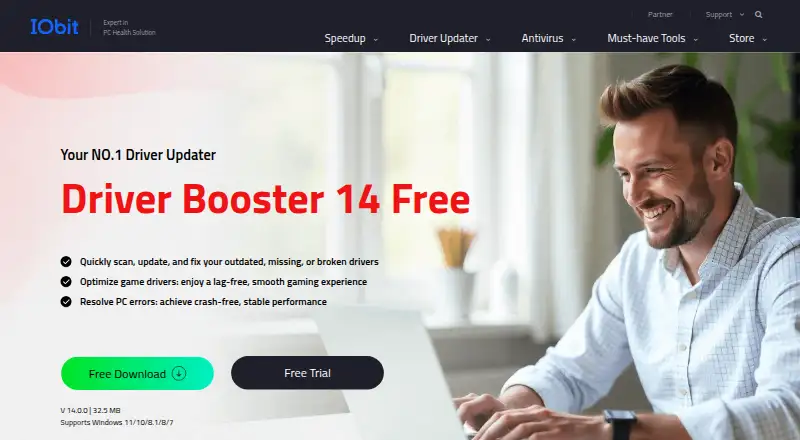
What Driver Booster is
Driver Booster is a Windows utility that scans a computer and checks the status of device drivers, then can install or update them automatically. Its hardware coverage includes graphics cards, printers, audio, network, chipset, and USB devices. The free version lists more than 19 million drivers, while the PRO database lists more than 23 million. Driver checks include Microsoft WHQL verification and an IObit security scan. Driver Booster also includes scheduled maintenance, junk cleanup, restore-point tools, and driver rollback. Gaming-related tools include Game Ready driver updates, Game Boost, and repair for missing game DLLs; it can scan and repair more than 60 game components and 680 DLLs. PRO adds driver updates without a network connection and automatic backups of older drivers. Supported Windows versions listed include 11, 10, 8.1, 8, 7, and XP, plus Windows 10/11 ARM64. The listed minimum requirements are a 1 GHz processor, 1 GB RAM, and 1 GB of free disk space. The free plan is available, and paid plans include a 60-day money-back guarantee. A one-PC annual PRO plan is listed at $39.95 a year.
Good
- Automatically scans driver status.
- Covers graphics, printer, audio, network, and USB drivers.
- Free edition lists more than 19 million drivers.
- Restore points support three previous driver versions.
- Supports Windows 10/11 ARM64.
Watch out
- Listed device limit is one.
- Offline driver updates are a PRO feature.
- PRO backups of old drivers are automatic.
Who it suits
Driver Booster may suit Windows users who want to scan for driver updates and manage restore points or rollback. Its gaming-related tools may be relevant to users maintaining game components and drivers.
Verdict
Driver Booster offers driver scanning and updating, with additional rollback, maintenance, and gaming tools. The free edition is available; the listed annual one-PC PRO plan costs $39.95 a year.
Plans and prices
From Driver Booster's own pricing page, checked 20 Sep 2026.
| Plan | Price | What it gives you |
|---|---|---|
| Driver Booster PRO 3 Months / 1 PC | Priced on request | 1 PC · 3 months / 1 PC |
| Driver Booster PRO 3 Months / 1 PC | — | 1 PC |
| Driver Booster PRO 1 Year / 1 PC | $39.95 a year | 1 PC · 1 Year / 1 PC |
| Driver Booster PRO 1 Year / 3 PCs | $74.85 a year | 3 PCs · 1 Year / 3 PCs |
| 3 Months / 1 PC | $11.95 a month | Covers 1 PC with a 60-day money-back guarantee · billed for 3 months |
The facts
Each one read from Driver Booster's own pages, with the date it was checked.
What it does
- Automatic Installation
- The page says drivers can be automatically installed or updated.checked 27 Sep 2026
- Automatic Scanning
- The tool automatically scans the system and checks driver status.checked 27 Sep 2026
- Backup Restore
- PRO automatically backs up old drivers before updates for restoration.checked 27 Sep 2026
- Customer Scale
- The purchase page states 500 million downloads and 95% user satisfaction.checked 27 Sep 2026
- DLL Repair
- It scans and repairs more than 60 game components and 680 DLLs.checked 27 Sep 2026
- Driver updates
- Yeschecked 20 Sep 2026
- Driver Verification
- Drivers are checked with Microsoft WHQL and an IObit security scan.checked 27 Sep 2026
- Gaming Features
- Features include Game Ready driver updates, Game Boost, and missing game DLL repair.checked 27 Sep 2026
- Global Availability
- The product is available in more than 200 countries and regions.checked 27 Sep 2026
- Hardware Scope
- It covers GPUs, printers, audio, network, chipset, USB, and other devices.checked 27 Sep 2026
- Junk cleanup
- Yeschecked 20 Sep 2026
- Offline Updates
- PRO supports updating drivers without a network connection.checked 27 Sep 2026
- Pro Driver Database
- The PRO version has a database of more than 23 million drivers.checked 27 Sep 2026
- Refund Policy
- Paid plans include a 60-day money-back guarantee.checked 27 Sep 2026
- Restore Points
- Automatic restore points support three previous driver versions.checked 27 Sep 2026
- Restore-point tools
- Yeschecked 20 Sep 2026
The company
- Company Experience
- IObit states more than 20 years of PC optimization experience.checked 27 Sep 2026
- Founded
- 2004checked 23 Sep 2026
- Headquarters
- San Francisco, California, USAchecked 23 Sep 2026
Where it runs
- Device limit
- 1checked 20 Sep 2026
Money
- Free Driver Database
- The free version lists more than 19 million device drivers.checked 27 Sep 2026
- Free plan
- Yeschecked 20 Sep 2026
- Free Trial
- The page offers a free trial but does not state its duration.checked 27 Sep 2026
- Free Version
- Driver Booster 14 Free is available as a free driver updater for Windows.checked 27 Sep 2026
The full review of Driver Booster
Overview
Driver Booster is a Windows utility that scans for outdated drivers and can install updates automatically. It suits people who want driver maintenance alongside gaming and cleanup tools; its free edition makes it possible to start without a subscription. The trade-off is that stronger safeguards and offline updating sit behind PRO.
Key features
Automatic scanning checks driver status across GPUs, printers, audio, network, chipset, USB, and other devices. Automatic installation can reduce the work of finding and applying updates, while Microsoft WHQL checks and an IObit security scan add verification before installation. The free database covers more than 19 million device drivers; PRO expands that to more than 23 million.
Driver Booster also includes scheduled maintenance, junk cleanup, restore-point tools, and driver rollback. Automatic restore points support three previous driver versions, giving users a way back if an update causes trouble. PRO adds automatic backups of old drivers and offline driver updates, useful when a PC needs drivers but has no network connection.
Gaming tools include Game Ready driver updates, Game Boost, and repairs for more than 60 game components and 680 DLLs. That makes Driver Booster more relevant to PC gamers than a driver updater focused solely on device maintenance, though these extras are not a substitute for a dedicated game library or performance suite.
Pricing
Driver Booster uses a freemium model. Driver Booster 14 Free is a free driver updater for Windows, with access to a database of more than 19 million drivers. It includes driver updating, scanning, junk cleanup, scheduled maintenance, and restore-point tools. The free edition is the sensible starting point for occasional maintenance; users who need the larger database, offline updates, or automatic driver backups have a reason to consider PRO.
| Plan | Price and coverage | Best for |
|---|---|---|
| Driver Booster PRO 3 Months / 1 PC | Custom pricing; 1 PC | People who want a shorter single-PC term. |
| Driver Booster PRO 1 Year / 1 PC | $39.95 a year; 1 PC | One-PC users who want PRO features for a year. |
| Driver Booster PRO 1 Year / 3 PCs | $74.85 a year; 3 PCs | Households or users maintaining three PCs. |
| 3 Months / 1 PC | $11.95 a month, billed for 3 months; 1 PC | Single-PC use over a three-month period. |
Paid plans include a 60-day money-back guarantee. The 3-PC annual plan costs more overall than the 1-PC plan but covers two additional computers; the single-PC annual option is the lower-cost stated annual PRO plan. Choose by seat count and term, and confirm the plan terms before purchase.
Platforms
Driver Booster supports Windows 11, 10, 8.1, 8, 7, and XP, including Windows 10/11 ARM64. The stated minimum requirements are a 1 GHz processor, 1 GB of RAM, and 1 GB of free disk space. The platform listing supports a broad range of Windows PCs, although the product's Windows support summary highlights Windows 10 and 11.
Who it's for
Driver Booster is a good fit for Windows users who want to keep a range of device drivers current from one utility, especially gamers who value Game Ready updates and game-component repair. Its free edition is useful for routine scanning and updates without an upfront purchase. Users who need offline installation or automatic backups before updating should weigh the PRO cost; those maintaining multiple PCs should account for the device limit on each plan.
Pros and cons
- Pro: Broad device coverage and automatic scanning make it practical for maintaining many driver types in one place.
- Pro: Restore points and rollback offer a recovery path if a driver update causes problems.
- Pro: Game Ready updates, Game Boost, and DLL repair add gaming-specific tools beyond basic driver updating.
- Con: Offline updating and automatic old-driver backups are PRO features, so users who need them must pay.
- Con: Plans are limited to one or three PCs, which may not suit users managing a larger fleet.
- Con: The three-month single-PC PRO option uses custom pricing, making it harder to compare with the stated annual prices.
Alternatives
For a broader comparison of driver tools, browse Driver Updater Software or, for gaming-focused options, Game Driver Updaters. For utilities centered more generally on PC maintenance, see PC Optimization Software.
Driver Genius is another freemium Windows option; its free edition includes driver backup and restore, offline driver updates, hardware information, and temperature monitoring. DriverPack Solution is a free Windows alternative with online and offline driver packages. DriversCloud is free and supports web, Windows, and Linux.
DriverMax is worth comparing if unlimited driver installs on one computer are the priority: its listed plans include $4.95 a month and $10.39 a year. Auslogics Driver Updater offers a free plan limited to one driver update at a time and a Pro plan for three PCs. Driver Talent X has a free edition with automatic detection, updates, uninstall, backup, and restore.
CCleaner is a broader cleaning and privacy alternative across Android, iOS, macOS, and Windows, with a free plan and a Professional plan at $44.95 a year. Driver Easy is a paid Windows alternative with a 7-day free trial and a 1-PC plan.
Verdict
Choose Driver Booster if you want a Windows driver updater with a free starting point, rollback tools, and useful gaming extras in the same utility. PRO makes the strongest case for users who need offline updates or automatic driver backups. If the free edition covers your maintenance needs, or if your priority is a different platform or a larger number of PCs, look elsewhere.
Alternatives to Driver Booster
- 1

CCleaner
Free planAndroidiOSmacOSWindows8.1From $44.95 a year - 2
Driver Genius
Free planWindows7.4Free plan - 3
DriverMax
Free planWindows7.0From $10.39 a year - 4

Driver Talent X
Free planWindows6.9From $19.95 a year - 5

DriverPack Solution
Free planWindows6.8Free plan - 6
DriverHub
Free planWindows6.7Free plan