DriversCloud
DriversCloud is a free service for identifying Windows PC hardware and software, finding matching drivers, and downloading them.
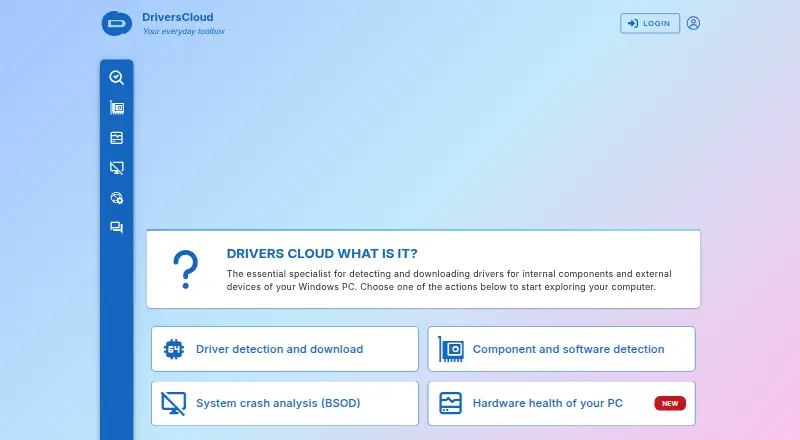
What DriversCloud is
DriversCloud is a free service for identifying Windows PC hardware and software, finding matching drivers, and downloading them. Its configuration report can cover hardware, software, drivers, and network configurations, and can be saved as a PDF. Users can also back up and restore drivers, including rolling back to a previous driver state. For troubleshooting, DriversCloud analyzes Windows blue-screen minidump files to help identify crash causes. Its hardware monitoring service graphs temperatures, fan speeds, and voltages, with alerts available. Computers without internet access can be scanned using a dedicated offline application; the resulting .dc configuration file can then be uploaded. Drivers come from manufacturers’ official websites and are distributed without modification or an added installer. The service is free to use with or without an account. A free account can retain configurations, history, and preferences without a time limit, while disposable accounts expire after 30 days. DriversCloud is made by a company founded in 2004 and headquartered in Cannes, France. The agent and machine-dependent services run on Windows 10 and 11; the offline application also supports Windows 7 SP1 and Windows 8.
Good
- Free service, usable with or without an account
- Reports inventory hardware, software, drivers, and network configurations
- Driver backup, restore, and rollback are available
- Analyzes Windows blue-screen minidump files
- Sensor graphs include temperatures, fan speeds, and voltages
- Offline scanning supports computers without internet access
Watch out
- The agent and machine-dependent services run on Windows 10 and 11
- There is no macOS or Linux agent
- An account can store reports for up to 10 configurations
Who it suits
DriversCloud suits Windows users who need to identify, download, back up, restore, or roll back drivers, and people diagnosing crashes or monitoring hardware sensors. The maker also describes it as suitable for beginners and professionals, including network managers and technical support teams.
Verdict
Choose DriversCloud if you need a free way to inspect Windows configurations and manage drivers, with extra tools for crash analysis and hardware monitoring. Look elsewhere if you need a macOS or Linux agent, or want an account to retain reports for more than 10 configurations.
Plans and prices
From DriversCloud's own pricing page, checked 11 Oct 2026.
| Plan | Price | What it gives you |
|---|---|---|
| DriversCloud | Free | Free to use with or without an account · free account stores configurations, history, and preferences without a time limit · disposable account expires after 30 days · Completely free service |
The facts
Each one read from DriversCloud's own pages, with the date it was checked.
What it does
- Account limit
- The about page says an account can hold reports for up to 10 configurations.checked 11 Oct 2026
- Compatibility
- The agent and machine dependent services run on Windows 10 and 11, while the offline application also runs on Windows 7 SP1 and Windows 8; the maker says there is no macOS or Linux agent.checked 11 Oct 2026
- Connection security
- The agent opens an outgoing authenticated HTTPS connection using a client WebSocket, and its local service opens no port or listener.checked 11 Oct 2026
- Crash analysis
- The service analyzes Windows blue-screen minidump files to help identify the cause of system crashes.checked 11 Oct 2026
- Data handling
- The maker says stored configurations are encrypted, data is not sold or shared with third parties, and users can export or delete their configurations.checked 11 Oct 2026
- Driver backup
- Users can back up and restore their drivers through the service and its agent.checked 11 Oct 2026
- Driver sources
- Drivers are collected from manufacturers’ official websites and distributed without modification or an added installer.checked 11 Oct 2026
- Hardware monitoring
- The monitoring service graphs sensor readings including temperatures, fan speeds, and voltages, and supports alerts.checked 11 Oct 2026
- Intended users
- The maker describes the service as intended for beginners and professionals, including network managers, technical services, and computer hotlines.checked 11 Oct 2026
- Offline use
- For a computer without internet access, the FAQ describes using a dedicated offline application and uploading a .dc configuration file.checked 11 Oct 2026
- PC diagnostics
- Its configuration report can inventory hardware, software, drivers, and network configurations, and can be downloaded as a PDF.checked 11 Oct 2026
- Privacy controls
- The agent offers four privacy levels, and identifying information such as serial numbers is in the highest level and is not sent unless explicitly enabled.checked 11 Oct 2026
- Purpose
- DriversCloud detects Windows PC hardware and software, helps identify matching drivers, and provides driver downloads.checked 11 Oct 2026
- Support
- The site provides a technical assistance forum, and its contact form is for site remarks, suggestions, and commercial enquiries rather than computer problems.checked 11 Oct 2026
The company
- Founded
- 2004checked 23 Sep 2026
- Headquarters
- Cannes, Francechecked 23 Sep 2026
Money
- Free plan
- Yeschecked 20 Sep 2026
The full review of DriversCloud
DriversCloud is a free service for identifying Windows hardware, matching it with manufacturer drivers, and investigating configuration or stability problems. It fits individual Windows owners and support teams that need reports and recovery tools alongside driver downloads. Its broad diagnostic coverage is compelling, provided your machines can run the Windows agent and your report archive stays within the account limit.
Overview
DriversCloud builds an inventory of hardware, installed software, drivers, and network settings, then presents matching driver downloads. The service obtains those packages from manufacturers’ official websites and distributes them without modification or an additional installer, reducing the risk of an updater adding unrelated software.
This is more than a driver lookup. You can back up and restore drivers, roll back a problematic driver, inspect Windows blue-screen minidumps for likely crash causes, and monitor temperatures, fan speeds, and voltages on graphs with alerts. That combination gives troubleshooters useful context when a simple “outdated driver” list would not explain a problem.
Key features
Configuration reports can be exported as PDFs, making a machine’s state easier to document or pass to a technician. An account stores reports for up to 10 configurations, a reasonable ceiling for a household or a small group of PCs but a constraint for a larger help desk.
Offline scanning is supported through a dedicated application: it creates a .dc configuration file that can be uploaded from an internet-connected computer. This is valuable for isolated or newly installed systems, although it adds a transfer step compared with scanning online.
Privacy settings are unusually granular. The agent provides four levels, and identifying data such as serial numbers is withheld unless the highest level is explicitly enabled. The maker says stored configurations are encrypted, are not sold or shared with third parties, and can be exported or deleted. Its agent makes an authenticated outgoing HTTPS connection through a client WebSocket; the local service opens no listening port, which limits exposure on the machine being scanned.
Pricing
The DriversCloud plan costs nothing and is a completely free service, with or without an account. A free account retains configurations, history, and preferences without a time limit, subject to the 10-configuration account cap. A disposable account expires after 30 days, so it suits a one-off diagnostic job rather than an ongoing maintenance record. There is no free trial because the service itself is free, and no paid tier or renewal charge is presented.
Platforms
The agent and machine-dependent services run on Windows 10, Windows 11, and later versions. The offline application also runs on Windows 7 SP1 and Windows 8. DriversCloud offers web access and is categorized for Linux, but the maker provides no macOS or Linux agent; those systems therefore cannot use the full local detection and machine-service workflow.
Who it's for
Beginners can use it to identify unknown hardware and find corresponding drivers without paying for an updater. More experienced users gain rollback, backup, minidump analysis, sensor alerts, and PDF documentation. Network managers, technical services, and computer hotlines benefit from repeatable reports and offline collection, provided their inventory remains within 10 configurations per account. It is a poor fit for organizations needing a large central archive or for anyone seeking one agent that runs natively across Windows, macOS, and Linux.
Pros and cons
- Pro: Manufacturer-sourced drivers are delivered without modification or an added installer, a cleaner route than bundled updater packages.
- Pro: Driver backup, restore, and rollback provide a recovery path when an update causes trouble.
- Pro: Minidump analysis and sensor graphs with alerts extend the service into practical crash and hardware troubleshooting.
- Pro: Four privacy levels, encrypted storage, export and deletion controls, and an outbound-only connection give administrators meaningful control over collected data.
- Con: The full agent workflow is Windows-only, excluding macOS and Linux machines.
- Con: Accounts retain reports for only 10 configurations, limiting larger support inventories.
- Con: Offline diagnosis requires creating and uploading a separate .dc file rather than scanning directly from the disconnected PC.
- Con: Computer-problem support is routed to a technical forum; the contact form is for site remarks, suggestions, and commercial enquiries.
Alternatives
For a broader shortlist of updater tools, see Driver Updater Software; for wider system-maintenance utilities, see PC Optimization Software.
Driver Genius is the closer alternative when you want a Windows freemium product with driver updates, backup and restore, offline updating, and hardware information, plus a free trial. DriverHub suits users who prefer automatic restore-point creation and automatic downloading, installation, and updating on Windows. DriverMax is worth considering when you need unlimited installs, but its paid plans charge $4.95 a month for one computer or $10.39 a year billed once a year.
DriverPack Solution is another free Windows option with online and offline driver packages. Driver Talent X offers Windows driver detection, updates, uninstall, backup, and restore through a freemium model. CCleaner is the better choice when cross-platform cleaning and privacy tools matter more than dedicated driver diagnostics. IObit Uninstaller is aimed at removing applications and cleaning leftovers rather than managing hardware drivers. AVG Secure Browser is a browser alternative focused on ad blocking, anti-tracking, private browsing, and web protection.
Verdict
Choose DriversCloud if you want a no-cost Windows service that combines trustworthy driver sourcing with backups, crash analysis, offline reports, and hardware monitoring. Look elsewhere if you need a macOS or Linux agent, a larger retained-machine inventory, or a dedicated support channel for computer problems.
Getting started
- Visit https://www.driverscloud.com/.
- Use the service with or without an account.
- For an internet-connected Windows 10 or 11 computer, use the agent for machine-dependent services.
- For an offline computer, use the dedicated offline application and upload its .dc configuration file.
- Create a free account if you want configurations, history, and preferences retained without a time limit.
Limits worth knowing
A free account can hold reports for up to 10 configurations. Disposable accounts expire after 30 days; free accounts have no time limit for configurations, history, and preferences.
Questions
How much does DriversCloud cost?
The service is free to use. The listed DriversCloud plan is free.
Does DriversCloud require an account?
No. It can be used with or without an account; a free account retains configurations, history, and preferences without a time limit.
Which systems does it support?
The agent and machine-dependent services run on Windows 10 and 11. The offline application also runs on Windows 7 SP1 and Windows 8; there is no macOS or Linux agent.
Can I scan a computer without internet access?
Yes. Use the dedicated offline application and upload the resulting .dc configuration file.
What can DriversCloud do besides find drivers?
It can create downloadable configuration reports, back up and restore drivers, analyze Windows blue-screen minidumps, and graph hardware sensor readings with alerts.
How can users get technical help?
The site provides a technical assistance forum. Its contact form is for site remarks, suggestions, and commercial enquiries, rather than computer problems.
Alternatives to DriversCloud
- 1

CCleaner
Free planAndroidiOSmacOSWindows8.9From $44.95 a year - 2

AVG Secure Browser
Free planAndroidWebExtensionmacOS8.5From $39.99 a year - 3

Avast One
Free planAndroidiOSExtensionmacOS8.3Free plan - 4
Process Lasso
Free planWindows8.2From $14.97 a year - 5

Kudu
Free planWebAPILinuxmacOS8.2From $5 a month - 6

PC Matic
AndroidiOSWebAPI8.2From $30 a year