
Kudu
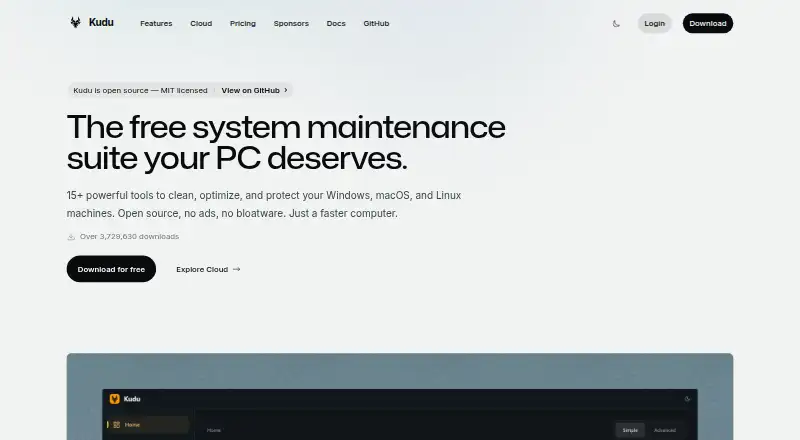
Kudu is a system maintenance suite with a free, open-source desktop app for Windows, macOS, and Linux, plus a cloud dashboard for managing device fleets.
What Kudu is
Kudu is a system maintenance suite with a free, open-source desktop app for Windows, macOS, and Linux, plus a cloud dashboard for managing device fleets. Desktop tools cover junk cleanup, performance monitoring, security and privacy, software updates, and scheduled maintenance. Cleanup Receipts show which items were selected, removed, skipped, or unsuccessful. Storage History tracks folder growth and lets users compare snapshots, while Recovery Centre provides access to supported recovery records and eligible settings restoration. Maintenance operations run locally, and the desktop app does not collect, transmit, or store personal data by default. Kudu Cloud adds device health, telemetry, remote commands, maintenance automation, and compliance checks for SOC 2, CIS, and NIST controls. It can also provide hardening assessments and audit-ready reports. The desktop app is free; Cloud Basic costs $5/device/mo and Pro costs $9/device/mo. Cloud billing counts recently connected Windows machines; devices offline for 30 days or more pause and stop counting.
Good
- Free, open-source desktop app for three operating systems
- Cleanup Receipts detail cleanup outcomes
- Storage History compares folder snapshots
- Cloud supports remote commands and maintenance automation
Watch out
- Cloud Basic costs $5/device/mo
- Cloud Pro costs $9/device/mo
- PagerDuty notifications are a Pro feature
Who it suits
Kudu suits individuals seeking maintenance tools across Windows, macOS, or Linux, and teams managing device fleets through a browser dashboard. Its cloud compliance and automation tools may suit teams that need those capabilities.
Verdict
Kudu combines local desktop maintenance tools with optional cloud fleet management. The free desktop app and paid cloud plans serve different needs, so check which tools and device-management features you require.
Plans and prices
From Kudu's own pricing page, checked 20 Sep 2026.
| Plan | Price | What it gives you |
|---|---|---|
| Free desktop app | Free | Core maintenance tools · No account required · MIT-licensed open source |
| Basic | $5 a month | Starts at 1 device · 30 days data retention · unlimited devices · $5/device/mo |
| Pro | $9 a month | Starts at 1 device · 90 days data retention · unlimited devices · $9/device/mo |
| Desktop app | Free | Windows, macOS, and Linux · core maintenance tools |
The facts
Each one read from Kudu's own pages, with the date it was checked.
What it does
- Cleanup records
- Cleanup Receipts show what was selected, removed, skipped, or failed after a cleanup.checked 4 Oct 2026
- Cloud data handling
- For connected devices, Kudu says telemetry excludes file paths, file contents, browsing history, passwords, and personally identifiable information; process name sharing is opt-in.checked 4 Oct 2026
- Cloud fleet management
- Kudu Cloud provides a browser dashboard for device health, telemetry, remote commands, and maintenance automation.checked 4 Oct 2026
- Compliance
- Kudu Cloud continuously checks SOC 2, CIS, and NIST controls and offers hardening assessments and audit-ready reports.checked 4 Oct 2026
- Desktop tools
- The desktop app includes system cleaning, performance monitoring, security and privacy tools, software updating, and scheduling.checked 4 Oct 2026
- Driver updates
- Yeschecked 20 Sep 2026
- Integrations
- Kudu Cloud can route alerts to Slack, email, or webhooks; PagerDuty notifications are listed as a Pro feature.checked 4 Oct 2026
- Junk cleanup
- Yeschecked 20 Sep 2026
- Limits
- Cloud billing counts Windows machines whose Kudu agent connected in the last 30 days, and devices offline for 30 or more days are paused and stop counting toward billing.checked 4 Oct 2026
- Privacy
- The desktop app does not collect, transmit, or store personal data by default, and maintenance operations run locally on the device.checked 4 Oct 2026
- Product
- Kudu is a free, open-source system maintenance suite for cleaning, optimizing, and protecting Windows, macOS, and Linux machines.checked 4 Oct 2026
- Recovery
- Recovery Centre lets users inspect supported recovery records and restore eligible settings.checked 4 Oct 2026
- Restore-point tools
- Yeschecked 20 Sep 2026
- Scheduled maintenance
- Yeschecked 20 Sep 2026
- Security details
- The privacy policy says data is encrypted in transit via HTTPS and API keys are stored as SHA-256 hashes.checked 4 Oct 2026
- Startup manager
- Yeschecked 20 Sep 2026
- Storage history
- Storage History tracks folder growth over time and compares snapshots.checked 4 Oct 2026
- Support
- Pro includes priority support, and custom plans offer dedicated support.checked 4 Oct 2026
Money
- Free plan
- Yeschecked 20 Sep 2026
The company
- Headquarters
- United States and South Africachecked 23 Sep 2026
The full review of Kudu
Kudu is a maintenance suite for Windows, macOS, and Linux, with a separate cloud service for managing connected devices. It suits both people who want local upkeep tools and teams that need fleet oversight, but those are distinct offerings with different costs.
Overview
The free, open-source desktop app covers routine cleanup, monitoring, privacy and security tools, software updates, and maintenance scheduling. It runs maintenance locally and does not collect, transmit, or store personal data by default. Kudu Cloud adds browser-based device management and compliance features for organizations; its per-device charges make it a different proposition from the free desktop utility.
Key features
Kudu includes junk cleanup, a startup manager, driver updates, scheduled maintenance, and restore-point tools across its desktop platforms. Cleanup Receipts record what a cleanup selected, removed, skipped, or failed to handle, helping users review its outcome. Storage History compares snapshots to track folder growth, while Recovery Centre can inspect supported recovery records and restore eligible settings. These records and recovery tools make Kudu more accountable than a cleanup-only utility, though recovery is limited to eligible settings and supported records.
Kudu Cloud provides a dashboard for device health, telemetry, remote commands, and maintenance automation. It continuously checks SOC 2, CIS, and NIST controls and offers hardening assessments and audit-ready reports, so it is aimed at teams with fleet or compliance responsibilities rather than someone maintaining a single PC. Alerts can be routed to Slack, email, or webhooks; PagerDuty notifications are reserved for Pro.
Cloud telemetry excludes file paths, file contents, browsing history, passwords, and personally identifiable information, and sharing process names is opt-in. The desktop app's local-first default will suit privacy-conscious users, while organizations connecting devices should weigh the telemetry model against their own requirements. Kudu says data is encrypted in transit via HTTPS and API keys are stored as SHA-256 hashes.
Pricing
The Free desktop app costs nothing and includes core maintenance tools, requires no account, and is MIT-licensed open source. A separate Desktop app plan is also free for Windows, macOS, and Linux core maintenance tools. These free options cover local upkeep, not the cloud fleet-management capabilities.
Basic costs $5 a month, billed $5/device/mo, starts at 1 device, and provides 30 days of data retention with unlimited devices. Pro costs $9 a month, billed $9/device/mo, starts at 1 device, and extends retention to 90 days; it also includes priority support and PagerDuty notifications. The extra cost is most relevant to teams needing longer telemetry history or those integrations, while Basic gives up those Pro benefits. Custom pricing is available for custom plans, which offer dedicated support.
Cloud billing counts Windows machines whose Kudu agent connected in the last 30 days. Devices offline for 30 or more days are paused and stop counting toward billing, an important distinction for fleets with intermittent connectivity. The plans start at one device and have unlimited devices; the stated retention periods are the key tier difference.
Platforms
Kudu supports Windows, macOS, and Linux desktop devices, with a web dashboard for cloud management and API access. That breadth makes it a stronger fit for mixed desktop environments than Windows-only maintenance tools. Its listed capabilities include junk cleanup, startup management, driver updates, scheduled maintenance, and restore-point tools.
Who it's for
Choose Kudu's desktop app for free local maintenance across the three major desktop operating systems, particularly if you value cleanup records, storage snapshots, and eligible settings recovery. Choose Kudu Cloud when you need centralized health monitoring, remote commands, automation, or compliance reporting. It is not the right choice if you only need a paid personal cleaner or do not need fleet features: the cloud plans charge per device for capabilities separate from the desktop app.
Pros and cons
- Pros: Free, open-source local tools run without an account and do not transmit personal data by default.
- Pros: Cleanup Receipts, Storage History, and Recovery Centre add review and recovery functions beyond basic cleanup.
- Pros: Cloud plans combine device oversight, maintenance automation, and compliance checks, with billing pauses for devices offline at least 30 days.
- Cons: Cloud charges are per device, so fleet management is not included in the free desktop app.
- Cons: Basic has 30 days of retention and no PagerDuty notifications; Pro is needed for 90-day retention, priority support, and PagerDuty.
- Cons: Recovery Centre only handles supported records and eligible settings, so it is not a general recovery guarantee.
Alternatives
CCleaner is a Windows, macOS, and Android/iOS alternative with a free plan for standard cleaning, standard privacy protection, and Basic Health Check; choose it if those listed functions fit better than Kudu's maintenance and fleet-management split. Advanced SystemCare is Windows-only, and its free plan covers PC cleaning, startup optimization, and resource optimization, making it a more focused option for those needs. Glary Utilities is another Windows-only choice; its free plan combines computer speed, problem repair, privacy protection, and manual updating, while Professional costs $39.95 a year for 3 PCs.
Argente Utilities offers a Windows free plan for 1 PC forever and a Basic plan at €9 a year for one year on one PC, with automatic updates and no donation reminder; choose it if those terms suit your single-PC use. WinZenith is a free Windows portable application with no ads and system optimization and cleanup tools, a fit for users seeking that specific portable format. Wise Care 365 is a Windows alternative whose free plan includes checkup, cleaning and speed optimization, hardware inventory, privacy protection, real-time monitoring, and automatic updates. WhaleClean has a free Windows 10/11 plan with basic junk cleaning and startup management but manual scans only, so it suits users who do not need scheduled scanning. Microsoft PC Manager is a free Windows option for readers who want a PC-focused alternative.
For broader category comparisons, browse PC Optimization Software or Patch Management Software.
Verdict
Kudu is a strong choice for people who want free, local maintenance across Windows, macOS, or Linux, and for teams that need cloud fleet controls and compliance reporting. Its clearest reason to choose it is the combination of accountable desktop cleanup and optional management tools; look elsewhere if you need only a simple Windows cleaner or do not want per-device cloud costs.
Getting started
- Open the Kudu website
- Use the desktop app on Windows, macOS, or Linux
- Choose the free desktop app, Basic, or Pro
- Use Kudu Cloud through its browser dashboard
- Connect devices for health, telemetry, remote commands, or maintenance automation
Limits worth knowing
The free desktop app provides core maintenance tools. The cheapest cloud plan, Basic at $5 per device per month, starts at one device and retains data for 30 days; devices offline for 30 days or more pause and stop counting toward billing.
Questions
Which platforms does Kudu support?
The desktop app supports Windows, macOS, and Linux. Kudu also provides an API and a browser-based cloud dashboard.
Is Kudu open source?
Yes. The free desktop app is MIT-licensed open source.
Does the desktop app require an account?
The Free desktop app plan says no account is required.
How much do Kudu Cloud plans cost?
Basic costs $5 per device per month, and Pro costs $9 per device per month. Both start at one device.
What data does Kudu Cloud retain?
Basic includes 30 days of data retention, while Pro includes 90 days.
What integrations are available?
Kudu Cloud can route alerts to Slack, email, or webhooks. PagerDuty notifications are listed as a Pro feature.
Alternatives to Kudu
- 1

CCleaner
Free planAndroidiOSmacOSWindows8.9From $44.95 a year - 2
Process Lasso
Free planWindows8.1From $14.97 a year - 3
Advanced SystemCare
Free planWindows8.0Free plan - 4
Glary Utilities
Free planWindows8.0From $39.95 a year - 5

Avast Cleanup Premium
AndroidiOSmacOSWindows8.0From $29.88 a year - 6
BleachBit
Free planOpen sourceLinuxmacOSWindows8.0Free plan