Glary Utilities
Glary Utilities is a Windows utility for cleaning and maintaining PCs, with more than 20 included tools.
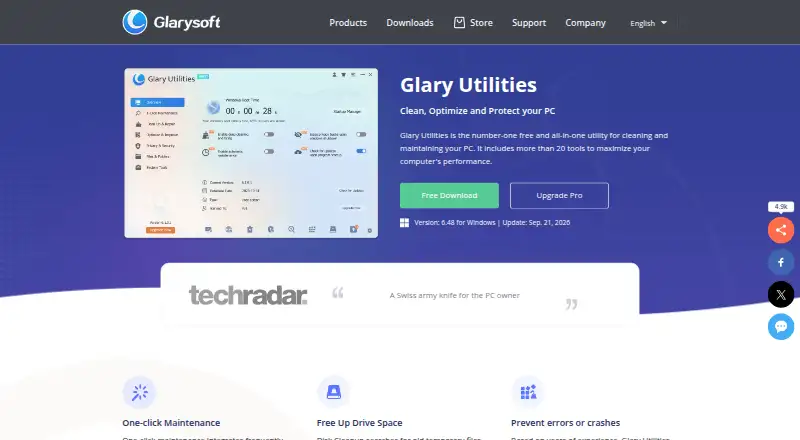
What Glary Utilities is
Glary Utilities is a Windows utility for cleaning and maintaining PCs, with more than 20 included tools. Its functions include junk cleanup, startup management, driver updates, scheduled maintenance, and restore-point tools. The startup manager can identify unnecessary programs that use system resources, while its update tools help find newer software versions. Privacy features can locate and delete browsing records and permanently delete files. File recovery tools help find and restore accidentally deleted items, including those removed after the Recycle Bin was emptied. The free version is available for Windows PCs, and the Pro plan costs $39.95 a year for up to 3 PCs. Listed Windows support includes versions 11, 10, 8, 7, 2000, XP, and Vista, in 32- and 64-bit versions; another listing specifically identifies Windows 10 and 11. The software is available in 44 languages. The listed version is 6.48, updated September 21, 2026. Version 6.48.0.52 improves Uninstall Manager, Empty Folder Finder, and Startup Manager.
Good
- Free version available for Windows PCs
- Includes more than 20 tools
- Can help restore files deleted from the Recycle Bin
- Available in 44 languages
Watch out
- The supplied information gives no specific free-version limits
- Pro costs $39.95 a year for up to 3 PCs
- No trial is stated
Who it suits
Glary Utilities suits Windows PC users looking for cleanup, maintenance, privacy, or file recovery tools. The Pro plan is for users covering up to 3 PCs.
Verdict
Glary Utilities brings cleanup, maintenance, privacy, and recovery tools together for Windows PCs. The free version is available, while Pro is listed at $39.95 a year for up to 3 PCs.
Plans and prices
From Glary Utilities's own pricing page, checked 20 Sep 2026.
| Plan | Price | What it gives you |
|---|---|---|
| Free | Free | Faster Computer · Problems Repairing · Privacy Protection · Manual updating |
| Professional | $39.95 a year | 3 PCs · 3 PCs |
| Glary Utilities Free | Free | Free version for Windows PCs |
| Glary Utilities Pro | $39.95 a year | For up to 3 PCs · billed annually at $39.95 |
| Glary Utilities Technician | $169 a year | Optimization tool for service providers · billed annually at $169 |
The facts
Each one read from Glary Utilities's own pages, with the date it was checked.
Where it runs
- Device limit
- 3checked 20 Sep 2026
- Platform support
- Supports Windows 11, 10, 8, 7, 2000, XP, and Vista, with 32/64-bit versions.checked 28 Sep 2026
What it does
- Driver updates
- Yeschecked 20 Sep 2026
- File recovery
- Helps find and restore accidentally deleted files, including after the Recycle Bin is emptied.checked 28 Sep 2026
- Included tools
- Includes more than 20 tools to maximize computer performance.checked 28 Sep 2026
- Junk cleanup
- Cleans temporary files, installation files, logs, history, cache, and error reports.checked 28 Sep 2026
- Latest version
- The listed version is 6.48, updated September 21, 2026.checked 28 Sep 2026
- Paid from
- 39.95checked 20 Sep 2026
- Privacy protection
- Finds and deletes browsing records and can permanently delete files.checked 28 Sep 2026
- Pro pricing
- The Pro version costs $39.95 per year for up to 3 PCs.checked 28 Sep 2026
- Purchase security
- The store states that purchases are secure and encrypted.checked 28 Sep 2026
- Refund policy
- The store offers a 90-day money-back guarantee.checked 28 Sep 2026
- Release updates
- Version 6.48.0.52 improves Uninstall Manager, Empty Folder Finder, and Startup Manager.checked 28 Sep 2026
- Restore-point tools
- Yeschecked 20 Sep 2026
- Scheduled maintenance
- Yeschecked 20 Sep 2026
- Software updates
- Helps discover and update newer software versions.checked 28 Sep 2026
- Startup management
- Identifies and disables unnecessary startup programs that use system resources.checked 28 Sep 2026
- Startup manager
- Yeschecked 20 Sep 2026
- Support availability
- The store states that technical support is available 24/7.checked 28 Sep 2026
- Supported languages
- Available in 44 languages.checked 28 Sep 2026
Money
- Free plan
- Yeschecked 20 Sep 2026
- Free tier
- A free all-in-one utility for cleaning and maintaining Windows PCs.checked 28 Sep 2026
- Free tier limits
- The page does not state specific limits for the free version.checked 28 Sep 2026
- Provider plan
- A Technician optimization plan is offered for service providers at $169 per year.checked 28 Sep 2026
The full review of Glary Utilities
Glary Utilities is a broad Windows maintenance suite for people who want cleanup, startup controls, privacy tools, and file recovery in one package. It is most compelling for households or users maintaining several PCs; those who need only a basic cleaner may find its paid tier more than they need.
Overview
With more than 20 tools, Glary Utilities covers a wide range of routine PC upkeep: junk cleanup, scheduled maintenance, startup management, software-update discovery, restore-point tools, privacy protection, and file recovery. Its advantage is breadth in one suite. That makes it a practical choice for users who want several maintenance jobs together, rather than a specialist tool for just one.
The software supports Windows 11, 10, 8, 7, 2000, XP, and Vista in 32- and 64-bit versions, and is available in 44 languages. Windows 10 and 11 are the stated support for this entry. Version 6.48, updated September 21, 2026, includes improvements to Uninstall Manager, Empty Folder Finder, and Startup Manager.
Key features
Cleanup and ongoing maintenance
Junk cleanup and scheduled maintenance are useful for people who want recurring upkeep, while restore-point tools add a system-maintenance function beyond cleaning. The suite’s scope is its selling point, but users seeking a single narrowly focused utility may not benefit from carrying a larger toolkit.
Startup, privacy, and recovery
The startup manager identifies programs that use system resources and lets users disable ones they consider unnecessary. That offers control over startup behavior, though the decision about which programs to disable remains with the user. Privacy tools find and remove browsing records and can permanently delete files. File recovery can help restore accidentally deleted items, including files removed after emptying the Recycle Bin; it is a useful recovery option, not a reason to treat deletion as risk-free.
Software updates
Glary Utilities helps discover newer software versions. This is useful for users who want update discovery alongside maintenance, but the described function is discovery and updating assistance, not a promise that every application is covered.
Pricing
The Free plan costs nothing and includes faster-computer, problem-repair, privacy-protection, and manual-updating functions. Glary Utilities Free is also offered at no cost as a free version for Windows PCs. The free tier is the sensible starting point for basic upkeep, but specific caps are not established, so users should not assume it includes every Pro capability.
Professional costs $39.95 a year, billed for 3 PCs. Glary Utilities Pro is also priced at $39.95 a year, billed annually, for up to 3 PCs. The three-PC allowance makes this a better fit for a household or someone maintaining multiple computers than for a single-PC user who needs only occasional cleanup. The store offers a 90-day money-back guarantee. No trial is stated.
Glary Utilities Technician costs $169 a year, billed annually, for service providers seeking an optimization tool. It is a distinct professional plan rather than the economical choice for ordinary home use. The store states that purchases are secure and encrypted and that technical support is available 24/7.
Platforms
Glary Utilities is for Windows PCs. The supported range includes Windows 11, 10, 8, 7, 2000, XP, and Vista, with 32- and 64-bit versions; Windows 10 and 11 are the stated support for this entry.
Who it's for
Choose Glary Utilities if you want a single Windows package spanning cleanup, scheduled maintenance, startup controls, privacy, software-update discovery, and recovery, especially across up to three PCs on Pro. It is less suited to someone who wants only a basic cleaner, or who needs definite free-tier caps before deciding whether the free version is sufficient.
Pros and cons
- Pros: More than 20 tools cover multiple maintenance needs, including privacy and file recovery, so users can keep several common tasks in one suite.
- Pros: Pro covers up to three PCs for $39.95 a year, which can suit users maintaining several household machines.
- Pros: Support spans multiple Windows generations and 44 languages.
- Cons: Specific free-version limits are not established, making it harder to know whether the free edition will cover a user's needs.
- Cons: The annual Pro plan may be unnecessary for a single-PC user who wants only basic cleanup.
Alternatives
Compare PC optimization software if you want to weigh this broad maintenance suite against more focused options.
- CCleaner is worth considering if you want cleaning and privacy protection on Android, iOS, macOS, or Windows; its free plan includes standard privacy protection, standard cleaning, and a basic Health Check.
- Advanced SystemCare is another Windows freemium option, with free PC cleaning, startup optimization, and resource optimization.
- Microsoft PC Manager is a free Windows alternative for readers who want a free PC-management option.
- Kudu may suit readers looking for a free desktop app with core maintenance tools, no account requirement, and an MIT-licensed open-source foundation; it also supports Linux, macOS, web, and Windows.
- Wise Care 365 is another Windows freemium choice, with a free plan that combines cleaning, speed optimization, hardware inventory, privacy protection, monitoring, and automatic updates.
- Process Lasso is a Windows alternative for readers who prefer a subscription billed monthly or annually per PC; it also offers a free plan and trial.
- Auslogics BoostSpeed offers a free tier with diagnostics, essential optimization, basic junk and registry cleanup, and disk defragmentation.
- BleachBit is a free, open-source option for readers who want a cleaner available on Linux, macOS, and Windows.
Verdict
Glary Utilities is a strong fit for Windows users who want one package for several upkeep tasks, particularly when maintaining up to three PCs. Its breadth is the main reason to choose it; the unclear free-tier limits and annual Pro cost are good reasons to look elsewhere if your needs stop at basic cleanup.
Alternatives to Glary Utilities
- 1

CCleaner
Free planAndroidiOSmacOSWindows8.9From $44.95 a year - 2

Kudu
Free planWebAPILinuxmacOS8.2From $5 a month - 3
Process Lasso
Free planWindows8.1From $14.97 a year - 4
Advanced SystemCare
Free planWindows8.0Free plan - 5

Avast Cleanup Premium
AndroidiOSmacOSWindows8.0From $29.88 a year - 6

BleachBit
Free planOpen sourceLinuxmacOSWindows8.0Free plan