Microsoft PC Manager
Microsoft PC Manager is a free Windows utility for cleaning up a PC, managing storage and addressing common system issues.
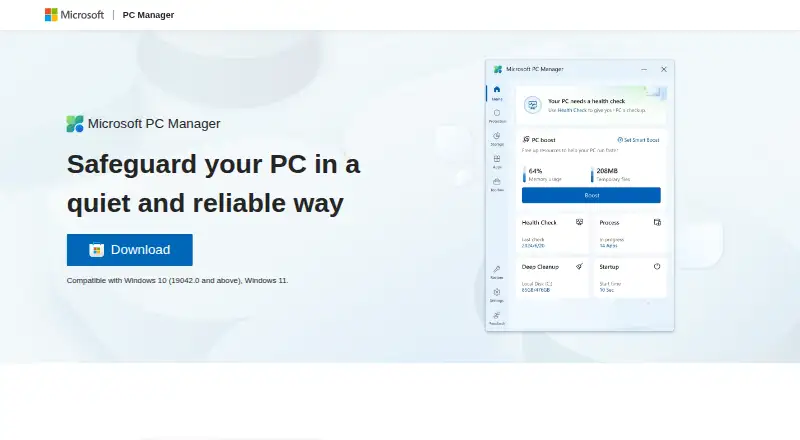
What Microsoft PC Manager is
Microsoft PC Manager is a free Windows utility for cleaning up a PC, managing storage and addressing common system issues. It supports Windows 10 and 11. Its health checkup can find and fix issues, while cleanup tools remove junk and free space. Large-file management and Storage Sense offer additional ways to reclaim storage. The software includes a startup manager and built-in Windows tools, along with a Toolbox and Mini toolbar. It can reduce ads and app pop-up interruptions, and scan for and clear threats with one click. Microsoft describes it as a quiet way to safeguard a PC. The listed languages include English, Chinese, Japanese, Korean, Spanish, Indonesian, Portuguese, Russian and Turkish, as well as Traditional Chinese and regional variants of English, Spanish and Portuguese. Microsoft provides a Discord channel link and contact email, plus links to privacy information and legal notices.
Good
- Free to download and use on a PC
- Supports Windows 10 and 11
- Includes cleanup, startup and storage tools
- Health checkup finds and fixes issues
- Can scan for and clear threats with one click
Watch out
- Listed platform is Windows only
- The product supports Windows 10 and 11
Who it suits
It suits Windows 10 or 11 users who want free cleanup, storage management and system health tools in one utility.
Verdict
Microsoft PC Manager brings cleanup, storage and health-check tools together for Windows 10 and 11 PCs. It is available free and includes a one-click threat scan.
Plans and prices
From Microsoft PC Manager's own pricing page, checked 27 Sep 2026.
| Plan | Price | What it gives you |
|---|---|---|
| Free plan | Free | Available for free on a PC. |
The facts
Each one read from Microsoft PC Manager's own pages, with the date it was checked.
The company
- Company identity
- The product is presented under the Microsoft brand.checked 27 Sep 2026
What it does
- Copyright year
- The page shows Microsoft copyright for 2025.checked 27 Sep 2026
- Discord community
- Microsoft PC Manager provides a Discord channel link.checked 27 Sep 2026
- Email support
- A Microsoft PC Manager contact email is provided.checked 27 Sep 2026
- Health checkup
- It finds and fixes issues quickly through a health checkup.checked 27 Sep 2026
- Junk cleanup
- Yeschecked 21 Sep 2026
- Legal notices
- The page links to terms, third-party software notices, and trademarks.checked 27 Sep 2026
- Mini toolbar
- It offers a Toolbox and Mini toolbar to improve computer-use efficiency.checked 27 Sep 2026
- More languages
- It also lists Traditional Chinese and regional variants of Spanish, Portuguese, and English.checked 27 Sep 2026
- Performance boost
- It cleans up the system, frees space, and boosts PC performance.checked 27 Sep 2026
- Pop-up management
- It reduces ads and app pop-up interruptions.checked 27 Sep 2026
- Privacy information
- The page links to Microsoft Privacy and Consumer Health Privacy information.checked 27 Sep 2026
- Security positioning
- Microsoft describes it as a quiet and reliable way to safeguard a PC.checked 27 Sep 2026
- Startup manager
- Yeschecked 21 Sep 2026
- Storage management
- It helps manage large files and use Storage Sense to free storage.checked 27 Sep 2026
- Supported languages
- The page lists English, Chinese, Japanese, Korean, Spanish, Indonesian, Portuguese, Russian, and Turkish.checked 27 Sep 2026
- Threat scanning
- It can scan and clear threats with one click.checked 27 Sep 2026
Money
- Free download
- The software is available to download and use for free on a PC.checked 27 Sep 2026
- Free plan
- Yeschecked 21 Sep 2026
Where it runs
- Windows support
- Compatible with Windows 10 version 19042.0 and above, and Windows 11.checked 27 Sep 2026
- Windows tools
- It includes a variety of built-in Windows tools.checked 27 Sep 2026
The full review of Microsoft PC Manager
Overview
Microsoft PC Manager is a Windows maintenance app for routine cleanup, storage management and system checks. It suits Windows 10 and 11 users who want these tools in one free download. Its breadth is useful for basic upkeep, but its Windows-only focus and maintenance-oriented feature set make it a poor fit for users seeking a cross-platform or more specialized utility.
Key features
Junk cleanup, performance boosting and a startup manager cover common housekeeping needs: reclaiming space and controlling what launches with Windows. That makes PC Manager a sensible place to start when a computer needs routine attention, though the stated functions do not make it a comprehensive system-management suite.
Storage tools help manage large files and use Storage Sense to free space. A health checkup looks for issues and can fix them quickly, while a Toolbox and Mini toolbar surface built-in Windows tools. These features put several maintenance routes within one app; the shortcuts will matter most to users who regularly use the Windows tools they expose.
PC Manager can reduce ads and app pop-ups, and it offers one-click threat scanning that can scan for and clear threats. That is a useful addition to a maintenance utility, but readers looking specifically for security software may prefer a dedicated security product. Microsoft also provides a Discord channel link, a contact email, privacy information and legal notices.
Pricing
PC Manager has one plan, Free, and is available to download and use on a PC at no cost. There is no paid tier to unlock the listed cleanup, storage, startup-management or health-check functions. That keeps routine maintenance accessible, but buyers looking for a choice of plans or a broader paid feature set should consider another tool.
Platforms
The app supports Windows 10 and 11 PCs. It is not the right choice for anyone who needs the same maintenance utility on macOS, Linux, iOS or Android. Supported languages include English, Chinese, Japanese, Korean, Spanish, Indonesian, Portuguese, Russian and Turkish, plus Traditional Chinese and regional variants of Spanish, Portuguese and English.
Who it's for
PC Manager is best for Windows users who want free, centralized tools for cleanup, startup control, storage and quick system checks. It is less suitable for people who need a utility on multiple operating systems or whose priority is a more specialized approach to PC maintenance.
Pros and cons
- Pros: Free to download and use, with cleanup, startup management, storage tools and health checks in one Windows app.
- Pros: One-click threat scanning, pop-up reduction and shortcuts to built-in Windows tools add useful functions beyond junk cleanup.
- Cons: Support is limited to Windows 10 and 11, so it cannot serve users across different device platforms.
- Cons: Its stated focus is routine maintenance; users seeking a more specialized utility may find the scope too narrow.
Alternatives
PC Optimization Software is the broader category to browse if you want to compare options before choosing.
Choose CCleaner if you need a freemium alternative that supports Android, iOS and macOS as well as Windows, or want its listed Professional plan at $44.95 a year.
Advanced SystemCare is another freemium Windows option; its Free plan includes PC cleaning, startup optimization and resource optimization.
Glary Utilities offers a free Windows plan with faster-computer tools, problem repair, privacy protection and manual updating, plus a Professional plan at $39.95 a year for 3 PCs.
Kudu offers a free desktop app with core maintenance tools, no account requirement and an MIT-licensed open-source model.
Wise Care 365 has a free Windows plan that combines one-click checkups, cleaning and speed optimization with hardware inventory, privacy protection, real-time monitoring and automatic updates.
Process Lasso is a Windows alternative with a free plan and trial, plus a single-PC monthly plan at $4.95 a month.
Auslogics BoostSpeed has a free plan covering diagnostics, essential optimization, basic junk and registry cleanup, and disk defragmentation; its Pro plan covers 3 PCs.
BleachBit is worth considering if you want free, open-source software under the GPLv3 license that supports Windows, macOS and Linux.
Verdict
Choose Microsoft PC Manager if you use Windows 10 or 11 and want a free, convenient place for routine cleanup, storage tasks and system checks. Its one-click threat scan and extra Windows shortcuts broaden that package, but users needing cross-platform support or a more specialized utility should look elsewhere.
Alternatives to Microsoft PC Manager
- 1

CCleaner
Free planAndroidiOSmacOSWindows8.9From $44.95 a year - 2

Kudu
Free planWebAPILinuxmacOS8.2From $5 a month - 3
Process Lasso
Free planWindows8.1From $14.97 a year - 4
Advanced SystemCare
Free planWindows8.0Free plan - 5
Glary Utilities
Free planWindows8.0From $39.95 a year - 6

Avast Cleanup Premium
AndroidiOSmacOSWindows8.0From $29.88 a year