
SARDU MultiBoot Creator
SARDU MultiBoot Creator makes a bootable multiboot drive for computer maintenance from a catalog of more than 300 bootable ISO images, grouped into Antivirus…
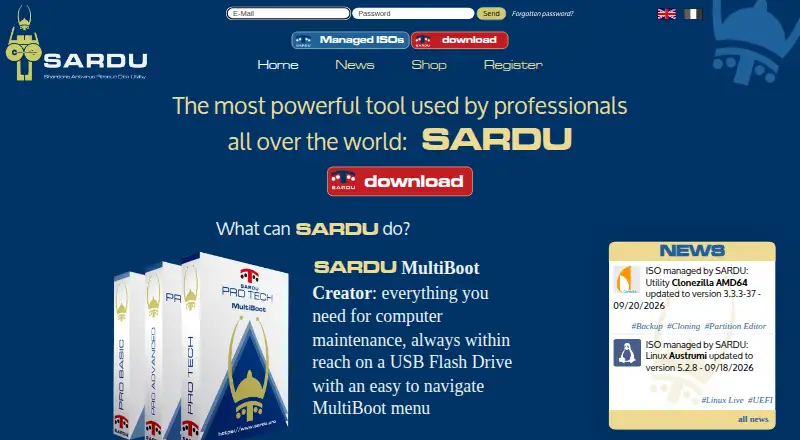
What SARDU MultiBoot Creator is
SARDU MultiBoot Creator makes a bootable multiboot drive for computer maintenance from a catalog of more than 300 bootable ISO images, grouped into Antivirus, Utility, Linux and Windows categories. It can create a rescue disk on a USB flash drive or DVD, and its downloader can fetch selected ISO images and build the USB in one step. The resulting media can support Windows installation, cloning, backup and restore, data recovery, password recovery or change, RAM testing and hard disk checks. SARDU is portable: unzip the download and use it without installation. Downloads are listed as SARDU 6.1.0 for Windows and SARDU 4.4.0 for GNU Linux. Free licenses are for personal, non-commercial use, while PRO permits commercial use. PRO supports BIOS Legacy and UEFI boot; free licenses do not include the stated PRO UEFI feature. Secure Boot must be disabled for the described Windows installation workflow. SARDU points users to its FAQ and accepts email questions in Italian or English.
Good
- Catalog includes more than 300 bootable ISO images.
- Can create media on USB or DVD.
- Built-in downloader can fetch selected ISO images.
- Portable app requires no installation.
Watch out
- Free licenses are limited to personal, non-commercial use.
- The stated UEFI boot feature is for PRO.
- Secure Boot must be disabled for the described Windows installation workflow.
Who it suits
SARDU suits people assembling maintenance or rescue media from bootable ISO images. Free licenses fit personal, non-commercial use; commercial use requires PRO.
Verdict
SARDU combines an ISO catalog, download tool and bootable-media creation for maintenance tasks. Check the license and boot-mode requirements before using it, especially for commercial work or UEFI support.
Plans and prices
From SARDU MultiBoot Creator's own pricing page, checked 8 Oct 2026.
| Plan | Price | What it gives you |
|---|---|---|
| Free registered | Free | Personal, non-commercial use · remote automatic updates |
| Free standard | Free | Personal, non-commercial use · no remote automatic updates |
| PRO Advanced | — | Up to 2 PCs · commercial use · One year from activation |
| PRO Advanced Lifetime | — | Up to 2 PCs · commercial use · No expiry |
| PRO Basic | — | 1 PC · commercial use · One year from activation |
| PRO Basic Lifetime | — | 1 PC · commercial use · No expiry |
| PRO Tech | — | Up to 3 PCs · commercial use · IT maintenance and security tools · One year from activation |
The facts
Each one read from SARDU MultiBoot Creator's own pages, with the date it was checked.
What it does
- Boot media
- The download page says SARDU can create a multiboot rescue disk on a USB flash drive or DVD.checked 8 Oct 2026
- Boot support limit
- The download page says PRO supports BIOS Legacy and UEFI boot, while free licenses do not receive the stated PRO UEFI feature.checked 8 Oct 2026
- ISO catalog
- The maker describes a catalog of over 300 bootable ISO images organized into Antivirus, Utility, Linux, and Windows categories.checked 8 Oct 2026
- ISO downloader
- SARDU includes a downloader that can fetch selected ISO images and create the multiboot USB in one step.checked 8 Oct 2026
- License limits
- The standard and registered free licenses are for personal, non-commercial use; the PRO license permits commercial use.checked 8 Oct 2026
- Operating systems
- The download page offers SARDU 6.1.0 for Windows and SARDU 4.4.0 for GNU Linux.checked 8 Oct 2026
- Privacy
- The privacy disclosure says AWS hosts the site data in the European Economic Area and describes security measures to prevent unauthorized access, disclosure, modification, and destruction.checked 8 Oct 2026
- Purpose
- SARDU creates a bootable multiboot USB drive for computer maintenance from a catalog of bootable ISO images.checked 8 Oct 2026
- Secure Boot
- The product page states that Secure Boot must be disabled for the described Windows installation workflow.checked 8 Oct 2026
- Support
- SARDU directs users to its FAQ and accepts questions by email in Italian or English.checked 8 Oct 2026
- System repair
- The maker lists Windows installation, cloning, backup and restore, data recovery, password recovery or change, RAM testing, and hard disk checks as uses for a created USB.checked 8 Oct 2026
The company
- Company identity
- The contact page identifies Davide Costa as SARDU Pro CEO and lists the business address in Sanluri, Italy.checked 8 Oct 2026
- Founded
- 2008checked 28 Sep 2026
- Headquarters
- Sanluri, Italychecked 28 Sep 2026
Where it runs
- Portable app
- The maker says SARDU is portable, requires no installation, and is ready to use after unzipping the download.checked 8 Oct 2026
The full review of SARDU MultiBoot Creator
SARDU MultiBoot Creator is a multiboot-media builder for maintaining and installing computers. It best suits technically capable users who want several repair tools on one USB drive or DVD. Its main advantage is bringing an extensive ISO catalog and downloader into one workflow; the free licenses are personal-use only, and PRO is required for commercial use and stated UEFI support.
Overview
SARDU organizes more than 300 bootable ISO images into Antivirus, Utility, Linux, and Windows categories. It can assemble a rescue disk on a USB flash drive or DVD, and its downloader can fetch selected images while creating a multiboot USB in one step. That makes it useful for building a varied maintenance kit without collecting every image separately; the catalog is less valuable if you only need a single installer.
The resulting media is intended for tasks including Windows installation, cloning, backup and restore, data and password recovery, RAM testing, and hard-disk checks. SARDU is portable: unzip the download and run it without installation. The Windows installation workflow described by the maker requires Secure Boot to be disabled, a practical limitation for systems where that setting cannot be changed.
Key features
- Multiboot ISO catalog: More than 300 images across four categories let users consolidate tools for different maintenance jobs. That breadth is valuable for recurring repair work, but may be needless overhead for a one-off installation.
- Integrated ISO downloader: Fetching selected images and building the USB in one step cuts out separate download-and-assembly stages. The feature is specifically described for USB creation, while the rescue medium can also be a DVD.
- Portable application: No installation is required; unzip the package and it is ready to run. That suits technicians who want a utility they can launch without setting up an installed application.
Pricing
SARDU is freemium, with free and paid licenses. The two free plans are limited to personal, non-commercial use. Free registered costs nothing and includes remote automatic updates; Free standard costs nothing and does not. Both are unsuitable for commercial maintenance, and neither receives the stated PRO UEFI support.
The paid options are for commercial use and are priced by computer count or term. PRO Basic is €1,190,952 a year, billed one year from activation, for 1 PC. PRO Advanced is €23,901,912 a year on the same billing term for up to 2 PCs. PRO Tech is €47,903,832 a year, billed one year from activation, for up to 3 PCs and includes IT maintenance and security tools. The lifetime licenses have no expiry: PRO Basic Lifetime is €49,902,495, paid once for 1 PC, and PRO Advanced Lifetime is €99,904,995, paid once for up to 2 PCs. The lower-cost annual tiers cover fewer PCs and do not include the Tech plan's stated tools; choose by seat count and whether ongoing annual or no-expiry licensing fits your use.
Platforms
SARDU offers a Windows release, version 6.1.0, and a GNU Linux release, version 4.4.0. There is no macOS app. Its multiboot support and USB/DVD output make it a fit for users working from either supported desktop platform, but not for Mac-only workflows.
Who it's for
SARDU is a strong fit for repair technicians and technically capable personal users who want a portable, multi-purpose rescue medium. Registered free is the better personal option for users who want remote automatic updates; standard free keeps the same personal-use restriction without them. Businesses should choose a PRO license, checking the PC allowance and UEFI requirement before committing. It is a weaker choice for a user who needs just one boot image, relies on Secure Boot for the described Windows installation process, or needs a macOS application.
Pros and cons
- Pro: A catalog of more than 300 images and an integrated downloader can turn a single USB into a broad repair toolkit.
- Pro: The portable app runs after unzipping, with Windows and GNU Linux releases available.
- Pro: The registered free license includes remote automatic updates for personal use.
- Con: Commercial use and stated PRO UEFI support require a paid license, limiting the free plans for professional deployment.
- Con: Secure Boot must be disabled for the described Windows installation workflow.
- Con: There is no macOS release, and the annual PRO plans have PC caps.
Alternatives
Bootable USB Software and Boot Manager Software are useful category roundups for comparing tools by role. For a free, open-source option across Linux, macOS, and Windows, consider balenaEtcher; its stated plans are free, though SARDU is the choice here when a multiboot maintenance catalog and integrated ISO downloader matter.
Deepin Boot Maker is a free option for Linux, macOS, and Windows, with no paid plans or usage limits stated. Fedora Media Writer is also free on those three platforms and is described around Fedora images. Raspberry Pi Imager is a free desktop imaging utility for Windows, Linux, and macOS, with its source code published publicly. Choose these when their stated platform or image focus better matches your need than SARDU's broader maintenance catalog.
UNetbootin is a free alternative for Linux, macOS, and Windows; USBImager is a free, MIT-licensed open-source option for the same platforms. YUMI is free for Linux and Windows and supports USB flash drives or microSD. These are alternatives to consider when you want a free option on their supported platforms; SARDU is more specifically suited to assembling a multi-image maintenance medium.
Buddi is free budgeting software for Linux, macOS, and Windows, so it is not a boot-media substitute.
Verdict
Choose SARDU if you maintain multiple computers and want one portable USB or DVD with a broad selection of repair and installation images. The catalog, downloader, and multiboot output are its strongest reasons to pick it. Look elsewhere if you need only a single installer, require macOS, cannot disable Secure Boot for the described Windows workflow, or need commercial or UEFI use without a PRO license.
Alternatives to SARDU MultiBoot Creator
- 1
UNetbootin
Free planOpen sourceLinuxmacOSSelf-hostedWindows7.1Free plan - 2
USBImager
Free planOpen sourceLinuxmacOSWindows7.1Free plan - 3

balenaEtcher
Free planLinuxmacOSWindows6.8From $1,720 a year - 4
FlashBoot
Free planWindows6.5$29.95 one-time - 5
WinToUSB
Free planWindows6.5$44.95 one-time - 6
Unraid USB Creator
LinuxmacOSWindows6.4$49 one-time