
Fedora Media Writer
Fedora Media Writer writes Fedora images to USB flash drives and can download the required image before writing.
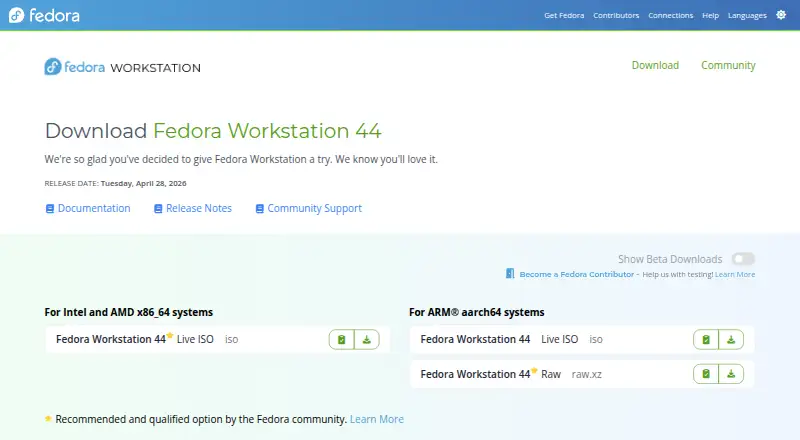
What Fedora Media Writer is
Fedora Media Writer writes Fedora images to USB flash drives and can download the required image before writing. It runs on Linux, Windows, and macOS. Fedora says a Live Fedora image on a flash drive can be booted to try Fedora without making permanent changes to the computer; getting started requires a 4GB USB drive. Writing uses direct device access and overwrites the drive’s existing contents and partition layout. The application includes a Restore feature that returns the drive to a standard single-partition layout. Fedora’s instructions describe checking the written image by comparing the USB device with the downloaded ISO or booting and running the media check. They also advise verifying downloaded images against a checksum file signed by a Fedora Project OpenPGP certificate. Installation options include Fedora’s RPM package, Flathub on Linux, Windows releases, and a macOS DMG. The project identifies the software as GPL-2.0 licensed and directs users who encounter crashes or writing errors to open an issue on GitHub. Fedora Media Writer is free, listed as free.
Good
- Can download Fedora images before writing.
- Restore feature resets the drive to one partition.
- Available for Linux, Windows, and macOS.
- Instructions describe ways to check the written image.
Watch out
- Writing an image destroys existing USB contents.
- Requires a 4GB USB flash drive.
Who it suits
Fedora Media Writer suits people preparing a USB drive to boot Fedora, including those who want to try a Live Fedora image without permanent computer changes. It is available on Linux, Windows, and macOS.
Verdict
Fedora Media Writer provides a direct route to writing Fedora images, with a restore option for the USB drive afterward. Be sure the drive contains nothing you need before writing, since its contents are overwritten.
Plans and prices
From Fedora Media Writer's own pricing page, checked 4 Oct 2026.
| Plan | Price | What it gives you |
|---|---|---|
| Fedora Media Writer | Free | Fedora images · Linux, Windows, macOS |
The facts
Each one read from Fedora Media Writer's own pages, with the date it was checked.
Money
- Bootable trial
- Fedora's download page says a Live Fedora image on a flash drive can be booted to try Fedora without making permanent changes to the computer.checked 4 Oct 2026
What it does
- Data loss
- The Fedora QA test instructions warn that writing an image destroys the USB stick's existing contents.checked 4 Oct 2026
- Download integrity
- Fedora's download page instructs users to verify downloaded images with a checksum file signed by a Fedora Project OpenPGP certificate.checked 4 Oct 2026
- Image downloads
- The application can automatically download the required image before writing it.checked 4 Oct 2026
- Image verification
- The Fedora QA test describes checking that the image was written correctly, including by comparing the USB device with the downloaded ISO or booting and running the media check.checked 4 Oct 2026
- Installation options
- Fedora's QA instructions list installation through Fedora's RPM package, Flathub on Linux, Windows releases, and a macOS DMG.checked 4 Oct 2026
- License
- The project repository identifies Fedora Media Writer as GPL-2.0 licensed.checked 4 Oct 2026
- Purpose
- Fedora Media Writer writes Fedora images to USB flash drives.checked 4 Oct 2026
- Restore feature
- Because writing overwrites the drive's partition layout, the application provides a Restore feature to return it to a standard single-partition layout.checked 4 Oct 2026
- Support
- The project asks users experiencing crashes or writing errors to open an issue on GitHub.checked 4 Oct 2026
- Supported systems
- Fedora Media Writer runs on Linux, Windows, and macOS.checked 4 Oct 2026
- USB requirement
- Fedora's download page says a 4GB USB flash drive is needed to get started with Fedora Media Writer.checked 4 Oct 2026
- Write behavior
- The project describes writing the image in a dd-like fashion using direct device access.checked 4 Oct 2026
The company
- Founded
- 2003checked 28 Sep 2026
The full review of Fedora Media Writer
Fedora Media Writer is a free utility for putting Fedora images on USB flash drives. It is best for people preparing Fedora installation or Live media on Linux, Windows, or macOS; its focused Fedora purpose makes it a less natural fit for broader USB-imaging needs.
Overview
The app can download the Fedora image before writing it, keeping image retrieval and USB preparation in one workflow. Fedora says a Live image can be booted to try the operating system without making permanent changes to the computer, so the tool also supports a low-commitment first look. You will need a 4GB USB flash drive.
Writing uses direct device access in a dd-like manner and destroys the drive’s existing contents. That is appropriate for creating bootable media, but makes checking the target drive and moving any files off it essential before proceeding. Fedora’s download guidance also recommends verifying an image with a checksum file signed by a Fedora Project OpenPGP certificate.
Key features
Write and restore
Writing changes the USB drive’s partition layout. The Restore feature returns it to a standard single-partition layout, which is useful when you want to reuse the stick for ordinary storage afterward. It does not change the fact that the original contents are overwritten.
Check the result
Fedora’s QA guidance describes verifying a written image by comparing the USB device with the downloaded ISO, or by booting the drive and running the media check. These checks provide a way to catch a faulty write rather than assuming the drive is ready.
Getting help
For crashes or writing errors, the project asks users to open an issue on GitHub. The software is GPL-2.0 licensed.
Pricing
Fedora Media Writer is free, with no free trial because there is no paid plan to try. The Fedora Media Writer plan costs nothing and covers Fedora images on Linux, Windows, and macOS. There are no paid tiers or plan quotas to weigh; its main limitation is scope, not a feature gate.
Platforms
Fedora Media Writer runs on Linux, Windows, and macOS. Fedora’s installation options include its RPM package and Flathub on Linux, Windows releases, and a macOS DMG. That broad desktop coverage suits users preparing a Fedora USB from whichever of these systems they already use.
Who it's for
Choose it if your goal is to create Fedora bootable media, especially if you want the app to download the image and then restore the USB layout for later reuse. It is also a sensible route for someone who wants to try Fedora from a Live USB without changing the computer. Look elsewhere if your needs center on a general-purpose imaging workflow or preserving data on the target drive.
Pros and cons
Pros
- Automatic Fedora image downloads keep fetching and writing in one app.
- Restore returns the USB drive to a standard single-partition layout after the write.
- Linux, Windows, and macOS support makes it usable from the major desktop platforms.
- Fedora QA guidance offers concrete ways to check the write, including a media check when booted.
Cons
- Writing destroys the USB drive’s existing contents, so it cannot be used safely without first moving needed files.
- Its stated purpose is Fedora images, so users seeking a broader bootable-USB tool should consider alternatives.
- Image integrity requires attention to the separate checksum verification step recommended by Fedora.
Alternatives
balenaEtcher is a free, open-source alternative on Linux, macOS, and Windows; consider it if you prefer an imaging tool presented as open source rather than one focused on Fedora images.
UNetbootin is another free option for Linux, macOS, and Windows, with donations accepted and no paid plans.
USBImager is a free, MIT-licensed option for Linux, macOS, and Windows.
YUMI is free and supports Windows and Linux, with USB flash drives or microSD cards as its stated media; choose it if that platform and media combination suits your setup.
Easy2Boot is a free option for Linux and Windows; its menu system uses open-source components and plain-text scripts, while its download also includes the maker’s closed-source Windows utilities.
Universal USB Installer is free for Linux and Windows and recommends an 8GB-or-larger USB drive; its listed Windows 10/11 or modern Linux requirements for UUI Py and persistence up to 40GB may matter if those fit your use.
Buddi is free budgeting software for Linux, macOS, and Windows, rather than a bootable USB tool.
TFLint is a free command-line Terraform linter for Linux, macOS, self-hosted environments, and Windows, not a bootable USB utility.
Browse the Bootable USB Software directory for more options.
Verdict
Fedora Media Writer is a strong fit for anyone who wants a free, direct way to prepare Fedora bootable media across Linux, Windows, or macOS. Automatic image downloads and USB restore make the workflow practical, but the destructive write and Fedora-centered purpose are decisive reasons to look elsewhere if you need to keep existing drive contents or want a broader tool.
Alternatives to Fedora Media Writer
- 1
UNetbootin
Free planOpen sourceLinuxmacOSSelf-hostedWindows7.1Free plan - 2
USBImager
Free planOpen sourceLinuxmacOSWindows7.1Free plan - 3

balenaEtcher
Free planLinuxmacOSWindows6.8From $1,720 a year - 4
FlashBoot
Free planWindows6.5$29.95 one-time - 5
WinToUSB
Free planWindows6.5$44.95 one-time - 6
Unraid USB Creator
LinuxmacOSWindows6.4$49 one-time