
Deepin Boot Maker
Deepin Boot Maker is a free, open-source utility for creating a Deepin boot disk from an ISO image.
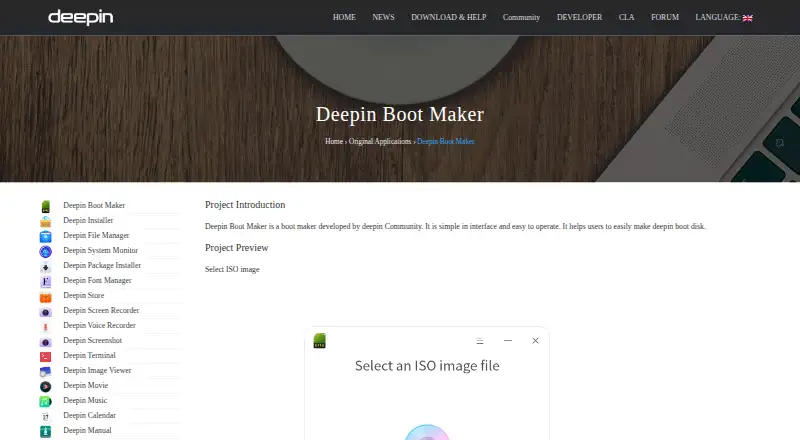
What Deepin Boot Maker is
Deepin Boot Maker is a free, open-source utility for creating a Deepin boot disk from an ISO image. Its workflow is to select an ISO, choose a USB disk, start creating the disk, and complete the process. The project is designed for Deepin installation ISOs and also works with Ubuntu live installation ISOs. ISO images can also be added by dragging and dropping them into the software. The official download directory lists a Windows executable and a macOS ZIP archive. For Linux, Deepin users can install it from the repository with `sudo apt-get install deepin-boot-maker`; the README says the only binary release is currently from a Deepin OS ISO. The project is licensed under GPL-3.0-only, and its product page links to the source code. The README lists a wiki, forum, Developer Center, and Matrix for usage help. Developed by the deepin Community, the project encourages issue reports and code contributions.
Good
- Free and licensed under GPL-3.0-only
- Works with Deepin and Ubuntu live install ISOs
- Windows and macOS downloads are listed
- Usage help includes a wiki, forum, and Matrix
Watch out
- The only binary release is currently from a Deepin OS ISO
- Linux repository installation instructions are for Deepin users
Who it suits
It suits people who want to create a Deepin boot disk, including those working with Deepin or Ubuntu live installation ISOs. Windows and macOS downloads are listed, while Linux repository installation is described for Deepin users.
Verdict
Deepin Boot Maker provides a short ISO-to-USB workflow and supports Deepin and Ubuntu live installation images. Check the platform-specific distribution details before choosing how to install it.
Plans and prices
From Deepin Boot Maker's own pricing page, checked 11 Oct 2026.
| Plan | Price | What it gives you |
|---|---|---|
| Deepin Boot Maker | Free | No paid plans or usage limits stated |
The facts
Each one read from Deepin Boot Maker's own pages, with the date it was checked.
What it does
- Contributions
- The README encourages users to report issues and contribute changes.checked 11 Oct 2026
- Distribution
- The README says the only binary release is currently from a Deepin OS ISO; Deepin users can also install it from the repository.checked 11 Oct 2026
- Drag and drop
- A Deepin article says the software supports dragging and dropping ISO images to add them.checked 11 Oct 2026
- How it works
- The product page shows a workflow to select an ISO image, select a USB disk, start making the disk, and complete the process.checked 11 Oct 2026
- Integrations
- The product page links to a Transifex location for the project's internationalization work.checked 11 Oct 2026
- ISO support
- The project README says it is designed for Deepin install ISOs and also works with Ubuntu live install ISOs.checked 11 Oct 2026
- License
- The project is licensed under GPL-3.0-only.checked 11 Oct 2026
- Purpose
- Deepin Boot Maker helps users create a Deepin boot disk.checked 11 Oct 2026
- Source availability
- The product page links to the project's source code on GitHub.checked 11 Oct 2026
- Support
- The project README lists a wiki, forum, Developer Center, and Matrix for usage help.checked 11 Oct 2026
- Workflow
- The product page shows steps to select an ISO image, select a USB disk, start making the disk, and complete the process.checked 11 Oct 2026
Where it runs
- Linux installation
- The repository says Deepin users can install the tool from the repository with apt-get install deepin-boot-maker.checked 11 Oct 2026
- Linux packaging
- The README gives `sudo apt-get install deepin-boot-maker` as the repository installation command for Deepin users.checked 11 Oct 2026
- macOS
- The official download directory lists a macOS ZIP archive named deepin-boot-maker.zip.checked 11 Oct 2026
- Platforms
- The product page links to Windows and macOS downloads, and the project README describes installation from the Deepin repository.checked 11 Oct 2026
- Windows
- The official download directory lists a Windows executable named deepin-boot-maker.exe.checked 11 Oct 2026
The company
- Maker
- Deepin Boot Maker is developed by the deepin Community.checked 11 Oct 2026
- Maker security statement
- Deepin Technology describes itself as aiming to provide safe and reliable Linux-based operating systems and open-source solutions.checked 11 Oct 2026
The full review of Deepin Boot Maker
Deepin Boot Maker is a free utility for turning installation images into bootable USB disks. It is best suited to people preparing Deepin or Ubuntu live media. Its focused image support keeps the job straightforward, but makes it a limited choice for other distributions.
Overview
The tool centers on one task: preparing a USB disk from an ISO. That focus is useful when the image is supported, but readers who need a writer for a broader mix of distributions should look elsewhere.
Key features
The process moves through four steps: choose an ISO, select a USB disk, start writing, and finish. Users can also drag and drop an ISO to add it. This is a compact workflow for making installation media, without a wider set of image uses established by the supported formats: Deepin install ISOs and Ubuntu live install ISOs.
Deepin Boot Maker is developed by the deepin Community under the GPL-3.0-only license, and its source code is available on GitHub. Users can report issues and contribute changes. A wiki, forum, Developer Center, and Matrix offer usage help; Transifex supports the project's internationalization work.
Pricing
The Deepin Boot Maker plan costs nothing. The project is open source, with no paid plans or usage limits stated. That makes the price simple for anyone who needs the supported workflow, whether occasionally or repeatedly.
Platforms
Apps are available for Linux, Windows, and macOS. The official download directory provides a Windows executable and a macOS ZIP archive. Deepin users can install the Linux version from the repository with sudo apt-get install deepin-boot-maker. The README says the only binary release is currently distributed from a Deepin OS ISO, which makes Linux installation less direct for users who are not on Deepin.
Who it's for
Choose Deepin Boot Maker if you need to create a Deepin installer or Ubuntu live installation disk and value a focused, free tool. It is less suitable for users who want to write other distributions' images or need a general-purpose USB imaging utility.
Pros and cons
Pros
- Free and GPL-3.0-only, with source code available for users who want to inspect or contribute to the project.
- Supports Deepin and Ubuntu live install ISOs, with both file selection and drag-and-drop input.
- Has Linux, Windows, and macOS apps, plus several channels for usage help.
Cons
- Its stated ISO support focuses on Deepin and Ubuntu live install images, limiting its usefulness for other distributions.
- The only binary release is currently distributed from a Deepin OS ISO; users on other Linux distributions may find setup less convenient.
Alternatives
balenaEtcher is a free, open-source option for readers seeking a similar cross-platform choice. For a Fedora image, Fedora Media Writer is the more targeted pick, with free apps for Linux, macOS, and Windows. SARDU MultiBoot Creator suits readers considering a freemium tool with Windows and Linux support. Buddi, Raspberry Pi Imager, UNetbootin, USBImager, and YUMI are other listed alternatives.
See the Bootable USB Software directory for more options.
Verdict
Deepin Boot Maker is a sound pick for users creating Deepin or Ubuntu live USB media who want a free, open-source tool with a short workflow. Its strongest reason to choose it is that focused simplicity; its main reason to look elsewhere is the narrow ISO support, especially if you need media for other distributions.
Getting started
- Open the Deepin Boot Maker website
- Download the Windows executable or macOS ZIP, or use the Deepin repository on Linux
- On Deepin Linux, install with sudo apt-get install deepin-boot-maker
- Launch the application
- Select an ISO image, or drag and drop it into the software
- Select a USB disk and start making the disk
Questions
Is Deepin Boot Maker free?
Yes. The listed plan costs nothing, and the project is open source.
Which operating systems are supported?
Applications are listed for Linux, macOS, and Windows.
Which ISO files does it support?
It is designed for Deepin install ISOs and also works with Ubuntu live install ISOs.
How can Deepin users install it on Linux?
The repository gives sudo apt-get install deepin-boot-maker as the installation command.
Is the source code available?
Yes. The product page links to the project's source code on GitHub.
Where can users get help?
The README lists a wiki, forum, Developer Center, and Matrix.
Alternatives to Deepin Boot Maker
- 1
UNetbootin
Free planOpen sourceLinuxmacOSSelf-hostedWindows7.1Free plan - 2
USBImager
Free planOpen sourceLinuxmacOSWindows7.1Free plan - 3

balenaEtcher
Free planLinuxmacOSWindows6.8From $1,720 a year - 4
FlashBoot
Free planWindows6.5$29.95 one-time - 5
WinToUSB
Free planWindows6.5$44.95 one-time - 6
Unraid USB Creator
LinuxmacOSWindows6.4$49 one-time