Salesforce Visual Remote Assistant
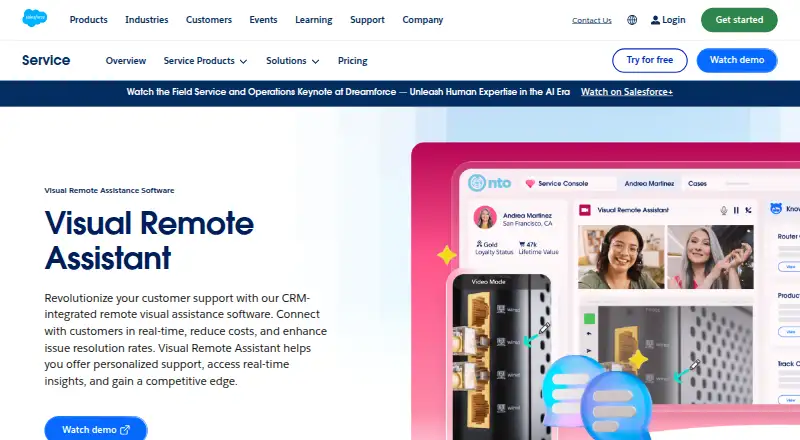
The facts below are what the maker publishes about Salesforce Visual Remote Assistant, checked and dated. Our editors have not written about it yet.
Plans and prices
From Salesforce Visual Remote Assistant's own pricing page, checked 14 Nov 2026.
| Plan | Price | What it gives you |
|---|---|---|
| Visual Remote Assistant | $50 a month | Per user · Annual contract required · Annual contract required |
The facts
Each one read from Salesforce Visual Remote Assistant's own pages, with the date it was checked.
What it does
- Augmented reality
- Agents use video, screenshots, and on-screen annotations, including arrows drawn with augmented reality, to guide troubleshooting.checked 14 Nov 2026
- Desktop sharing
- Desktop sharing lets teams guide customers through actions while keeping sensitive information confidential.checked 14 Nov 2026
- How a session starts
- An agent or technician sends a secure SMS or email link, and the customer joins a two-way video stream in a mobile browser with no app, login, or password.checked 14 Nov 2026
- Integrations
- It is used with Contact Center, Field Service and Operations, and Sales Cloud, and sessions can show Field Service customer, asset, and work-order details.checked 14 Nov 2026
- License prerequisites
- Setup requires Service Cloud or Field Service licenses, Lightning Experience, Visual Remote Assistant licenses bought through an account executive, and the managed package.checked 14 Nov 2026
- Live video
- Agents connect with customers and employees through live video without a download.checked 14 Nov 2026
- Low bandwidth
- Salesforce says remote visual assistance is designed to keep working on low or variable bandwidth by reducing video quality to still frames if needed.checked 14 Nov 2026
- Notable limit
- Visual Remote Assistant is not available in a Trailhead Playground, and the published edition requires an annual contract.checked 14 Nov 2026
- Recording
- Sessions can be recorded automatically so teams can review missed details, performance, and call quality.checked 14 Nov 2026
- Security and privacy
- Customers approve terms and conditions and grant camera access for the call, and the join link is described as secure.checked 14 Nov 2026
- Support
- The pricing page lists a Standard Success Plan in all licenses, Premier Success with 24/7 support for business-stopping issues, and Signature Success by contacting an account executive.checked 14 Nov 2026
- Visual Flows
- Visual Flows automate tasks, use optical character recognition to open knowledge articles, and can add a CSAT survey after each session.checked 14 Nov 2026
- What it does
- Visual Remote Assistant is CRM-integrated software for real-time visual support that helps reduce costs and improve issue resolution.checked 14 Nov 2026
- Who it is for
- It is aimed at contact-center agents, field technicians, and sales teams in manufacturing, healthcare, equipment services, utilities, and contact centers.checked 14 Nov 2026
The company
- Founded
- 1999checked 4 Oct 2026
- Headquarters
- San Francisco, California, United Stateschecked 4 Oct 2026
Money
- Trial offer
- The product and pricing pages offer a 30-day Service Cloud trial with no credit card and no installations.checked 14 Nov 2026
Alternatives to Salesforce Visual Remote Assistant
- 1

Zoho Assist
Free planAndroidiOSWebLinux8.1From $10 a month - 2

Blitzz Visual Remote Assistance
AndroidiOSWebAPI7.8From $19 a month - 3

Cobrowse.io
AndroidiOSWebAPI7.6From $18 a month - 4

LiveCall
Free planAndroidiOSWebAPI7.5Free plan - 5

Median
Free planWebAPISelf-hosted7.3Free plan - 6

Surfly
Free planAndroidiOSWebAPI7.3Free plan