
RunCode.io
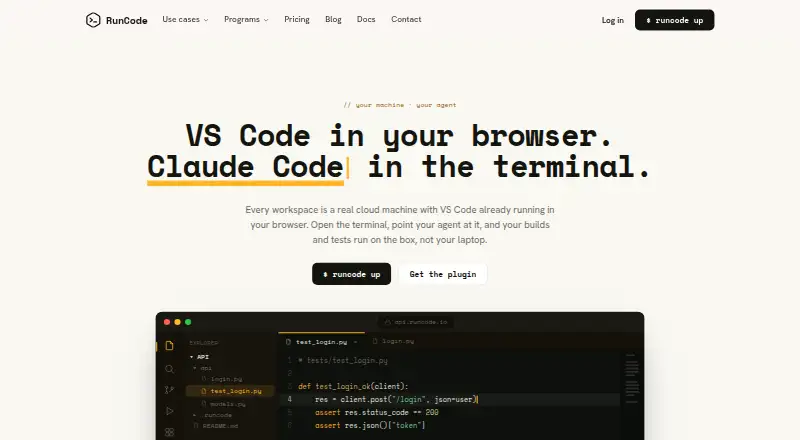
RunCode.io provides cloud development workspaces with VS Code in a browser, while builds and tests run on the cloud machine.
What RunCode.io is
RunCode.io provides cloud development workspaces with VS Code in a browser, while builds and tests run on the cloud machine. Users can share running workspaces and collaborate on code in real time. RunCode says development can happen from a laptop, tablet, or phone without installing or configuring software. Its browser IDE includes an integrated terminal, port forwarding, and Git source control, with repository connections for GitHub, GitLab, and Bitbucket. It supports Linux-based languages and frameworks such as Python, C++, Java, PHP, Node.js, C#, Ruby, and Go. Users can launch pre-configured or blank workspaces. Plugin documentation describes connections for Codex and Claude Code, plus SSH access for VS Code Remote, JetBrains, git, scp, rsync, and plain SSH. Compute is billed per second while running, and stopped workspace storage costs $0.10/GB-month until resumed or deleted. RunCode says workspace data is stored in MinIO behind firewalls, and access can be VPN-restricted. The Beginner plan allows two parallel workspaces with a 30-minute inactivity timeout.
Good
- Browser IDE includes terminal, port forwarding, and Git controls.
- Supports several repository hosts and programming languages.
- Workspaces can be shared for real-time collaboration.
- SSH access includes JetBrains and VS Code Remote.
Watch out
- No free plan is offered.
- Compute is billed while workspaces run.
- Stopped workspace storage incurs a monthly charge.
Who it suits
RunCode.io suits developers who want browser-based cloud workspaces, including people using a laptop, tablet, or phone. Its sharing and repository connections may also suit teams collaborating on code.
Verdict
RunCode.io moves VS Code development into cloud workspaces, with device access, collaboration, and repository connections. Account for both per-second compute billing and storage charges when a workspace is stopped.
Plans and prices
From RunCode.io's own pricing page, checked 22 Sep 2026.
| Plan | Price | What it gives you |
|---|---|---|
| Tiny | $0.03 a month | 2 GB RAM · 2 vCPU · 10 GB disk · Plus $1.00/month storage when stopped |
| Small | $0.05 a month | 4 GB RAM · 2 vCPU · 20 GB disk · Plus $2.00/month storage when stopped |
| Medium | $0.09 a month | 8 GB RAM · 2 vCPU · 30 GB disk · Plus $3.00/month storage when stopped |
| Large | $0.18 a month | 16 GB RAM · 4 vCPU · 50 GB disk · Plus $5.00/month storage when stopped |
| X-Large | $0.35 a month | 32 GB RAM · 8 vCPU · 100 GB disk · Plus $10.00/month storage when stopped |
| Beginner | Free | 2 parallel workspaces · 30-min inactivity timeout · live collaboration · private and public repositories · GitHub, GitLab, Bitbucket · Pay-Per-Use |
| Enterprise | Free | 8 parallel workspaces · 30-min inactivity timeout · standard and performance workspaces · organisation and team sharing · wire transfer, card and invoicing · Pay-Per-Use |
| Tiny performance workspace | $0.03 a month | 2 GB RAM · 2 vCPU · 10 GB disk · Compute per second while running; + $1.00/mo storage when stopped |
| Small performance workspace | $0.05 a month | 4 GB RAM · 2 vCPU · 20 GB disk · Compute per second while running; + $2.00/mo storage when stopped |
| Medium performance workspace | $0.09 a month | 8 GB RAM · 2 vCPU · 30 GB disk · Compute per second while running; + $3.00/mo storage when stopped |
| Large performance workspace | $0.18 a month | 16 GB RAM · 4 vCPU · 50 GB disk · Compute per second while running; + $5.00/mo storage when stopped |
| X-Large performance workspace | $0.35 a month | 32 GB RAM · 8 vCPU · 100 GB disk · Compute per second while running; + $10.00/mo storage when stopped |
The facts
Each one read from RunCode.io's own pages, with the date it was checked.
Money
- Billing
- Compute is billed per second while a workspace runs; stopped workspace storage is billed at $0.10/GB-month until the workspace is resumed or deleted.checked 7 Oct 2026
- Free plan
- Nochecked 22 Sep 2026
Where it runs
- Browser IDE
- The browser IDE includes an integrated terminal, port forwarding, and a Git source control panel.checked 7 Oct 2026
- Device access
- RunCode says users can develop from a laptop, tablet, or phone without installing or configuring software.checked 7 Oct 2026
What it does
- Collaboration
- Users can share running workspaces and code together in real time.checked 7 Oct 2026
- Editors and agents
- RunCode's plugin documentation describes connections for Codex and Claude Code, and SSH access for VS Code Remote, JetBrains, git, scp, rsync, and plain SSH.checked 7 Oct 2026
- Integrations
- The pricing page lists GitHub, GitLab, and Bitbucket repository connections.checked 7 Oct 2026
- Product
- RunCode provides cloud development workspaces with VS Code running in the browser, where builds and tests run on the cloud machine.checked 7 Oct 2026
- Security
- RunCode says workspace data is stored in MinIO behind firewalls, workspaces receive a fresh passcode on restart, and access can be restricted to a VPN.checked 7 Oct 2026
- SSH security
- The SSH documentation says private keys remain on the user's machine, while access uses short-lived workspace-scoped sessions and a pinned gateway host key.checked 7 Oct 2026
- Support
- RunCode says students, startups, institutions, and open-source teams can receive onboarding and community support.checked 7 Oct 2026
- Technology support
- RunCode supports Linux-based languages and frameworks, including Python, C++, Java, PHP, Node.js, C#, Ruby, and Go.checked 7 Oct 2026
- Workspace configuration
- Users can launch pre-configured workspaces or blank workspaces, according to RunCode's nonprofit program page.checked 7 Oct 2026
The company
- Company identity
- RunCode's blog identifies the founder and CEO as Ashwin Kumar and the company as RunCode Inc.checked 7 Oct 2026
- Founded
- RunCode's blog says the product journey began in 2019; an exhibitor directory describes RunCode.io as founded in 2022 in Telangana, India.checked 7 Oct 2026
The full review of RunCode.io
RunCode.io provides cloud development workspaces with VS Code in a browser, while builds and tests run on the remote machine. It is a strong fit for developers who need to work across devices or collaborate in a shared environment. Its main trade-off is a paid usage model that charges for both running compute and stopped workspace storage.
Overview
RunCode moves the development machine into the cloud, letting a laptop, tablet, or phone connect without installing or configuring software. Workspaces can be pre-configured or blank, and users can share a running workspace to code together in real time. That makes it useful when collaborators need a common environment or when local devices differ in capacity. Developers who want a free plan or a machine whose costs end when it is shut down should look elsewhere.
Key features
Browser IDE and remote tools
The browser IDE combines VS Code with an integrated terminal, port forwarding, and a Git source control panel. SSH access also connects VS Code Remote, JetBrains, git, scp, rsync, and plain SSH, while documented integrations cover Codex and Claude Code. This range accommodates browser-first work as well as familiar local tools, though it still relies on a cloud workspace rather than a local development machine.
Languages, repositories, and collaboration
RunCode supports Linux-based languages and frameworks including Python, C++, Java, PHP, Node.js, C#, Ruby, and Go. GitHub, GitLab, and Bitbucket repository connections cover the major hosted code platforms named for the service. Real-time shared workspaces can help a team work in the same environment; the Beginner plan's two parallel workspaces may suit an individual or small workload, but it is a narrow ceiling for juggling several projects.
Access and security
RunCode says workspace data is stored in MinIO behind firewalls, each restart receives a fresh passcode, and access can be restricted to a VPN. For SSH, private keys stay on the user's machine; access uses short-lived sessions scoped to a workspace and a pinned gateway host key. These controls provide concrete safeguards for remote access, while the VPN restriction is useful for teams that need to limit who can reach a workspace.
Pricing
RunCode has no free plan. Its price sheet combines per-second compute rates with monthly storage charges, so the compute rate alone does not represent the full cost of keeping a workspace. Stopped workspace storage is billed at $0.10/GB-month until the workspace is resumed or deleted.
| Plan | Compute | Storage when stopped | Resources |
|---|---|---|---|
| Tiny | $0.03 a month | Plus $1.00/month | 2 GB RAM, 2 vCPU, 10 GB disk |
| Small | $0.05 a month | Plus $2.00/month | 4 GB RAM, 2 vCPU, 20 GB disk |
| Medium | $0.09 a month | Plus $3.00/month | 8 GB RAM, 2 vCPU, 30 GB disk |
| Large | $0.18 a month | Plus $5.00/month | 16 GB RAM, 4 vCPU, 50 GB disk |
| X-Large | $0.35 a month | Plus $10.00/month | 32 GB RAM, 8 vCPU, 100 GB disk |
The Tiny and Small tiers are the lower-cost starting points for lighter projects; Medium doubles Tiny's RAM, while Large and X-Large add substantially more memory, CPU, and disk for heavier workloads. Each rate is billed per second while a workspace runs, and the storage charge applies after it stops. The Beginner plan has custom pricing, two parallel workspaces, and a 30-minute inactivity timeout. Enterprise also has custom pricing and the same timeout, with up to eight parallel workspaces. The higher workspace allowance suits more concurrent work, but both plans impose an inactivity limit.
The separately named Tiny, Small, and Medium performance workspace options show the same compute rates and resource sizes, with storage charges of + $1.00/mo, + $2.00/mo, and + $3.00/mo respectively when stopped. Buyers should account for the running rate and the recurring storage amount together when estimating costs.
Platforms
RunCode lists Android, iOS, Linux, macOS, Windows, the web, and an extension. This breadth supports connecting from mobile devices as well as desktop systems, although the work itself runs in the cloud. Persistent storage is supported, VCS hosts can be multiple, and JetBrains support is available. RunCode does not offer a self-hosted option, which rules it out for teams that require development environments on their own infrastructure.
Who it's for
RunCode suits developers who want a cloud-hosted Linux environment accessible from different devices, teams that benefit from real-time shared workspaces, and users who need both browser and SSH editor access. Its range of workspace sizes serves projects with different resource needs. It is less suitable for cost-sensitive users who require a free tier, people who want all charges to stop when work pauses, or organizations that need self-hosting.
Pros and cons
- Pro: Browser IDE and SSH options, including JetBrains and VS Code Remote, let developers choose how to reach the same cloud workspace.
- Pro: Real-time workspace sharing and GitHub, GitLab, and Bitbucket connections support collaborative work across common repository hosts.
- Pro: Workspace sizes span 2 GB to 32 GB RAM, with up to 8 vCPU and 100 GB disk on X-Large.
- Con: There is no free plan, so trying the service requires paid usage.
- Con: Stopping a workspace ends compute billing but leaves a storage charge until it is resumed or deleted.
- Con: Beginner and Enterprise workspaces time out after 30 minutes of inactivity, which may interrupt unattended work.
- Con: There is no self-hosted option for organizations that need to run the platform on their own infrastructure.
Alternatives
Cloud Development Environments and Coding Playgrounds are useful starting points for comparing services by category.
- Replit is the better fit for readers who want a free daily-usage option, with one live project and one background task at a time.
- GitHub Codespaces offers a free plan and 2-core compute at $0.18 a month, making it worth considering for readers who prioritize a free tier or GitHub's service.
- PaizaCloud Cloud IDE has a free plan with one server and up to 24-hour server lifetime, a fit for readers whose needs fit within those limits.
- Coder offers unlimited self-hosted workspaces on its free Community plan, for teams that want infrastructure they control.
- Daytona offers a pay-as-you-go plan with 5 GiB storage free before storage charges, which may suit readers seeking a free storage allowance.
- Kloudlite publishes its controllers, CRDs, CLI, and workspace images under the MIT license, for readers who value an open-source stack.
- Okteto has a free Starter plan for five seats, a useful alternative for a small team comparing seat-based plans.
- AWS Cloud9 charges no additional fee for Cloud9 itself, while AWS resource use is billed at normal rates; it may suit readers already choosing AWS resources or an existing Linux server over RunCode's workspace plans.
Verdict
Choose RunCode.io if you want a shared, device-flexible cloud workspace with browser and SSH access across a broad range of development tools. Its strongest case is combining collaboration with multiple ways to work in the same persistent environment. Look elsewhere if you need a free plan, self-hosting, or costs that end when you stop a workspace.
Getting started
- Open the RunCode.io website
- Choose a listed workspace plan
- Launch a pre-configured or blank workspace
- Open VS Code in the browser
- Connect a GitHub, GitLab, or Bitbucket repository
- Use the browser terminal, port forwarding, or Git panel
Limits worth knowing
RunCode has no free plan. Beginner allows two parallel workspaces and Enterprise allows eight; both list a 30-minute inactivity timeout. Stopped workspace storage is billed at $0.10/GB-month until the workspace is resumed or deleted.
Questions
Does RunCode.io offer a free plan?
No.
Which devices and platforms can access RunCode?
It lists Android, iOS, Linux, macOS, Windows, web, and an extension. Development can be accessed from a laptop, tablet, or phone through the browser.
Which repositories can I connect?
The pricing page lists GitHub, GitLab, and Bitbucket connections.
What does the Tiny workspace provide?
Tiny costs $0.03 per month and lists 2 GB RAM, 2 vCPU, and 10 GB disk. It adds $1.00 per month for storage when stopped.
How is usage billed?
Compute is billed per second while a workspace runs. Stopped workspace storage is billed at $0.10/GB-month until resumed or deleted.
Can I use JetBrains or SSH?
Yes. Documentation describes SSH access for JetBrains, VS Code Remote, git, scp, rsync, and plain SSH.
Alternatives to RunCode.io
- 1

Replit
Free planAndroidiOSWebLinux9.2From $18 a month - 2

StackBlitz
Free planAndroidiOSWebAPI8.9Free plan - 3

Playcode
Free planAndroidiOSWebAPI8.9From $25 a month - 4
Paperspace Gradient
Free planOpen sourceWebAPIExtensionLinux8.7From $8 a month - 5
GitHub Codespaces
Free planAndroidiOSWebAPI8.6Free plan - 6

JDoodle
Free planAndroidiOSWebAPI8.6From $4 a month