GitHub Codespaces
GitHub Codespaces provides configured cloud development environments hosted by GitHub.
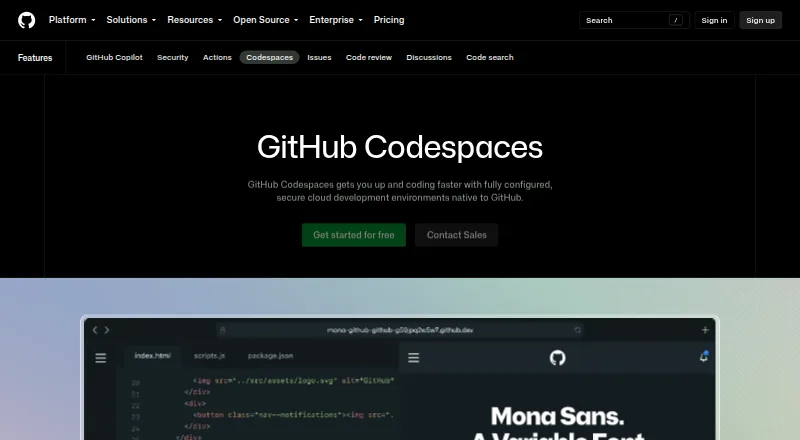
What GitHub Codespaces is
GitHub Codespaces provides configured cloud development environments hosted by GitHub. Repository dev container files let a project specify an environment that users can recreate, and a codespace can start from a template or a repository branch or commit. Each runs in a Docker container on a GitHub-hosted virtual machine; available machine sizes span 2 cores, 8 GB RAM and 32 GB storage through 32 cores, 128 GB RAM and 128 GB storage. Developers can connect through a browser, Visual Studio Code or GitHub CLI from any internet-connected device, including an iPad. An extension also connects a GitHub account to a local Visual Studio Code installation. Each codespace gets its own virtual machine and isolated network, including after restart. Connections use a TLS-encrypted tunnel and GitHub authentication, and forwarded ports default to private. GitHub Free personal accounts include 120 compute hours and 15 GB-month storage; Pro includes 180 hours and 20 GB-month. Usage is billed monthly beyond included use. Codespaces cannot be self-hosted and is unavailable for repositories owned by managed user accounts.
Good
- Start from a template, branch or commit
- Connect from any internet-connected device
- Dev container files define repeatable environments
- Each codespace uses an isolated virtual machine and network
- Organization owners can set access and spending controls
Watch out
- Cannot be self-hosted
- Unavailable for managed-user-account repositories
- Free and Pro accounts have included compute and storage quotas
Who it suits
Codespaces suits developers who want repository-configured cloud environments accessible through a browser, VS Code or the CLI. It can also suit teams that need organization controls for access and spending.
Verdict
Codespaces offers configurable cloud development environments with browser, editor and CLI access. Its GitHub hosting requirement, included-usage quotas and managed-account restriction are key constraints.
Plans and prices
From GitHub Codespaces's own pricing page, checked 22 Sep 2026.
| Plan | Price | What it gives you |
|---|---|---|
| 2-core compute | $0.18 a month | 2-core machine · Usage is billed monthly. |
| 4-core compute | $0.36 a month | 4-core machine · Usage is billed monthly. |
| 8-core compute | $0.72 a month | 8-core machine · Usage is billed monthly. |
| 16-core compute | $1.44 a month | 16-core machine · Usage is billed monthly. |
| 32-core compute | $2.88 a month | 32-core machine · Usage is billed monthly. |
| Codespaces storage | $0.07 a month | Storage for codespaces and prebuilds · Usage is billed monthly. |
| GitHub Codespaces personal included usage | Free | GitHub Free: 120 compute hours · 15 GB-month storage · 2-core machines cost $0.18/hour beyond quota · storage $0.07/GB-month · Monthly included quota; additional use billed monthly |
| GitHub Codespaces pay-as-you-go | $0.18 a month | 2-core compute: $0.18/hour · 4-core: $0.36/hour · 8-core: $0.72/hour · 16-core: $1.44/hour · 32-core: $2.88/hour · storage: $0.07/GB-month · Compute billed monthly; storage billed monthly |
The facts
Each one read from GitHub Codespaces's own pages, with the date it was checked.
What it does
- Access
- Users can connect through a browser, Visual Studio Code, or GitHub CLI.checked 28 Sep 2026
- Authentication
- Codespace connections use a TLS-encrypted tunnel and GitHub authentication, and each codespace receives a new GitHub token when created or restarted.checked 28 Sep 2026
- Cloud-hosted runtime
- Each codespace runs in a Docker container on a GitHub-hosted virtual machine, with machine types from 2 cores, 8 GB RAM, and 32 GB storage up to 32 cores, 128 GB RAM, and 128 GB storage.checked 28 Sep 2026
- Configuration
- Repository dev container configuration files let projects define repeatable development environments for users.checked 28 Sep 2026
- Entry points
- A codespace can be created from a template or from any branch or commit in a repository.checked 28 Sep 2026
- Integrations
- The GitHub Codespaces extension connects a GitHub account to develop directly in a local Visual Studio Code installation.checked 28 Sep 2026
- Managed accounts
- Codespaces is not available for repositories owned by managed user accounts.checked 28 Sep 2026
- Organization controls
- Organizations can choose which repositories and users have access to Codespaces and can set spending limits.checked 28 Sep 2026
- Port forwarding
- Forwarded ports are private by default, and organization owners can restrict public or organization-wide port visibility.checked 28 Sep 2026
- Purpose
- Codespaces provides configured cloud development environments hosted by GitHub.checked 28 Sep 2026
- Security isolation
- Each codespace uses its own newly built virtual machine and isolated virtual network, and is deployed to a new VM when restarted.checked 28 Sep 2026
- Self hosting
- GitHub states that Codespaces cannot be self-hosted.checked 28 Sep 2026
- Usage limits
- GitHub Free personal accounts include 120 compute hours and 15 GB-month of storage, while GitHub Pro includes 180 hours and 20 GB-month.checked 28 Sep 2026
Where it runs
- Device support
- Codespaces can be started from any device with internet access, including an iPad.checked 28 Sep 2026
The company
- Founded
- 2008checked 28 Sep 2026
- Headquarters
- San Francisco, California, United Stateschecked 28 Sep 2026
Money
- Free plan
- Yeschecked 22 Sep 2026
The full review of GitHub Codespaces
GitHub Codespaces is a cloud service for creating development workspaces from GitHub repositories. It suits developers and teams that want a repeatable environment they can open from different devices and editors. Its strongest case is configurable, GitHub-connected workspaces; the trade-off is usage-based cost and no self-hosted option.
Overview
Each codespace runs in a Docker container on a GitHub-hosted virtual machine. A repository’s dev container configuration can define the environment so contributors start from the same setup, while a codespace can be created from a template or from a particular branch or commit.
Users can connect through a browser, Visual Studio Code, or GitHub CLI, and can start a workspace from any internet-connected device, including an iPad. The GitHub Codespaces extension also connects a GitHub account to a local Visual Studio Code installation. That flexibility is useful when a project needs a consistent environment across different devices, but Codespaces remains tied to GitHub-hosted repositories and infrastructure: it cannot be self-hosted, and repositories owned by managed user accounts are not supported.
Key features
Configurable machine sizes
Machine types range from 2 cores, 8 GB RAM, and 32 GB storage to 32 cores, 128 GB RAM, and 128 GB storage. That gives teams room to select a workspace size for different workloads, but larger machines raise the hourly rate substantially. Prebuilds, persistent storage, terminal access, and codebase indexing round out the workspace capabilities. Supported languages include C#, Go, Java, JavaScript, Python, Ruby, and TypeScript.
Isolation and organization controls
Each codespace gets a newly built virtual machine and isolated virtual network, and restarting it deploys a new VM. Connections use a TLS-encrypted tunnel and GitHub authentication, with a new GitHub token issued on creation or restart. Forwarded ports are private by default; organization owners can restrict public or organization-wide visibility. Organizations can also choose which repositories and users may use Codespaces and set spending limits. These controls help teams limit exposure and manage access, though the cloud-only model leaves infrastructure hosting outside their control.
Pricing
Codespaces is freemium, with usage billed monthly. GitHub Free includes 120 compute hours and 15 GB-month of storage; GitHub Pro includes 180 hours and 20 GB-month. The included allowance makes occasional use possible without compute charges, but regular users need to watch both compute and storage consumption. On GitHub Free, use beyond quota costs $0.18/hour for a 2-core machine and $0.07/GB-month for storage.
The pay-as-you-go rates are $0.18/hour for 2-core compute, $0.36/hour for 4-core, $0.72/hour for 8-core, $1.44/hour for 16-core, and $2.88/hour for 32-core. Codespaces storage costs $0.07/GB-month. The listed monthly compute prices are $0.18 for 2-core, $0.36 for 4-core, $0.72 for 8-core, $1.44 for 16-core, and $2.88 for 32-core; these are usage-billed rates, not a fixed-price unlimited workspace subscription. The free included-usage plan is the sensible starting point for light or occasional work, while pay-as-you-go suits users who need more time or larger machines and can monitor their consumption. Storage charges also matter for workspaces and prebuilds.
Platforms
Codespaces supports web, Visual Studio Code extension, GitHub CLI, Android, iOS, Linux, macOS, and Windows access. It is a cloud deployment rather than a self-hosted development environment.
Who it's for
Codespaces is a strong fit for GitHub-based projects that benefit from reproducible dev-container setups, remote access, and organization-level access and spending controls. It is less suitable for teams that require self-hosted infrastructure or for repositories owned by managed user accounts. Developers who only need occasional compute may find the included Free or Pro quotas adequate; sustained use, especially on larger machines, calls for close attention to metered costs.
Pros and cons
Pros
- Dev container configuration makes a project environment repeatable for contributors.
- Browser, editor, and CLI access lets users connect from varied devices, including an iPad.
- Machine sizes up to 32 cores and 128 GB RAM accommodate substantially different workspace needs.
- Private-by-default forwarded ports, isolated VMs, and organization access and spending controls offer meaningful administrative safeguards.
Cons
- Usage-based compute and storage billing can make ongoing costs harder to predict than a fixed subscription.
- There is no self-hosted option, so teams cannot run Codespaces on their own infrastructure.
- Repositories owned by managed user accounts cannot use Codespaces.
- GitHub Free and Pro have finite compute and storage allowances, so intensive use can exceed included quotas.
Alternatives
For mobile-focused build pipelines, Codemagic has a free plan for one team member with 500 build minutes refilled monthly and one parallel build. Bitrise offers a free-forever Hobby plan for a team of one with build credits aimed at small projects. Appcircle is another freemium option, with a Starter plan that includes one concurrent build and up to 20 builds per month.
AppVeyor has a free Open-source plan with unlimited public projects, one concurrent job, and five self-hosted jobs. Bitbucket Pipelines is worth considering for its free tier of up to five users and 50 build minutes per month. GitLab Duo Code Suggestions is a free tool with a paid Pro plan at $19 a month per user.
Jenkins is a free alternative. TeamCity offers a free-forever on-premises Professional plan with unlimited users and three build agents. For broader category comparisons, browse Continuous Integration Software, Issue Tracking Software, DevOps Platforms, Code Quality Management Software, Game Build Automation Software, and AI Code Generators.
Verdict
Choose GitHub Codespaces if your work already lives in GitHub and you want consistent, configurable cloud workspaces that can be reached from a browser, editor, or CLI. Its main advantage is combining repeatable environments with flexible access and organization controls. Look elsewhere if self-hosting or managed-account repository support is essential, or if metered usage does not fit your budget.
Getting started
- Open the GitHub Codespaces website or connect through a supported access route.
- Choose a repository template, branch, or commit to create a codespace.
- Use the repository’s dev container configuration to define its environment.
- Connect through a browser, Visual Studio Code, or GitHub CLI.
- Review included usage and monthly compute and storage rates for the account.
Limits worth knowing
GitHub Free personal accounts include 120 compute hours and 15 GB-month of storage; GitHub Pro includes 180 hours and 20 GB-month. Additional usage is billed monthly, with compute rates from $0.18 per hour for 2-core machines and storage at $0.07 per GB-month. Codespaces is unavailable for repositories owned by managed user accounts and cannot be self-hosted.
Questions
Does GitHub Codespaces have a free plan?
Yes. GitHub Free personal accounts include 120 compute hours and 15 GB-month of storage. GitHub Pro includes 180 hours and 20 GB-month.
How much does Codespaces cost?
Compute usage is billed monthly: 2-core compute is $0.18 per hour, 4-core is $0.36, 8-core is $0.72, 16-core is $1.44, and 32-core is $2.88. Storage is $0.07 per GB-month.
Which devices can connect to a codespace?
Codespaces can be started from any device with internet access, including an iPad. Connections are available through a browser, Visual Studio Code, or GitHub CLI.
Can Codespaces be self-hosted?
No. GitHub states that Codespaces cannot be self-hosted.
Which development tools can I use with Codespaces?
Access is supported through a browser, Visual Studio Code, or GitHub CLI. Supported IDEs also include Visual Studio, JetBrains IDEs, Eclipse, and Xcode.
Are codespaces available for managed user account repositories?
No. Codespaces is not available for repositories owned by managed user accounts.
Alternatives to GitHub Codespaces
- 1

Replit
Free planAndroidiOSWebLinux9.2From $18 a month - 2

StackBlitz
Free planAndroidiOSWebAPI8.9Free plan - 3

Playcode
Free planAndroidiOSWebAPI8.9From $25 a month - 4
Paperspace Gradient
Free planOpen sourceWebAPIExtensionLinux8.7From $8 a month - 5

JDoodle
Free planAndroidiOSWebAPI8.6From $4 a month - 6
Lightning AI Studios
Free planWebAPILinuxmacOS8.5From $20 a month