ResourceSpace
ResourceSpace is open-source digital asset management software for organizing and sharing images, videos, audio, documents, Office files, PDFs, text files, a…
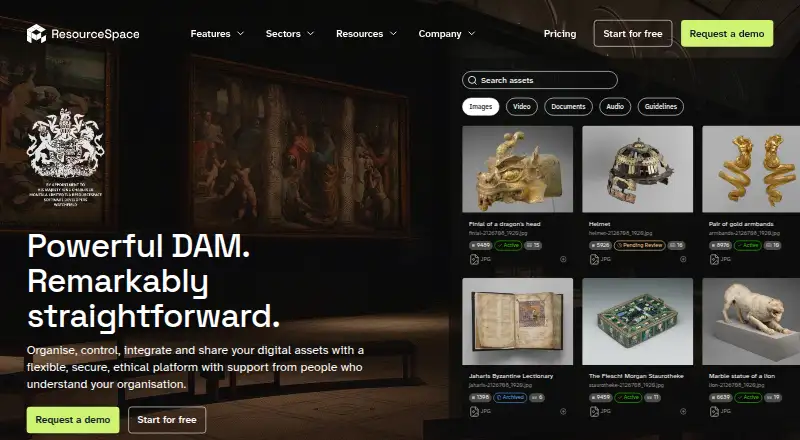
What ResourceSpace is
ResourceSpace is open-source digital asset management software for organizing and sharing images, videos, audio, documents, Office files, PDFs, text files, and raw image formats. It includes metadata and tagging, approval workflows, version history, and guest sharing. Teams can collaborate using secure share links, public portals, and submission and approval queues. The software offers an open RESTful API and pre-built integrations with collections systems, CMS, and social platforms. It can be self-hosted, and Docker can run on Linux, Windows, macOS, AWS, Azure, and Google Cloud. The free cloud service includes 10 GB of storage, and there is no annual software license fee. Cloud plans have user limits from 25 on Team Cloud to unlimited on Platinum Cloud, with storage options that vary by plan. Annual billing is the default; monthly payment can be requested with direct debit. ResourceSpace says it and its data centres are ISO 27001 certified. Users can export files with a metadata CSV or download the whole system for self-hosting.
Good
- Supports images, video, audio, and documents
- Includes metadata, tagging, and approval workflows
- Free cloud service includes 10 GB storage
- Offers self-hosting and an open RESTful API
- ISO 27001 certified, according to ResourceSpace
Watch out
- Free cloud storage is limited to 10 GB
- Cloud-plan pricing is not listed
- Monthly payment must be requested
Who it suits
ResourceSpace suits teams that need to organize, review, and share varied digital assets. Its cloud plans offer different user limits, while self-hosting is an option for organizations that want to run the software themselves.
Verdict
ResourceSpace combines asset organization, collaboration, and export options, with both cloud and self-hosted use. The free cloud service is limited to 10 GB, and cloud-plan prices are not listed.
Plans and prices
From ResourceSpace's own pricing page, checked 21 Sep 2026.
| Plan | Price | What it gives you |
|---|---|---|
| Free | Free | 10 GB storage · Free forever when self-hosted or when cloud storage remains within 10GB. |
| Team Cloud | Priced on request | For start-ups, project teams and smaller organisations; 25 users and storage options from 1 TB to 9 TB. · 25 users · Annual by default; monthly payment available on request |
| Business Cloud | Priced on request | For mid-sized organisations or departmental use; 100 users and storage options from 3 TB to 15 TB. · 100 users · Annual by default; monthly payment available on request |
| Enterprise Cloud | Priced on request | For established organisations with large digital asset collections; 500 users and storage options from 8 TB to 20 TB. · 500 users · Annual by default; monthly payment available on request |
| Platinum Cloud | Priced on request | For global organisations with multiple offices or teams; unlimited users and storage options from 50 TB to 100+ TB. · Unlimited users · Annual by default; monthly payment available on request |
| Free 10GB cloud service | Free | For trying the software or basic requirements without support. |
The facts
Each one read from ResourceSpace's own pages, with the date it was checked.
What it does
- Access security
- Enterprise SSO, MFA, granular permissions and consent management are built in.checked 27 Sep 2026
- AI privacy
- Assets are processed only for requested AI functionality and are not used to train third-party models.checked 27 Sep 2026
- API access
- Yeschecked 21 Sep 2026
- Asset formats
- The interface lists images, video, documents and audio as asset types.checked 27 Sep 2026
- Data export
- Users can download files with metadata CSV or download the entire system for self-hosting.checked 27 Sep 2026
- Guest sharing
- Yeschecked 21 Sep 2026
- Integrations API
- ResourceSpace offers an open RESTful API and pre-built integrations with collections systems, CMS and social platforms.checked 27 Sep 2026
- License fee
- There is no annual software license fee.checked 27 Sep 2026
- Metadata and tagging
- Yeschecked 21 Sep 2026
- Open-source DAM
- ResourceSpace is free, open-source digital asset management software.checked 27 Sep 2026
- Organisation scale
- ResourceSpace is trusted by more than 500 organisations worldwide.checked 27 Sep 2026
- Security certification
- ResourceSpace and its data centres are ISO 27001 certified.checked 27 Sep 2026
- Sharing collaboration
- Secure share links, public portals and submission and approval queues support collaboration.checked 27 Sep 2026
- Supported asset types
- Images,videos,audio,documents,Office files,PDFs,text files and raw image formatschecked 21 Sep 2026
- Support onboarding
- Paid packages include technical support, backups, security, upgrades, disaster recovery and guided onboarding.checked 27 Sep 2026
- User limits
- Team Cloud has 25 users, Business Cloud 100, Enterprise Cloud 500 and Platinum Cloud unlimited users.checked 27 Sep 2026
Where it runs
- Approval workflows
- Yeschecked 21 Sep 2026
- Supported platforms
- Docker can run on Linux, Windows, macOS, AWS, Azure and Google Cloud.checked 27 Sep 2026
Money
- Billing frequency
- Billing is annual by default; monthly payment is available on request with direct debit.checked 27 Sep 2026
- Free plan
- Yeschecked 21 Sep 2026
- Free storage
- The free cloud service includes 10GB of storage.checked 27 Sep 2026
- Free trial
- A free trial is available after requesting a demo.checked 27 Sep 2026
The company
- Company ownership
- The company describes itself as ethical and employee owned.checked 27 Sep 2026
- Founded
- 2006checked 23 Sep 2026
The full review of ResourceSpace
Overview
ResourceSpace is an open-source digital asset management system built to organise and share an organisation’s digital files. It suits teams that need structured review and permissions across a broad mix of assets, particularly those able to self-host or work within a defined cloud-storage tier. Its strongest case is control: a free self-hosted option, extensive access safeguards and a route to scale cloud storage; the trade-off is that cloud pricing requires a sales conversation.
ResourceSpace supports images, video, audio, documents, Office files, PDFs, text files and raw image formats. Metadata and tagging, version history, guest sharing and approval workflows bring asset organisation and review together. The company, founded in 2006, is employee owned and says more than 500 organisations use the software.
For a wider look at this category, see our Digital Asset Management Software list.
Key features
Organisation and review
Metadata and tagging help teams classify a varied library, while version history preserves changes and approval workflows give review a place in the same system. That combination is useful where assets move through a formal sign-off process; teams that only need a simple shared file area may find a full DAM more structure than they need.
Sharing and control
Secure share links, public portals, guest sharing, and submission and approval queues support collaboration inside and outside a team. Granular permissions, enterprise SSO, MFA and consent management provide controls for organisations with stricter access requirements. ResourceSpace and its data centres are ISO 27001 certified.
AI processing is limited to requested functionality, and assets are not used to train third-party models. The open RESTful API and pre-built integrations with collections systems, CMS and social platforms make it a plausible fit for organisations connecting asset management to existing services. Users can download files with a metadata CSV or download the entire system for self-hosting, which gives organisations a practical export path.
Pricing
ResourceSpace has no annual software licence fee. Its Free plan costs nothing, forever when self-hosted or while cloud storage stays within 10 GB. The separate free 10GB cloud service is intended for trying the software or basic needs and comes without support. That cap is suitable for a small library or initial evaluation, but not a growing collection of large media files.
Paid cloud plans are billed annually by default; monthly payment is available on request with direct debit. Team Cloud has 25 users and storage options from 1 TB to 9 TB, for start-ups, project teams and smaller organisations. Business Cloud allows 100 users and 3 TB to 15 TB, aimed at mid-sized organisations or departmental use. Enterprise Cloud supports 500 users and 8 TB to 20 TB for established organisations with large collections. Platinum Cloud has unlimited users and 50 TB to 100+ TB for global organisations with multiple offices or teams. Each is custom pricing, so buyers need a quote to compare costs. Paid packages include technical support, backups, security, upgrades, disaster recovery and guided onboarding.
A free trial is available after requesting a demo. That gives prospective buyers a way to assess the software before committing, while the demo request adds a step compared with immediate self-service trials.
Platforms
ResourceSpace supports API, Linux, macOS, self-hosted and Windows environments. Docker can run on Linux, Windows, macOS, AWS, Azure and Google Cloud, giving organisations several deployment routes. Self-hosting is the clearest fit for teams prioritising control over their deployment; the cloud tiers suit teams wanting larger managed storage and paid support.
Who it's for
ResourceSpace is best suited to organisations managing diverse assets with metadata, permissions and approval needs, from small project teams through global groups. Its free self-hosted option is especially compelling for technically capable teams that want to avoid an annual licence fee. A small team that needs managed cloud storage beyond 10 GB should weigh the user and storage tiers against custom pricing before choosing it.
Pros and cons
- Pros: Free self-hosting has no annual software licence fee, making it attractive to organisations able to manage their own deployment.
- Pros: Broad file-format support, metadata, version history and approvals keep asset organisation and review in one system.
- Pros: Granular permissions, SSO, MFA and ISO 27001 certification address security needs that matter to larger organisations.
- Cons: The free cloud service stops at 10 GB, a tight ceiling for sizeable media libraries.
- Cons: Cloud-plan costs are custom, so budgets cannot be compared without requesting a quote.
- Cons: The free cloud service has no support, while paid support and onboarding require moving to a paid package.
Alternatives
For a free cloud DAM with a clear small-team allowance, choose Data Dwell: its free plan includes 3 users, 3 GB storage, 5 portals and 100 downloads, trading ResourceSpace’s 10 GB cloud cap for explicit limits on users, portals and downloads. Playbook is a better fit for a small team prioritising a generous starter allowance: its free plan includes 100 GB, 300 assets, 3 members, 3 guests, one publish page and 1,000 API calls per month.
iconik offers free collaborator access and a $9.00 per month Browse User plan, making it worth considering when those access tiers match a team’s needs. Air has a free plan with 120 credits per month and unlimited users, plus a $25.00 per month Starter plan with 600 credits per month and unlimited users; it may suit teams that prefer credit-based tiers.
Cloudinary offers a free plan for 3 users and one account with 25 monthly credits, so it may be a better match for a small group comfortable with those limits. DBGallery has a free plan with 20 GB storage, while its listed team tiers include 5 users with 500 GB or 25 users with 1 TB; consider it when those storage and team-size combinations fit better.
ioMoVo starts with a free tier for 2 users, 2 GB storage and 4 GB transfer, and a $12.00 per month Starter tier for 5 users and 10 GB storage. Razuna offers a free plan with 500 GB storage, 5 users, 2 workspaces and one collection, a markedly different free allowance for teams whose needs fit those limits.
Verdict
Choose ResourceSpace if your organisation needs a capable, open-source DAM with structured approvals, granular security and the option to self-host without an annual licence fee. Its free cloud service is only 10 GB, and custom pricing makes the larger cloud tiers harder to budget upfront. Teams that need predictable cloud costs or a larger free allowance should compare alternatives before committing.
Getting started
- Visit resourcespace.com to explore the software.
- Request a demo to access a free trial.
- Choose self-hosting or the free cloud service with 10 GB of storage.
- For a cloud plan, select a tier based on its user limit and storage options.
- Ask about monthly payment with direct debit if annual billing is not suitable.
Limits worth knowing
The free cloud service provides 10 GB of storage and is for trying the software or basic requirements without support. Cloud user limits range from 25 on Team Cloud to unlimited on Platinum Cloud, while storage options vary by plan.
Questions
Is ResourceSpace free?
Yes. It is free, open-source software, and the free cloud service includes 10 GB of storage. There is no annual software licence fee.
Can I self-host ResourceSpace?
Yes. ResourceSpace can be self-hosted, and users can download the entire system for that purpose.
What kinds of assets does it support?
Supported types include images, videos, audio, documents, Office files, PDFs, text files, and raw image formats.
What are the cloud plan user limits?
Team Cloud supports 25 users, Business Cloud 100, Enterprise Cloud 500, and Platinum Cloud unlimited users.
How is cloud billing handled?
Annual billing is the default. Monthly payment is available on request with direct debit.
What integrations are available?
ResourceSpace offers an open RESTful API and pre-built integrations with collections systems, CMS, and social platforms.
Alternatives to ResourceSpace
- 1
Brandworkz
Free planAndroidiOSWebAPI8.9$500 one-time - 2

Air
Free planiOSWebAPIExtension8.6From $25 a month - 3

Unity
Free planAndroidiOSWebAPI8.4Free plan - 4

Razuna
Free planAndroidiOSWebAPI8.3From $99 a month - 5
Playbook
Free planAndroidiOSWebAPI8.3From $10 a month - 6

Artwork Flow
Free planAndroidiOSWeb8.2From $30 a month