RemoteCall
RemoteCall provides remote support for computers and mobile devices through browser and listed desktop and mobile platforms.
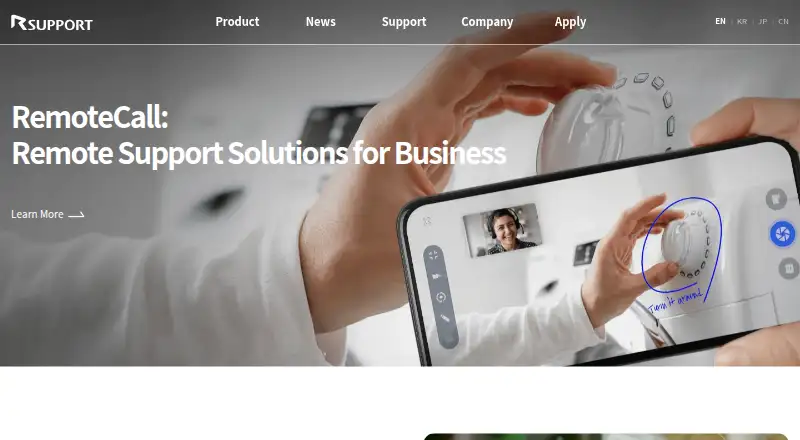
What RemoteCall is
RemoteCall provides remote support for computers and mobile devices through browser and listed desktop and mobile platforms. PC support includes screen sharing and remote control on Windows, macOS, and Linux. Mobile support offers screen sharing and control for Android and iOS, while Visual Support lets an agent view live video from a customer's smartphone camera. The SDK can embed remote assistance in existing web or mobile applications, and browser access works without installation. A customer enters a one-time code and consents before screen control begins. Customers can stop control, mask shared-screen areas, and require consent for recording, capture, or file transfer. Listed capabilities include unattended access, session recording, multi-monitor support, and session transfer, with five sessions per ID. RemoteCall is paid, has no free plan, and offers a 14-day trial.
Good
- Supports Windows, macOS, Linux, iOS, and Android
- Remote mobile screen control
- Live smartphone-camera visual assistance
- Consent and masking controls
- Five sessions per ID
Watch out
- No free plan
- Trial lasts 14 days
- Online subscriptions are for one user
- Plans limit sessions to five per ID
Who it suits
It suits enterprise support teams assisting customers or employees across desktop and mobile devices. The maker presents it for IT, manufacturing, education, public services, and finance.
Verdict
RemoteCall combines PC, mobile, and camera-based support with consent controls and browser access. Its paid packs differ in visual, mobile, recording, transfer, and technical-support coverage.
Plans and prices
From RemoteCall's own pricing page, checked 11 Oct 2026.
| Plan | Price | What it gives you |
|---|---|---|
| RemoteCall Visual Support — annual | $40.84 a year | 5 sessions per ID · real-time video support · billed annually |
| RemoteCall Visual Support — monthly | $49 a month | 5 sessions per ID · real-time video support · billed monthly |
| RemoteCall Base Pack — annual | $49.92 a year | 1,000MB file transfer · 5 sessions per ID · billed annually |
| RemoteCall Base Pack — monthly | $59.90 a month | 1,000MB file transfer · 5 sessions per ID · billed monthly |
| RemoteCall Visual Pack — annual | $62.42 a year | 1,000MB file transfer · 5 sessions per ID · session recording · billed annually |
| RemoteCall Mobile Pack — annual | $66.59 a year | 1,000MB file transfer · 5 sessions per ID · mobile screen control and sharing · billed annually |
| RemoteCall Visual Pack — monthly | $74.90 a month | 1,000MB file transfer · 5 sessions per ID · session recording · billed monthly |
| RemoteCall Mobile Pack — monthly | $79.90 a month | 1,000MB file transfer · 5 sessions per ID · mobile screen control and sharing · billed monthly |
| RemoteCall Total Pack — annual | $86.60 a year | 1,000MB file transfer · 5 sessions per ID · PC, mobile, and visual support · 1-on-1 technical support · billed annually |
| RemoteCall Total Pack — monthly | $129.90 a month | 1,000MB file transfer · 5 sessions per ID · PC, mobile, and visual support · 1-on-1 technical support · billed monthly |
The facts
Each one read from RemoteCall's own pages, with the date it was checked.
What it does
- Certifications
- RSUPPORT states that it acquired ISO/IEC 27017:2015 and reacquired ISO/IEC 27001:2022 certification in December 2025.checked 11 Oct 2026
- Mobile support
- Mobile support provides remote screen sharing and control for Android and iOS devices.checked 11 Oct 2026
- PC support
- PC support includes screen sharing and remote control, with Windows, macOS, and Linux listed among supported environments.checked 11 Oct 2026
- Privacy controls
- Customers can stop agent control, mask parts of the shared screen, and require consent for recording, capture, or file transfer.checked 11 Oct 2026
- SDK integration
- The RemoteCall SDK can embed remote support into existing web and mobile apps or services.checked 11 Oct 2026
- Session limit
- The listed Base and Mobile packs allow 5 sessions per ID, and the Total Pack also lists 5 sessions per ID.checked 11 Oct 2026
- Session security
- The customer enters a one-time access code and must consent before an agent can begin screen control.checked 11 Oct 2026
- Support
- The Total Pack includes 1-on-1 technical support, and the pricing page provides a sales contact at [email protected].checked 11 Oct 2026
- Visual support
- Visual Support lets an agent assist by viewing live video from a customer's smartphone camera.checked 11 Oct 2026
- Web access
- RemoteCall offers browser-based support access without installation.checked 11 Oct 2026
- What it does
- RemoteCall provides remote support for computers and mobile devices, including real-time visual assistance through a smartphone camera.checked 11 Oct 2026
- Who it serves
- The maker presents RemoteCall for enterprise customer and employee support across IT, manufacturing, education and public services, and finance.checked 11 Oct 2026
The company
- Founded
- 2001checked 28 Sep 2026
- Headquarters
- Seoul, Republic of Koreachecked 28 Sep 2026
Money
- Plan availability
- The pricing FAQ says online subscriptions are for a single user; inquiries are required for multiple accounts and on-premise deployment.checked 11 Oct 2026
Alternatives to RemoteCall
- 1

DWService
Free planOpen sourceAndroidiOSWebAPI9.4From $40 a year - 2

ManageEngine Remote Access Plus
Free planAndroidiOSWebAPI9.0From $75 a year - 3

Zoho Assist
Free planAndroidiOSWebLinux8.8From $10 a month - 4

AirDroid Remote Support
Free planAndroidiOSWebAPI8.8From $18.99 a year - 5
dualmon
Free planAndroidiOSWebmacOS8.6From $19 a year - 6
Iperius Remote
Free planAndroidiOSLinuxmacOS8.5Free plan