QRaten
QRaten is an academic attendance platform for managing users, courses, sub-courses, QR sessions and attendance reports.
What QRaten is
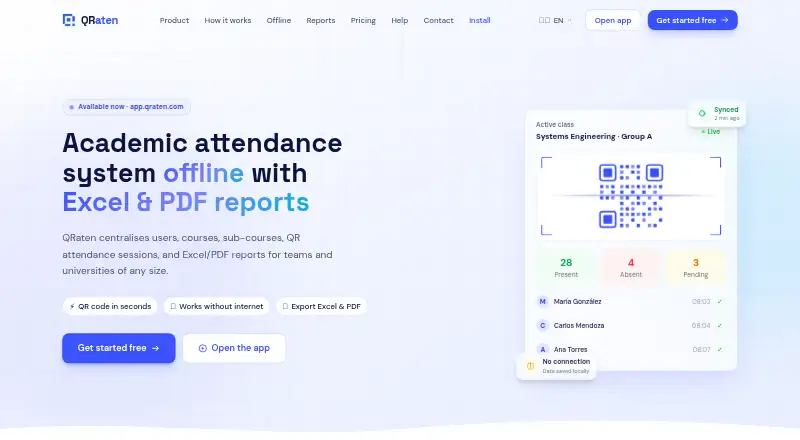
QRaten is an academic attendance platform for managing users, courses, sub-courses, QR sessions and attendance reports. Teachers create classes, and students record attendance by scanning a QR code or entering a code that expires after a limited time. When offline, the app stores data locally, queues actions and syncs them once a connection returns; its site says the local data is encrypted and synchronization conflicts are resolved automatically. Users can export attendance reports to Excel or PDF and filter them by course, date, role, status and academic period. QRaten supports student, teacher, assistant and substitute roles with role-based permissions. It is an installable Progressive Web App rather than an app-store download. The installation guide lists Android 8+, iOS 16.4+, Windows, Mac and Linux through compatible browsers. The Free Plan includes attendance, personal history, alerts and offline syncing. Pro adds institutional course and user management, reports, analytics, integrations, onboarding and priority support; it is listed as free for a limited time. QRaten does not guarantee uninterrupted cloud availability.
Good
- Students can check in by QR scan or time-limited code.
- Offline actions sync when connectivity returns.
- Reports export to Excel and PDF.
- Supports four role types with permissions.
- Progressive Web App works through compatible browsers.
Watch out
- Pro is listed as free only for a limited time.
- The service does not guarantee uninterrupted cloud availability.
- Terms exclude responsibility for data lost through unsynced offline use or misuse.
- Some parts may not yet fully meet stated accessibility aims.
Who it suits
QRaten suits academic institutions that need QR-based attendance, role-based access and downloadable reports. Its offline queueing may help users who sometimes lose their connection, though unsynced offline use carries data-loss risk under the terms.
Verdict
QRaten combines attendance capture, offline synchronization and reporting in an installable browser-based app. Institutions should consider its cloud availability and unsynced-data limitations when choosing it.
Plans and prices
From QRaten's own pricing page, checked 15 Oct 2026.
| Plan | Price | What it gives you |
|---|---|---|
| Free Plan | Free | students and members · QR/code attendance · personal history · offline sync · essential alerts · PWA installation · forever |
| Pro Plan Full access | Free | institutional courses, sub-courses and users · advanced roles · Excel/PDF executive reports · analytics · onboarding · integrations · priority support · limited time |
The facts
Each one read from QRaten's own pages, with the date it was checked.
What it does
- Accessibility
- QRaten aims to conform to WCAG 2.1 Level AA and states that some parts may not yet be fully accessible.checked 30 Sep 2026
- Accessibility target
- QRaten says it aims for WCAG 2.1 Level AA and supports keyboard navigation, alternative text, responsive layouts and screen readers.checked 15 Oct 2026
- Alerts
- The feature list includes custom or real-time alerts for attendance monitoring.checked 15 Oct 2026
- API and SDKs
- The maker's public pages provide no API reference, SDK download or developer documentation.checked 15 Oct 2026
- Attendance validation
- Teachers create classes and students record attendance by scanning a QR code or entering a time-limited code.checked 30 Sep 2026
- Compatibility
- The installation guide lists Android 8+, iOS 16.4+, Windows, Mac and Linux support through compatible browsers.checked 30 Sep 2026
- Conflict handling
- The maker says synchronization automatically resolves conflicts and preserves consistency.checked 15 Oct 2026
- Course hierarchy
- Institutions can organize faculties, courses, subjects and sub-courses in one structure.checked 15 Oct 2026
- Developer background
- LinkedIn identifies Andres Alpiri in Santa Cruz de la Sierra, Bolivia, and describes QRaten as an offline-capable public attendance PWA.checked 15 Oct 2026
- Documentation
- Public documentation consists mainly of marketing pages, FAQs, legal pages and a browser installation guide; no technical documentation portal is listed.checked 15 Oct 2026
- Dynamic QR
- The Spanish product page says the displayed QR changes every 10 seconds.checked 15 Oct 2026
- Independent access control
- AppRecs says invitation creators can activate or deactivate access and that accounts use email and password authentication.checked 15 Oct 2026
- Independent feature detail
- AppRecs describes teacher tools for creating courses, groups and subgroups, issuing invitations and generating QR roll calls.checked 15 Oct 2026
- Independent requirement
- AppRecs lists a camera for QR scanning and an internet connection for synchronization as requirements for its Android listing.checked 15 Oct 2026
- Independent role detail
- AppRecs documents separate workflows for teachers, alternate teaching assistants and students.checked 15 Oct 2026
- Integration
- The Pro feature list promises integration with existing academic or administrative systems but names no specific connectors.checked 15 Oct 2026
- Integrations
- The Pro plan includes integration with existing systems and the site mentions academic and administrative workflow integration.checked 30 Sep 2026
- Invitations
- Teachers and administrators can invite users with specific roles, and invitation links expire automatically.checked 15 Oct 2026
- Licence
- The terms state that QRaten's code, design and brand belong to its creators and may not be copied or modified without permission.checked 15 Oct 2026
- Limit: accessibility
- The accessibility statement acknowledges that some platform areas are not yet fully accessible.checked 15 Oct 2026
Where it runs
- App delivery
- QRaten is a Progressive Web App installable from the browser without the App Store or Google Play.checked 30 Sep 2026
- Browser support
- The accessibility page lists current Chrome, Firefox, Safari and Edge browsers as compatible.checked 15 Oct 2026
- Device binding
- The FAQ says attendance sessions are tied to a device to deter one student recording for another.checked 15 Oct 2026
- Independent app listing
- AppRecs lists an Android QRaten app by Ganex as free with 10+ downloads.checked 15 Oct 2026
The full review of QRaten
QRaten is a browser-installable attendance platform for schools and other academic institutions. It best suits teams that need QR or code-based check-ins, offline capture and attendance reporting across defined staff and student roles. Its free plan is a useful starting point, but institutions should weigh the Pro plan’s time-limited terms and the risk of unsynced offline data.
Overview
QRaten brings users, courses, sub-courses and attendance sessions together in one academic platform. Teachers create classes; students record attendance by scanning a QR code or entering a code that expires after a set time. That combination gives institutions two check-in methods, while duplicate-record protections and device-bound sessions are intended to reduce repeat or proxy attendance.
It also supports absence tracking, alerts and personal attendance history. The platform’s role-based permissions cover students, teachers, assistants and substitutes, making it more suited to an institution with differentiated responsibilities than a simple single-class register.
QRaten is a Progressive Web App that can be installed through a compatible browser rather than an app store. Its compatibility guide specifies Android 8+ and iOS 16.4+, as well as Windows, Mac and Linux through compatible browsers.
Key features
Offline capture and sync
QRaten saves actions locally when a device is offline and queues them for automatic synchronization once connectivity returns. The site says local data is encrypted and conflicts are resolved automatically during sync. That can help classes continue recording attendance through connection interruptions, but it does not remove the need to confirm that queued records have synchronized: the terms disclaim responsibility for data lost through unsynced offline use.
Reports and administration
Users can export attendance records to Excel or PDF and filter them by course, date, role, status and academic period. These options are useful for reviewing patterns or preparing records by cohort and timeframe. Institutional course and user management, analytics, onboarding and integrations with existing systems are part of Pro, rather than the Free plan.
Security and accessibility
QRaten describes secure authentication, expiring invitations, role-based access and synchronization checks alongside protections against duplicate attendance. Device-bound sessions are intended to make it harder for a student to check in on another person’s behalf using a different device. The platform aims for WCAG 2.1 Level AA conformance, while acknowledging that some parts may not yet be fully accessible; institutions with specific accessibility requirements should assess suitability for their users.
Pricing
QRaten uses a freemium model and offers a free plan. The Free Plan costs nothing, billed $0 / forever. It includes students and members, QR/code attendance, personal history, access on mobile, tablet and computer, offline sync, essential alerts and PWA installation. It is the sensible place to start for individual use or a small group that can manage without institutional administration, analytics or exports.
The Pro Plan Full access costs nothing, billed Free for a limited time. It adds everything in Free plus institutional course and user management, advanced roles, Excel/PDF reports, analytics, onboarding, integrations and priority support. That package is aimed at institutions needing centralized management and reporting, but its free-for-a-limited-time billing term makes it a less certain long-term basis for budgeting than the forever-free plan.
A free trial is also offered. The plan terms do not state seat or usage quotas, or the duration of the trial; institutions should clarify those points before relying on Pro at scale.
Platforms
QRaten covers Android, iOS, Linux, macOS, web and Windows, with installation through a compatible browser. It is not distributed through the App Store or Google Play; users install the PWA from the browser. The guide’s minimum versions are Android 8+ and iOS 16.4+.
Who it's for
QRaten is a good fit for academic institutions that want QR or expiring-code attendance, offline recording, role-based permissions and exports in one workflow. It is especially relevant where connectivity can be intermittent and staff need attendance reports organized by course, date or academic period.
It is less compelling for organizations that require guaranteed cloud availability or cannot tolerate any uncertainty around offline records: QRaten does not guarantee uninterrupted cloud service and disclaims responsibility for loss caused by unsynced offline use or misuse. Its stated accessibility goal also falls short of a promise that every part is already fully accessible.
Pros and cons
- Pros: QR scanning and time-limited code entry give teachers two attendance capture methods.
- Pros: Offline queuing with automatic sync can keep attendance capture moving during connection interruptions.
- Pros: Excel and PDF reports with filters support institution-level review of attendance records.
- Pros: The forever-free plan includes offline sync, alerts and PWA installation, without a stated end date.
- Cons: The Pro plan is free only for a limited time, which complicates long-term cost planning.
- Cons: The service disclaims uninterrupted cloud availability and responsibility for data lost through unsynced offline use.
- Cons: Some parts may not yet meet the platform’s stated WCAG 2.1 Level AA accessibility aim.
Alternatives
For a wider comparison, see Student Attendance Software. Bulsee is a free alternative with a free plan and Android, iOS and web support; choose it if those platform options matter and you want a free starting point. UnivTrack is also free and spans web, desktop and mobile platforms, so it may suit readers comparing free tools across a similarly broad device range.
SchoolPass Visitor Management is a paid option for Android, iOS and web. SwipeK12 is another paid Android, iOS and web option, with its starting package priced by request. Attendances offers a school-specific quote and a free trial for Android and web. AttenQR is a freemium web, iOS and Android alternative. Edusign is a paid Android, iOS and web service with a free trial. Attendae is a freemium web option.
Verdict
Academic institutions that need flexible attendance capture, offline sync and filtered Excel or PDF reporting should consider QRaten, particularly if its forever-free plan covers their needs or Pro’s institutional tools are worth adopting. Look elsewhere if uninterrupted service is essential, unsynced records pose unacceptable risk, or accessibility must already be complete across every part of the product.
Getting started
- Open https://www.qraten.com/en in a compatible browser.
- Install QRaten as a Progressive Web App from the browser.
- Use the Free Plan, which is billed at $0 forever, or start the listed free trial.
- For institutional course and user management, consider Pro Plan Full access.
- Contact QRaten at [email protected] or WhatsApp +591 70930853 for institutional support.
Limits worth knowing
The Free Plan includes attendance, personal history, offline sync and essential alerts, while institutional course and user management, advanced roles, reports, analytics, integrations, onboarding and priority support are included in Pro. Pro Plan Full access is listed as free for a limited time.
Questions
Is QRaten free?
Yes. The Free Plan is billed at $0 forever. Pro Plan Full access is listed as free for a limited time.
What platforms does QRaten support?
The listed platforms are Android, iOS, Linux, macOS, web and Windows. QRaten is an installable PWA, and its guide lists Android 8+, iOS 16.4+, Windows, Mac and Linux through compatible browsers.
How do students record attendance?
They can scan a QR code or enter a time-limited code created for a class attendance session.
Can QRaten work offline?
It stores data locally and queues actions while offline, then syncs automatically when a connection returns. QRaten says offline data is encrypted and sync conflicts are resolved automatically.
What does Pro include?
Pro includes institutional course and user management, advanced roles, Excel and PDF reports, analytics, onboarding, integrations and priority support.
Who makes QRaten, and how can institutions contact it?
The site lists [email protected] and WhatsApp +591 70930853 for institutional contacts.