
Qobra
Qobra is sales compensation software for RevOps, Finance, and Sales teams that need to automate and manage commissions.
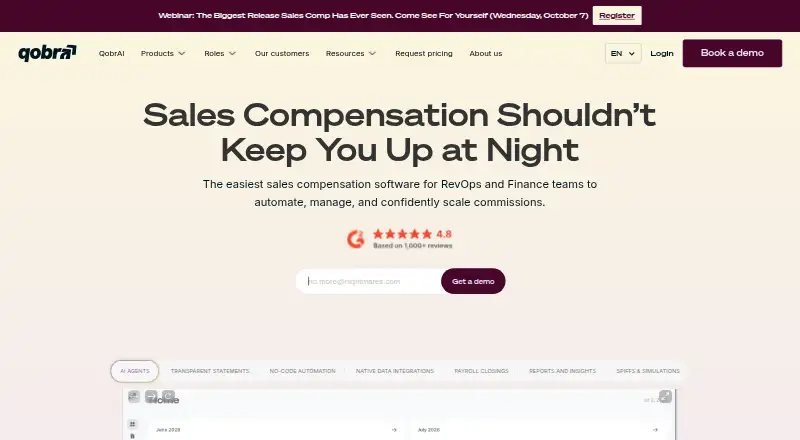
What Qobra is
Qobra is sales compensation software for RevOps, Finance, and Sales teams that need to automate and manage commissions. Its no-code plan tools support custom rules, tiers, bonuses, SPIFs, and draw structures, with simulations and sandboxing for plan evaluation. Employees can see commission statements, targets, and incentives in dashboards that update in real time. The platform also supports commission calculations, quota and bonus management, payout tracking, approval workflows, and reporting on performance, payouts, margins, and cost of sales.
Qobra connects with CRM systems including Salesforce, HubSpot, Microsoft Dynamics 365, Pipedrive, Zoho CRM, and Odoo. Data sources include Snowflake, BigQuery, PostgreSQL, Microsoft SQL, and Redshift; refreshes can be scheduled up to four times daily. HRIS integrations include Workday, BambooHR, and HiBob, and finalized payouts can be sent to an HRIS or exported through CSV, SFTP, or the API. It offers a public API, access controls, SSO and Google sign-in, customizable roles, and audit trails. Qobra was founded in 2020 and lists New York and Paris. Pricing is available on request; prospective customers can book a demo.
Good
- Builds custom plans with no-code tools.
- Simulates plans in a sandbox.
- Shows employees statements, targets, and incentives.
- Connects with listed CRM and HRIS systems.
- Provides approval workflows and audit trails.
Watch out
- Subscription prices are not displayed.
- Data refreshes can be scheduled up to four times daily.
- The product is paid.
Who it suits
Qobra is aimed at RevOps, Finance, and Sales teams managing commission plans and payouts. It may fit organizations that want configurable plans, approval steps, and connections to CRM, data, or HRIS systems.
Verdict
Qobra combines configurable commission plans with employee visibility, approvals, and payout reporting. Teams should request pricing and check whether its listed integrations and refresh schedule suit their needs.
The facts
Each one read from Qobra's own pages, with the date it was checked.
What it does
- API
- Qobra provides a public API for custom integrations.checked 5 Oct 2026
- Audience
- Qobra presents the product for RevOps, Finance, and Sales teams managing commissions.checked 5 Oct 2026
- Commission visibility
- Employees can view commission statements, targets, and incentives through dashboards with real-time updates.checked 5 Oct 2026
- CRM integrations
- Native CRM connectors include Salesforce, HubSpot, Microsoft Dynamics 365, Pipedrive, Zoho CRM, and Odoo.checked 5 Oct 2026
- Data integrations
- Qobra lists Snowflake, BigQuery, PostgreSQL, Microsoft SQL, and Redshift connections, with data refreshes schedulable up to four times daily.checked 5 Oct 2026
- Data sync limits
- Data warehouse connections can be scheduled to refresh up to four times a day, and admins can trigger a refresh manually.checked 5 Oct 2026
- HRIS and payroll
- Native HRIS integrations include Workday, BambooHR, and HiBob; finalized payouts can be sent to an HRIS or exported through CSV, SFTP, or the API.checked 5 Oct 2026
- Integrations
- Native CRM connectors include Salesforce, HubSpot, Microsoft Dynamics 365, Pipedrive, Zoho CRM, and Odoo.checked 5 Oct 2026
- Mobile
- Qobra describes its mobile experience as responsive and available across mobile devices for dashboards, statements, and KPIs.checked 5 Oct 2026
- Mobile experience
- Qobra describes a responsive mobile experience for viewing dashboards, statements, and key performance indicators.checked 5 Oct 2026
- Pricing
- The opened official product pages direct visitors to book a demo and do not display subscription prices.checked 5 Oct 2026
- Product
- Qobra is sales compensation software for RevOps, Finance, and sales teams to automate and manage commissions.checked 5 Oct 2026
- Reporting
- The platform provides reporting and dashboards for sales performance, payouts, margins, and cost of sales.checked 5 Oct 2026
- Security controls
- Product pages describe SSO, Google sign-in, custom permissions, and validation workflows; the linked trust center was inaccessible during research.checked 5 Oct 2026
- Security features
- Product features include SSO and Google sign-in, access controls, validation workflows, and audit trails.checked 5 Oct 2026
Where it runs
- Approvals and audit
- Qobra includes commission validation workflows, customizable user roles, and an audit trail of platform actions.checked 5 Oct 2026
The company
- Company
- Qobra says it was founded in July 2020 by Antoine Fort, Tanguy Moullec, and Axel Poitral.checked 5 Oct 2026
- Company history
- Qobra says it was founded in July 2020 by Antoine Fort, Tanguy Moullec, and Axel Poitral.checked 5 Oct 2026
- Founded
- 2020checked 28 Sep 2026
- Headquarters
- New York and Parischecked 28 Sep 2026
- Headquarters address
- The legal notice lists SalesCrew SAS, which edits Qobra's website, at 3 rue Jules Guesde, 91130 Ris-Orangis, France.checked 5 Oct 2026
Money
- Plan automation
- Its no-code tools support custom compensation rules, tiers, bonuses, SPIFs, and draw structures.checked 5 Oct 2026
- Plan design
- Its no-code plan tools support custom rules, tiers, bonuses, SPIFs, draw structures, simulations, and sandboxing.checked 5 Oct 2026
- Plan testing
- Users can simulate compensation plans in a sandbox and track plan changes with version control.checked 5 Oct 2026
The full review of Qobra
Qobra is a commission-management platform for RevOps, Finance, and sales organizations with more than one compensation rule to administer. It is most compelling when teams need employees to see current earnings while administrators model, approve, and audit complex plans. Buyers should be comfortable with demo-led custom pricing and scheduled data synchronization.
Overview
Qobra brings commission calculation, quota and bonus management, payout tracking, and compensation reporting into one system. Its no-code approach is aimed at plans built from custom rules, tiers, bonuses, SPIFs, and draw structures rather than a single fixed formula. Sandbox simulations and version control let administrators test a proposed plan and retain a record of changes before putting it into operation.
The product is designed for RevOps, Finance, and Sales teams managing compensation across CRM, data-warehouse, HRIS, and payroll processes. That breadth makes it a stronger fit for organizations coordinating several contributors than for a small team that only needs a basic commission calculator.
Key features
Plan builders can model varied compensation arrangements without code, then use a sandbox to examine outcomes before approval. Version control is valuable when rates or quotas change because teams can distinguish a current plan from earlier iterations. The trade-off is operational: warehouse connections can refresh at most four times daily, although an administrator can start a refresh manually. Organizations that require continuously current source data should account for that cadence.
Employees get dashboards showing commission statements, targets, and incentives with real-time updates within Qobra. This gives salespeople a direct view of how performance relates to compensation instead of making every question an administrative request. Validation workflows, customizable user roles, custom permissions, SSO, and Google sign-in provide controls for review and access, while an audit trail records platform actions.
Reporting covers sales performance, payouts, margins, and cost of sales. Those views help Finance and leadership connect incentive expense with commercial results rather than reviewing payout totals in isolation. Qobra also offers a responsive mobile experience for dashboards, statements, and key performance indicators, useful for users who monitor results away from a desktop.
Native CRM connectors support Salesforce, HubSpot, Microsoft Dynamics 365, Pipedrive, Zoho CRM, and Odoo. Data connections include Snowflake, BigQuery, PostgreSQL, Microsoft SQL, and Redshift. Workday, BambooHR, and HiBob integrations cover HRIS use cases; finalized payouts can be sent to an HRIS or exported through CSV, SFTP, or the public API. The API leaves room for custom integrations where a native connector is not enough.
Pricing
Qobra uses paid, custom pricing. Its product pages direct prospective customers to book a demo based on their compensation plans rather than publishing subscription rates. That sales process is appropriate for organizations whose plan complexity and integrations need scoping, but it prevents a quick price comparison and gives smaller teams no self-serve entry point.
Because there are no published tiers, buyers should use the demo to establish the recurring subscription, implementation scope, users or payees covered, integration work, and any limits that apply to their particular plan. Teams with straightforward requirements may find the process heavier than a product with a public starter plan.
Platforms
Qobra supports Android, iOS, web access, and an API. The mobile experience is responsive across mobile devices for dashboards, statements, and KPIs, while the API supports custom data or workflow connections alongside the native integrations.
Who it's for
Qobra is best suited to RevOps, Finance, and Sales teams that administer multiple commission structures and need a governed process from plan design through payout. It fits organizations already using one of its CRM, warehouse, or HRIS connectors and those that want employees to see targets and statements themselves. A small business with one uncomplicated formula, no approval requirement, and a preference for transparent monthly pricing is less likely to benefit from its broader administration model.
Pros and cons
Pros
- Flexible plan modeling: custom rules, tiers, bonuses, SPIFs, and draw structures cover varied compensation designs.
- Safer plan changes: sandbox simulations and version control support review before a new plan goes live.
- Clear employee and manager views: real-time statements sit alongside targets, incentives, validation workflows, roles, and an audit trail.
- Broad system coverage: six native CRM connectors, five listed warehouse connections, three HRIS integrations, exports, and a public API reduce manual handoffs.
Cons
- Custom pricing only: visitors must book a demo, so costs cannot be assessed quickly from a published rate card.
- Scheduled warehouse sync: refreshes top out at four times daily unless an administrator triggers one manually, which may not suit near-continuous commission operations.
- Potentially excessive for simple teams: the governance and integration emphasis is harder to justify when compensation is basic and handled in one system.
Alternatives
OpenIncent is the better starting point for users who want a freemium option, including a free “Use it yourself” plan, and can handle plan interpretation and approval work themselves.
Choose Salesforce Sales Cloud instead when a freemium CRM environment is the priority, with a free suite and a published $25-per-user monthly Starter Suite.
Driven suits smaller deployments seeking a free plan capped at three seats and one compensation plan, or a $29 EUR-per-month Pro plan billed per commissionee.
Centify is an alternative for teams wanting a free version for up to three users before moving to quoted subscriptions.
STAKT is a paid alternative available on Android, iOS, and web.
Performio is worth considering when pricing based on team size, implementation scope, participants, and selected capabilities matches the buying process.
Variabl is another paid option using a custom quote tailored to plan complexity, data sources, integrations, and organizational requirements.
QCommission is a paid alternative with API, web, Windows, and self-hosted availability and a Premier plan sized for up to 12,000,000 source transaction lines per fiscal year.
For broader comparison, see the Incentive Compensation Management Software, Sales Compensation Software, and Sales Commission Software lists.
Verdict
Choose Qobra if your RevOps, Finance, or Sales operation needs configurable compensation plans, employee-facing visibility, controlled approvals, and reporting connected to CRM and HRIS workflows. Its main reason to look elsewhere is the combination of demo-only pricing and warehouse refreshes scheduled no more than four times daily, which can be a poor fit for simple teams or processes demanding continuously current data.
Alternatives to Qobra
- 1

Varicent Incentive Compensation Management
AndroidiOSWebAPI7.3From $56 a month - 2
Sales Cookie
AndroidiOSWeb7.0$40 usage-based - 3

Forma.ai
AndroidiOSWeb6.9 - 4

Performio
AndroidiOSWebAPI6.8 - 5

Xactly Incent
AndroidiOSWeb6.5 - 6
QuotaPath
WebAPI6.4From $35,525 a year