
Qlty Cloud
Qlty Cloud analyzes code quality and coverage, then reports feedback on pull requests.
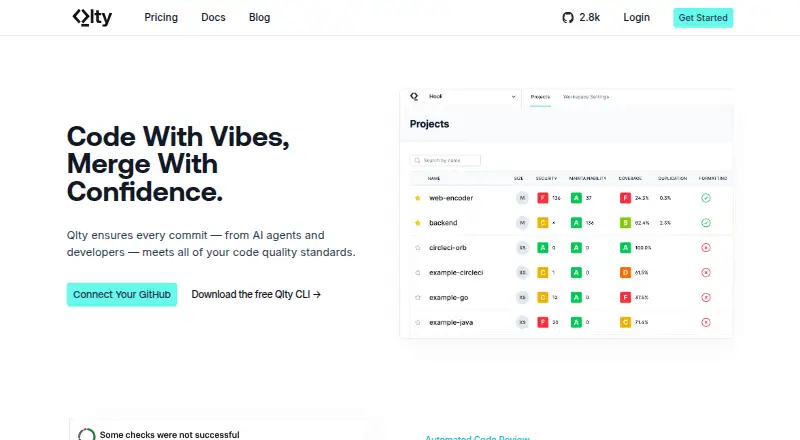
What Qlty Cloud is
Qlty Cloud analyzes code quality and coverage, then reports feedback on pull requests. Automated reviews can provide quality feedback and pass-fail statuses, with customizable analysis and triage rules. Its analysis includes linting, defects, formatting, duplication, security, and complexity. Coverage tools include gates, diff coverage, GitHub pull request comments, and separate tags for unit and integration suites. Qlty integrates with GitHub through a GitHub App and supports GitHub Actions and CircleCI Orb for coverage workflows. It advertises more than 70 linters, formatters, and security analyzers, and says cloud analysis needs no CI setup. The Free plan lists 1,000 analysis minutes and 100 AI autofixes per month, with unlimited contributors and repositories. Pro costs $20 a month and includes 20,000 analysis minutes and 5,000 AI autofixes per month. Qlty says it does not store clones of analyzed repositories, encrypts data in transit and at rest, and runs analysis in sandboxed AWS Fargate containers destroyed after each run. The service is cloud-based.
Good
- Pull request reviews provide pass-fail statuses.
- Includes coverage gates and diff coverage.
- Advertises more than 70 analysis tools.
- Free plan includes unlimited contributors and repositories.
- Supports GitHub Actions and CircleCI Orb workflows.
Watch out
- Free support is best-effort through Discord and GitHub.
- Free plan lists 1,000 analysis minutes monthly.
- Free plan lists 100 AI autofixes monthly.
- AI explanations and code fixes require opt-in for business services.
Who it suits
Qlty Cloud suits development teams that want code-quality and coverage feedback in pull requests. Its listed language support and GitHub workflows may fit teams using those tools.
Verdict
Qlty Cloud combines code analysis, pull request feedback, and coverage tools, with a free plan and paid options. Review the plan limits and support terms, and note that AI explanations and fixes require opt-in for business services.
Plans and prices
From Qlty Cloud's own pricing page, checked 2 Oct 2026.
| Plan | Price | What it gives you |
|---|---|---|
| Pro | $20 a month | 20,000 analysis minutes / month · 5,000 AI autofixes / month · one year of trends history · web-based support |
| Enterprise | $30 a month | 75,000 analysis minutes / month · 5,000 AI autofixes / month · advanced analytics · organization policies · priority support with SLA |
| Free | — | 1,000 analysis minutes / month · 100 AI autofixes / month · unlimited contributors and repositories · community support |
The facts
Each one read from Qlty Cloud's own pages, with the date it was checked.
What it does
- AI autofixes
- The site says AI generates autofix suggestions for 90% of issues.checked 2 Oct 2026
- AI data use
- For business services, AI explanations and code fixes require opt-in, and Qlty says neither it nor its subprocessors train models on customer content.checked 2 Oct 2026
- Analysis
- Analysis types include linting, defects, formatting, duplication, security, and complexity.checked 2 Oct 2026
- Automated review
- Qlty provides quality feedback and pass-fail statuses on pull requests, with customizable analysis and triage rules.checked 2 Oct 2026
- Cloud workflow
- Qlty says cloud analysis requires no CI setup and can be running in minutes.checked 2 Oct 2026
- Coverage
- Qlty supports coverage gates, diff coverage, coverage comments on GitHub pull requests, and separate tags for unit and integration suites.checked 2 Oct 2026
- Integrations
- Qlty Cloud integrates with GitHub through a GitHub App and supports GitHub Actions and CircleCI Orb for coverage workflows.checked 2 Oct 2026
- Limits
- A contributor is a unique user or bot who pushed an analyzed commit, uploaded coverage, or logged in during a rolling 30-day period; bots and AIs count if they open pull requests.checked 2 Oct 2026
- Plugins
- The site advertises more than 70 linters, formatters, and security analyzers for unified reporting and management.checked 2 Oct 2026
- Product
- Qlty Cloud analyzes code for quality issues and coverage and provides feedback on pull requests.checked 2 Oct 2026
- Security
- Qlty says it has SOC 2 Type II certification and runs analysis in sandboxed AWS Fargate containers that are destroyed after each run.checked 2 Oct 2026
- Source code handling
- Qlty says it does not store clones of analyzed Git repositories and encrypts data in transit and at rest.checked 2 Oct 2026
- Support
- Free plan support is via Discord and GitHub on a best-effort basis; paid plans include email support, while Enterprise also offers Slack support.checked 2 Oct 2026
The company
- Company
- Qlty Software says its mission is to help developers improve codebase health and reduce software maintenance toil.checked 2 Oct 2026
- Headquarters
- New York, NY, USchecked 28 Sep 2026
The full review of Qlty Cloud
Qlty Cloud brings code-quality analysis and coverage into pull request workflows. It suits teams that want configurable checks across a broad mix of languages, especially those already using GitHub. Its generous free contributor allowance is appealing, but monthly analysis and AI-fix quotas need to match the team’s workload.
Overview
Qlty combines code analysis, coverage tracking and pull request feedback in a cloud service. Its analysis spans linting, defects, formatting, duplication, security and complexity, with quality gates, technical-debt tracking and remediation workflows for teams seeking to make code health part of routine review.
Cloud analysis requires no CI setup, and Qlty says it can be running in minutes. GitHub teams can connect through its GitHub App; coverage workflows also work with GitHub Actions and CircleCI Orb. More than 70 linters, formatters and security analyzers feed into unified reporting, a useful breadth for repositories with varied languages and toolchains.
Key features
Pull request feedback
Qlty posts quality feedback and pass-fail statuses on pull requests, with customizable analysis and triage rules. That lets teams tune what blocks or informs review rather than treating every finding alike. The site says AI can generate autofix suggestions for 90% of issues, but the monthly fix quota is finite and AI explanations and fixes for business services require opt-in.
Coverage and analysis
Coverage gates, diff coverage and coverage comments on GitHub pull requests help teams assess changes as they are proposed. Separate tags for unit and integration suites can keep those coverage signals distinct. Supported languages and formats range from C/C++, Java and Python to Terraform, Kubernetes, SQL and YAML, making the analyzer breadth a practical strength for mixed codebases.
Security and data handling
Qlty says it holds SOC 2 Type II certification and runs analyses in sandboxed AWS Fargate containers that are destroyed after each run. It says it does not retain clones of analyzed repositories, encrypts data in transit and at rest, and neither it nor its subprocessors trains models on customer content. Business customers still need to opt in to AI explanations and fixes.
Pricing
Qlty uses a freemium model, with paid plans from $20/mo. The Free plan includes 1,000 analysis minutes and 100 AI autofixes per month, unlimited contributors and repositories, and community support. That contributor allowance removes a common seat-count constraint, but the modest monthly processing and fix quotas may make Free best for evaluation or lighter workloads. Support is best-effort through Discord and GitHub.
Pro costs $20 a month and includes 20,000 analysis minutes and 5,000 AI autofixes per month, one year of trends history and web-based support. It is the natural step up for teams whose routine analysis exceeds Free’s quota or that want a year of historical trends. Enterprise costs $30 a month and raises the analysis allowance to 75,000 minutes while retaining 5,000 monthly autofixes; it adds advanced analytics, organization policies and priority support with an SLA. Email support is included with paid plans, while Enterprise also adds Slack support.
Contributor limits are based on unique users or bots that, within a rolling 30-day period, push an analyzed commit, upload coverage or log in. Bots and AI agents count when they open pull requests, so teams with automated review activity should account for that definition even though the plans include unlimited contributors.
Platforms
Qlty Cloud is a cloud deployment with web access and support for API, extension, Linux, macOS and Windows platforms. Its cloud workflow is the main route for analysis; coverage can also be integrated into GitHub Actions or CircleCI Orb.
Who it's for
Qlty is a strong fit for engineering teams that want configurable quality checks and coverage feedback in pull requests without setting up CI analysis first. Teams working across many languages can benefit from the broad analyzer catalog. It is less compelling for organizations that need self-hosted deployment, or for groups whose AI-fix demand will outgrow the included monthly allowance.
Pros and cons
- Pros: Unlimited contributors and repositories on Free let teams assess the workflow without seat or repository caps.
- Pros: Pull request statuses, coverage gates and customizable triage bring quality and coverage signals into review.
- Pros: Broad language support and more than 70 analyzers suit repositories with varied stacks.
- Cons: Free’s 1,000 analysis minutes and 100 AI autofixes per month can constrain regular use.
- Cons: Bots and AIs count as contributors when they open pull requests, a relevant consideration for automated workflows.
- Cons: Free support is best-effort through community channels rather than paid-plan email support.
Alternatives
Compare code quality management software if you want to weigh Qlty against other tools in the category.
GitHub Codespaces is a different kind of freemium development environment, with 2-core and 4-core compute plans priced at $0.18 a month and 0.36 USD respectively; choose it when hosted coding environments are the priority rather than Qlty’s code-quality and coverage workflow.
Qodana is another freemium option with a free trial and Community plan; consider it if you want to compare a code-quality product with a self-hosted platform option.
QualityGate offers a free plan and free trial; it is an alternative to consider for teams comparing quality-gate tools.
ReSharper has free non-commercial use for C# support in VS Code and compatible editors, alongside a paid plan at 389.00 USD per; it may suit an individual seeking that focused editor support rather than cloud-based team analysis.
CodeScene offers a Community Edition free for open-source projects with automated PR reviews, hotspots, knowledge distribution and PDF reports. Open-source teams prioritizing those capabilities should consider it.
Gitar offers a free plan for open-source projects on public GitHub or GitLab repositories with an OSI-approved license; those projects can compare its Pro features at no cost against Qlty’s broader free quotas.
Codacy has a free Developer plan with an IDE plugin, 38 programming languages and VS Code, JetBrains and Cursor integration. Developers prioritizing IDE integrations may prefer it.
CodeAnt AI has a 14-day free trial without a credit card and a plan featuring one full AI pentest scan; consider it if that security-testing offer better matches your needs.
Verdict
Qlty Cloud is a sound choice for teams that want broad code analysis, coverage checks and configurable pull request feedback in one cloud workflow, particularly when GitHub is central to development. The unlimited free contributors and repositories make it easy to assess, while paid quotas and stronger support serve heavier use. Look elsewhere if you need self-hosting or require more AI fixes than the monthly allowance provides.
Getting started
- Visit https://qlty.sh/.
- Connect GitHub through the Qlty GitHub App.
- Choose a plan: Free, Pro at $20 a month, or Enterprise at $30 a month.
- Use GitHub Actions or CircleCI Orb for coverage workflows, if needed.
- Configure analysis and triage rules for pull requests.
Limits worth knowing
The Free plan provides 1,000 analysis minutes and 100 AI autofixes per month. Pro provides 20,000 analysis minutes and 5,000 AI autofixes per month; Enterprise provides 75,000 analysis minutes and 5,000 AI autofixes per month.
Questions
Is there a free plan?
Yes. Free includes 1,000 analysis minutes and 100 AI autofixes per month, with unlimited contributors and repositories.
How much do paid plans cost?
Pro costs $20 a month. Enterprise costs $30 a month.
Which platforms does Qlty Cloud support?
Listed platforms are API, extension, Linux, macOS, web, and Windows.
What integrations are supported?
Qlty connects to GitHub through a GitHub App and supports GitHub Actions and CircleCI Orb for coverage workflows.
How are contributors counted?
A contributor is a unique user or bot who pushed an analyzed commit, uploaded coverage, or logged in during a rolling 30-day period. Bots and AIs count if they open pull requests.
How does Qlty handle code and AI data?
Qlty says it does not store analyzed repository clones and encrypts data in transit and at rest. Business AI explanations and code fixes require opt-in, and Qlty says it and its subprocessors do not train models on customer content.
Alternatives to Qlty Cloud
- 1

DeepSource
Free planWebAPILinuxmacOS8.0From $30 a month - 2

GitHub CodeQL
Free planWebExtensionLinuxmacOS7.5From $30 a month - 3

Codacy
Free planWebExtension7.0From $18 a year - 4

Semgrep Supply Chain
Free planWebAPILinuxmacOS7.0From $30 a month - 5
Reek
Free planLinux6.2Free plan - 6
Brakeman
Free planLinuxSelf-hosted6.0Free plan