
Pushwoosh
Pushwoosh is a customer engagement platform for messaging through mobile push, mobile in-app, web push, email, SMS, WhatsApp, Kakao Talk, and Telegram.
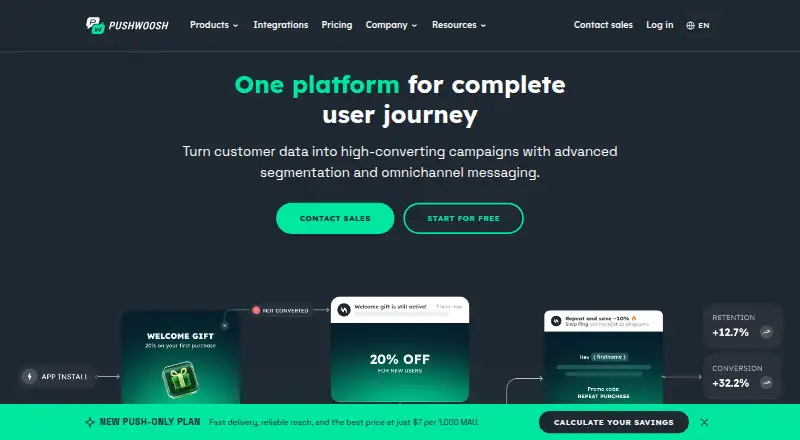
What Pushwoosh is
Pushwoosh is a customer engagement platform for messaging through mobile push, mobile in-app, web push, email, SMS, WhatsApp, Kakao Talk, and Telegram. Its tools include audience segmentation, personalization, automation workflows, analytics, A/B testing, and a visual Journey Builder. All plans include API access, including a unified API for the messaging channels. The free subscription covers projects with up to 1,000 monthly active users and includes unlimited push notifications, unlimited in-app impressions, and 20,000 email sends per month. Additional email sends cost $1.50 per 1,000. Plans use monthly active users or monthly unique email recipients as the billing metric. Listed paid choices include Email only at $5.00 per month, Push only at $7.00 per month, and Omnichannel at $13.00 per month. Pushwoosh says SDK integration, user import, and initial subscriber gathering take 2 to 10 days. It states a 99.9% uptime commitment and lists GDPR and ePrivacy compliance, ISO 27001:2022 certification, SOC 2 Type 2 auditing, and HIPAA compliance.
Good
- Free tier includes unlimited push notifications.
- Free tier includes 20,000 monthly email sends.
- All plans include API access.
- Supports segmentation, automation, and A/B testing.
- Lists integrations including Shopify and Segment.
Watch out
- Free subscription covers projects up to 1,000 MAU.
- Additional email sends cost $1.50 per 1,000.
- SDK integration and initial subscriber gathering take 2 to 10 days.
Who it suits
Pushwoosh suits teams that need to coordinate customer messaging across multiple channels, with automation and analytics. Its free tier may suit projects with up to 1,000 monthly active users.
Verdict
Pushwoosh offers multi-channel messaging with automation, analytics, and API access across its plans. Review the billing metric and free-tier limits, especially if a project sends more than 20,000 emails per month.
Plans and prices
From Pushwoosh's own pricing page, checked 20 Sep 2026.
| Plan | Price | What it gives you |
|---|---|---|
| Pay-as-you-go | Free | 1,000 MAU · 5 AI requests per day · 20,000 email sends per month · Unlimited push notifications · Unlimited in-app impressions · billed monthly |
| Push only | $7 a month | Limited offer until December 31; price locked for 24 months after signup. · Mobile push · Mobile in-apps · Web push · Full toolset included · billed monthly |
| Omnichannel | $13 a month | Includes all channels and the full platform. · Mobile push · Mobile in-apps · Web push · Email · SMS · WhatsApp · billed monthly |
| Email only | $5 a month | Email-only plan. · Email campaigns · 20,000 included sends per month in the pricing calculator · Full toolset included · billed monthly |
| Free pay-as-you-go | Free | Free while the project stays within 1,000 MAU. · $0 /month |
| Custom plan | Priced on request | Offered when estimated cost exceeds $3,000/month. |
The facts
Each one read from Pushwoosh's own pages, with the date it was checked.
What it does
- API access
- All plans include full API access and a unified API for all channels.checked 27 Sep 2026
- Automation features
- Features include Journey Builder, A/B testing, segmentation, personalization, analytics, and autonomous AI optimization.checked 27 Sep 2026
- Infrastructure security
- The company uses privately owned enterprise-grade hardware, anti-DDoS protection, and isolated dedicated infrastructure.checked 27 Sep 2026
- Paid from
- 5checked 20 Sep 2026
- SDK integration time
- SDK integration, user import, and initial subscriber gathering takes 2 to 10 days.checked 27 Sep 2026
- Security certifications
- Pushwoosh states GDPR and ePrivacy compliance, ISO 27001:2022 certification, SOC 2 Type 2 auditing, and HIPAA compliance.checked 27 Sep 2026
- Service uptime
- Pushwoosh states a 99.9% service uptime commitment.checked 27 Sep 2026
- Support availability
- Pushwoosh advertises 24/7 available support and technical integration assistance.checked 27 Sep 2026
- Supported channels
- Channels include mobile push, mobile in-app, web push, email, SMS, WhatsApp, Kakao Talk, and Telegram.checked 27 Sep 2026
Money
- Billing metric
- Plans use monthly active users or monthly unique email recipients.checked 27 Sep 2026
- Extra email cost
- Additional email sends cost $1.50 per 1,000 emails.checked 27 Sep 2026
- Free plan
- Yeschecked 20 Sep 2026
- Free tier features
- The free tier includes unlimited push, unlimited in-app impressions, and 20,000 email sends monthly.checked 27 Sep 2026
- Free tier limit
- The free subscription covers projects with up to 1,000 MAU.checked 27 Sep 2026
The company
- Company identity
- The site identifies the company as Pushwoosh Inc.checked 27 Sep 2026
- Founded
- 2014checked 23 Sep 2026
- Headquarters
- Fairfax, Virginia, United Stateschecked 23 Sep 2026
- Team admin controls
- Custom plans include SSO, a dedicated private cloud, a dedicated manager, and commercial agreements.checked 27 Sep 2026
Where it runs
- Platform availability
- Pushwoosh says it is available on all platforms and supports known platforms for data and messaging.checked 27 Sep 2026
- Platform integrations
- Integrations include Adjust, Amplitude, Appsflyer, Mixpanel, Segment, and Shopify.checked 27 Sep 2026
The full review of Pushwoosh
Overview
Pushwoosh is a messaging and automation platform for teams that need to coordinate customer outreach across mobile, web, and messaging channels. It suits app publishers and businesses building lifecycle campaigns, particularly those that value API access and automated journeys. Its free tier is generous for push and in-app messaging, but email caps and audience-based billing deserve close attention as a project grows.
Journey Builder, segmentation, personalization, A/B testing, analytics, and autonomous AI optimization give teams tools to build and refine campaigns in one platform. All plans include full API access through a unified API for the supported channels. Pushwoosh states that SDK integration, user import, and initial subscriber gathering take 2 to 10 days; it also advertises 24/7 support and technical integration assistance.
Key features
- Campaign automation: Journey Builder and behavioral triggers support workflows that respond to user activity. This is useful for teams managing lifecycle messaging, though campaign results still depend on how well they define segments and journeys.
- Targeting and testing: Segmentation, personalization, and A/B testing let teams tailor messages and compare approaches. Mobile analytics adds measurement for app campaigns.
- Broad channel coverage: Pushwoosh supports mobile push, mobile in-app, web push, email, SMS, WhatsApp, Kakao Talk, and Telegram. That range is a strength for cross-channel programs, while teams only sending push may not need the broader platform.
- Integrations and API: Integrations include Adjust, Amplitude, Appsflyer, Mixpanel, Segment, and Shopify. Full API access on every plan is a meaningful advantage for teams connecting messaging to their own systems.
- Security and uptime: Pushwoosh states GDPR and ePrivacy compliance, ISO 27001:2022 certification, SOC 2 Type 2 auditing, HIPAA compliance, and a 99.9% uptime commitment. It says it uses privately owned enterprise-grade hardware, anti-DDoS protection, and isolated dedicated infrastructure.
Pricing
Pushwoosh uses a freemium model, with plans billed monthly and pricing based on monthly active users or monthly unique email recipients. The free options are useful for smaller projects, but email volume and the 1,000-MAU ceiling can become constraints as an audience expands.
- Pay-as-you-go — free: Covers 1,000 MAU, 5 AI requests per day, 20,000 email sends per month, unlimited push notifications, and unlimited in-app impressions. This is the clearest starting point for small app projects focused on push or in-app messaging. Additional email sends cost $1.50 per 1,000 emails.
- Free pay-as-you-go — free: Free while the project stays within 1,000 MAU. The free tier includes the same stated free allowance: unlimited push, unlimited in-app impressions, and 20,000 monthly email sends. The audience cap makes it a test bed, not an open-ended option for a growing app.
- Email only — $5 a month: Email campaigns, 20,000 included monthly sends in the pricing calculator, and the full toolset. It fits teams whose primary need is email; the send allowance means heavier volume can add cost.
- Push only — $7 a month: Mobile push, mobile in-app, web push, and the full toolset. The price is a limited offer until December 31 and is locked for 24 months after signup. This suits teams centered on push channels, but excludes the broader channel set in Omnichannel.
- Omnichannel — $13 a month: Includes all channels and the full platform, with mobile push, mobile in-app, web push, email, SMS, and WhatsApp named in the plan. It is the fit for teams coordinating several channels rather than paying for email or push alone.
- Custom plan — custom pricing: Offered when estimated cost exceeds $3,000/month. Custom plans include SSO, a dedicated private cloud, a dedicated manager, and commercial agreements, making this the enterprise route for teams needing those controls.
Platforms
Pushwoosh supports web, Windows, macOS, iOS, and Android. It says it is available on all platforms and supports known platforms for data and messaging. Mobile OS support covers iOS and Android. That breadth suits teams serving both app and web audiences, while a platform list alone does not establish a fit for every specific technical environment.
Who it's for
Pushwoosh is best suited to app and digital-product teams that want automation, audience targeting, and messaging across several channels, with APIs available from the start. Smaller projects can begin with the free allowance, especially if they rely on push and in-app impressions. Teams expecting more than 1,000 MAU or more than 20,000 monthly email sends should assess the relevant billing metric and overage cost before committing.
Pros and cons
- Pro: Unlimited push and in-app impressions on the free tier make it practical for small projects to build messaging activity without those channels consuming a stated allowance.
- Pro: Full API access on every plan and a unified API across channels give development teams room to integrate before moving to custom pricing.
- Pro: Journey Builder, segmentation, personalization, A/B testing, and analytics cover the core workflow from targeting through measurement.
- Con: The free tier stops at 1,000 MAU and 20,000 monthly email sends, so projects with larger audiences or email programs need to budget for a paid plan or extra sends.
- Con: Billing may be based on MAU or monthly unique email recipients; teams should determine which metric governs their intended plan before estimating costs.
- Con: The Push only price is promotional through December 31, so the offer's stated 24-month lock should be considered alongside its limited duration.
Alternatives
For a different focus, consider RevenueCat, Klaviyo, Braavo Analytics, Akkio, ChartMogul, ContactPigeon Predictive Insights, SaaSFlow, or Siftmo.
- Choose RevenueCat if you want a freemium option whose Pro plan is free up to $2,500 in monthly tracked revenue, then charges 1% of tracked revenue above that threshold.
- Choose Klaviyo if a web-based email and mobile messaging starter plan is enough: its free plan covers up to 250 active profiles, 500 email sends per month, and $5 of mobile messages per month.
- Choose Braavo Analytics if you need analytics with integrations, apps, and seats included in a paid plan; its WITH FUNDING plan is $70 a month, with prices reflecting annual billing.
- Choose Akkio if you want an AI analytics platform with custom pricing based on your needs and access to domain-specific agents.
- Choose ChartMogul if you need subscription analytics and its free plan for businesses under $120K ARR.
- ContactPigeon Predictive Insights is another web-based alternative.
- SaaSFlow is another freemium alternative.
- Siftmo is another freemium alternative.
For category browsing, see Customer Lifetime Value Software, Mobile Marketing Automation Software, and Push Notification Software.
Verdict
Choose Pushwoosh if your team needs to orchestrate app and web messaging across channels, and values automation plus full API access on every plan. Its free tier makes push and in-app messaging accessible to small projects, while the main cautions are the 1,000-MAU cap, email allowance, and billing metric. If your needs are limited to email or a narrower messaging program, compare the channel-specific plans before paying for broader coverage.
Getting started
- Visit the Pushwoosh website.
- Choose the free plan or a listed paid plan.
- Integrate the SDK, import users, and gather initial subscribers; Pushwoosh says this takes 2 to 10 days.
- Connect supported integrations or use the API to work with channels.
Limits worth knowing
The free plan covers projects with up to 1,000 monthly active users, 20,000 email sends per month, and 5 AI requests per day. Additional email sends cost $1.50 per 1,000. The listed Email only plan includes 20,000 sends per month in the pricing calculator.
Questions
Is Pushwoosh free?
Yes. Its free plan is $0.00 per free and covers projects with up to 1,000 monthly active users.
What does the free plan include?
It includes unlimited push notifications, unlimited in-app impressions, 20,000 email sends per month, and 5 AI requests per day.
How much do the paid plans cost?
Listed monthly plans are Email only at $5.00 per month, Push only at $7.00 per month, and Omnichannel at $13.00 per month.
Which channels does Pushwoosh support?
Channels include mobile push, mobile in-app, web push, email, SMS, WhatsApp, Kakao Talk, and Telegram.
Which platforms can I use it on?
Pushwoosh is available on web, Windows, macOS, iOS, and Android.
Which integrations are available?
Integrations include Adjust, Amplitude, Appsflyer, Mixpanel, Segment, and Shopify.
Alternatives to Pushwoosh
- 1

RevenueCat
Open sourceAndroidiOSWebAPI8.1 - 2
Oracle Responsys
AndroidiOSWebAPI7.3From $2 a year - 3

Klaviyo
Free planWeb7.0Free plan - 4

TrueProfit
AndroidiOSWebExtension7.0From $35 a month - 5

Reaktion
AndroidiOSWeb6.8From $169 a month - 6

Baremetrics
WebAPI6.6From $75 a month