
Punch:io
Punch:io is paid employee time-clock software available on web, iOS, and Android.
What Punch:io is
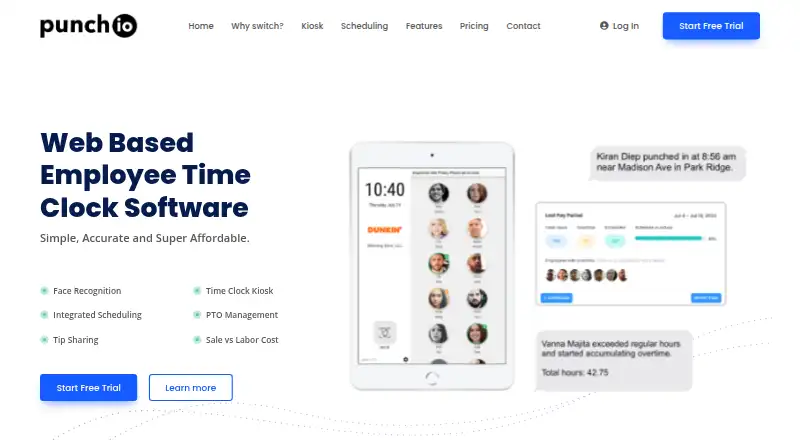
Punch:io is paid employee time-clock software available on web, iOS, and Android. Employees can clock in through a kiosk or, when enabled, a personal account; administrators can also enter punches. Kiosks support one-touch face recognition and optional key codes, and the kiosk app runs on iOS or Android tablets. Managers can share and adjust shifts, repeat schedules, and create future schedules. Daily, weekly, or bi-weekly overtime rules, early-punch restrictions, and configurable automatic breaks are supported, with notifications when overtime starts accumulating. Reports calculate payroll with overtime and break adjustments and allow punchcard corrections. The product also lists PTO tracking, holiday and vacation records, broadcast or private messaging, and location display for personal-device punches. The home page advertises a 15-day trial, while terms state 30 days. Pricing placeholders are unresolved, so no readable exact price is provided.
Good
- Kiosk, personal, and administrator punching
- Face recognition and key-code options
- Overtime and automatic-break rules
- Payroll-oriented attendance reports
- iOS, Android, and web access
Watch out
- No free plan
- Pricing page shows unresolved placeholders
- Trial length differs between pages
- Terms exclude industry-specific HIPAA or FISMA tailoring
Who it suits
Punch:io suits workplaces needing kiosk, mobile, or administrator time entry with scheduling, overtime, break, PTO, and attendance records. It is designed, developed, and supported in the United States.
Verdict
Punch:io offers several clock-in methods alongside scheduling, payroll calculations, attendance corrections, and team messaging. Confirm the applicable trial terms and obtain clear pricing before adoption.
The facts
Each one read from Punch:io's own pages, with the date it was checked.
What it does
- Clock in methods
- Employees can punch in through a kiosk or personal account, and admins can punch in on their behalf.checked 9 Oct 2026
- Compliance limitation
- The terms say the site is not tailored for industry-specific regulations such as HIPAA or FISMA.checked 9 Oct 2026
- Integrations
- The pages opened did not state any named third-party integrations.checked 9 Oct 2026
- Location tracking
- For punches made on personal devices, the product says it shows where employees punched in or out.checked 9 Oct 2026
- Other features
- The product lists custom automatic breaks, PTO tracking for personal days, vacation and holidays, and broadcast and private messaging.checked 9 Oct 2026
- Overtime
- Overtime rules can be set daily, weekly, or bi-weekly, and the product describes notifications when employees begin accumulating overtime.checked 9 Oct 2026
- Pricing
- The pricing section displays unresolved template variables instead of numeric prices; it describes a monthly base price, charges for additional employees, and optional scheduling and notification services.checked 9 Oct 2026
- Pricing limits
- The pricing page shows unrendered price placeholders, so it does not provide a readable exact price in the opened page.checked 9 Oct 2026
- Privacy
- The privacy notice says collected personal information may include facial images, and payment data is stored by Stripe.checked 9 Oct 2026
- Product
- Punch:io describes itself as web based employee time clock software.checked 9 Oct 2026
- Punch methods
- Employees can clock in and out through a kiosk or, if enabled, by logging into a personal account on a device; admins can also punch in for employees.checked 9 Oct 2026
- Reporting
- Reporting includes pre-calculated payroll with overtime additions and break deductions, and lets users edit incorrect or missing punchcards.checked 9 Oct 2026
- Scheduling
- Managers can share and adjust shifts, repeat schedules, and create future schedules.checked 9 Oct 2026
- Support
- The contact page says email inquiries receive a reply within 24 hours and lists phone support Monday through Friday, 9 a.m. to 5 p.m. EST.checked 9 Oct 2026
- Tablet support
- The Punchio Kiosk App works on iOS or Android tablets.checked 9 Oct 2026
- Time rules
- The product supports daily, weekly, or bi-weekly overtime rules, early punch restrictions, and configurable auto breaks.checked 9 Oct 2026
Where it runs
- Kiosk authentication
- The kiosk supports one-touch face recognition and optional key code authentication.checked 9 Oct 2026
- Platforms
- The site describes browser access and says the Punchio Kiosk app works on iOS or Android tablets.checked 9 Oct 2026
The company
- Maker location
- The site says Punch:io is designed, developed, and supported in the United States.checked 9 Oct 2026
- Team tools
- Features include PTO tracking and broadcast or private messaging.checked 9 Oct 2026
Money
- Trial
- The site offers a 15-day free trial.checked 9 Oct 2026
- Trial terms
- The home page advertises a 15-day free trial, while the terms page says new users receive a 30-day free trial.checked 9 Oct 2026
Alternatives to Punch:io
- 1

Jibble
Free planAndroidiOSWebAPI8.0From $4.49 a month - 2

Workforce.com
AndroidiOSWebAPI7.9From C$12.80 a month - 3
QuickBooks Time
AndroidiOSWebAPI7.8From $20 a month - 4

Timeero
AndroidiOSWebAPI7.7From $5 a month - 5

Fareclock
Free planAndroidiOSWebLinux7.5Free plan - 6
PunchFlow
Free planAndroidiOSWebmacOS7.4From A$10 a month