
Pumble
Pumble is a team communication and collaboration app for businesses, available on the web, Windows, macOS, Linux, iOS, and Android.
What Pumble is
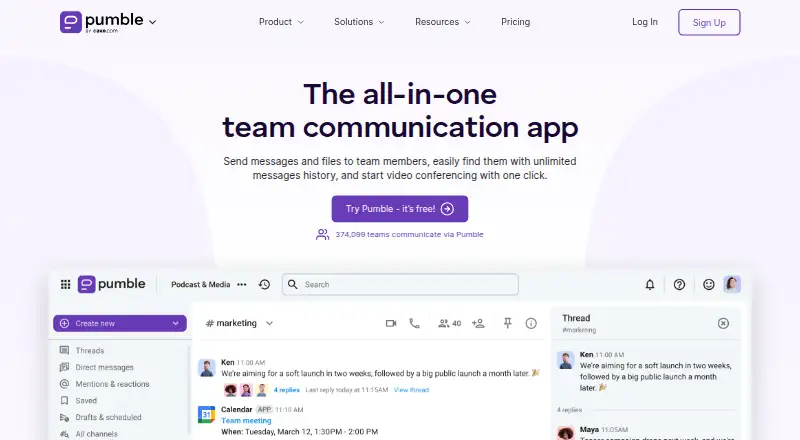
Pumble is a team communication and collaboration app for businesses, available on the web, Windows, macOS, Linux, iOS, and Android. Teams can talk in public or private channels, direct messages, group chats, and threaded replies. They can also exchange files, links, voice messages, and video messages, then search conversations and files. For meetings, Pumble offers voice and video conferencing, screen sharing, meeting links, and in-call messaging. Its publicly available API can be used to create private or public integrations, and API access is available on every subscription. The free plan includes unlimited users, channels, and message history, with 10 GB of storage per workspace and up to three apps and integrations, with Clockify and Plaky excluded from that count. Enterprise adds SSO, data retention controls, and an administrative audit log.
Good
- Runs on web, desktop, and mobile platforms.
- Supports channels, direct messages, and threaded replies.
- Unlimited message history is included on the free plan.
- API access is available on any subscription.
- Paid features have a seven-day trial without a credit card.
Watch out
- Free plan limits apps and integrations to three.
- Free plan includes 10 GB storage per workspace.
- Enterprise is required for SSO and audit logs.
Who it suits
Pumble may suit teams that need chat, file sharing, and meetings in one app. Its free plan is described as suitable for startups and nonprofit organizations.
Verdict
Pumble combines team messaging, file sharing, and conferencing across a broad set of platforms. The free plan covers unlimited users and message history, while its app limit and workspace storage allowance are worth checking.
Plans and prices
From Pumble's own pricing page, checked 2 Oct 2026.
| Plan | Price | What it gives you |
|---|---|---|
| Free | Free | Unlimited users · unlimited message history · unlimited channels · 10 GB storage per workspace · up to 3 apps and integrations, plus Clockify and Plaky |
| Pro | $2.49 a month | 10 GB storage per seat · up to 10 apps and integrations · group meetings · screen sharing · per seat/month billed annually (or $2.99 if billed monthly) |
| Business | $3.99 a month | 20 GB storage per seat · unlimited integrations · meeting recordings · guest users · advanced channel analytics · per seat/month billed annually (or $4.99 if billed monthly) |
| Enterprise | $6.99 a month | 100 GB storage per seat · SSO · data retention · audit log · full organization analytics · per seat/month billed annually (or $7.99 if billed monthly) |
| Productivity Suite | $12.99 a month | Enterprise Pumble, Clockify, and Plaky features · per seat/month billed annually (or $15.99 if billed monthly) |
The facts
Each one read from Pumble's own pages, with the date it was checked.
What it does
- Channels
- Yeschecked 20 Sep 2026
- Chat
- It supports public and private channels, direct messages, group chats, and threaded replies.checked 2 Oct 2026
- Collaboration
- Users can send voice and video messages, share files and links, and search past conversations and files.checked 2 Oct 2026
- Compliance
- CAKE.com’s security page describes a SOC 2 Type II report, ISO/IEC 27001:2022 certification, and GDPR coverage.checked 2 Oct 2026
- Custom integrations
- Pumble says its API is publicly available for creating private or public integrations, and API access is available on any subscription.checked 2 Oct 2026
- Guest access
- Yeschecked 20 Sep 2026
- Integrations
- The integrations page lists Google Calendar, GitHub, GitLab, Gmail, Google Drive, Jira, Trello, Zapier, Zendesk, and Zoom, among others.checked 2 Oct 2026
- Intended users
- Pumble describes its free plan as suitable for startups and nonprofit organizations.checked 2 Oct 2026
- Meetings
- Pumble offers voice and video conferencing, screen sharing, meeting links, and in-call messaging.checked 2 Oct 2026
- Message history
- unlimitedchecked 20 Sep 2026
- Paid from
- 2.49checked 20 Sep 2026
- Purpose
- Pumble describes itself as a team communication and collaboration app for businesses.checked 2 Oct 2026
- Security controls
- The Enterprise plan includes SSO using SAML2 or OAuth2, data retention controls, and an administrative audit log.checked 2 Oct 2026
- Support
- The pricing page lists priority customer support for Enterprise and a dedicated success representative for qualifying customers.checked 2 Oct 2026
Money
- Free plan
- Yeschecked 20 Sep 2026
- Free-plan limits
- The Free plan allows up to 3 apps and integrations, excluding native Clockify and Plaky integrations, and includes 10 GB storage per workspace.checked 2 Oct 2026
- Trial
- The pricing FAQ says paid features can be tried free for 7 days without a credit card.checked 2 Oct 2026
Where it runs
- Platforms
- Pumble lists web, Windows, Mac, Linux, Android, and iOS availability.checked 2 Oct 2026
- Supported platforms
- web,windows,macos,linux,ios,androidchecked 20 Sep 2026
The full review of Pumble
Pumble is a business communication app for teams that want channel-based chat alongside file sharing and meetings. It is a strong fit for organizations that need uncapped users and searchable history without a per-seat bill; teams that use many connected apps or need more storage will need to weigh the paid tiers.
Overview
Public and private channels, direct and group messages, threaded replies, and search across conversations and files give teams several ways to organize day-to-day communication. Voice and video messages, file and link sharing, and conferencing with screen sharing and in-call messaging extend Pumble beyond chat. The free plan’s unlimited users, channels, and message history are meaningful advantages for growing teams, but its 10 GB workspace storage and three-app integration allowance can become constraints when files or connected tools multiply.
Key features
Chat and meetings
Teams can separate discussions into channels, keep one-to-one or group exchanges in messages, and use threads to keep replies attached to the relevant conversation. Search across past conversations and files helps preserve context. Pumble also supports voice and video conferencing, meeting links, screen sharing, and in-call messaging. Group meetings and screen sharing appear on Pro and above, making a paid plan the practical choice for teams that rely on those meeting capabilities.
Integrations and controls
Named integrations include Google Calendar, Plaky, Clockify, Calendly, GitHub, Gmail, Google Drive, Jira, Polls, RSS, and Zapier. The public API is available on any subscription, so teams can build private or public integrations without first moving to a higher plan. Enterprise adds SSO through SAML2 or OAuth2, data-retention controls, and an administrative audit log. CAKE.com describes SOC 2 Type II reporting, ISO/IEC 27001:2022 certification, and GDPR coverage; Enterprise also includes priority support, while qualifying customers can receive a dedicated success representative.
Pricing
Pumble is freemium, with a 7-day trial of paid features that requires no credit card. Per-seat prices below are billed annually; monthly billing is also shown where offered.
| Plan | Price | What it includes |
|---|---|---|
| Free | free | Unlimited users, message history, and channels; 10 GB storage per workspace; up to 3 apps and integrations, plus Clockify and Plaky. |
| Pro | $2.49 a month billed annually per seat (or $2.99 if billed monthly) | 10 GB storage per seat, up to 10 apps and integrations, group meetings, and screen sharing. |
| Business | $3.99 a month billed annually per seat (or $4.99 if billed monthly) | 20 GB storage per seat, unlimited integrations, meeting recordings, guest users, and advanced channel analytics. |
| Enterprise | $6.99 a month billed annually per seat (or $7.99 if billed monthly) | 100 GB storage per seat, SSO, data retention, audit log, and full organization analytics. |
| Productivity Suite | $12.99 a month billed annually per seat (or $15.99 if billed monthly) | Enterprise Pumble, Clockify, and Plaky features. |
Free suits startups and nonprofit organizations that can work within the shared storage and app caps. Pro is the lowest-cost step up for per-seat storage, more integrations, and group meetings, though the app limit remains 10. Business is the more suitable tier for teams needing unlimited integrations, guest users, or recorded meetings. Enterprise is aimed at organizations that need identity and retention controls, audit logging, and deeper analytics. Productivity Suite makes sense for teams seeking the Enterprise Pumble tier alongside Clockify and Plaky features; its higher price is harder to justify if those products are not needed.
Platforms
Pumble supports web, Windows, macOS, Linux, iOS, and Android. An API is also available for integrations, including on the Free plan.
Who it's for
Pumble is best for teams that want unlimited users and message history on a free chat plan, or a relatively low-cost route to more storage and collaboration features. It is less compelling for organizations that need generous shared storage or more than three connected apps without upgrading, and teams that need Enterprise-level controls should account for the per-seat cost.
Pros and cons
- Pro: Free has no user, channel, or message-history cap, making it viable for teams that need long-lived conversations without per-seat charges.
- Pro: API access on any subscription lets teams create integrations without making an upgrade a prerequisite.
- Pro: The paid tiers add storage per seat, meeting tools, and progressively stronger administrative controls.
- Con: Free's 10 GB is shared across the workspace, and only three apps and integrations are allowed beyond Clockify and Plaky.
- Con: Group meetings and screen sharing require Pro or above, while meeting recordings require Business.
- Con: SSO, data retention, and audit logs are reserved for Enterprise, so organizations needing those controls must pay the higher per-seat rate.
Alternatives
Microsoft Teams is worth considering for teams whose meeting needs fit its free plan’s 100 participants, 60-minute group meetings, and 5 GB cloud storage limits. Lark offers a Starter tier with 20 users, 100 GB storage, 18 months of message history, and 1,000 monthly automations, which may suit a smaller group prioritizing those allowances. Chanty is an option for teams of up to five that can use its free plan’s 20GB team storage, 10 integrations, and one guest user. Rocket.Chat has a free Starter plan for 50 users. Slack may suit teams willing to accept a 90-day message-history window and up to ten apps on its free plan. Wire is an alternative for readers who value its fully open-source code. Zoho Cliq has a free plan with 100 participants per group, 10,000 searchable messages, and 100 GB storage per organization. Zulip is another option, with 10,000 messages of search history and 5 GB total file storage on Cloud Free.
Browse more in Team Collaboration Software and Team chat apps.
Verdict
Choose Pumble if your team wants unlimited users and searchable history at no cost, with a clear upgrade path for meetings, storage, integrations, and administration. Its strongest reason to stay is the breadth of the free chat plan; look elsewhere or budget for an upgrade if shared storage, many integrations, or Enterprise controls are essential.
Alternatives to Pumble
- 1

Zulip
Free planOpen sourceAndroidiOSWebAPI9.4From $3.50 a month - 2

Lark
Free planAndroidiOSWebAPI9.1From $6 a month - 3
Microsoft Teams
Free planAndroidiOSWebLinux9.0Free plan - 4
Slack
Free planAndroidiOSWebLinux9.0From $8.75 a month - 5

Rocket.Chat
Free planOpen sourceAndroidiOSWebAPI8.9Free plan - 6

Wire
Free planAndroidiOSWebLinux8.6From €7.45 a month