Proton Meet
Proton Meet is a video conferencing service for teams, friends, and family, available on the web and apps for Windows, macOS, Linux, iOS, and Android.
What Proton Meet is
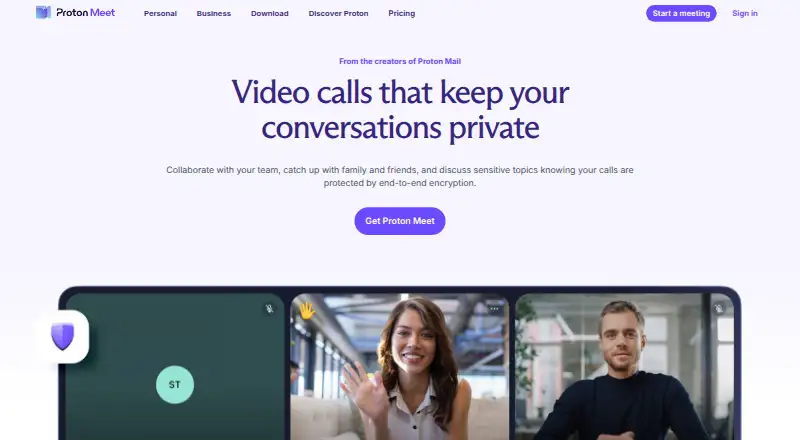
Proton Meet is a video conferencing service for teams, friends, and family, available on the web and apps for Windows, macOS, Linux, iOS, and Android. It uses Messaging Layer Security to encrypt audio, video, screen sharing, and chats end to end. Guests can join through a meeting link without creating a Proton account. Hosts can blur backgrounds, reduce noise, lock meetings, prevent new participants from joining, mute audio, stop video, and remove attendees. Meet integrates with Proton Calendar for scheduling calls and appointments. Proton says every Meet app is open source for independent auditing and that the service does not retain meeting passwords, audio, video, chat messages, or metadata linking participants after a call. The free plan is free, billed $0.00 every month, with meetings up to 60 minutes, 50 participants, and five meeting links per day. The Professional plan lists meetings up to 24 hours and 100 participants, alongside screen sharing, chat, scheduling, and recording. Proton states that Meet complies with GDPR, HIPAA, CJIS, and PCI.
Good
- Encrypts audio, video, screen shares, and chats end to end.
- Guests can join without a Proton account.
- Available on web, desktop, and mobile platforms.
- Integrates with Proton Calendar.
- Hosts can lock meetings and remove attendees.
Watch out
- Free meetings are limited to 60 minutes.
- Free plan allows up to 50 participants.
- Free plan permits five meeting links per day.
Who it suits
Proton Meet suits security-conscious teams and people who need confidential work meetings. Its guest links also allow external participants to join without a Proton account.
Verdict
Proton Meet combines end-to-end encryption, guest access, and meeting controls across web and mobile platforms. Review the free plan’s duration and participant limits against your meeting needs.
Plans and prices
From Proton Meet's own pricing page, checked 21 Oct 2026.
| Plan | Price | What it gives you |
|---|---|---|
| Meet Free | Free | 60 minutes per meeting · up to 50 participants · up to five meeting links per day · $0.00/month |
| Meet Professional | $7.99 a month | 24 hours per meeting · up to 100 participants · unlimited meetings per day · recording · scheduling · $95.88 every 12 months |
| Workspace Standard | $12.99 a month | Meet Professional features · 1 TB storage per user · 15 custom email domains · $155.88 every 12 months |
| Workspace Premium | $19.99 a month | 250-person meetings · 3 TB storage per user · 20 custom email domains · Lumo AI · data retention policies · $239.88 every 12 months |
The facts
Each one read from Proton Meet's own pages, with the date it was checked.
Where it runs
- Appointment scheduling
- Paid plans provide private Calendar booking pages that create meetings automatically when appointments are booked.checked 21 Oct 2026
What it does
- Calendar integration
- Meet integrates with Proton Calendar to add calls to schedules and supports Calendar appointment scheduling.checked 30 Sep 2026
- Chat
- In-call chat is encrypted, visible to everyone in the meeting, and normally disappears when the call ends.checked 21 Oct 2026
- Chat threads
- Threaded replies became available to all users on October 14, 2026, while chat remains temporary and end-to-end encrypted.checked 21 Oct 2026
- Data handling
- Proton says it does not store meeting passwords, audio, video, chat messages, or metadata linking participants after a call ends.checked 30 Sep 2026
- Developer documentation
- Proton’s Meet support documentation covers setup, web use, camera and microphone troubleshooting, screen sharing, chat, and recording; the reviewed Meet pages do not present a public Meet API or SDK.checked 21 Oct 2026
- Downloads
- Proton distributes native iOS, Android, macOS, Windows, and Linux apps plus an Android APK and browser access.checked 21 Oct 2026
- Encryption
- Meet uses Messaging Layer Security for end-to-end encryption of audio, video, screen shares, and chats.checked 30 Sep 2026
- End-to-end encryption
- Audio, video, screen sharing, and chat are encrypted on participants’ devices with Messaging Layer Security so Proton cannot decrypt them.checked 21 Oct 2026
- Guest access
- Guests can join from a link without a Proton account or installed app.checked 21 Oct 2026
- Host controls
- Hosts can mute participants, disable video, remove attendees, and lock meetings against new joins.checked 21 Oct 2026
- Intended users
- Proton describes Meet as suitable for security-conscious teams and for work meetings where confidentiality matters.checked 30 Sep 2026
- Launch news
- Proton announced Proton Meet publicly on March 31, 2026, describing it as privacy-first conferencing for work and personal use.checked 21 Oct 2026
- License
- The public ProtonMeet meet-common repository is licensed under GNU GPL version 3 or later.checked 21 Oct 2026
- Limit: feature depth
- EuropeanStack notes missing breakout rooms, polling, webinar mode, and very large events compared with Zoom.checked 21 Oct 2026
- Limit: interface maturity
- Reddit reviewers described missing self-view controls, pixelation, audio synchronization problems, and a less polished interface than Zoom.checked 21 Oct 2026
- Limit: mobile screen audio
- An App Store reviewer reported that iOS screen sharing could not transmit video audio, with Proton saying web support existed instead.checked 21 Oct 2026
The company
- Company founded
- Proton’s LinkedIn company page lists 2014 as its founding year.checked 21 Oct 2026
- Company headquarters
- Proton lists its address in Plan-les-Ouates, Geneva, Switzerland.checked 21 Oct 2026
- Company history
- Proton says it was founded in Switzerland in 2014 by scientists who met at CERN.checked 30 Sep 2026
- Company legal name
- The download page identifies the maker as Proton AG.checked 21 Oct 2026
- Company size
- Proton’s LinkedIn page lists 501–1,000 employees.checked 21 Oct 2026
- Founded
- 2014checked 23 Sep 2026
- Headquarters
- Geneva, Switzerlandchecked 23 Sep 2026
The full review of Proton Meet
Overview
Proton Meet is a video-conferencing service for teams, friends, and family who want private calls across web and desktop and mobile apps. It is a strong fit for confidential work meetings where end-to-end encryption matters, though its free plan’s short meeting limit can make it a poor match for longer sessions.
Key features
Meet uses Messaging Layer Security to encrypt audio, video, screen sharing, and chat end to end. That makes privacy a central reason to choose it, not merely an add-on; hosts also get practical controls to lock a meeting, block late arrivals, mute or stop video, remove attendees, blur backgrounds, and reduce noise.
Guests can join from a meeting link without creating Proton accounts, easing access for clients or family members outside a team. Proton Calendar integration can add calls to schedules and supports appointment scheduling. Proton says its apps are fully open source for independent auditing, and that it is ISO 27001 certified, has SOC 2 Type II attestation, and complies with GDPR, HIPAA, CJIS, and PCI.
Proton says it does not retain meeting passwords, audio, video, chat messages, or metadata linking participants after a call ends. Recording is local, which suits users who want a recording option without making cloud recording the default. Setup guides, feature explanations, and troubleshooting articles are available through Proton’s support center.
Pricing
Meet is freemium, with a 14-day trial and paid plans from $7.99/user/mo (annual). The entry-level Meet Free plan costs nothing, billed $0.00 every month. It allows meetings of up to 60 minutes, up to 50 participants, and five meeting links per day. That is enough for shorter calls, but the duration and daily link cap can constrain frequent or extended use.
Meet Professional has custom pricing and raises meeting duration to 24 hours and capacity to 100 participants, with unlimited meetings per day. It also adds screen sharing, built-in chat, appointment scheduling, and meeting recording. For teams that need longer calls or those collaboration tools, it is the more suitable Meet tier; those who only need occasional short calls can stay on Free.
Workspace Standard has custom pricing and includes Meet Professional, 1 TB of storage per user, and 15 custom email domains. Workspace Premium includes Standard, increases storage to 3 TB per user and custom domains to 20, and supports video meetings with 250 participants. These bundles make more sense for organizations that also need the listed storage and email-domain allowances than for users seeking video meetings alone.
Platforms
Meet is available on the web and through apps for Windows, macOS, Linux, iOS, and Android. That broad device coverage helps mixed-platform groups join without relying on one operating system.
Who it's for
Meet suits security-conscious teams and anyone holding work conversations where confidentiality matters. Guest links make it workable for calls involving people outside a Proton account, while the free tier can serve small groups with meetings that fit within an hour. It is less compelling for regular long meetings or groups above 50 participants unless they move to a paid plan.
Pros and cons
- Pros: End-to-end encryption covers calls, screen shares, and chats, supporting confidential conversations.
- Pros: Guests can join by link without creating an account, reducing friction for external participants.
- Pros: Host controls include locking meetings and removing attendees, useful for managing access during a call.
- Cons: Free meetings stop at 60 minutes and 50 participants, limiting longer sessions and larger groups.
- Cons: The free plan permits only five meeting links per day, a constraint for users scheduling frequent calls.
- Cons: Paid plan prices are custom at the tier level, so the listed starting price alone does not show what a particular team will pay.
Alternatives
For a broader comparison, see Secure Video Conferencing Software.
Microsoft Teams is worth considering if its free plan’s 100 participants, 60-minute group meetings, and 5 GB cloud storage better fit your needs. Choose Webex App if a free plan with unlimited meetings is more important than Meet’s 60-minute free duration; Webex caps those calls at 40 minutes and 100 attendees. TrueConf is another freemium option with a free trial and self-hosted availability. Olivasal offers a free plan and supports Linux, web, API, and self-hosted deployment.
Google Meet may suit readers comparing a $7 a month annual/fixed-term Business Starter plan, which includes 30 GB pooled storage per user and 100 meeting participants. Zoom Meetings is an alternative with a Basic plan for 100 participants and 40-minute meetings, or a Pro plan with meetings up to 30 hours. OpenTalk is an option for those seeking open-source software with auditable code and free community use. Zoho Meeting has a free plan for 100 participants and 60-minute meetings.
Verdict
Choose Proton Meet if end-to-end encryption, guest access, and strong host controls matter more than a generous free meeting allowance. Its Free tier is practical for short calls, while Professional is the better fit for teams needing long sessions and recording. Look elsewhere if you need longer free meetings, or compare custom-priced tiers carefully if your group needs higher capacity or bundled storage and email domains.
Alternatives to Proton Meet
- 1
OpenTalk
Free planOpen sourceAndroidiOSWebAPI8.6Free plan - 2

8x8 Meet
Free planAndroidiOSWebAPI8.2From $24 a month - 3
Microsoft Teams
Free planAndroidiOSWebLinux8.2Free plan - 4

Jami
Free planOpen sourceAndroidiOSWebAPI7.9Free plan - 5
VSee
Free planAndroidiOSWebAPI7.9From $29 a month - 6
TrueConf
Free planAndroidiOSWebAPI7.8From $10 a year