
Progress MOVEit Transfer
Progress MOVEit Transfer is enterprise managed file transfer software for organizations that need controlled, secure file exchanges.
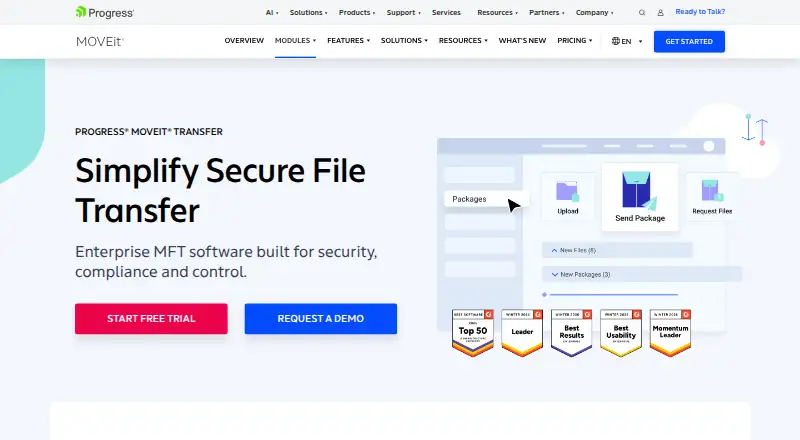
What Progress MOVEit Transfer is
Progress MOVEit Transfer is enterprise managed file transfer software for organizations that need controlled, secure file exchanges. It runs on Windows Server on-premises, in a preferred cloud or as a managed service. Files are protected with AES 256-bit encryption in transit and at rest, and transfer activity is recorded in a tamper-evident database. Administrators can review who accessed transferred files and when. Users can share secure folders or send ad hoc transfers through a web interface, while administrators manage users, groups, roles, delegated permissions and multi-tenancy. Supported protocols include FTPS, SFTP and HTTP/S. Integrations include DLP, antivirus, SSO, MFA, Azure Blob storage and MOVEit Automation. Access options include Windows and iOS desktop clients, Android and iOS mobile apps, and the web. The interface supports English, French, German, Spanish, Japanese, Polish, Arabic, Portuguese and Chinese. High availability can use active-active web farms or active-passive disaster recovery. Pricing is on request, with a 30-day trial listed; the pricing page returns a 404 error.
Good
- AES 256-bit encryption covers files in transit and at rest.
- Transfer activity is logged in a tamper-evident database.
- Supports FTPS, SFTP and HTTP/S.
- Offers web, desktop and mobile access.
Watch out
- Pricing is on request.
- The listed pricing page returns a 404 error.
- No free plan is listed.
Who it suits
It suits organizations managing file transfers that need security controls, audit records and administrative permissions. Its deployment options may suit teams using on-premises Windows Server, cloud or managed service setups.
Verdict
MOVEit Transfer combines encrypted transfers, activity records and flexible deployment for enterprise file exchange. Pricing requires an inquiry, though a 30-day trial is listed.
Plans and prices
From Progress MOVEit Transfer's own pricing page, checked 27 Sep 2026.
| Plan | Price | What it gives you |
|---|---|---|
| Free Trial | Free | Trial access is offered through the product page. |
The facts
Each one read from Progress MOVEit Transfer's own pages, with the date it was checked.
What it does
- API access
- Functionality can be extended with API access.checked 27 Sep 2026
- Audit logging
- Logs file transfer activities in a tamper-evident database.checked 27 Sep 2026
- Custom branding
- The user interface can be personalized with custom branding.checked 27 Sep 2026
- Data encryption
- Uses AES 256-bit encryption for files in transit and at rest.checked 27 Sep 2026
- Deployment options
- Runs on Windows Server on-premises, in a preferred cloud, or as a managed service.checked 27 Sep 2026
- Download tracking
- Reviews recipient download activity, including who accessed files and when.checked 27 Sep 2026
- High availability
- Supports active-active web farms and active-passive disaster recovery architectures.checked 27 Sep 2026
- Interface languages
- Supports English, French, German, Spanish, Japanese, Polish, Arabic, Portuguese and Chinese.checked 27 Sep 2026
- Pricing page status
- The listed pricing page returns a 404 error.checked 27 Sep 2026
- Product category
- Enterprise managed file transfer software focused on security, compliance and control.checked 27 Sep 2026
- Security certifications
- Backed by SOC 2 Type 2, ISO 27001 and FIPS certifications.checked 27 Sep 2026
- Sharing options
- Provides secure folder sharing and ad hoc file transfer options through a web interface.checked 27 Sep 2026
- Support contact
- Progress lists a support phone number: 1-800-477-6473.checked 27 Sep 2026
- System integrations
- Integrates with DLP, antivirus, SSO, MFA, Azure Blob storage and MOVEit Automation.checked 27 Sep 2026
- Transfer protocols
- Supports FTPS, SFTP and HTTP/S for file transfers.checked 27 Sep 2026
Where it runs
- Client platforms
- Offers desktop clients for Microsoft Windows and Apple iOS, mobile apps for Android and iOS, plus web access.checked 27 Sep 2026
The company
- Company history
- Progress identifies the company as having 40 years of history.checked 27 Sep 2026
- Founded
- 1981checked 28 Sep 2026
- Headquarters
- Burlington, Massachusetts, United Stateschecked 28 Sep 2026
- Team administration
- Supports users, groups, delegated permissions, roles and multi-tenancy.checked 27 Sep 2026
Money
- Free plan
- Nochecked 20 Sep 2026
The full review of Progress MOVEit Transfer
Overview
Progress MOVEit Transfer is managed file transfer software for organizations that need to govern sensitive exchanges across teams and systems. It suits enterprises that need deployment choice, auditability and administrative controls; smaller teams looking for a self-serve, transparently priced service should look elsewhere.
Its combination of encryption, transfer records and on-premises, cloud or managed deployment makes it a strong fit for controlled business workflows, though the custom-pricing model makes cost harder to judge before contacting Progress.
Key features
Secure transfers with accountability
Files are encrypted with AES 256-bit protection in transit and at rest, and the product carries SOC 2 Type 2, ISO 27001 and FIPS certifications. Those safeguards suit organizations with formal security requirements. A tamper-evident database records transfer activity, while download tracking identifies who accessed files and when, giving administrators a useful record beyond simply confirming that a file was sent.
Users can share secure folders or send files ad hoc through a web interface. FTPS, SFTP and HTTP/S support accommodate different transfer workflows. This breadth is useful for mixed environments, but organizations should choose MOVEit for managed exchange and control rather than as a lightweight consumer sharing tool.
Administration and connectivity
Users, groups, roles, delegated permissions and multi-tenancy give administrators ways to separate responsibilities and manage access across teams. Custom branding can make the interface fit an organization’s identity. Integrations include DLP, antivirus, SSO, MFA, Azure Blob storage and MOVEit Automation, connecting transfer management with security and workflow systems.
High availability supports active-active web farms and active-passive disaster recovery architectures. Together with Windows Server, preferred-cloud and managed-service deployment options, this gives organizations room to align the system with their infrastructure and continuity approach. The flexibility is valuable, but it also means this is an enterprise deployment decision, not simply a tool to adopt without planning.
Pricing
MOVEit Transfer is paid software with custom pricing; Progress offers a 30-day trial and no free plan. Trial access is offered through the product page. The trial gives prospective buyers a defined evaluation window, but there is no free tier for ongoing use, and organizations must request pricing to assess fit against their budget.
No per-seat or transfer-volume price is stated, so buyers should confirm licensing scope and any usage terms with Progress before committing. For enterprises with specific deployment and governance needs, custom pricing may accommodate a tailored arrangement; for teams wanting to compare fixed costs directly, it is a drawback.
Platforms
MOVEit Transfer offers web access, Windows desktop clients, Apple iOS desktop clients, and Android and iOS mobile apps, alongside API access. Its server deployment runs on Windows Server, either on-premises, in a preferred cloud or as a managed service. The broad language support—English, French, German, Spanish, Japanese, Polish, Arabic, Portuguese and Chinese—helps serve distributed teams, though the server platform is Windows Server rather than a stated Linux option.
Who it's for
Choose MOVEit Transfer when file exchange needs to be centrally administered, auditable and integrated with existing security controls. Its multi-tenancy, role management, protocol support and high-availability architectures make it especially relevant to organizations operating multiple teams or critical transfer workflows.
It is less suitable for individuals or small groups that mainly need simple sharing, a free plan or a published price before engaging a vendor. The feature set and deployment choices are compelling when control is the priority; they are harder to justify when that level of administration is unnecessary.
Pros and cons
- Pros: AES 256-bit encryption and SOC 2 Type 2, ISO 27001 and FIPS certifications suit security-conscious organizations.
- Pros: Tamper-evident activity records and recipient download tracking make transfers more accountable.
- Pros: On-premises, cloud and managed-service deployment offer meaningful infrastructure choice.
- Pros: Protocols, security integrations, API access and high-availability options support complex environments.
- Cons: Custom pricing requires a vendor inquiry, making upfront cost comparisons difficult.
- Cons: No free plan means ongoing use requires a paid arrangement after the 30-day trial.
- Cons: Windows Server deployment may not suit organizations seeking a Linux server option.
Alternatives
For broader platform choice, JSCAPE Managed File Transfer is a paid option with Linux, macOS, web and Windows platforms. Cleo Integration Cloud is another paid choice, with API, self-hosted and web platforms and custom pricing dependent on ecosystem scale, transactions, data volume and integrations.
Globalscape EFT offers a free trial and paid bundles, including a Core Server Bundle with FTP over SSL/TLS, HTTPS and a web client, and a Collaboration Bundle with 250 Work. Serv-U Managed File Transfer Server may suit buyers who prefer a stated per-server monthly price: $335 a month. It supports Android, iOS, Linux, Windows, web and API platforms and offers a free trial.
GoAnywhere MFT is a paid alternative. Titan MFT Server offers a free trial, Windows or Linux deployment on-premises, hybrid or in the cloud, and custom configurations and volume licensing by quote. Kiteworks Managed File Transfer is another paid option, with Windows listed as its platform.
SFTPPlus offers a different purchasing model: its file transfer server with MFT capabilities costs $1,900, paid once, billed as a one-time purchase, and includes a free trial. Its listed license is per installation inside one operating system.
Browse Managed File Transfer Software or Secure File Transfer Software for more options.
Verdict
Progress MOVEit Transfer is a strong choice for enterprises that need secure file exchange with detailed accountability, flexible deployment and administrative control. Its main reason to choose it is the combination of tamper-evident records, download visibility and integration options; its main reason to look elsewhere is custom pricing, particularly if you need a simpler service or a predictable published cost.