
FileFast
FileFast sends large files by link or email and collects incoming files through request links.
What FileFast is
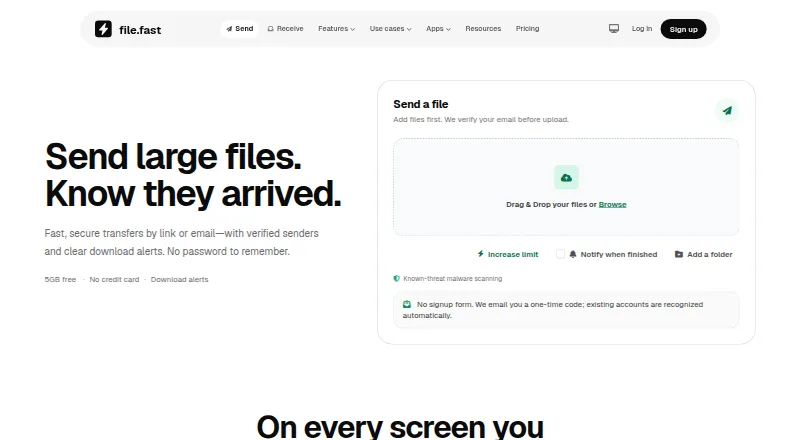
FileFast sends large files by link or email and collects incoming files through request links. Recipients can usually download in a browser without an account or app, while senders can see when transfers are opened and files are downloaded. Links may be public, limited to email-verified visitors or restricted to recipient allowlists, and folder transfers preserve the selected folder structure. Verified recipients can preview supported work, comment on a page or timestamp, and approve it or request changes. FileFast supports web, iPhone and iPad, Android, macOS, Chrome and Firefox. The Free plan costs nothing and includes 5 GB per transfer and 10 GB of storage; no credit card is required, but email verification is used before upload. Plus costs $5.99 a month, Creator costs $14.99 per individual per month, and Teams costs $12 per member per month with a two-member minimum ($24/month). The API supports uploads, tracked transfers, collections, verified submissions and recipient activity. FileFast says known-threat scanning runs before release, while noting it cannot catch every threat.
Good
- Free plan includes 5 GB per transfer and 10 GB storage.
- Recipients can download in a browser without an account.
- Senders can track opens and downloads.
- Verified recipients can comment and approve or request changes.
Watch out
- Free transfers expire after 1, 3 or 7 days.
- FileFast says threat scanning cannot catch every threat.
- Teams requires at least two members, costing $24/month.
Who it suits
FileFast suits people sending occasional personal files, frequent large-file senders, and creative professionals needing client review. Teams may suit groups that send and receive files together.
Verdict
FileFast combines large-file transfers with recipient access controls, delivery tracking and review tools. Its free tier has defined transfer and storage limits, while paid options add larger capacities and team features.
Plans and prices
From FileFast's own pricing page, checked 29 Sep 2026.
| Plan | Price | What it gives you |
|---|---|---|
| Free | Free | For occasional personal transfers. · 5 GB per transfer · 10 GB storage · 10 email recipients · 3 transfer collections · password and 1, 3, or 7 day expiry |
| Plus | $5.99 a month | For frequent senders and very large files. · 300 GB per transfer · 1 TB storage · 25 email recipients · personal API access and signed webhooks · per month |
| Creator | $14.99 a month | For photographers, designers, and video professionals. · 1 TB per transfer · 2 TB storage · 100 email recipients · branded delivery · file requests and client review · per individual per month |
| Teams | $12 a month | Two-member minimum ($24/month). · 2 TB per transfer · 3 TB storage per member · 250 email recipients · shared workspace and administration · per member per month; two-member minimum ($24/month) |
| Enterprise | Priced on request | For security-sensitive and larger organizations. · Planned · SSO, SCIM, enforced MFA, custom retention and transfer policies, SLA and priority support · Custom |
The facts
Each one read from FileFast's own pages, with the date it was checked.
What it does
- Access controls
- Transfers can use public links, email-verified visitors, or recipient allowlists.checked 29 Sep 2026
- API
- The versioned HTTP API supports uploads, tracked transfers, collections, verified submissions, and recipient activity.checked 29 Sep 2026
- API access
- Yeschecked 21 Sep 2026
- API integrations
- Plus and Creator offer personal API access; Teams offers team API capacity.checked 28 Sep 2026
- Audience
- The site positions Free for occasional personal transfers, Plus for frequent senders, Creator for photographers, designers and video professionals, and Teams for groups sending and receiving together.checked 29 Sep 2026
- Client review
- Verified recipients can preview supported work, comment on a page or timestamp, and approve or request changes.checked 29 Sep 2026
- Custom branding
- Nochecked 21 Sep 2026
- Data retention
- Detailed transfer events expire after two years, while network identifiers are removed from transfer analytics after 30 days.checked 29 Sep 2026
- Delivery tracking
- Senders can see when transfers are opened and files are downloaded.checked 29 Sep 2026
- Download access
- Recipients can download through a browser without an app or account.checked 28 Sep 2026
- Download tracking
- Transfers show opens and downloads, with download alerts and analytics on paid plans.checked 28 Sep 2026
- Expiry options
- Free transfers support 1, 3, or 7 day expiry.checked 28 Sep 2026
- Folder transfers
- Folder transfers preserve the selected folder structure for recipients.checked 29 Sep 2026
- Integrations
- Chrome and Firefox extensions can insert a finished FileFast link into an open Gmail draft, and the API offers signed outbound webhooks.checked 29 Sep 2026
- Large file handling
- Large files remain intact without compression.checked 28 Sep 2026
- Link expiry
- 90checked 21 Sep 2026
- Link sharing
- Links can be pasted into WhatsApp, Slack, email, or messages.checked 28 Sep 2026
The company
- Company identity
- FileFast is made by Primo.checked 28 Sep 2026
Where it runs
- Desktop app
- Yeschecked 21 Sep 2026
Money
- Free account requirements
- No credit card is required, and email verification is used before upload.checked 28 Sep 2026
- Free billing
- The Free plan costs $0 per month.checked 28 Sep 2026
- Free plan
- Yeschecked 21 Sep 2026
- Free storage
- The Free plan includes 10 GB of storage.checked 28 Sep 2026
- Free transfer limit
- Free users can send up to 5 GB per transfer.checked 28 Sep 2026
The full review of FileFast
FileFast is a large-file transfer service for sending files by link or email and collecting them through request links. It best suits frequent senders and creative teams that need delivery tracking, recipient controls, or client review. Its free tier works for occasional transfers; larger capacities and collaboration tools require a paid plan.
Overview
FileFast keeps large files intact and can preserve folder structure for recipients. Recipients usually download in a browser without an account or app, which makes it practical when sharing with clients or collaborators who do not use FileFast. Senders can choose public links, email-verified visitors, or recipient allowlists, then see when a transfer is opened and its files are downloaded.
Verified recipients can preview supported work, comment on a page or timestamp, and approve it or request changes. That makes FileFast more useful than a simple delivery link for review cycles, though client review is reserved for Creator and above. Links can be shared through email, WhatsApp, Slack, or messages.
Key features
- Large transfers and folders: Files can be sent without compression, and folder transfers retain the selected structure. This suits projects where the recipient needs the original files and organization intact.
- Access and expiry: Free transfers can expire after 1, 3, or 7 days. Paid plans include password protection and expiry; recipient controls range from public links to verified visitors and allowlists.
- Tracking and review: Senders can follow opens and downloads. Creator adds client review for supported work, reducing the need to handle feedback separately.
- API and extensions: Plus and Creator include personal API access, while Teams provides team API capacity. The versioned API supports uploads, tracked transfers, collections, verified submissions, and recipient activity; signed outbound webhooks are supported. Chrome and Firefox extensions can insert a finished link into an open Gmail draft.
- Security: FileFast says it uses HTTPS, private object storage, adaptive password hashing, expiring one-time codes, and authenticator MFA. Known-threat scanning runs before release, but the service cautions that scanning will not catch every threat. Detailed transfer events expire after two years; network identifiers are removed from transfer analytics after 30 days.
Pricing
FileFast has a free plan and monthly paid options. Free costs nothing, requires email verification before upload, and does not require a credit card. It allows 5 GB per transfer, 10 GB of storage, 10 email recipients, and three transfer collections. It is a sensible fit for occasional personal sending, but the transfer and storage caps make it limiting for routine large projects.
Plus costs $5.99 a month and raises capacity to 300 GB per transfer and 1 TB of storage, with 25 email recipients, personal API access, and signed webhooks. It fits frequent senders who need much larger transfers but do not need Creator's review tools or branding.
Creator costs $14.99 per individual per month. It includes 1 TB per transfer, 2 TB of storage, 100 email recipients, branded delivery, file requests, and client review. Photographers, designers, and video professionals who exchange work and gather feedback are the clearest fit; the per-person price is less suited to a group that needs shared administration.
Teams costs $12 per member per month, with a two-member minimum of $24/month. It provides 2 TB per transfer, 3 TB of storage per member, 250 email recipients, shared workspace, and administration including roles, groups, branding, audit history, and billing. It suits groups sending and receiving together, but the minimum means a solo user cannot buy it at the per-member rate.
Enterprise uses custom pricing and is aimed at larger or security-sensitive organizations. It adds SSO, SCIM, enforced MFA, custom retention and transfer policies, SLA, and priority support. Checkout is described as secure and cancellation is allowed anytime; no trial or refund terms are given.
Platforms
FileFast supports iPhone and iPad, Android, macOS, Chrome, Firefox, and web access. A desktop app is available, and recipients can download through a browser without installing one. API access supports integration work beyond the browser and extensions.
Who it's for
Choose FileFast if you regularly deliver large files and value recipient access controls, download tracking, or a client feedback loop. Free is appropriate for occasional personal transfers; Plus serves frequent senders; Creator is strongest for creative professionals sharing work for review; and Teams is built for groups that need shared workspace and administration. It is a weaker fit if your priority is simply free, high-volume storage or if you need the Enterprise controls without custom pricing.
Pros and cons
- Pro: Browser downloads without an account reduce friction for recipients.
- Pro: Verified access options and open/download tracking give senders more control and visibility than an untracked public link.
- Pro: Creator combines large transfers with client review, file requests, and branded delivery.
- Con: Free is capped at 5 GB per transfer and 10 GB storage, so regular large-file work calls for a paid plan.
- Con: Teams requires at least two members, making its $12.00 USD per-member monthly price a $24/month minimum.
- Con: Enterprise pricing is custom, so organizations must request pricing for its advanced administration and security controls.
Alternatives
File transfer services is a useful starting point for comparing the category. Choose MASV instead if pay-as-you-go pricing matters: it offers 15 GB free each month, then charges $0.25/GB, and supports Linux and Windows as well as macOS, web, and API.
pCloud is worth considering when the priority is storage across Android, iOS, Linux, macOS, and Windows; its free plan includes 10 GB of storage. Choose rclone instead if you want a free, open-source project and are comfortable with its Linux, macOS, Windows, Android, web, API, or self-hosted platform options.
CrushFTP is another option. Files.com is another option. Filestack is another option. TransferNow is another option. Heave is another option.
Verdict
FileFast is a strong choice for frequent large-file senders and creative teams that need tracked delivery, controlled recipient access, or integrated client review. Its browser-first recipient access and clear progression from personal transfers to team administration are the main reasons to choose it. Look elsewhere if the free caps are too restrictive, or if you need predictable Enterprise pricing.