
PixelMod
PixelMod is an image editor that brings several image tasks together: background removal, upscaling, optimization, resizing, watermarking, and editable layer…
What PixelMod is
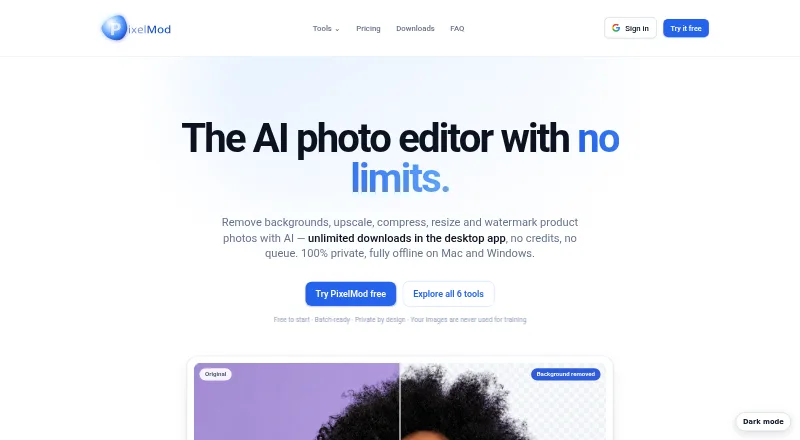
PixelMod is an image editor that brings several image tasks together: background removal, upscaling, optimization, resizing, watermarking, and editable layers through its Layers Beta feature. You can apply settings across a batch of images and export the results as a ZIP. It accepts PNG, JPG/JPEG, and WEBP input. The macOS and Windows desktop apps process images locally and can work offline after sign-in; the web version processes uploads transiently, encrypts them in transit, and deletes them after processing. PixelMod says submitted images are not used to train AI models. The free plan includes five web downloads per month, unlimited desktop downloads, a 0.5 MP maximum, and the Standard model. Starter is $7 a month and Pro is $14 a month; both provide higher resolution limits and Maximum Quality. Desktop requirements are macOS 12 or later on Apple Silicon or Intel, or Windows 10/11 64-bit. Paid subscriptions renew automatically until cancelled through the customer portal.
Good
- Combines six image editing functions in one editor.
- Batch settings can be exported as a ZIP.
- Desktop apps process images locally and work offline after sign-in.
- Web uploads are deleted after processing.
- Supports PNG, JPG/JPEG, and WEBP input.
Watch out
- Free plan is capped at 0.5 MP.
- Free plan uses the Standard model.
- Free plan allows five web downloads monthly.
- Paid subscriptions renew automatically until cancelled.
Who it suits
PixelMod suits people who want image editing and batch processing in one tool, with either browser-based or desktop workflows. Its free plan may fit users who can work within the 0.5 MP limit and Standard model.
Verdict
PixelMod combines everyday image edits with batch export and editable layers in beta. The free plan has clear resolution and web-download limits, while higher resolution and Maximum Quality require a paid plan.
Plans and prices
From PixelMod's own pricing page, checked 29 Sep 2026.
| Plan | Price | What it gives you |
|---|---|---|
| Free | Free | 5 web downloads/month · ≤0.5 MP · unlimited desktop downloads · Standard model · all tools + manual touch-up · $0 /month |
| Starter | $7 a month | 100 web downloads/month · unlimited desktop downloads · up to 16 MP · Maximum Quality · all tools + touch-up · $7 USD / month |
| Pro | $14 a month | 1,000 web downloads/month · unlimited desktop downloads · up to 25 MP · Maximum Quality · priority processing · $14 USD / month |
The facts
Each one read from PixelMod's own pages, with the date it was checked.
What it does
- AI training
- PixelMod says it does not use submitted images to train AI models.checked 29 Sep 2026
- Batch workflow
- Users can apply settings to a batch of images and export them as a ZIP.checked 29 Sep 2026
- Desktop processing
- The macOS and Windows desktop apps process images locally and can work offline after sign-in.checked 29 Sep 2026
- Desktop requirements
- The downloads section lists macOS 12 or later on Apple Silicon or Intel and Windows 10/11 64-bit.checked 29 Sep 2026
- Integrations and providers
- The listed service providers include Google for sign-in, Supabase for authentication and account data, Modal for web/API image processing, Lemon Squeezy for payments, and Hostinger for hosting.checked 29 Sep 2026
- Layers Beta
- Layers separates a subject from its background into editable layers, and the site says the feature is in beta.checked 29 Sep 2026
- Notable limitation
- The Free plan is capped at 0.5 MP and uses the Standard model; higher resolution and Maximum Quality require a paid plan.checked 29 Sep 2026
- Paid from
- 7checked 20 Sep 2026
- Security measures
- The privacy policy lists encryption in transit, access controls, least-privilege practices, credential protection, and service monitoring.checked 29 Sep 2026
- Subscription terms
- Paid plans are recurring subscriptions that renew automatically until cancelled through the customer portal.checked 29 Sep 2026
- Support
- PixelMod lists [email protected] for support and privacy questions.checked 29 Sep 2026
- Supported image formats
- The FAQ lists PNG, JPG/JPEG, and WEBP as supported input formats.checked 29 Sep 2026
- Web image handling
- Web uploads are encrypted in transit, processed transiently, and automatically deleted after processing.checked 29 Sep 2026
- What it does
- PixelMod combines background removal, image upscaling, optimization, resizing, watermarking, and Layers Beta in one image editor.checked 29 Sep 2026
Money
- Free plan
- Yeschecked 20 Sep 2026
The full review of PixelMod
Overview
PixelMod brings background removal, upscaling, optimization, resizing and watermarking together with a batch workflow that exports processed images as a ZIP. It suits people who need several practical image edits in one place, especially when repeated settings save time across a group of files.
The main trade-off is the free plan’s 0.5 MP ceiling and Standard model: it is useful for trying the workflow, but not for larger images or Maximum Quality processing. Paid plans raise those limits and add web-download capacity.
For more options, browse Photo Resizing Software and AI Photo Editors.
Key features
- Batch processing: Apply settings to multiple images and export them together in a ZIP. That is a useful fit for recurring resize or cleanup jobs, rather than editing files one by one.
- Core image edits: Background removal, upscaling, optimization, resizing and watermarking sit in the same editor, reducing the need to switch tools for these tasks.
- Layers Beta: The feature separates a subject from its background into editable layers. Its beta status makes it an option to explore, not a dependable reason on its own to choose the product.
- Format and output controls: Inputs include PNG, JPG/JPEG and WEBP; outputs include PNG and JPEG. Resizing is by dimensions, and quality controls are supported.
- Desktop and web handling: The macOS and Windows apps process images locally and can work offline after sign-in. Web uploads are encrypted in transit, processed transiently and automatically deleted afterward. PixelMod says it does not use submitted images to train AI models.
The privacy policy describes encryption in transit, access controls, least-privilege practices, credential protection and service monitoring. Service providers include Google for sign-in, Supabase for authentication and account data, Modal for web/API image processing, Lemon Squeezy for payments and Hostinger for hosting. Support and privacy questions can be sent to [email protected].
Pricing
PixelMod is freemium, with no free trial. The Free plan costs nothing. It includes five web downloads per month, unlimited desktop downloads, a 0.5 MP maximum and the Standard model. That is a constrained but useful way to assess the editor; the resolution cap rules it out for larger source images.
Starter costs $7 a month and includes 100 web downloads per month, unlimited desktop downloads, a 16 MP maximum and Maximum Quality. It is the sensible paid entry point for regular use that stays within that web quota. Pro costs $14 a month, raising the web allowance to 1,000 downloads and the maximum resolution to 25 MP while retaining unlimited desktop downloads and Maximum Quality. Choose it when the Starter quota or resolution limit would be restrictive.
Prices are in USD, with applicable taxes shown at checkout. Paid plans renew automatically until cancelled through the customer portal, so subscribers should account for recurring billing rather than treating either price as a one-time purchase.
Platforms
PixelMod is available on the web, macOS and Windows. Desktop requirements are macOS 12 or later on Apple Silicon or Intel, and Windows 10/11 64-bit. Local processing and offline use after sign-in make desktop the better fit when web-download quotas or connectivity are concerns; web access is the alternative when a desktop app is not practical.
Who it's for
PixelMod is best suited to people who need a mix of image cleanup and resizing, batch export, and the choice of local desktop processing or web use. The free plan fits small, lower-resolution jobs. For higher-resolution files or Maximum Quality, a paid plan is necessary; frequent web users should match their expected monthly volume to Starter or Pro.
Pros and cons
Pros
- Several common edits in one editor: Background removal, upscaling, optimization, resizing and watermarking cover a broad everyday workflow.
- Batch ZIP export: Shared settings and a single archive make groups of processed images easier to handle.
- Local desktop processing: macOS and Windows apps can work offline after sign-in, unlike a workflow dependent on web processing.
- Clear paid-plan steps: Starter and Pro specify web quotas and resolution ceilings, while both include Maximum Quality and unlimited desktop downloads.
Cons
- Free processing is tightly capped: Five web downloads a month and 0.5 MP maximum limit its usefulness beyond light evaluation; the free plan also uses Standard rather than Maximum Quality.
- Paid plans are recurring: Both automatically renew until cancelled, and applicable taxes are added at checkout.
- Layers are still beta: Users seeking a settled editable-layer workflow should not rely on this feature as a mature centerpiece.
- Output formats are narrower than inputs: WEBP is accepted, but the listed outputs are PNG and JPEG.
Alternatives
- XnConvert is a stronger fit for Linux users or those who want a free option for private, educational or nonprofit use; its listed company license for 100+ licenses costs 6.50 EUR.
- Converseen is a free, GPL version 3 option for Linux, macOS or Windows users who prefer free software.
- Batch Resize is an iOS or macOS alternative with a free download containing advertising and a 34.99 USD one-time in-app purchase to remove ads.
- Desqueeze is an iOS alternative with a free Basic plan.
- Icecream Image Resizer is a Windows option with main features available free and a 12.00 USD one-time PRO lifetime license for unlimited batch resizing.
- Light Image Resizer suits Windows users who prefer a single purchase: its 24.99 USD one-time price buys a lifetime license for the purchased major version for one user, and a free trial is available.
- Photo Size Optimizer is a free Mac-only option with no in-app purchases.
- imgproxy is a Linux alternative.
Verdict
Choose PixelMod if you want batch image work, a useful mix of editing tools and the flexibility of local desktop processing, with paid plans for higher resolution and Maximum Quality. Look elsewhere if your needs exceed the free plan but you do not want a recurring subscription, or if you need a non-beta layers workflow or WEBP output.
Getting started
- Open https://pixelmod.io/ and choose the web editor or a desktop app.
- For desktop use, install the macOS 12-or-later or Windows 10/11 64-bit app.
- Sign in to use the desktop app offline after sign-in.
- Choose the Free plan or a paid plan based on its download allowance and maximum image size.
- Upload PNG, JPG/JPEG or WEBP images and select tools or batch settings.
- Export finished images as PNG or JPEG, or export a batch as a ZIP.
Limits worth knowing
The Free plan allows five web downloads per month, a 0.5 MP maximum and the Standard model. Starter costs $7 a month and allows 100 web downloads per month with a 16 MP maximum; Pro costs $14 a month and allows 1,000 web downloads per month with a 25 MP maximum. Both paid plans include Maximum Quality.
Questions
Is there a free plan?
Yes. Free includes five web downloads per month, unlimited desktop downloads, a 0.5 MP maximum and the Standard model.
How much do the paid plans cost?
Starter costs $7 a month and Pro costs $14 a month. Both are recurring subscriptions that renew automatically until cancelled through the customer portal.
Which platforms are supported?
PixelMod is available on web, macOS and Windows. The desktop downloads require macOS 12 or later on Apple Silicon or Intel, or Windows 10/11 64-bit.
Which image formats does it accept and export?
It accepts PNG, JPG/JPEG and WEBP input. PNG and JPEG are listed as output formats.
Can I use PixelMod offline?
The macOS and Windows desktop apps can work offline after sign-in. They process images locally.
Does PixelMod use submitted images to train AI models?
PixelMod says it does not use submitted images to train AI models.
Alternatives to PixelMod
- 1
imgproxy
Free planOpen sourceAndroidiOSWebAPI8.6Free plan - 2

Topaz Gigapixel
AndroidiOSWebAPI7.5From $149 a year - 3
Converseen
Free planOpen sourceLinuxmacOSWindows7.3Free plan - 4
Fotosizer
Free planWindows7.3$13.88 one-time - 5
BatchPhoto
macOSWindows7.1$29.95 one-time - 6

ON1 Resize AI
macOSWindows6.7