Fotosizer
Fotosizer is a Windows app for resizing and processing batches of photos and images.
What Fotosizer is
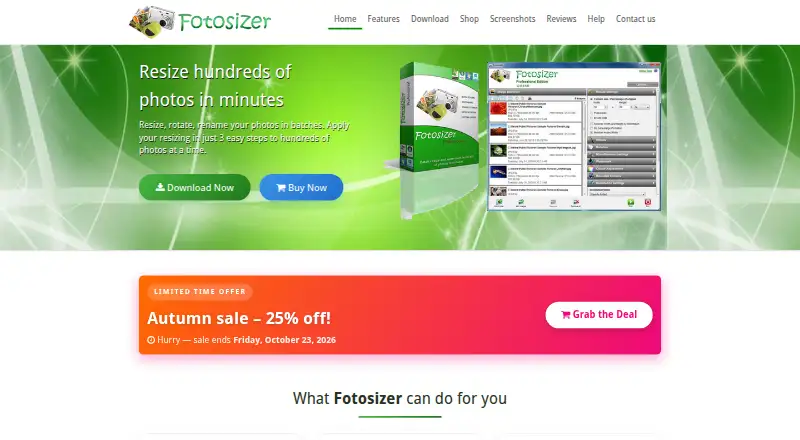
Fotosizer is a Windows app for resizing and processing batches of photos and images. It supports batch resizing, rotation, renaming, watermarking, and image optimization, with resizing options for percentages, custom dimensions, one-side sizing, padding, aspect-ratio preservation, and cropping. Supported formats include TIFF, JPEG, GIF, BMP, PNG, WMF, EMF, and WEBP; it can handle animated GIFs and multipage TIFFs. The free Standard Edition is available as a download. Professional Edition adds text and image watermarks, color adjustments, rounded corners, and completion actions. Users can select images in Windows File Explorer and open Fotosizer from the right-click context menu. The download page lists Windows XP through Windows 11 in both 32-bit and 64-bit versions, and the software is available in 35 languages. Professional lifetime licenses include free updates and future new versions. The shop says versions for Mac, Linux, iOS, Android, and Chromebook are unavailable. Fotosizer says device and crash information is collected only after an application error if a user chooses to send an error report. Purchases are handled by FastSpring, which receives payment details; Fotosizer says it does not receive customers’ credit card details.
Good
- Batch resizing, rotation, renaming, and optimization
- Supports TIFF, JPEG, GIF, BMP, PNG, WMF, EMF, and WEBP
- Available in 35 languages
- File Explorer right-click access
Watch out
- Available only for Windows
- Professional Edition is needed for text and image watermarks
Who it suits
Fotosizer suits Windows users who want to resize or otherwise process batches of images, with several sizing controls and file formats. It may also suit users who need batch renaming, rotation, or watermarking.
Verdict
Fotosizer combines batch resizing with other image-processing tasks and supports a wide range of listed formats. The free Standard Edition covers the basic offering; Professional Edition adds watermarking and other listed tools.
Plans and prices
From Fotosizer's own pricing page, checked 15 Oct 2026.
| Plan | Price | What it gives you |
|---|---|---|
| Standard Edition | Free | Batch resizing, rotation and destination features |
| Personal | $13.88, paid once | 1 computer · lifetime license · 25% off; shown price $13.88 USD (regular $18.50 USD) |
| Home 360 | $26.96, paid once | Up to 3 computers · lifetime license · 25% off; shown price $26.96 USD (regular $35.95 USD) |
| Business 360 | $26.96, paid once | Up to 3 computers · lifetime license · 25% off; shown price $26.96 USD (regular $35.95 USD) |
| Startup | $74.96, paid once | Up to 10 computers · lifetime license · 25% off; shown price $74.96 USD (regular $99.95 USD) |
| Business | $364.46, paid once | Up to 50 computers · lifetime license · 25% off; shown price $364.46 USD (regular $485.95 USD) |
| Business Plus | $674.63, paid once | Up to 150 computers · lifetime license · 25% off; shown price $674.63 USD (regular $899.50 USD) |
| Enterprise | $1,590.71, paid once | Up to 350 computers · lifetime license · 25% off; shown price $1590.71 USD (regular $2120.95 USD) |
| Enterprise Plus | $4,496.96, paid once | Up to 1,000 computers · lifetime license · 25% off; shown price $4496.96 USD (regular $5995.95 USD) |
| Enterprise Unlimited | $6,746.96, paid once | Unlimited computer installs · lifetime license · 25% off; shown price $6746.96 USD (regular $8995.95 USD) |
The facts
Each one read from Fotosizer's own pages, with the date it was checked.
What it does
- Batch processing
- It supports batch resizing, rotation, renaming, watermarking, and image optimization.checked 5 Oct 2026
- Batch resize controls
- Resizing supports percentages, custom dimensions, one-side sizing, padding, aspect-ratio preservation, presets and cropping.checked 15 Oct 2026
- Effects
- Built-in effects include black and white, negative, sepia, pixelate, vignette, monochrome, Polaroid, vintage, soft, vibrant, Gotham, cold, warm and dark.checked 15 Oct 2026
- Folder filtering
- Folder imports can be filtered by filename, size, creation date, modification date, or combined/all matching rules.checked 15 Oct 2026
- Formats
- Supported formats include TIFF, multipage TIFF, JPEG, GIF, animated GIF, BMP, PNG, WMF, EMF and WEBP.checked 15 Oct 2026
- Image formats
- Supported formats include TIFF, JPEG, GIF, BMP, PNG, WMF, EMF, and WEBP, including animated GIFs and multipage TIFFs.checked 5 Oct 2026
- Image selection
- Users can add files, folders, subfolders, drag and drop items, use Windows Explorer context-menu integration and sort the image list.checked 15 Oct 2026
- Installer automation
- Silent installation supports /S plus switches for shortcuts, automatic updates, Explorer integration, installation directory and product key.checked 15 Oct 2026
- Languages
- The application lists 35 supported languages, including English, French, German, Spanish, Chinese, Japanese, Arabic and Vietnamese.checked 15 Oct 2026
- Language support
- Fotosizer is available in 35 languages.checked 5 Oct 2026
- Licence
- The Standard EULA permits personal and commercial use but grants a non-exclusive, non-transferable licence and prohibits resale, modification, redistribution, sublicensing and reverse engineering.checked 15 Oct 2026
- License updates
- The Professional lifetime license includes free updates and future new versions without buying the product again.checked 5 Oct 2026
- Limit: editing depth
- Clubic lists limited editing options, no non-destructive editing and a restricted free edition.checked 15 Oct 2026
- Limit: localisation
- Clubic criticizes the dated-looking interface and says the French translations are poor enough that English is easier to understand.checked 15 Oct 2026
- Limit: preview expectations
- The SnapFiles reviewer wished for a preview option and said the product did not offer a distinctive feature set.checked 15 Oct 2026
- Metadata
- Fotosizer can copy JPEG EXIF camera information and preserve selected creation, modification and picture-taken dates.checked 15 Oct 2026
- Payment handling
- Purchases are handled by FastSpring, and Fotosizer says it does not receive customers’ credit card details.checked 5 Oct 2026
- Praise: speed and quality
- A SnapFiles reviewer gave 4/5, reporting fast processing, preserved quality, drag-and-drop handling and standard resize options.checked 15 Oct 2026
- Praise: usability
- ComputerBase rated it 3.6/5 from 56 ratings and described the interface and batch workflow as easy for beginners.checked 15 Oct 2026
- Praise: workflow
- Softpedia’s editor rated it 3.5/5 and praised its simple, logical step-by-step handling for resizing, conversion and effects.checked 15 Oct 2026
The company
- Company
- Fotosizer is a product of FutureFiniti Limited, registered in England and Wales, with its registered office in London.checked 5 Oct 2026
- Headquarters
- The maker lists its registered office at 86-90 Paul Street, London, England, EC2A 4NE.checked 15 Oct 2026
- Maker
- Fotosizer is a product of independently owned FutureFiniti Limited, registered in England and Wales as company 14824584.checked 15 Oct 2026
Where it runs
- Platform limitation
- The help and shop pages say there are no Mac, Linux, iOS, Android or Chromebook versions.checked 15 Oct 2026
The full review of Fotosizer
Fotosizer is a Windows application for processing groups of images, from resizing and rotation to renaming and optimization. It is best suited to people with recurring batch jobs who want flexible sizing controls without a subscription. Its broad format support is a strength; its Windows-only reach is the clear constraint.
Overview
Fotosizer brings several common image-preparation tasks into one batch workflow. That makes it a practical choice for preparing folders of images, rather than a tool focused on editing individual photos. Resizing can follow a percentage, custom dimensions or one side, with options for padding, preserving aspect ratio and cropping. The range gives users room to fit output requirements, though its automation is preset-based rather than unrestricted.
It supports TIFF, JPEG, GIF, BMP, PNG, WMF, EMF and WEBP, including animated GIFs and multipage TIFFs. That breadth is useful when a batch contains different formats. The trade-off is platform reach: Fotosizer runs on Windows, with downloads listed from Windows XP through Windows 11 in 32-bit and 64-bit versions, but no Mac, Linux, iOS, Android or Chromebook edition.
Key features
- Batch processing: Resize, rotate, rename, watermark and optimize groups of images. This combination suits repeatable preparation work; users needing more open-ended automation should not mistake preset-based processing for a general workflow engine.
- Resize controls: Choose percentage or custom dimensions, resize by one side, add padding, maintain aspect ratio or crop. These options accommodate different output shapes without forcing one sizing method on every batch.
- Professional tools: Professional Edition adds text and image watermarks, color adjustments, rounded corners and completion actions. Those extras can make it a better fit for batches that need finishing steps, while the free Standard Edition remains the basic option.
- File Explorer access: Select images in Windows File Explorer and launch Fotosizer’s resize option from the right-click menu. This shortens the path from selecting files to starting a resize job.
- Language and privacy: Fotosizer is available in 35 languages. Its privacy policy says device and crash information is collected only when an application error occurs and the user chooses to send an error report.
Pricing
Fotosizer uses a freemium model. Standard Edition is free; paid editions are one-time lifetime licenses rather than subscriptions. Professional lifetime licensing includes free updates and future new versions without another purchase.
| Plan | Price | License |
|---|---|---|
| Standard Edition | free | Free download |
| Personal | $11.10, paid once | Up to 1 computer |
| Business 360 | $21.57, paid once | Up to 3 computers |
| Home 360 | $21.57, paid once | Up to 3 computers |
| Startup | $59.97, paid once | Up to 10 computers |
| Business | $291.57, paid once | Up to 50 computers |
| Business Plus | $539.70, paid once | Up to 150 computers |
| Enterprise | $1,272.57, paid once | Up to 350 computers |
| Enterprise Plus | $3,597.57, paid once | Up to 1000 computers |
| Enterprise Unlimited | $5,397.57, paid once | Unlimited computer installs |
The free Standard Edition suits basic use; Professional Edition is the relevant upgrade for users who need its additional watermarking and finishing tools. Personal is the lowest-cost paid choice for one computer, while the multi-computer licenses fit households, startups and organizations that need more installs. The larger tiers increase permitted installs rather than introducing a subscription commitment. Purchases are handled by FastSpring, and Fotosizer says it does not receive customers’ credit card details.
Platforms
Fotosizer is for Windows. The download page lists support from Windows XP through Windows 11 in 32-bit and 64-bit versions. It is not an option for users who need a Mac, Linux, mobile or Chromebook application.
Who it's for
Choose Fotosizer if you regularly resize or prepare batches on Windows and value control over dimensions, broad format support and a one-time license. It is less suitable for cross-platform teams, mobile-first workflows or users who need automation beyond presets. Users who only need basic resizing can start with Standard Edition; those who need Professional’s watermarking and finishing tools have a clear reason to pay.
Pros and cons
- Pro: Batch resizing sits alongside rotation, renaming, watermarking and optimization, reducing the need to split routine preparation tasks across tools.
- Pro: Flexible sizing options and support for eight formats, including animated GIFs and multipage TIFFs, suit varied image folders.
- Pro: Lifetime licenses include future versions and updates, avoiding recurring subscription costs.
- Con: Windows-only support rules it out for users on other operating systems and mixed-platform workflows.
- Con: Preset-based automation may not satisfy users who need more flexible or complex batch workflows.
- Con: Professional tools require a paid license; the free Standard Edition covers the basic offering.
Alternatives
Browse Photo Resizing Software for the category, or Batch Photo Processing Software for tools centered on processing groups of images.
- PixelMod is a freemium alternative for users who want macOS or web access as well as Windows; its free plan has a 0.5 MP maximum and allows five web downloads per month, alongside unlimited desktop downloads.
- XnConvert is a freemium choice for users who need Linux or macOS support in addition to Windows. Private, educational and nonprofit use is freeware; a company license is also offered.
- Converseen is a free alternative for users who want software for Linux, macOS or Windows under GNU GPL version 3.
- Batch Resize is an iOS and macOS option; its free download contains advertising, with a one-time purchase to remove ads.
- Desqueeze is an iOS alternative for users who want a mobile resizing app.
- Cantaloupe is a free, self-hosted or web-based image server for users seeking that kind of setup.
- Icecream Image Resizer is another Windows freemium option; its free tier covers main features, while PRO is listed for unlimited batch resizing.
- NextDiff is a free Windows alternative for personal and commercial use on Windows 10 and 11.
Verdict
Fotosizer is a strong fit for Windows users who need repeatable batch resizing plus practical preparation tools, especially if broad format support and a lifetime license matter more than cross-platform access. Start with Standard Edition for basic jobs; choose a Professional license when its extra finishing tools or multi-computer installs justify the cost. Look elsewhere if you work outside Windows or need less constrained automation.
Getting started
- Open the Fotosizer website
- Download the free Standard Edition for Windows
- Select images in Windows File Explorer
- Choose Fotosizer from the right-click context menu
- Set resize, rotation, naming, watermark, or optimization options
- Purchase a lifetime license through FastSpring if needed
Limits worth knowing
The free Standard Edition is a free download, while professional additions require a paid license. Paid licenses differ by computer count, from one computer in Personal to unlimited installs in Enterprise Unlimited.
Questions
Is Fotosizer free?
Yes. The Standard Edition is available as a free download.
Which platforms does Fotosizer support?
It supports Windows, with downloads listed for Windows XP through Windows 11 in 32-bit and 64-bit versions. The shop says there are no Mac, Linux, iOS, Android, or Chromebook versions.
What image formats can it process?
Supported formats are TIFF, JPEG, GIF, BMP, PNG, WMF, EMF, and WEBP. Animated GIFs and multipage TIFFs are included.
What does Professional Edition add?
Professional Edition adds text and image watermarks, color adjustments, rounded corners, and completion actions.
How many computers can a license cover?
Personal covers one computer, Business 360 and Home 360 cover up to three, and Enterprise Unlimited allows unlimited computer installs. These are lifetime licenses.
Who handles payment?
Purchases are handled by FastSpring, and Fotosizer says it does not receive customers’ credit card details.
Alternatives to Fotosizer
- 1
imgproxy
Free planOpen sourceAndroidiOSWebAPI8.6Free plan - 2

Topaz Gigapixel
AndroidiOSWebAPI7.5From $149 a year - 3
Converseen
Free planOpen sourceLinuxmacOSWindows7.3Free plan - 4

PixelMod
Free planWebmacOSWindows7.2From $7 a month - 5
BatchPhoto
macOSWindows7.1$29.95 one-time - 6

ON1 Resize AI
macOSWindows6.7