
Desqueeze
Desqueeze is an iOS app for resizing and reformatting batches of photos, videos and Live Photos.
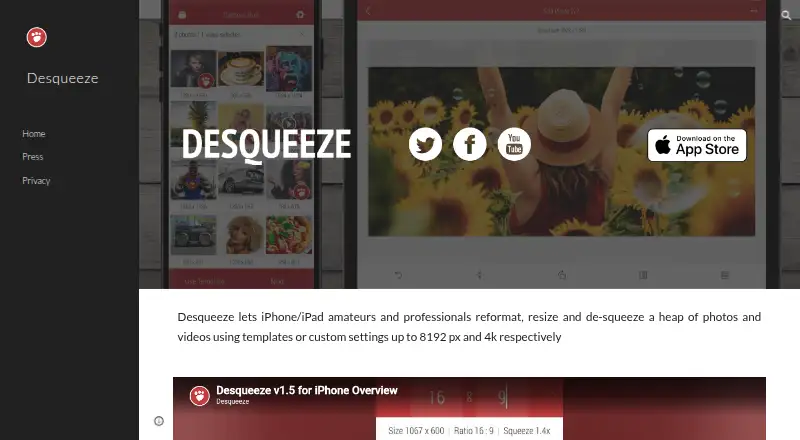
What Desqueeze is
Desqueeze is an iOS app for resizing and reformatting batches of photos, videos and Live Photos. Sizing options include pixels, aspect ratios and percentages, with Stretch, Fill and Fit methods. Users can select a whole Photo Library album, including mixed photo and video items, and choose from more than 100 standard templates or create and modify templates of their own. It supports PNG, JPEG, HEIC and TIFF photos, plus MP4, QuickTime MOV and M4V video. HDR processing and 12 color profiles, including Original (Automatic), are listed. Exports can be saved to the Photo Library or Files app and shared through services such as Instagram, Mail, Facebook and Messages. The free Basic plan limits photos to 4,032 × 3,024 pixels and videos to 1920 × 1080 pixels; PRO supports photos up to 18,000 × 12,000 pixels and video up to 8K. PRO costs $4.49 a month, $34.99 a year or $59.99, paid once for lifetime access. The app requires iOS 17 or later on iPhone and iPad; Apple Vision compatibility with visionOS 1 or later is also listed.
Good
- Batch resizing supports mixed photos and videos
- More than 100 standard templates
- Supports HDR processing and 12 color profiles
- Exports to Photo Library or Files
- PRO supports video up to 8K
Watch out
- Basic photos are limited to 4,032 × 3,024 pixels
- Basic videos are limited to 1920 × 1080 pixels
- Requires iOS 17 or later on iPhone and iPad
- PRO lifetime access costs $59.99, paid once
Who it suits
Desqueeze suits iPhone and iPad users who need to resize mixed photo and video batches, apply templates or export to common apps and services. Users working beyond the Basic output limits can consider a PRO plan.
Verdict
Desqueeze provides detailed resize controls, batch album processing and broad format support for photos and video. The Basic plan has resolution limits, while PRO removes those limits and unlocks all features.
Plans and prices
From Desqueeze's own pricing page, checked 3 Oct 2026.
| Plan | Price | What it gives you |
|---|---|---|
| Basic | Free | Photos up to 4,032 x 3,024 px · videos up to 1920 x 1080 px · free version has additional limitations described in the app |
| PRO Monthly | $4.49 a month | Unlocks all features and removes Basic version limitations |
| PRO Annual | $34.99 a year | Unlocks all features and removes Basic version limitations |
| Lifetime Access to PRO Version | $59.99, paid once | Unlocks all features and removes Basic version limitations |
The facts
Each one read from Desqueeze's own pages, with the date it was checked.
What it does
- Basic limits
- The listed Basic limits are 4,032 × 3,024 pixels for photos and 1920 × 1080 pixels for videos; PRO supports photos up to 18,000 × 12,000 pixels and videos up to 8K.checked 3 Oct 2026
- Batch and album processing
- The app supports batch resizing and selecting a full Photo Library album, including mixed photo and video items.checked 3 Oct 2026
- Export and sharing
- Results can be saved to the Photo Library or Files app and shared through services such as Instagram, Mail, Facebook, and Messages.checked 3 Oct 2026
- Formats
- Supported photo formats include PNG, JPEG, HEIC, and TIFF, and supported video formats include MP4, QuickTime MOV, and M4V.checked 3 Oct 2026
- HDR and color
- The app supports HDR processing and offers 12 color profiles, including Original (Automatic).checked 3 Oct 2026
- Policy and support
- The privacy policy says collected data may be used to provide customer support and states that questions can be sent to [email protected].checked 3 Oct 2026
- Privacy practices
- The developer indicates that identifiers, diagnostics, and other data may be collected and linked to the user for analytics and app functionality; Apple says this information has not been verified by Apple.checked 3 Oct 2026
- Purpose
- Desqueeze batch resizes, reformats, and de-squeezes photos, videos, and Live Photos.checked 3 Oct 2026
- Resize controls
- It supports sizing in pixels, aspect ratios, and percentages, with Stretch, Fill, and Fit resize methods.checked 3 Oct 2026
- Templates
- It offers more than 100 standard templates and lets users create personal templates and modify duplicated standard templates.checked 3 Oct 2026
The company
- Maker
- The website identifies Aliaksei Khutarshchykau as the operator of Desqueeze and Desqueeze PRO and provides [email protected].checked 3 Oct 2026
Where it runs
- Supported devices
- The App Store listing says Desqueeze requires iOS 17 or later on iPhone and iPad, and also lists Apple Vision compatibility with visionOS 1 or later.checked 3 Oct 2026
The full review of Desqueeze
Desqueeze is an iOS app for resizing, reformatting, and de-squeezing photos, videos, and Live Photos in batches. It suits iPhone and iPad users who need album-level processing and repeatable output settings rather than a desktop editor. The free tier covers routine mobile jobs, while high-resolution work and unrestricted features require PRO.
Overview
Desqueeze combines still-image and video conversion in a single mobile workflow. Output can be defined by exact pixel dimensions, an aspect ratio, or a percentage, then processed with Stretch, Fill, or Fit. That gives practical control over whether content is distorted, cropped to fill, or contained within the requested frame.
Batch handling is one of its strongest reasons to choose it. You can select an entire Photo Library album, including albums that mix photos and videos, instead of working item by item. Live Photo support also keeps that format in the same workflow. The trade-off is platform scope: this is an iPhone, iPad, and Apple Vision app, not a cross-platform desktop utility.
Key features
More than 100 standard templates provide ready-made dimensions for recurring jobs. Personal templates and editable duplicates of standard templates are more useful than a fixed preset list: teams or creators can establish a preferred output and adjust it without rebuilding settings each time.
Photo input and output support includes PNG, JPEG, HEIC, and TIFF. Video support covers MP4, QuickTime MOV, and M4V. HDR processing and 12 color profiles, including Original (Automatic), address workflows where preserving or deliberately changing color handling matters.
Exports can go to the Photo Library or Files app, and the app can share results through Instagram, Mail, Facebook, and Messages. Those destinations fit an iOS-first publishing routine, although the listed workflow does not replace a broader desktop asset-management system.
Pricing
Basic costs nothing. It includes photos up to 4,032 × 3,024 pixels and videos up to 1920 × 1080 pixels, with additional limitations in the free version. That is sufficient for many phone-sharing and standard social-media tasks, but the ceilings can exclude larger originals or high-resolution delivery.
PRO Monthly costs $4.49 a month, and PRO Annual costs $34.99 a year. Both unlock all features and remove Basic-version limitations; the annual option reduces the effective monthly cost for people who use the app throughout the year, while monthly billing suits occasional intensive periods.
Lifetime Access to PRO Version costs 59.99 USD once and carries the same feature unlock and limit removal without a recurring charge. It is the clearest fit for long-term users who expect to process high-resolution media repeatedly. No seat counts, quota terms, or trial period are stated, so this is principally a choice between Basic's caps and PRO's unrestricted output range.
Platforms
The App Store listing requires iOS 17 or later on iPhone and iPad and also lists Apple Vision compatibility with visionOS 1 or later. Supported-platform coverage is therefore concentrated in Apple's mobile ecosystem.
The developer indicates that identifiers, diagnostics, and other data may be collected and linked to the user for analytics and app functionality; Apple says it has not verified that information. The privacy policy says collected data may also be used for customer support, with questions directed to [email protected].
Who it's for
Desqueeze is a strong match for iPhone and iPad photographers, social publishers, and anyone repeatedly converting mixed photo-and-video albums. Templates, multiple sizing methods, HDR handling, and direct sharing make it especially practical when jobs start and finish on an Apple device.
It is less suitable for Windows, macOS, or Linux users, or for workflows that need a desktop-first tool. Basic is appropriate when 4,032 × 3,024 photo and 1920 × 1080 video limits are acceptable; PRO is the sensible choice for source files beyond those dimensions or output up to 18,000 × 12,000 photos and 8K video.
Pros and cons
- Pros: Album-wide batches can include mixed photos and videos, reducing manual sorting.
- Pros: Pixel, ratio, and percentage sizing with Stretch, Fill, and Fit covers both exact delivery specs and framing preferences.
- Pros: More than 100 templates plus editable personal presets support repeatable production.
- Pros: HDR processing, 12 color profiles, and broad photo and video format support give control beyond a basic resizer.
- Cons: Basic's resolution ceilings rule it out for larger photo masters and video above Full HD.
- Cons: The app is limited to Apple's mobile and Vision platforms, so it cannot serve a mixed desktop fleet.
- Cons: PRO is required to remove Basic limitations, adding a subscription or a relatively substantial one-time purchase for occasional users.
Alternatives
Choose PixelMod instead if you need macOS, Windows, or web access; its Free plan allows unlimited desktop downloads but limits web downloads to five per month and caps output at 0.5 MP.
XnConvert is the better alternative for Linux, macOS, or Windows users seeking a freeware option for private, educational, or nonprofit use.
Pick Converseen instead for free, open-source desktop image conversion on Linux, macOS, or Windows.
Fotosizer suits Windows users who want a free Standard Edition or a lifetime Personal license for one computer.
Choose Batch Resize for an iOS or macOS alternative with a free, ad-supported plan and a 34.99 USD one-time ad-removal purchase.
Cantaloupe is a free, self-hosted or web image-server option.
Icecream Image Resizer is a Windows alternative with a free tier and a 12.00 USD lifetime PRO license.
NextDiff is a free Windows 10 and 11 option for personal and commercial use.
The broader Photo Resizing Software list is useful when you need to compare more tools across platforms.
Verdict
Choose Desqueeze if you work on iPhone or iPad and want one app for mixed-media album batches, reusable templates, and controlled photo and video output. Its main advantage is the combination of flexible sizing and mobile-native processing. Look elsewhere if you need desktop or cross-platform coverage, or if your work must stay within the Basic tier while exceeding its resolution limits.
Alternatives to Desqueeze
- 1
imgproxy
Free planOpen sourceAndroidiOSWebAPI8.6Free plan - 2

Topaz Gigapixel
AndroidiOSWebAPI7.5From $149 a year - 3
Converseen
Free planOpen sourceLinuxmacOSWindows7.3Free plan - 4

Fotosizer
Free planWindows7.3$13.88 one-time - 5

PixelMod
Free planWebmacOSWindows7.2From $7 a month - 6
BatchPhoto
macOSWindows7.1$29.95 one-time