BatchPhoto
BatchPhoto automates repeatable photo work, including resizing, converting, cropping, watermarking, date stamping, and renaming.
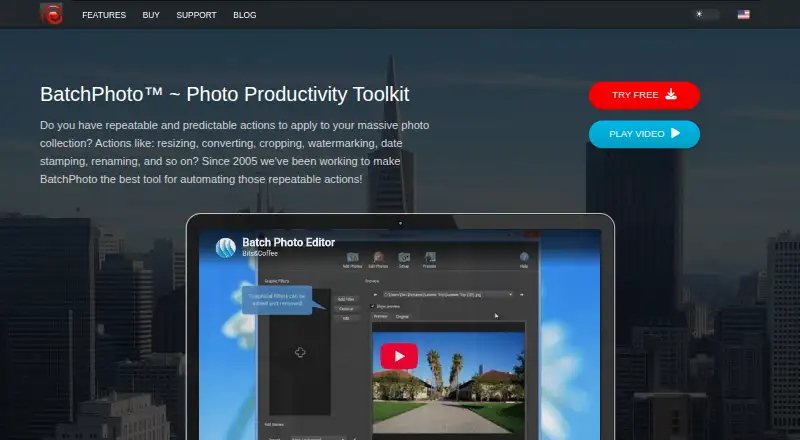
What BatchPhoto is
BatchPhoto automates repeatable photo work, including resizing, converting, cropping, watermarking, date stamping, and renaming. It can process thousands of images in one session using multi-core CPUs and converts to and from more than 170 formats, including JPEG, TIFF, PNG, GIF, and PDF. The software supports DSLR RAW formats and can preserve EXIF and IPTC metadata when saving between compatible formats. Folder Watch can monitor for new images and apply custom edits automatically; Enterprise adds scripts for unattended processing. Users can also edit images and upload them to FTP or SFTP. BatchPhoto is available for Windows and macOS, with a license for one computer. Home costs $29.95, paid once, Pro costs $49.95, paid once, and Enterprise costs $129.95, paid once; each includes 12 months of free updates. A free, fully featured trial is available. The maker offers a 60-day money-back guarantee on purchases through its site.
Good
- Processes thousands of images in one session.
- Converts to and from more than 170 formats.
- Supports DSLR RAW formats and RAW processing.
- Folder Watch applies custom edits to new images.
- Preserves EXIF and IPTC metadata in compatible saves.
Watch out
- No free plan is listed.
- Each license covers one computer.
- Mac App Store edition limits projects and scripts to Pictures-folder images.
- Mac App Store edition excludes the PC version and Facebook upload.
Who it suits
BatchPhoto suits people who repeat photo-editing tasks across large image sets. Home is for home and non-commercial work; Pro is for company use or professional features, and Enterprise adds folder monitoring and scripts.
Verdict
BatchPhoto brings repeatable edits, conversions, and renaming into an automated workflow for Windows and macOS. Choose a plan based on whether you need home use, professional features, or unattended folder processing.
Plans and prices
From BatchPhoto's own pricing page, checked 15 Oct 2026.
| Plan | Price | What it gives you |
|---|---|---|
| BatchPhoto Home | $29.95, paid once | home/non-commercial use · core batch editing · one-time license |
| BatchPhoto Pro Mac App Store | $29.99, paid once | Mac only · sandboxed Pictures-folder projects · no Facebook upload · one-time Mac App Store purchase |
| BatchPhoto Pro | $49.95, paid once | commercial use · watermarking · RAW development · one-time license |
| BatchPhoto Enterprise | $129.95, paid once | Monitor · unattended scripts · server support · one-time license |
The facts
Each one read from BatchPhoto's own pages, with the date it was checked.
What it does
- API and SDK
- The public help documents local scripting and command-line execution but does not describe a REST API or SDK.checked 15 Oct 2026
- Batch processing
- The application processes thousands of images in one operation and can use multicore CPUs.checked 15 Oct 2026
- Documentation
- The help center covers tutorials, interface steps, dozens of filters, formats, RAW processing, scripts and Monitor jobs.checked 15 Oct 2026
- Extensibility
- Scripts use editable XML .bps files containing image, filter and property nodes and can run from Windows command line or Task Scheduler.checked 15 Oct 2026
- File transfer
- The feature list says users can edit images and upload them to FTP or SFTP.checked 4 Oct 2026
- Folder automation
- Folder Watch monitors for new images and automatically applies custom edits; Enterprise also lists scripts for automatic processing.checked 4 Oct 2026
- Folder monitoring
- Monitor watches local or network folders and applies a saved job when new or changed images appear.checked 15 Oct 2026
- Format support
- The maker says BatchPhoto reads and writes more than 170 image formats, including JPEG, TIFF, PNG, GIF and PDF.checked 15 Oct 2026
- Image formats
- BatchPhoto converts to and from more than 170 image formats, including JPEG, TIFF, PNG, GIF, and PDF.checked 4 Oct 2026
- Integrations
- Images can be sent to FTP or SFTP, emailed, and launched from the Windows Explorer context menu.checked 15 Oct 2026
- License limit
- One BatchPhoto license is for use on one computer, either Windows or Mac.checked 4 Oct 2026
- License model
- BatchPhoto is distributed as paid Home, Pro and Enterprise editions with activation codes and time-limited included updates.checked 15 Oct 2026
- Limit: granular editing
- The Photo Video Guy reported that filters apply identically across a batch, with limited per-image controls and slow RAW previews.checked 15 Oct 2026
- Limit: interface and crashes
- Fstoppers described the interface as dated and reported crashes while configuring graphic filters.checked 15 Oct 2026
- Limit: output options
- The Gadgeteer reviewer wanted ZIP output and encountered errors with a grunge frame when multiprocessing was enabled.checked 15 Oct 2026
- Limit: RAW compatibility
- A 2023 review said CR3 RAW files were unsupported at that time.checked 15 Oct 2026
- Metadata
- EXIF and IPTC metadata can be preserved when saving between compatible formats.checked 15 Oct 2026
- Payment and refund
- Purchases are processed through FastSpring, and the maker offers a 60-day money-back guarantee for purchases made through its site.checked 4 Oct 2026
- PDF albums
- Multiple photographs can be combined into PDF albums.checked 15 Oct 2026
The company
- Company history
- Bits&Coffee says BatchPhoto development began in 2005; the legal entity registry records incorporation on June 14, 2007.checked 15 Oct 2026
- Headquarters
- Craiova, Romaniachecked 28 Sep 2026
- Maker legal entity
- The legal maker is Bits&Coffee SRL, based in Craiova, Romania.checked 15 Oct 2026
Where it runs
- Limit: Mac performance
- An App Store reviewer reported 30-to-60-second loading times on a 2021 Apple-chip MacBook Pro and sought a refund.checked 15 Oct 2026
- Mac App Store limits
- The Mac App Store edition excludes the PC version and Facebook upload, and its sandbox limits projects and scripts to images in the Pictures folder.checked 4 Oct 2026
Alternatives to BatchPhoto
- 1
imgproxy
Free planOpen sourceAndroidiOSWebAPI8.6Free plan - 2

Topaz Gigapixel
AndroidiOSWebAPI7.5From $149 a year - 3
Converseen
Free planOpen sourceLinuxmacOSWindows7.3Free plan - 4

Fotosizer
Free planWindows7.3$13.88 one-time - 5

PixelMod
Free planWebmacOSWindows7.2From $7 a month - 6

ON1 Resize AI
macOSWindows6.7