
Batch Resize
Batch Resize is an image-resizing app for iOS and macOS that changes multiple images to a chosen pixel size.
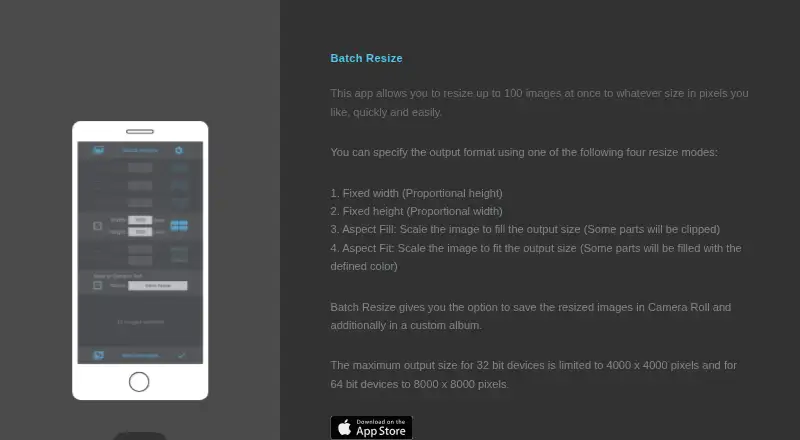
What Batch Resize is
Batch Resize is an image-resizing app for iOS and macOS that changes multiple images to a chosen pixel size. Its current App Store listing says it can handle up to 500 images at once. Resize options include fixed width, fixed height, maximum pixel, aspect fill, and aspect fit, giving users several ways to set the resulting dimensions. Finished images can be saved to Camera Roll or a custom album. Output size is capped at 4000 × 4000 pixels on 32-bit devices and 8000 × 8000 pixels on 64-bit devices. The listing names English, Dutch, French, German, Italian, Japanese, Korean, Portuguese, Russian, Simplified Chinese, and Spanish. The app is free to download and contains advertising; a 34.99 USD once in-app purchase removes ads. Its privacy disclosure says usage data may be used to track users and may be collected for third-party advertising and analytics; Apple says it has not verified this information. The listing links to the developer’s privacy policy and website.
Good
- Resizes up to 500 images at once.
- Offers five resize modes.
- Saves to Camera Roll or custom albums.
- Available in 11 listed languages.
Watch out
- Contains advertising on the free download.
- Ad removal costs 34.99 USD once.
- Output dimensions vary by device architecture.
- Privacy disclosure has not been verified by Apple.
Who it suits
It suits iOS and macOS users who need to resize batches of images and save the results to Camera Roll or a custom album. Users who want an ad-free app can remove ads with the listed in-app purchase.
Verdict
Batch Resize covers high-volume image resizing with several dimension modes and direct album saving. Check the device-specific output cap and advertising terms before choosing it.
Plans and prices
From Batch Resize's own pricing page, checked 3 Oct 2026.
| Plan | Price | What it gives you |
|---|---|---|
| Free | Free | Free download; contains advertising |
| Remove Ads | $34.99, paid once | In-app purchase to remove ads |
The facts
Each one read from Batch Resize's own pages, with the date it was checked.
What it does
- Advertising
- The app contains advertising, and the listing offers an in-app purchase to remove ads.checked 3 Oct 2026
- Batch size
- The current App Store listing says it can resize up to 500 images at once.checked 3 Oct 2026
- Languages
- The listing names English, Dutch, French, German, Italian, Japanese, Korean, Portuguese, Russian, Simplified Chinese, and Spanish.checked 3 Oct 2026
- Output limits
- The maximum output size is 4000 × 4000 pixels on 32-bit devices and 8000 × 8000 pixels on 64-bit devices.checked 3 Oct 2026
- Privacy disclosure
- The developer indicates usage data may be used to track users and may be collected for third-party advertising and analytics; Apple says this information has not been verified by Apple.checked 3 Oct 2026
- Purpose
- Batch Resize resizes multiple images to a chosen pixel size.checked 3 Oct 2026
- Resize modes
- The app lists fixed width, fixed height, maximum pixel, aspect fill, and aspect fit modes.checked 3 Oct 2026
- Save location
- Resized images can be saved to Camera Roll and to a custom album.checked 3 Oct 2026
- Support
- The App Store listing links to the developer’s privacy policy and website.checked 3 Oct 2026
Where it runs
- Platforms
- The App Store listing supports iPhone and iPad, and lists Mac compatibility on macOS 13 or later with an Apple M1 chip or later.checked 3 Oct 2026
The full review of Batch Resize
Batch Resize is a focused iOS and macOS utility for changing the dimensions of many images in one operation. It is best for photo-heavy workflows that need repeatable size rules rather than full editing tools. Its 500-image capacity is the central advantage, while device-specific output ceilings and advertising affect whether it fits demanding work.
Overview
The app concentrates on pixel-dimension changes, letting you apply one resizing approach across a selected group. That narrow remit is useful when the task is preparing images for storage, sharing, or a consistent destination size, but it should not be chosen as a general image editor because the stated function is resizing rather than broader correction or retouching.
Key features
Five modes address the most common dimension requirements: fixed width, fixed height, maximum pixel, aspect fill, and aspect fit. Fixed dimensions suit standard publishing targets; maximum-pixel sizing is useful when files must stay within a ceiling; and the fill and fit choices help when preserving a target shape matters. The range is practical, although it remains centered on dimensions instead of a larger editing workflow.
Batch processing supports up to 500 images at once. That is a substantial allowance for a photo set or recurring content job and reduces the need to repeat the same operation in smaller groups. Output size is limited to 4,000 × 4,000 pixels on 32-bit devices and 8,000 × 8,000 pixels on 64-bit devices. Owners of older hardware or anyone preparing very large images should treat that architecture-dependent cap as a purchasing consideration.
Results can be saved to Camera Roll or to a custom album, giving a simple way to separate processed files from originals. The app lists English, Dutch, French, German, Italian, Japanese, Korean, Portuguese, Russian, Simplified Chinese, and Spanish. Advertising is present, and an in-app purchase removes it. The developer indicates that usage data may be used to track users and collected for third-party advertising and analytics; Apple says that disclosure has not been verified by Apple.
Pricing
The Free plan costs nothing as a download with advertising. It is the sensible starting point for occasional resizing or for users who want to confirm that the available modes and device output cap meet their needs. There is no free trial because the core download is already free.
Remove Ads costs 34.99 USD once through an in-app purchase. It buys an ad-free experience, not a separately stated expansion of batch size, resize modes, output limits, or platform support. Frequent users who find advertising disruptive may value the one-time payment; everyone else can keep the free plan and accept the ads.
Platforms
Batch Resize supports iOS and macOS, with the mobile listing describing the 500-image batch limit and device-dependent maximum output. It is therefore a fit for Apple users who want the same narrowly defined resizing task on those platforms, not for Windows or Linux workflows.
Who it's for
Choose it for large photo batches, repeated dimension changes, and direct delivery to Camera Roll or a custom album. It is particularly suitable when five clearly defined resize modes cover the job and a batch of up to 500 images is useful. Look elsewhere if you need output beyond the applicable 4,000- or 8,000-pixel square limit, non-Apple support, or editing features beyond resizing.
Pros and cons
- Pro: Up to 500 images per batch makes high-volume resizing practical.
- Pro: Five dimension and fit modes handle both direct size targets and constrained layouts.
- Pro: Camera Roll and custom-album saving provide straightforward organization of results.
- Con: Maximum output depends on device architecture, topping out at 4,000 × 4,000 pixels on 32-bit and 8,000 × 8,000 on 64-bit devices.
- Con: The free download contains advertising, while removing it costs 34.99 USD once.
- Con: The stated privacy disclosure includes possible tracking and third-party advertising or analytics collection.
Alternatives
For a broader cross-platform choice, see Photo Resizing Software.
- PixelMod suits users who need macOS, web, and Windows access, with unlimited desktop downloads on its free plan but a 0.5 MP maximum and five web downloads per month.
- XnConvert is a better fit for Linux, macOS, or Windows users seeking freeware for private, educational, or nonprofit use.
- Converseen is the straightforward alternative for free, GPL-licensed software on Linux, macOS, or Windows.
- Fotosizer is Windows-only and offers a lifetime Personal license for 11.10 USD once.
- Desqueeze is the iOS alternative for users who prefer a dedicated mobile resizing app.
- Cantaloupe is for teams wanting a free, self-hosted or web-based open-source image server.
- Icecream Image Resizer fits Windows users who want a 12.00 USD one-time PRO lifetime license.
- NextDiff is a free Windows 10 and 11 option for personal and commercial use.
Verdict
Batch Resize is a sensible pick for Apple users who regularly resize large image groups and want five practical dimension modes with album-based saving. Its main reason to choose it is the 500-image batch allowance; its main reason to look elsewhere is the combination of architecture-based output limits, advertising, and a privacy disclosure that may not suit every user.
Alternatives to Batch Resize
- 1
imgproxy
Free planOpen sourceAndroidiOSWebAPI8.6Free plan - 2

Topaz Gigapixel
AndroidiOSWebAPI7.5From $149 a year - 3
Converseen
Free planOpen sourceLinuxmacOSWindows7.3Free plan - 4
Fotosizer
Free planWindows7.3$13.88 one-time - 5

PixelMod
Free planWebmacOSWindows7.2From $7 a month - 6
BatchPhoto
macOSWindows7.1$29.95 one-time