
Peergos
Peergos is a storage, sharing, and sync service that describes itself as post-quantum end-to-end encrypted.
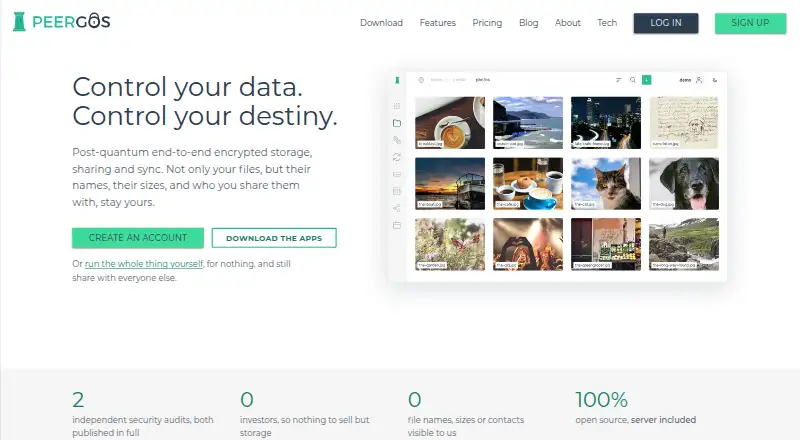
What Peergos is
Peergos is a storage, sharing, and sync service that describes itself as post-quantum end-to-end encrypted. It encrypts files on the user's device, and the maker says account keys stay there; it also says the server cannot see file names, sizes, folder structure, modification times, file types, contacts, or sharing relationships. Folder sync works both ways across devices and uploads changed chunks. Users can configure sync not to propagate deletions, allowing it to act as a backup. Secret links can expire, require a password, limit the number of uses, or allow writing back. The service includes calendar, document and spreadsheet editors, PDF viewing and editing, media playback, an image gallery, task board, Markdown browser, and wiki. Desktop apps support WebDAV and CalDAV/CardDAV, while Android can sync calendars and contacts with phone apps. Drive mounting is available on Windows, Linux, and Android, but not macOS. Peergos says its open-source server and software have published audits from Radically Open Security and Cure53. Users can self-host for free; paid plans list storage from 200 GB to 3000 GB.
Good
- Files are encrypted on the user's device.
- Sync can be configured not to propagate deletions.
- Secret links can have passwords, expiry, and use limits.
- The maker says the software and server are open source.
Watch out
- Drive mounting is not available on macOS.
- Paid storage plans are listed in GBP.
- Mounting is listed for Windows, Linux, and Android only.
Who it suits
Peergos may suit people looking for encrypted storage, sharing, and sync with self-hosting or built-in productivity tools. It also supports desktop integrations and Android calendar and contact syncing.
Verdict
Peergos combines encrypted storage and sync with sharing controls, integrations, and built-in apps. Self-hosting is free, while paid plans provide listed storage tiers.
Plans and prices
From Peergos's own pricing page, checked 30 Sep 2026.
| Plan | Price | What it gives you |
|---|---|---|
| Self-host | Free | Your disk · same software · run the server yourself · for ever |
| Pioneer | — | 3000 GB · unlimited devices · no maximum file size · Monthly £25 per month; yearly £20 per month |
| Pro | — | 200 GB · unlimited devices · no maximum file size · Monthly £4 per month; yearly £3 per month |
| Visionary | — | 1000 GB · unlimited devices · no maximum file size · Monthly £10 per month; yearly £8 per month |
The facts
Each one read from Peergos's own pages, with the date it was checked.
Where it runs
- Built-in apps
- Peergos includes calendar, document and spreadsheet editors, PDF viewing and editing, media playback, an image gallery, task board, Markdown browser and wiki.checked 30 Sep 2026
The company
- Company
- Peergos says it is a non-profit funded through user subscriptions, donations and grants, with no investors, debt or advertising.checked 30 Sep 2026
What it does
- Drive mounting
- A Peergos drive can mount in the file manager on Windows, Linux and Android, but mounting is not yet available on macOS.checked 30 Sep 2026
- Encryption
- Files are encrypted on the user's device, and the maker says account keys never leave it.checked 30 Sep 2026
- Folder sync
- Folder sync works in both directions across devices, uploads changed chunks, and can be configured to stop propagating deletions so sync acts as backup.checked 30 Sep 2026
- Integrations
- The desktop app supports WebDAV for tools such as rclone and CalDAV/CardDAV for apps such as Thunderbird; Android syncs calendars and contacts with the phone's apps.checked 30 Sep 2026
- Metadata privacy
- The maker says file names, sizes, folder structure, modification times, file types, contacts and sharing relationships are hidden from the server.checked 30 Sep 2026
- Open source
- The maker says Peergos is fully open source, including its server, and offers reproducible builds.checked 30 Sep 2026
- Pricing model
- Hosted plans differ by storage, while the maker says every plan includes the same features and there is no free tier on its server.checked 30 Sep 2026
- Product
- Peergos describes itself as post-quantum end-to-end encrypted storage, sharing and sync.checked 30 Sep 2026
- Security audits
- The maker says Peergos has been audited by Radically Open Security and Cure53, with both reports published in full.checked 30 Sep 2026
- Security controls
- Peergos supports authenticator apps, WebAuthn and CTAP2 security keys, Windows Hello, and single-use backup codes.checked 30 Sep 2026
- Self-hosting
- The maker says users can run the whole software themselves for free and still share with other Peergos users.checked 30 Sep 2026
- Sharing
- Secret links can be set to expire, require a password, allow a fixed number of uses, or permit writing back.checked 30 Sep 2026
The full review of Peergos
Overview
Peergos is a distributed storage service for encrypted file syncing and controlled sharing, with productivity and media tools built in. It suits privacy-conscious users who want to self-host or keep files and metadata away from the server. Its strongest case is the combination of metadata protection and flexible sharing; the main compromise is uneven drive-mounting support across desktop platforms.
Key features
Privacy and security
Files are encrypted on the user's device, and Peergos says account keys never leave it. It also says the server cannot see file names, sizes, folder structure, modification times, file types, contacts or sharing relationships. That scope makes Peergos a strong fit for users who want privacy to cover more than file contents. The service describes its encryption as post-quantum and end-to-end encrypted.
Account protection includes authenticator apps, WebAuthn and CTAP2 security keys, Windows Hello and single-use backup codes. Peergos says Radically Open Security and Cure53 audited it and that both full reports are published. It is fully open source, including its server, and offers reproducible builds, useful assurances for technically minded users who want to inspect the software. These controls do not remove the need to protect account access.
Sync, sharing and apps
Two-way folder sync transfers changed chunks across devices. A setting to stop deletions from propagating lets users preserve a backup-like copy instead of mirroring every removal. Secret sharing links can expire, require a password, limit the number of uses or allow recipients to write back, giving users practical control over how files are shared.
Peergos can mount as a drive in file managers on Windows, Linux and Android, but not yet on macOS. Its desktop app supports WebDAV for tools such as rclone and CalDAV/CardDAV for apps such as Thunderbird; Android can sync calendars and contacts with the phone's apps. The built-in suite spans calendar, document and spreadsheet editing, PDF viewing and editing, media playback, a gallery, task board, Markdown browser and wiki. That breadth reduces the need to reach for separate apps, though macOS users miss the drive-mount option.
Pricing
Peergos offers a free self-hosting option and three paid storage tiers. Self-host costs nothing, billed for ever, and provides the user's own disk, the same software and the ability to run the server. It is the best fit for users comfortable operating their own server; the trade-off is that storage comes from their disk rather than a hosted quota.
Pro costs £43 a month, with monthly billing at £4 per month or yearly billing at £3 per month. It includes 200 GB, unlimited devices and no maximum file size, making it the entry hosted option for users with moderate storage needs. Visionary costs £108 a month, billed monthly at £10 per month or yearly at £8 per month, and raises storage to 1000 GB with the same unlimited devices and no maximum file size. It suits users who need more room without changing the device allowance.
Pioneer costs £2,520 a month, billed monthly at £25 per month or yearly at £20 per month, and provides 3000 GB, unlimited devices and no maximum file size. It is the largest stated tier, for users with substantial storage requirements. The lower paid tiers offer less space, but share the same device and file-size terms.
Platforms
Peergos supports Android, Linux, macOS, web and Windows, as well as self-hosting. Its desktop app's WebDAV and calendar/contact integrations are useful for connecting existing tools, while drive mounting is limited to Windows, Linux and Android.
Who it's for
Choose Peergos if metadata privacy, configurable sharing and the option to run the server yourself matter as much as file storage. Its built-in editors and media tools make it more than a sync folder, and the paid tiers allow unlimited devices. It is less suited to someone who requires drive mounting on macOS or wants a hosted plan with more space than the 3000 GB Pioneer tier.
Pros and cons
- Pros: Broad metadata protection complements on-device encryption, rather than protecting file contents alone.
- Pros: Sync can stop propagating deletions, making it useful as a backup-style copy.
- Pros: Expiring, password-protected and use-limited links offer meaningful sharing controls.
- Pros: Self-hosting is free and includes the same software, while paid tiers allow unlimited devices and impose no maximum file size.
- Cons: Drive mounting is unavailable on macOS, despite macOS being a supported platform.
- Cons: Hosted storage is capped at 3000 GB across the stated paid tiers, so users needing more will need another arrangement.
Alternatives
Browse decentralized storage services to compare more options. Choose Sia if you want an open-source project supported by the nonprofit Sia Foundation and community donations, with a free plan and broader listed platform support including iOS and API. Carbide Network is an option to consider for its home-provider and personal-storage plans, both billed at $0.002/GB. Aleph Cloud (formerly Aleph.im) may suit users seeking static website hosting with IPFS distribution and basic bandwidth on a free tier. Walrus offers a free launch-period plan, with usage limits and pricing that may evolve. Stratos is another freemium option with listed support across mobile, desktop, web, API and self-hosted platforms. Filebase may be a better fit for API-oriented object storage: its free plan includes 5 GB shared storage, 500 pinned files, 10 GB IPFS egress and one bucket. Pinata offers API and web access with paid plans including Picnic at $20 a month for 1 TB storage, one gateway plus CDN and 500 GB bandwidth. Consider DeNet Storage if you prefer prepaid storage measured in GAS, with a stated option of 1 TB for one year or 100 GB for ten years.
Verdict
Peergos is a strong choice for privacy-conscious users who want encrypted sync, fine-grained link controls and a genuine self-hosting route. Its metadata protections and broad built-in toolkit set it apart as a private workspace, not just a place to store files. Look elsewhere if macOS drive mounting is essential or the stated hosted storage ceiling does not meet your needs.
Getting started
- Visit https://peergos.org/
- Choose self-hosting or a paid plan
- Install a client for Android, Linux, macOS or Windows, or use the web app
- For self-hosting, run the server yourself
- Configure folder sync and sharing options as needed
Limits worth knowing
The free self-host plan uses your own disk and requires you to run the server yourself. Paid plans list 200 GB, 1000 GB or 3000 GB of storage, unlimited devices and no maximum file size.
Questions
Is Peergos free?
The Self-host plan is free forever and uses your disk. The maker says users can run the whole software themselves for free.
What do paid plans cost?
Pro is £4 per month, or £3 per month yearly, for 200 GB. Visionary is £10 per month, or £8 per month yearly, for 1000 GB; Pioneer is £25 per month, or £20 per month yearly, for 3000 GB.
Which platforms does Peergos support?
It lists Android, Linux, macOS, self-hosted, web and Windows. Drive mounting is available on Windows, Linux and Android, but not macOS.
Is Peergos open source?
The maker says the full software, including the server, is open source and offers reproducible builds.
Does Peergos integrate with other apps?
The desktop app supports WebDAV and CalDAV/CardDAV. Android syncs calendars and contacts with the phone’s apps.
Who makes Peergos?
Peergos says it is a non-profit funded through user subscriptions, donations and grants, with no investors, debt or advertising.
Alternatives to Peergos
- 1
Sia
Free planOpen sourceAndroidiOSWebAPI8.4From $7.99 a month - 2
Aleph Cloud (formerly Aleph.im)
Free planOpen sourceWebAPILinuxmacOS8.1$0.01 usage-based - 3
Datum Storage
Free planAndroidiOSWebAPI7.9From $3.99 a month - 4
Carbide Network
Free planAndroidiOSAPImacOS7.6$0.01 usage-based - 5
Storj
WebAPILinuxmacOS6.8From $29 a month - 6

Pinata
Free planWebAPI6.7From $20 a month