
PDFix Desktop
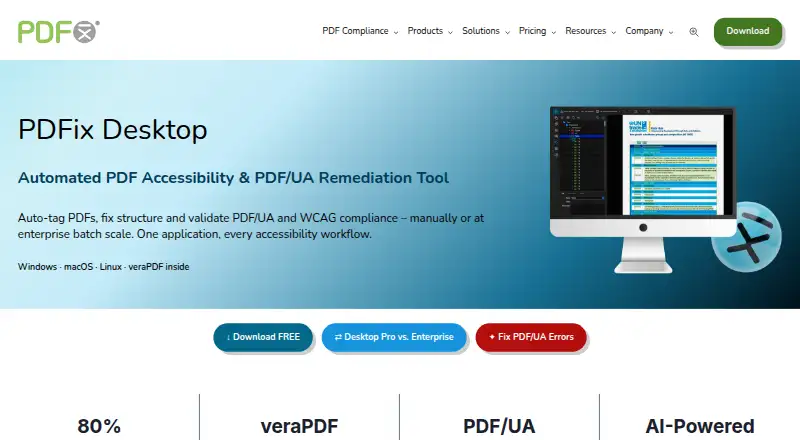
PDFix Desktop is a desktop tool for PDF accessibility remediation, auto-tagging, and PDF/UA and WCAG validation.
What PDFix Desktop is
PDFix Desktop is a desktop tool for PDF accessibility remediation, auto-tagging, and PDF/UA and WCAG validation. It runs on Windows, macOS, and Linux, and offers automated scans alongside manual review tools. Users can choose among four auto-tagging methods: basic tagging, templates generated from preflight checks, AI-generated templates, and predefined layout templates. A visual Accessibility Panel supports refinement of tables, headings, and alternative text. Its built-in veraPDF engine checks PDF/UA-1 and PDF/UA-2, WCAG 2.1 and 2.2, Section 508, and the European Accessibility Act. Audit reports can be exported as HTML, XML, or JSON. The free download includes all features, but saved PDFs may have redacted content and a watermark. Desktop Pro costs $599 per year; Enterprise adds batch processing with layout templates. Marketplace actions include IBM Docling, Amazon Textract, and OpenAI actions, with Docker required for external actions. PDFix says validation is local and documents are not uploaded to a server, but also notes that human checks and intervention remain necessary for full compliance.
Good
- Supports automated scans and manual review.
- Offers four auto-tagging methods.
- Validates PDF/UA, WCAG, Section 508, and EAA.
- Audit reports export to HTML, XML, or JSON.
- Validation is local, according to PDFix.
Watch out
- Saved PDFs from the free download may be redacted and watermarked.
- External marketplace actions require Docker.
- PDFix says human checks remain necessary for full compliance.
Who it suits
PDFix Desktop suits accessibility specialists, compliance and document teams, enterprises, and public-sector organizations working with PDFs. It offers both automated validation and manual remediation tools.
Verdict
PDFix Desktop brings tagging, manual fixes, and standards validation into a desktop workflow. The free download may alter saved PDFs, and full compliance still requires human review.
Plans and prices
From PDFix Desktop's own pricing page, checked 30 Sep 2026.
| Plan | Price | What it gives you |
|---|---|---|
| Desktop Enterprise | €1,000 a year | Per user · all Pro features · batch processing · €1,000/yr |
| Desktop Lite | Free | PDF/UA, WCAG 2.1/2.2, Section 508 and EAA validation · Windows, macOS and Linux |
| PDFix Desktop Lite | Free | Full feature access · saved PDFs may contain redacted content and watermark · free forever |
| Desktop Pro | $599 a year | Per user · remediation · AI auto-tagging · custom actions · layout templates · PDF conversion · $599 USD/year |
| PDFix Desktop Pro | $599 a year | Manual remediation · AI auto-tagging · layout templates · validation · XML/HTML reports · per user per year |
| PDFix Desktop Enterprise | €1,000 a year | High-volume batch processing · automated remediation · recurring workflows · per user per year |
The facts
Each one read from PDFix Desktop's own pages, with the date it was checked.
What it does
- AI actions
- The Actions Marketplace lists integrations including IBM Docling, Amazon Textract, OpenAI, Paddle and Tesseract-based actions.checked 15 Oct 2026
- AI integrations
- Marketplace actions integrate with PDFix Desktop and include IBM Docling, Amazon Textract, and OpenAI actions; external actions require Docker.checked 30 Sep 2026
- Automated scans
- Yeschecked 21 Sep 2026
- Auto-tagging
- It provides four auto-tagging methods: basic tagging, preflight-generated templates, AI-generated templates and predefined JSON templates.checked 15 Oct 2026
- Batch processing
- Enterprise workflows can apply layout templates and validation across hundreds or thousands of files.checked 15 Oct 2026
- Changelog
- Release 3.3.0 dated 2026-08-31 fixed tag editing, PDF/UA metadata, PDF/A saving and tagging-action issues, and updated the SDK to 9.3.0.checked 15 Oct 2026
- Compliance disclaimer
- PDFix says it does not guarantee full document accessibility and that human checks and intervention are required for full compliance.checked 30 Sep 2026
- Current desktop version
- The download page lists PDFix Desktop version 3.3.0.checked 15 Oct 2026
- Custom AI extensibility
- Marketplace actions link to open-source Docker implementations that can be adapted to integrate a customer-trained AI model.checked 15 Oct 2026
- Developer API
- PDFix SDK exposes automation APIs for Python, .NET/C#, Java, C++, and Node.js, with command-line binaries.checked 15 Oct 2026
- Documentation
- The maker links to SDK and Desktop documentation, user guides, validation guides, batch-action references, layout-template material and language-specific code examples.checked 15 Oct 2026
- Integrations
- PDFix announced PDF/UA validation and remediation actions becoming available in the Enfocus Switch App Store in 2026.checked 15 Oct 2026
- Intended users
- PDFix Desktop is presented for accessibility specialists, compliance teams, document teams, enterprises, and public-sector organizations.checked 30 Sep 2026
- Layout templates
- JSON layout templates encode reusable tagging rules for recurring document families such as invoices, reports and bank statements.checked 15 Oct 2026
- Licence
- An independent product directory describes Desktop licensing as a proprietary commercial EULA rather than open source, with SDK Lite under Apache 2.0.checked 15 Oct 2026
- Limit: human review
- PDFix says it does not guarantee 100% accessibility and that achieving full compliance requires human checks and intervention.checked 15 Oct 2026
The company
- Company background
- PDFix says it was founded in 2016 and is headquartered in Slovakia.checked 30 Sep 2026
- Company founded
- PDFix states that it was founded in 2016.checked 15 Oct 2026
- Company headquarters
- The maker identifies PDFix, s.r.o. at Jilemnickeho 3, Stupava, 90031, Slovakia as its European headquarters.checked 15 Oct 2026
- Company membership
- The PDF Association lists PDFix as a full member headquartered in Slovakia and says it joined in April 2016.checked 15 Oct 2026
- Company size
- Crunchbase lists PDFix as a private Slovak company with a 1–10 employee range.checked 15 Oct 2026
- Headquarters
- Stupava, Slovakiachecked 28 Sep 2026
Money
- Free plan
- Yeschecked 21 Sep 2026
- Free use limitation
- The free download provides access to all features, but saved PDFs may contain redacted content and a watermark.checked 30 Sep 2026
The full review of PDFix Desktop
PDFix Desktop is a desktop tool for tagging, remediating and validating accessible PDFs. It suits accessibility specialists and document teams that need both automated starting points and manual control. Its broad validation and local processing are appealing; the free download’s restrictions on saved PDFs make it better for evaluation than routine production.
Overview
PDFix combines auto-tagging, manual remediation and standards checks in one desktop workflow. Four tagging approaches—basic tagging, preflight-generated templates, AI-generated templates and predefined layout templates—give teams different ways to establish document structure. The visual Accessibility Panel supports refinements to tables, headings and alternative text, while remediation guidance helps users address issues.
Validation runs through veraPDF and covers PDF/UA-1, PDF/UA-2, WCAG 2.1 and 2.2, Section 508 and the European Accessibility Act. Audit reports can be exported as HTML, XML or JSON. PDFix says validation is 100% local and documents are not uploaded to a server, a useful property for teams handling sensitive files. Its compliance caveat matters: automated checks do not guarantee full accessibility, and human review and intervention remain necessary.
Key features
PDFix’s range of tagging methods can suit both one-off remediation and repeatable document layouts. The Accessibility Panel offers a manual correction path rather than leaving users with automated output alone. For recurring enterprise workflows, Enterprise adds batch processing with layout templates, reducing the need to handle each document individually.
Marketplace actions connect PDFix Desktop with IBM Docling, Amazon Textract and OpenAI actions. External actions require Docker, so teams should account for that requirement before building them into a workflow. The free download provides access to all features, but saved PDFs may contain redacted content and a watermark; that makes it a poor fit for delivering finished documents without a paid plan.
Pricing
PDFix uses a freemium model with a free plan and paid plans. Desktop Lite has custom pricing. It includes PDF/UA validation, WCAG 2.1 and 2.2 compliance checks, Section 508 and European Accessibility Act checks, veraPDF-powered validation, and Windows, macOS and Linux support. It fits readers focused on validation rather than remediation, though the free download’s saved-file restrictions still matter.
Desktop Pro costs $599 a year for an annual license at US customer pricing. It adds PDF remediation and accessibility fixes, AI-powered auto-tagging, custom actions, layout templates and PDF conversion. It is the practical choice for individual specialists or teams that need to fix PDFs as well as check them.
Desktop Enterprise costs €1,000 a year per user and includes all Pro features plus batch processing. It is aimed at organizations with recurring, higher-volume workflows. The free download is useful for exploring the feature set, but possible redactions and watermarking on saved PDFs limit its use for production deliverables.
Platforms
PDFix Desktop supports Linux, macOS and Windows. Its desktop format may suit teams that want local document processing across these operating systems.
Who it's for
PDFix is a strong fit for accessibility specialists, compliance teams, document teams, enterprises and public-sector organizations that need remediation alongside standards validation. Teams that require human review for full compliance should treat its validation as one part of a wider accessibility process, not a substitute for judgment. Organizations that only need occasional checks may prefer a free checker or a web-based service.
Pros and cons
- Pros: Multiple auto-tagging approaches and a visual panel for manual fixes support a workflow from initial structure to refinement.
- Pros: Validation spans PDF/UA, WCAG, Section 508 and EAA, with exportable audit reports and local processing.
- Pros: Enterprise batch processing with layout templates targets repeatable document work.
- Cons: Saved PDFs from the free download may contain redacted content and a watermark, limiting production use.
- Cons: Full compliance still requires human checks and intervention, so automated validation alone is insufficient.
- Cons: External marketplace actions require Docker, adding a setup requirement for those integrations.
Alternatives
For other options, see PDF Accessibility Software and Accessibility Testing Software.
- Grackle GO is worth considering for free web or desktop validation; its free plan allows files up to 25 MB and 10 validations per hour for unauthenticated users.
- PDFAccessibility.ai may suit web- or API-based workflows: its free plan includes unlimited accessibility checks and 10 accessible PDF exports, with uploads up to 10 MB and files retained for 7 days.
- DocAccessible offers web and API access; its free plan covers 3 documents per month, 2 active Exchange cases, 1 website, 20 monitored PDFs and files up to 10 MB.
- Fruition PDF Accessibility is a web- or API-based option with a free tier for 10 pages per month and basic structural remediation.
- Nutrient DWS Accessibility API may suit API or self-hosted workflows, with 20 auto-tagged pages and 100 validations per month on its free plan; its Starter plan costs $79 a month.
- Adobe PDF Services API is a web-based alternative with a free tier of 500 Document Transactions per month and custom-priced paid plans.
- Adobe Scan is a mobile option for Android and iOS.
- PAC (PDF Accessibility Checker) is a free Windows desktop application for PDF/UA and WCAG checks, quality checks and AI-assisted checks.
Verdict
Choose PDFix Desktop if your team needs a desktop toolkit that combines flexible tagging, manual PDF fixes and broad standards validation, with batch processing available at Enterprise level. Look elsewhere if you need to produce unrestricted finished PDFs on a free plan, or if you expect automated checks alone to establish full compliance.
Getting started
- Visit the PDFix Desktop website.
- Choose the free download or a paid plan.
- Install it on Windows, macOS or Linux.
- Use an auto-tagging method, then refine the document in the Accessibility Panel.
- For external Marketplace actions, use Docker.
Limits worth knowing
The free download provides access to all features, but saved PDFs may contain redacted content and a watermark. Desktop Pro is $599 a year; Enterprise adds batch processing at €€1,000 a year per user.
Questions
Is there a free plan?
Yes. The free download provides access to all features, though saved PDFs may contain redacted content and a watermark.
What does Desktop Pro cost?
Desktop Pro costs $599 a year for an annual license.
What platforms does it support?
PDFix Desktop supports Windows, macOS and Linux.
What standards can it validate?
Its veraPDF engine validates PDF/UA-1, PDF/UA-2, WCAG 2.1 and 2.2, Section 508 and the European Accessibility Act.
Does it integrate with AI services?
Marketplace actions include IBM Docling, Amazon Textract and OpenAI. External actions require Docker.
Does PDFix guarantee full accessibility?
No. PDFix says human checks and intervention are required for full compliance.
Alternatives to PDFix Desktop
- 1
Fruition PDF Accessibility
Free planWebAPI7.3$0.50 one-time - 2
PDFAccessibility.ai
Free planWebAPI6.7From $29 a month - 3

DocAccessible
Free planWebAPI6.6From $19 a month - 4
Normfluss
Free planWebAPI6.6Free plan - 5
Nutrient DWS Accessibility API
Free planAPISelf-hosted6.5From $79 a month - 6
EqualWeb PDF Tools
WebAPIExtension6.4