PDFAccessibility.ai
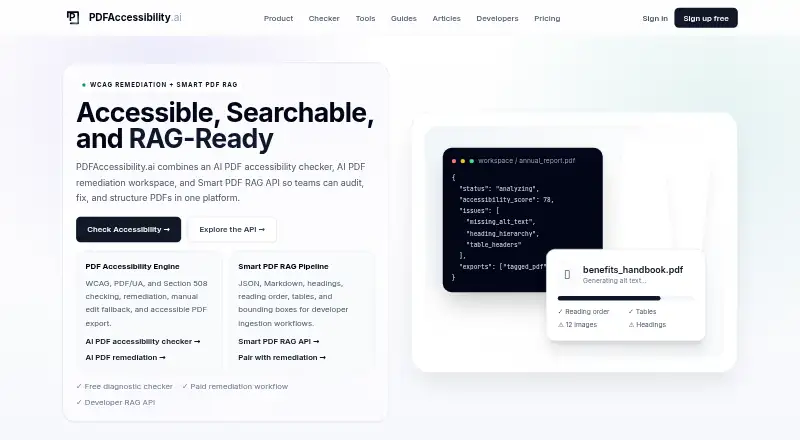
PDFAccessibility.ai combines PDF accessibility checks, automated remediation, manual editing, accessible PDF export, and a structured-data API.
What PDFAccessibility.ai is
PDFAccessibility.ai combines PDF accessibility checks, automated remediation, manual editing, accessible PDF export, and a structured-data API. Its checks report issues against WCAG, PDF/UA, Section 508, ADA, and EN 301 549 expectations. The remediation workflow tags document structure, adjusts reading order, and detects headings and tables to prepare documents for assistive technology. Users can edit tag types, heading levels, content, and image alt text when automation flags complex items. Batch processing supports per-file actions and ZIP downloads of remediated PDFs. Its Smart PDF RAG API returns JSON and Markdown with typed elements, tables, reading order, page references, and bounding boxes; documented use involves asynchronous uploads and polling. The free PDF Accessibility plan includes 10 accessible exports and seven-day file retention. The privacy policy says uploads are not used to train public AI models, though some workflows may send necessary information to infrastructure or AI providers. The FAQ says complex layouts, unusual tables, scanned pages, or ambiguous reading order may need manual review.
Good
- Checks against WCAG, PDF/UA, Section 508, ADA, and EN 301 549
- Supports manual edits to tags and image alt text
- Batch remediation includes ZIP downloads
- Free plans are available for exports and API parsing
Watch out
- Free PDF plan retains files for seven days
- Complex documents may need manual review
- API documentation identifies polling as the current baseline
Who it suits
PDFAccessibility.ai suits teams handling accessible PDF remediation, including compliance, education, government, legal, and healthcare teams. Developers and AI teams may use its structured PDF data API.
Verdict
PDFAccessibility.ai combines accessibility workflows with structured PDF extraction. Its automation can reduce manual work, but complex documents may still require review.
Plans and prices
From PDFAccessibility.ai's own pricing page, checked 30 Sep 2026.
| Plan | Price | What it gives you |
|---|---|---|
| Developer API Starter | Free | 100 parsed pages/month · JSON and Markdown preview · Reading order and heading structure · Bounding box preview · No production volume or organization API keys · forever |
| PDF Accessibility Free | Free | 10 accessible PDF exports · Unlimited accessibility checks · PDF uploads up to 10 MB · Files retained for 7 days · All converter tools · forever |
| Developer Pro | $29 a month | 50,000 parsed pages/month · Parse API access · API key management · JSON, Markdown, tables, headings, and bboxes · Usage dashboard · Layout-aware RAG chunks · monthly |
| PDF Accessibility Pro | $29 a month | 500 accessible PDF exports/month · Unlimited checks · 50 MB PDF uploads · 1 GB retained storage · Manual editor · Batch remediation and ZIP export · monthly |
| API Scale | $199 a month | 250,000 parsed pages/month · Organization API keys · Usage by key and member · Developer roles and team controls · Custom API volume available · Integration support · monthly |
| PDF Accessibility Enterprise | $199 a month | 5,000 accessible PDF exports/month · Unlimited checks · 10 GB retained storage · Higher-volume batch remediation · Team workflow · Priority remediation support · monthly |
The facts
Each one read from PDFAccessibility.ai's own pages, with the date it was checked.
What it does
- Accessibility checks
- It reports issues against WCAG, PDF/UA, Section 508, ADA, and EN 301 549 expectations.checked 30 Sep 2026
- Accuracy and review
- The FAQ describes automatic remediation as about 90% accurate across common PDFs and says complex layouts, unusual tables, scanned pages, or ambiguous reading order may need manual review.checked 30 Sep 2026
- API integration
- The documented API accepts PDF uploads at an asynchronous parse endpoint and uses polling for completed output.checked 30 Sep 2026
- API key handling
- The docs advise keeping API keys server-side and sending them in an X-API-Key header.checked 30 Sep 2026
- API limitation
- The API documentation identifies polling as the current baseline and says not to design around webhook delivery unless a supported integration is enabled.checked 30 Sep 2026
- Automatic remediation
- The remediation workflow tags PDF structure, improves reading order, detects headings and tables, and prepares documents for assistive technology.checked 30 Sep 2026
- Batch workflows
- Batch remediation supports per-file actions and ZIP downloads of ready accessible PDFs.checked 30 Sep 2026
- Data processing
- Some workflows may send necessary information to infrastructure or AI providers for document analysis, accessible text generation, or document intelligence.checked 30 Sep 2026
- Intended users
- The pricing page identifies compliance teams, agencies, education, government, legal, and healthcare teams as users for PDF remediation, and developers and AI teams for structured PDF data.checked 30 Sep 2026
- Manual editing
- Users can review and edit tag types, heading levels, content, and image alt text when automation flags complex items.checked 30 Sep 2026
- RAG output
- The API returns structured JSON and Markdown with typed elements, tables, reading order, page references, and bounding boxes.checked 30 Sep 2026
- Retention limit
- The free PDF Accessibility plan retains files for 7 days; the policy says retention can vary by plan, workflow, workspace configuration, and operational needs.checked 30 Sep 2026
- Security and privacy
- The privacy policy says uploaded documents are not used to train public AI models and describes administrative, technical, and organizational safeguards.checked 30 Sep 2026
- Support
- The Enterprise PDF Accessibility plan includes priority remediation support, while the API Scale plan includes integration support.checked 30 Sep 2026
- What it does
- The platform combines PDF accessibility checking, remediation, manual editing, accessible PDF export, and a Smart PDF RAG API.checked 30 Sep 2026
The full review of PDFAccessibility.ai
Overview
PDFAccessibility.ai combines PDF accessibility remediation with tools for extracting structured data from PDFs. It suits teams that need accessible exports or developers building document workflows; its strongest case is the combination of automated repair, manual correction, and a separate parsing API.
Automation can handle common documents, but the stated accuracy is about 90%, and difficult layouts still call for human review. Choose it when accessibility work or structured extraction is central; look elsewhere if you need a general-purpose PDF editor or cannot accommodate review of complex files.
Key features
Accessibility checks report issues against WCAG, PDF/UA, Section 508, ADA, and EN 301 549 expectations. Remediation can tag structure, improve reading order, and detect headings and tables, preparing documents for assistive technology. That can reduce repetitive correction for common PDFs, while scanned pages, unusual tables, complex layouts, and ambiguous reading order may still need attention.
The manual editor lets users adjust tag types, heading levels, content, and image alt text when automation flags a problem. Batch remediation adds per-file actions and ZIP downloads, a practical fit for teams processing multiple documents rather than one-off edits.
The Smart PDF RAG API returns JSON and Markdown with typed elements, tables, reading order, page references, and bounding boxes. Its documented workflow accepts uploads through an asynchronous parse endpoint and retrieves completed results by polling. Keep API keys server-side and send them in an X-API-Key header. Polling is the baseline; do not build around webhooks unless a supported integration is enabled.
The privacy policy says uploaded documents are not used to train public AI models and describes administrative, technical, and organizational safeguards. Some workflows may still send necessary information to infrastructure or AI providers for analysis, accessible text generation, or document intelligence. Free-plan files are retained for 7 days; retention may vary by plan and workflow.
Pricing
There are separate plans for accessibility remediation and developer API use, with free entry points in both. Paid plans start at $29 a month, billed monthly.
- PDF Accessibility Free: free, billed forever. Includes 10 accessible PDF exports, unlimited checks, uploads up to 10 MB, all converter tools, and 7-day file retention. It is useful for occasional work, but the export cap and upload size constrain regular use.
- Developer API Starter: free, billed forever. Includes 100 parsed pages per month, JSON and Markdown preview, reading order and heading structure, and bounding-box preview. It excludes production volume and organization API keys, so it is a preview tier rather than a production integration plan.
- PDF Accessibility Pro: $29 a month, billed monthly. Includes 500 accessible PDF exports per month, unlimited checks, 50 MB uploads, 1 GB retained storage, manual editing, and batch remediation with ZIP export. This is the paid fit for teams that need recurring remediation without enterprise volume.
- Developer Pro: $29 a month, billed monthly. Includes 50,000 parsed pages per month, parse API access, API key management, JSON, Markdown, tables, headings and bounding boxes, a usage dashboard, and layout-aware RAG chunks. It suits developers moving beyond previews to a production API workflow.
- PDF Accessibility Enterprise: $199 a month, billed monthly. Includes 5,000 accessible PDF exports per month, unlimited checks, 10 GB retained storage, higher-volume batch remediation, team workflow, and priority remediation support. It targets teams with greater export volume and collaborative needs.
- API Scale: $199 a month, billed monthly. Includes 250,000 parsed pages per month, organization API keys, usage by key and member, developer roles and team controls, and integration support; custom API volume is available. This is for larger API operations that need shared controls and support.
Platforms
PDFAccessibility.ai is available on the web and through an API. It is not positioned as a mobile or desktop application.
Who it's for
Compliance teams, agencies, education, government, legal, and healthcare teams are identified as users for remediation. Developers and AI teams are the natural fit for structured PDF data and the parse API. The separate plans make the distinction clear: choose based on whether the work is accessible exports or page-based extraction.
Pros and cons
Pros
- Remediation and correction in one workflow: automated tagging and reading-order work can be followed by edits to headings, tags, content, and alt text.
- Useful batch capabilities: per-file actions and ZIP downloads address repeat processing more directly than a single-document workflow.
- Structured extraction is API-ready: JSON and Markdown outputs include layout details such as page references and bounding boxes, supporting downstream document use.
- Free entry points: the accessibility tier allows 10 exports and the API tier 100 parsed pages per month without a charge.
Cons
- Automation is not a substitute for review: stated accuracy is about 90% across common PDFs, and complex or ambiguous files may need manual work.
- Free accessibility use is capped: 10 exports, 10 MB uploads, and 7-day retention limit its usefulness for sustained workloads.
- Starter API access is not for production volume: it is limited to 100 pages per month and has no production volume or organization API keys.
- API integration requires polling: webhook delivery should not be assumed unless a supported integration is enabled.
Alternatives
PDF Accessibility Software is the category directory for comparing more options.
- DocAccessible is worth considering for a lower-cost starting point: its free plan covers 3 documents per month, and Exchange costs $19 a month.
- Adobe Acrobat Pro is the alternative for readers who want a broader PDF editor across Android, iOS, macOS, web, and Windows, with editing, conversion, protection, signing, and advanced PDF and e-signature tools.
- Fruition PDF Accessibility offers a free tier billed at 10 pages per month for basic structural remediation, making it an option for small page volumes.
- AccessiblePDF may suit pay-per-page remediation: its PDF remediation plan costs $0.50 per page, with no minimums and a free check before remediation.
- CASO Comply is another paid, web-based option.
- EqualWeb PDF Tools is another freemium, web-based option.
- PREP is another paid, web-based option.
- Normfluss is another freemium web and API option, with a free trial.
Verdict
PDFAccessibility.ai is a strong fit for organizations that regularly remediate PDFs or developers who need structured extraction, especially when batch work or layout-aware API output matters. Its main advantage is the breadth from automated accessibility work through manual correction and structured data; its main drawback is that complex documents still require review, while free usage is tightly capped. Choose it for those specific workflows, not as a replacement for a general-purpose PDF editor.
Alternatives to PDFAccessibility.ai
- 1

PDFix Desktop
Free planAPILinuxmacOSSelf-hosted7.6Free plan - 2
Fruition PDF Accessibility
Free planWebAPI7.3$0.50 one-time - 3

DocAccessible
Free planWebAPI6.6From $19 a month - 4
Normfluss
Free planWebAPI6.6Free plan - 5
Nutrient DWS Accessibility API
Free planAPISelf-hosted6.5From $79 a month - 6
EqualWeb PDF Tools
WebAPIExtension6.4