PDF Scanner
PDF Scanner is an iPhone app that uses the camera to create searchable PDFs.
What PDF Scanner is
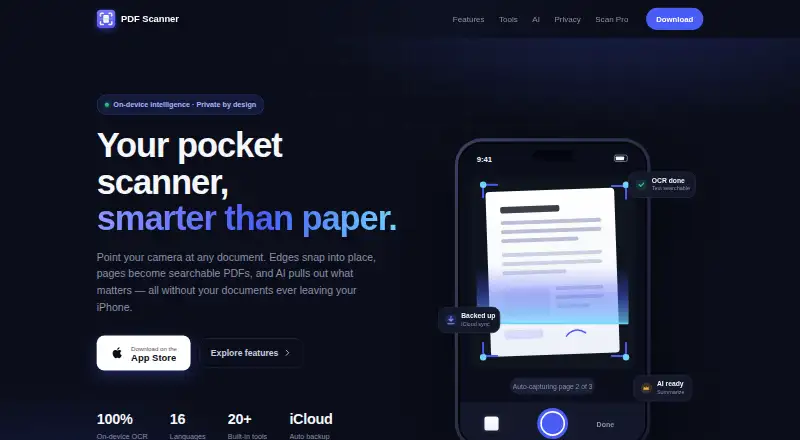
PDF Scanner is an iPhone app that uses the camera to create searchable PDFs. Its document scan detects edges, corrects perspective, and supports hands-free multi-page capture. Separate modes handle Live Text, ID cards, QR and barcodes, and image-to-PDF conversion. On-device OCR enables full-text search in the library and through iPhone Spotlight. PDF tools merge, compress, sign, set reminders, export PDF or ZIP files, email documents, and print with AirPrint. On-device AI can summarize scans, extract key information, and answer document questions. The maker says scanning, OCR, and processing stay on the device, with documents not uploaded for processing. Automatic iCloud backup is available, and deleted scans remain in Recently Deleted for 30 days. Imports work through Files, Photos, or the iOS share sheet. Scanning, OCR search, exports, and backups are free forever; Scan Pro removes ads and adds tools. The app requires iOS 17 or later and no account.
Good
- Captures searchable PDFs with edge correction
- On-device OCR supports library and Spotlight search
- Includes signing, compression, export, and AirPrint
- On-device AI summarizes and answers document questions
- Free scanning, OCR search, exports, and backups
Watch out
- Made for iPhone only
- Requires iOS 17 or later
- Scan Pro is needed to remove ads and add tools
Who it suits
It suits iPhone users who need searchable scans, OCR, document tools, and on-device processing. It is also suitable for users wanting iCloud backup and Spotlight search.
Verdict
PDF Scanner combines camera capture, OCR, PDF utilities, and document questions in an iPhone app. Its free core covers everyday scanning and backup, while Scan Pro adds extra tools and removes ads.
Plans and prices
From PDF Scanner's own pricing page, checked 22 Sep 2026.
| Plan | Price | What it gives you |
|---|---|---|
| Upgrade to Premium | — | — |
| Life Time Access | — | Lifetime access |
| Free | Free | Scanning · OCR search · exports · backups |
| Scan Pro | — | Ad-free · AI Key Info and Ask-your-document · unlimited pro tools · priority access to new features · One subscription; cancel anytime in Settings. |
The facts
Each one read from PDF Scanner's own pages, with the date it was checked.
What it does
- Account requirement
- The app is described as requiring no account or setup.checked 8 Oct 2026
- Auto capture
- Yeschecked 22 Sep 2026
- Backup and recovery
- The app offers automatic iCloud backup and keeps deleted scans in Recently Deleted for 30 days.checked 8 Oct 2026
- Document AI
- On-device AI can summarize scans, extract key information, and answer questions about a document.checked 8 Oct 2026
- Document capture
- Document Scan detects edges, corrects perspective, and supports hands-free multi-page capture.checked 8 Oct 2026
- Import and sharing
- Users can import PDFs and photos from Files, Photos, or other apps through the iOS share sheet.checked 8 Oct 2026
- Integrations
- The maker names iCloud backup, iPhone Spotlight search, Word or Pages text exports, and AirPrint printing.checked 8 Oct 2026
- Localization
- The site says the app is fully localized in 16 languages.checked 8 Oct 2026
- Multipage PDF
- Yeschecked 22 Sep 2026
- OCR and search
- On-device OCR enables full-text search across the library, including through iPhone Spotlight.checked 8 Oct 2026
- OCR included
- Yeschecked 22 Sep 2026
- PDF tools
- Built-in tools include merging, compression, signing, reminders, PDF and ZIP export, email, and AirPrint.checked 8 Oct 2026
- Privacy
- The maker says scanning, OCR, and document processing happen on-device and documents are not uploaded for processing.checked 8 Oct 2026
- Purpose
- PDF Scanner captures documents with an iPhone camera and turns them into searchable PDFs.checked 8 Oct 2026
- Scan modes
- The app supports Live Text, ID Card, QR and Barcode, and Image to PDF capture modes.checked 8 Oct 2026
- Searchable PDF
- Yeschecked 22 Sep 2026
Where it runs
- Android app
- Nochecked 22 Sep 2026
- iOS app
- Yeschecked 22 Sep 2026
- Platform requirement
- The maker says PDF Scanner is made for iPhone and requires iOS 17 or later.checked 8 Oct 2026
Money
- Free offering
- Scanning, OCR search, exports, and backups are described as free forever; Scan Pro removes ads and unlocks additional tools.checked 8 Oct 2026
- Free plan
- Yeschecked 22 Sep 2026
Alternatives to PDF Scanner
- 1

Smallpdf
Free planAndroidiOSWebWindows8.9From $10 a month - 2

DocuWare
AndroidiOSWebAPI8.6From £1,060 a month - 3

CamScanner
Free planAndroidiOSWebmacOS8.4From $59.99 a year - 4

Docutain
Free planAndroidiOSWindows8.4From €2.08 a month - 5

Google Photos
Free planAndroidiOSWebAPI8.4Free plan - 6

Easy Scanner
Free planAndroidiOS8.2From $4.49 a month