
PDF Candy
PDF Candy is a PDF toolkit for editing text, annotating, using OCR, and converting documents.
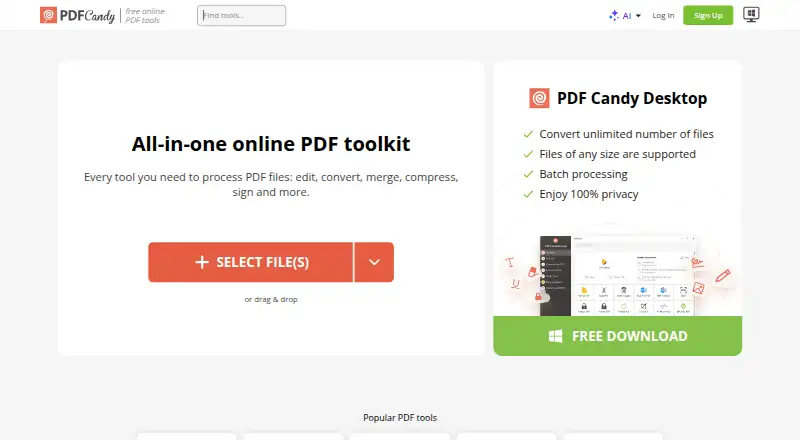
What PDF Candy is
PDF Candy is a PDF toolkit for editing text, annotating, using OCR, and converting documents. Its tools also cover merging, splitting, compressing, signing, protecting, and managing PDFs. AI features can summarize, translate, and answer questions about PDF documents. Files can be imported from Google Drive or Dropbox, then saved back to cloud storage. The service lists 98 PDF tools and support for 19 languages. PDF Candy Desktop is a Windows download with 35 tools that can run offline; the service also lists web, macOS, Linux, iOS, and Android access. The free plan has page and hourly restrictions, limited file size, no batch processing, and a desktop operations limit. Students and teachers can get one year of PDF Candy PRO online at no cost, with no hourly limits and uploads up to 500 MB. PDF Candy says processed files are deleted from its servers within two hours.
Good
- Includes text editing, annotation, OCR, and conversion.
- AI can summarize, translate, and answer questions about PDFs.
- Imports from Google Drive and Dropbox.
- Windows desktop tools can work offline.
- Students and teachers can get a year of PRO online at no cost.
Watch out
- Free use has page and hourly restrictions.
- Free plan limits file size and desktop operations.
- Free plan does not include batch processing.
Who it suits
PDF Candy suits people who need PDF editing and conversion tools across web, desktop, or mobile platforms. Its education offer may suit students and teachers who need larger uploads and unrestricted hourly use for a year.
Verdict
PDF Candy combines a wide range of PDF tools with cloud imports, AI features, and an offline Windows desktop option. Check the free-plan limits or paid terms against the file sizes and volume you need.
Plans and prices
From PDF Candy's own pricing page, checked 29 Sep 2026.
| Plan | Price | What it gives you |
|---|---|---|
| Desktop + Web Yearly | $4 a year | Web and Desktop access · No hourly limits · Up to 500 MB per task · High priority processing · Video Candy WEB · Image Candy WEB · yearly |
| Web Monthly | $6 a month | Web access · No hourly limits · Up to 500 MB per task · High priority processing · monthly |
| Web + Desktop FREE | Free | Page and hourly restrictions · No batch processing · Limited file size · No ads · No account needed · PDF Candy Desktop operations limit |
| Desktop + Web Lifetime | $99, paid once | Web and Desktop access · Lifetime license covers one software version and minor updates, not future major upgrades · pay once |
The facts
Each one read from PDF Candy's own pages, with the date it was checked.
What it does
- AI features
- Its AI tools can summarize, chat with, and translate PDF documents.checked 29 Sep 2026
- Annotation tools
- Yeschecked 20 Sep 2026
- Cloud integrations
- Users can import files from Google Drive and Dropbox and save updated versions back to cloud storage.checked 29 Sep 2026
- Compliance
- PDF Candy states that its platform complies with GDPR and that its infrastructure uses ISO 27001-certified data centers.checked 29 Sep 2026
- Education offer
- Students and teachers can get one year of PDF Candy PRO online at no cost, with no hourly limits and uploads up to 500 MB.checked 29 Sep 2026
- Encryption
- The security page says file transfers use HTTPS with TLS/SSL and documents are protected with 256-bit AES encryption in transit and at rest.checked 29 Sep 2026
- File retention
- PDF Candy says uploaded and created files are automatically deleted from its servers within two hours after processing.checked 29 Sep 2026
- OCR
- Yeschecked 20 Sep 2026
- Payment processing
- Payments are processed by Paddle, which PDF Candy describes as its billing provider.checked 29 Sep 2026
- PDF conversion
- Yeschecked 20 Sep 2026
- PDF toolkit
- PDF Candy provides online tools to edit, convert, merge, split, compress, sign, protect, and manage PDF files.checked 29 Sep 2026
- Refund terms
- PDF Candy offers a full refund within 30 days when recurring errors cannot be resolved within a reasonable period.checked 29 Sep 2026
- Support
- The pricing page says technical support will respond within two business days if the Help Center cannot resolve an order issue.checked 29 Sep 2026
- Text editing
- Yeschecked 20 Sep 2026
- Tool count
- The company page lists 98 PDF tools, 19 languages, and more than 3 million monthly visitors.checked 29 Sep 2026
The company
- Company
- PDF Candy says it was developed by the Icecream Apps team and has been offered since 2016.checked 29 Sep 2026
- Founded
- 2016checked 28 Sep 2026
Money
- Free plan
- Yeschecked 20 Sep 2026
- Free usage limits
- The free plan has page and hourly restrictions, limited file size, no batch processing, and a desktop operations limit.checked 29 Sep 2026
Where it runs
- Supported platforms
- web,windows,macos,linux,ios,androidchecked 20 Sep 2026
- Windows desktop
- PDF Candy Desktop is a Windows download with 35 tools that can operate offline.checked 29 Sep 2026
The full review of PDF Candy
PDF Candy is a freemium PDF toolkit for people who need more than a single-purpose editor or converter. Its mix of web tools, AI features, cloud storage connections and an offline Windows app makes it a flexible choice, though the free plan’s restrictions matter for regular or large-volume work.
Overview
Developed by the Icecream Apps team and offered since 2016, PDF Candy brings editing, conversion and file management together. It supports text editing, annotations and OCR, alongside tools to merge, split, compress, sign and protect PDFs. The breadth makes it a practical starting point for varied document jobs; people who only need one task may prefer a more focused tool.
PDF Candy’s company page lists 98 tools and 19 languages. AI features can summarize documents, answer questions about them through chat, and translate them. Google Drive and Dropbox imports and exports help users move files through the service without an extra manual download-and-upload step.
Key features
Online toolkit and AI
The range spans routine PDF changes and document conversion, with OCR and annotation extending its use beyond simple format changes. The AI tools add a way to explore or translate documents, but the service’s free-use limits can constrain frequent work. Users with large files or repeated jobs should compare those caps with a paid plan before relying on the free tier.
Desktop and cloud workflows
PDF Candy Desktop is a Windows download with 35 tools that can operate offline. That is useful when a connection is unavailable or local processing is preferable, though the desktop app is Windows-only. The web service supports imports from Google Drive and Dropbox and can save updated files back to either.
Security and support
PDF Candy says uploads and processed files are automatically removed from its servers within two hours. It says transfers use HTTPS with TLS/SSL and that documents receive 256-bit AES encryption in transit and at rest; it also states that the platform complies with GDPR and uses ISO 27001-certified data centers. Payments are handled by Paddle. If the Help Center cannot resolve an order issue, technical support aims to respond within two business days. A full refund is available within 30 days when recurring errors cannot be resolved within a reasonable period.
Pricing
PDF Candy uses a freemium model. The free Web + Desktop Free plan costs nothing and has page and hourly restrictions, limited file size, no batch processing and a desktop operations limit. It suits occasional, smaller jobs, but those restrictions make it a poor fit for sustained workloads.
- Web Monthly: $6 a month, billed monthly. Includes web access, no hourly limits, files up to 500 MB per task and high-priority processing. It is the straightforward option for regular online use without a yearly commitment.
- Desktop + Web Yearly: $4 a year, billed yearly. Includes web and desktop access, no hourly limits, up to 500 MB per task, high-priority processing, Video Candy WEB and Image Candy WEB. This adds the Windows app and two other web products, but the listed annual price is unusually low relative to the monthly plan; check the checkout terms before purchasing.
- Desktop + Web Lifetime: $99 a month, with payment listed as pay once. It includes access to PDF Candy Web and Desktop, but permanent access applies to a specific software version, not an unspecified stream of future versions.
Students and teachers can get one year of PDF Candy PRO online at no cost, with no hourly limits and uploads up to 500 MB. This education offer is a stronger fit than the restricted free plan for eligible users handling larger files.
Platforms
PDF Candy supports web, Windows, macOS, Linux, iOS and Android. The offline desktop application is specifically for Windows; other listed platforms should not be taken to mean they have an equivalent offline app.
Who it's for
PDF Candy suits people who move between several PDF tasks and want cloud imports, AI assistance or a Windows offline option in the same toolkit. It is less compelling for occasional users whose work fits within the free caps, or for anyone whose main requirement is an offline app on macOS or Linux.
Pros and cons
- Pros: Broad toolkit covering editing, OCR, annotations and file conversion as well as merging, splitting, compression, signing and protection.
- Pros: Google Drive and Dropbox imports and exports support a cloud-based workflow.
- Pros: The 35-tool Windows desktop app can work offline, and the education offer includes a year of online PRO with 500 MB uploads and no hourly limits.
- Cons: Free use is constrained by page and hourly caps, file size, lack of batch processing and a desktop operations limit.
- Cons: Offline desktop use is limited to Windows, and lifetime access covers a specific software version.
Alternatives
For a broader comparison of focused tools, see PDF editors, PDF Compression Software and PDF Merger Software.
PDF2Go is another freemium option with a free tier that provides access to most tools but limits file processing; consider it if that alternative tool set better suits your workflow.
iLovePDF offers a free Basic plan with limited tools and document processing, so it is another option for users comparing freemium PDF services.
PDF24 Compare PDF is free, with no limits, registration or time restrictions; choose it if those terms suit your needs.
Xodo Compress PDF is an alternative to consider for PDF compression.
Smallpdf offers a free plan and a seven-day free trial; compare it if you are considering a trial-based option.
PDFOptim has a free plan with three operations per day and a 25 MB per-file limit, a fit for smaller, infrequent jobs.
AvePDF offers more than 50 document tools on its free tier, with two processing operations per six hours, a 128 MB maximum file size and up to 10 files per processing.
BentoPDF Hyper Compress is an alternative to consider for PDF compression.
Verdict
PDF Candy is a sensible choice for users who want a wide-ranging PDF toolkit, cloud storage connections and, on Windows, offline desktop tools. Its free tier is best reserved for occasional work because of its file, page, hourly and desktop limits. If you need frequent processing, large files or batch jobs, compare the paid terms with your workload; if you need offline desktop support outside Windows, look elsewhere.
Getting started
- Visit https://pdfcandy.com/
- Use PDF Candy on the web or choose a listed platform
- Start with the free plan or choose a paid plan
- Import files from Google Drive or Dropbox, if desired
- On Windows, download PDF Candy Desktop for offline-capable tools
Limits worth knowing
The free plan has page and hourly restrictions, limited file size, no batch processing, and a desktop operations limit. The Web Monthly plan at $6 a month removes hourly limits and allows tasks up to 500 MB.
Questions
What does PDF Candy cost?
The free plan is available. Paid options include Web Monthly at $6 a month and Desktop + Web Yearly at $4 a year.
Which platforms can I use?
PDF Candy lists web, Windows, macOS, Linux, iOS, and Android. PDF Candy Desktop is a Windows download.
Can PDF Candy work offline?
PDF Candy Desktop for Windows has 35 tools that can operate offline.
What are the free plan limits?
The free plan has page and hourly restrictions, limited file size, no batch processing, and a desktop operations limit.
Can students and teachers get a free offer?
Students and teachers can get one year of PDF Candy PRO online at no cost, with no hourly limits and uploads up to 500 MB.
Does it connect to cloud storage?
Users can import files from Google Drive and Dropbox and save updated versions back to cloud storage.
Alternatives to PDF Candy
- 1

Smallpdf
Free planAndroidiOSWebWindows8.9From $10 a month - 2

LightPDF
Free planAndroidiOSWebAPI8.8From $15.99 a year - 3
PDF2Go
Free planAndroidiOSWebAPI8.7$6.42 usage-based - 4
Foxit PDF Editor
AndroidiOSWebmacOS8.5 - 5
WPS PDF Editor
Free planAndroidiOSWebExtension8.5From $3 a year - 6

HiPDF
Free planAndroidiOSWebAPI8.5Free plan